Abdulla AbdelHaq Blog


ForEach(Minute in MyLife)
MyExperience ++;

Displaying Arabic Number.

 Well, most applications that I worked with was multilingual that supports English UI and Arabic UI.

 And one of the major issue that we have faced is displaying Arabic numbers without the need of changing the regional settings of the PC.

So the code below will help you to display Arabic number without  changing any regional settings.


Code 1: the HTML code:


<form id="form1" runat="server">

<asp:TextBox ID="TextBox1" runat="server"></asp:TextBox>

<br />

<asp:Label ID="Label1" runat="server"></asp:Label>

<br />

<asp:Button ID="Button1" runat="server" Text="Convert to Arabic" />

</form>


Code 2: Code Behind


Protected Sub Button1_Click(ByVal sender As Object, ByVal e As System.EventArgs) Handles Button1.Click


        'Call Function

        Me.Label1.Text = "Arabic Number : <b>" & TranslateNumerals(Me.TextBox1.Text.Trim) & "</b>"

    End Sub


    Public Shared Function TranslateNumerals(ByVal sIn As String) As String


        Dim enc As New System.Text.UTF8Encoding


        Dim utf8Decoder As System.Text.Decoder


        utf8Decoder = enc.GetDecoder


        Dim sTranslated = New System.Text.StringBuilder


        Dim cTransChar(1) As Char


        Dim bytes() As Byte = {217, 160}


        ' Start Converting characters into Arabic mode.


        Dim aChars() As Char = sIn.ToCharArray


        For Each c As Char In aChars


            If Char.IsDigit(c) Then


                bytes(1) = 160 + CInt(Char.GetNumericValue(c))


                utf8Decoder.GetChars(bytes, 0, 2, cTransChar, 0)


                sTranslated.Append(cTransChar(0))


            Else


                sTranslated.Append(c)


            End If


        Next


        TranslateNumerals = sTranslated.ToString


    End Function


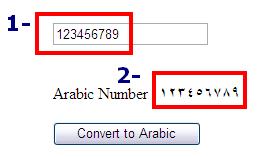
After you run the page, enter some English number and then click "Convert to Arabic" button to display the entered number in Arabic number mode.

Figure 1: Convert English Number into Arabic Number


I hope some one will find this very helpful

 ~ Abdulla AbdelHaq

Comments

joeaudette said:

Hi Abdulla,

I read this post this morning at it made me realize that my CMS mojoPortal is not really localizing everything as I thought. I always thought that calling .ToString() on an int or decimal would automaticaly format it according to the CultureInfo of the executing thread. I mean it does format it but it doesn't localize the digits. To me it seems like a shortcoming of ASP.NET localization that it does not do this automatically.

I thought there must be some way to make it work so I spent the afternoon doing my own investigation and trying to find a way to make it just work with .ToString()

I hoped it would work like this:

if ((CultureInfo.CurrentCulture.TwoLetterISOLanguageName == "ar") && (!CultureInfo.CurrentCulture.IsNeutralCulture))

           {

               CultureInfo arabic = new CultureInfo(CultureInfo.CurrentCulture.Name);

               arabic.NumberFormat.DigitSubstitution = DigitShapes.NativeNational;

               string[] arabicDigits = new string[] { "٠", "١", "٢", "٣", "٤", "٥", "٦", "٧", "٨", "٩" };

               arabic.NumberFormat.NativeDigits = arabicDigits;

               Thread.CurrentThread.CurrentCulture = arabic;

               Thread.CurrentThread.CurrentUICulture = arabic;

           }

I tried all the DigitSubstitution Enums but no matter what I tried I could not make it work. It seems to really be limited to the machine's region settings.

So your solution seems the only real way to do it.

I converted your method to C# SubstituteArabicDigits(string input) and then created an extension method for int so I can call .ToLocalString() on any int and internally use your method like this if the culture is Arabic

public static string ToLocalString(this int i)

       {

           switch (CultureInfo.CurrentCulture.TwoLetterISOLanguageName)

           {

               case "ar":

                   return SubstituteArabicDigits(i.ToString());

               default:

                   return i.ToString();

           }

       }

I'm thinking I can implement similar solutions for other languages based on your example and extension methods for decimal, double etc.

So thanks for sharing this strategy and pointing out that digit localization doesn't just happen automatically in ASP.NET.

# June 27, 2009 4:09 PM

Saravanan said:

Hi,

I need convert English text to Arabic in VB.net

any idea please

# July 27, 2009 1:06 AM

Abdulla.Abdelhaq said:

Hello Saravanan,

You can localize your text to display the proper language to you page depending on the current UI culture.

the below article is a good start to learn localization

aspalliance.com/821_Localization_in_ASPNET_20

feel free to contact me if you still have a problem or you start a topic on the ASP.NET official forum and I will be there to assist you.

# July 27, 2009 3:30 AM

nick said:

joeaudette could you post your C# method? thanks

# September 1, 2009 11:26 AM

nick said:

nevermind joeaudette. here is my C# version just in case anyone needs it.

       public string ConvertToArabicNumerals(string input)

       {

           System.Text.UTF8Encoding utf8Encoder = new UTF8Encoding();

           System.Text.Decoder utf8Decoder = utf8Encoder.GetDecoder();

           System.Text.StringBuilder convertedChars = new System.Text.StringBuilder();

           char[] convertedChar = new char[1];

           byte[] bytes = new byte[]{217,160};

           char[] inputCharArray = input.ToCharArray();

           foreach (char c in inputCharArray)

           {

               if(char.IsDigit(c))

               {

                   bytes[1] = Convert.ToByte(160 + char.GetNumericValue(c));

                   utf8Decoder.GetChars(bytes, 0, 2, convertedChar, 0);

                   convertedChars.Append(convertedChar[0]);

               }

               else

               {

                   convertedChars.Append(c);

               }

           }

           return convertedChars.ToString();

       }

# September 1, 2009 12:32 PM

Abdulla.Abdelhaq said:

Re: nick

there is many free sites that helps you to convert between C# and VB check this

www.developerfusion.com/.../vb-to-csharp

# September 1, 2009 2:52 PM

nick said:

Adullah, thanks for the link. Do you know how to test if a string is in Arabic? do you have to test the individual characters to see if they fall within the arabic character set or is there an easier way to do it. thanks

# September 2, 2009 11:21 AM

Abdulla.Abdelhaq said:

Re: Nick

Hello,

Yes you can. you can check the ASCII code if its in the arabic range or not.

Convert the VB code to C#.

 Shared Function FindArabicChr(ByVal _Text As String) As Boolean

           Dim Counter As Long

           Dim srcLength As Long = Len(_Text) - 1

           Dim srcText As String = _Text

           Dim flg As Boolean = False

           Do While Counter <= srcLength

               If (Asc(srcText.Chars(Counter)) >= 153 And (Asc(srcText.Chars(Counter)) <= 254)) Then

                   flg = True

                   Exit Do

               End If

               Counter += 1

           Loop

           return flg

       End Function

# September 2, 2009 12:01 PM

nick said:

Great! thanks for your help Abdullah

# September 2, 2009 1:10 PM

Abdulla.Abdelhaq said:

You are welcome :)

You know, I should post the above code in a new post, maybe it could help some one else.

# September 2, 2009 5:25 PM

kaleem anwar said:

can you pleaqse give me the sample code to convert a string into arabic language:

For example:

string str="this string will be in arabic";

i want to convert it into arabic....

can u please help me?

# September 4, 2009 5:52 AM

Abdulla.Abdelhaq said:

Re: Kaleem Anwar

Hello Kaleem,

you want a translator !

another solution you can go through with is to localize your text

read this

aspalliance.com/821_Localization_in_ASPNET_20

# September 4, 2009 6:49 AM

kaleem anwar said:

thanks for the reply but through localization i can only translate static text i want to translate text dynamic that will come from database

# September 4, 2009 8:02 AM

Abdulla.Abdelhaq said:

easy, you just make a column for each language in DB.

for example if you have a user table that contains username, then you need to create two column for username one for english and the other for arabic, and make sure that you use Nvarchar for arabic column.

now in UI. you get the proper column depend on UI culture.

# September 4, 2009 8:40 AM

imranwahabit said:

Ass salam alikom,hi abdullah i am developing a website,n i have to develop the website both in arabic in english,so how can i change the gridview colums into arabic as the gridview is attached to sqldatasource,so can u help me out,i am developing the website in vb bro so can forward me some code

# September 14, 2009 3:38 PM

Abdulla.Abdelhaq said:

Re: Imran

Hello Imran,

I answered your question on ASP.NET forum, I found that you have asked the same question in there.

forums.asp.net/.../3404638.aspx

# September 15, 2009 1:40 AM

Islam Eldemery said:

Has anyone got a version of this function that reverses the job, translates the Arabic numbers into English?

# October 17, 2009 12:38 PM

Abdulla.Abdelhaq said:

Re:Islam Eldemery

Well, you can ask who wrote the above function :)

# October 17, 2009 1:55 PM

Islam Eldemery said:

Hi Abdullah, Well I thought this post was little old and didn't expect you to reply, Actually you did a great job with this method, I'm sorry I should have asked you!

So since you replied, Do you have any idea how to get this function reversed?

# October 17, 2009 7:51 PM

Abdulla.Abdelhaq said:

Re:Islam Eldemery

Hi, I am just kidding with you :)

I receive an email when anyone submits a comment.

Anyway, you do not need to reveres numbers from Arabic to English, because the default page culture will understand any number as English number, so if you get a sets of numbers from DB and you want to display them into UI, then you can display it as is.

But if you want to display Arabic numbers, then you need to use the above method, because UI does not understand Arabic number.

Did you got it ?

# October 18, 2009 6:57 AM

Arun Madhav said:

Hi Abdullah,

Your posting was really helpfull....

can we type arabic numerals in a textbox in vb6? if yes, plz explain..

I changed locale settings in xp and set digit substitution to "context" in regional settings..but still can't type. Plz help..

Thanks & Regards

# October 19, 2009 6:27 AM

Abdulla.Abdelhaq said:

Re: Arun

Hi,

Sorry for my late response, I was so busy last few days.

Actually,  last time I worked with VB6 where in University 2004 Loooool.

I totally forget VB6. But do you have Arabic language installed in your PC ? make all religion settings to be arabic.

But in your case, end users must install Arabic languges in there PCs. which is not a good practices

# October 22, 2009 2:12 PM

Arun Madhav said:

Hi

Thanks for your replay...

Now i am able to type arabic digits in textbox. But only after typing an arabic alphabet. Therefore i have to extract digits from the textbox. If you can remember something from Old vb6, plz let me know... Thanks...

# October 26, 2009 1:14 AM

Johnny said:

Care for a LINQ method?

public static string GetNumberArabic(int index)

{

 CultureInfo ci = new CultureInfo("ar-AE");

 int number = index;

 StringBuilder res = new StringBuilder((int)Math.Log10(index));

 do

 {

   res.Append(ci.NumberFormat.NativeDigits[number % 10]);

   number /= 10;

 } while (number > 0);

 return res.ToString().ToCharArray().Select<char, string>(ch => ch.ToString()).Aggregate((accumulator, a) => a + accumulator);

}

# October 27, 2009 3:19 AM

ghassan_aljabiri said:

hello again

my page is UTF-8

it uploads an access databse to the server (.mdb)

it reads the data and displays some records in a gridview , every thing is OK

but the data in the gridview is not in the apporpriate encoding

# November 2, 2009 3:11 PM

Gabriel82 said:

شكراً عبدالله، وعيد مبارك عليك انشالله

# November 27, 2009 10:02 AM

Philip said:

That was great but I need the numbers to be displayed in arabic for the paging of a gridview or the numbers of a calendar? How can I do that? I think the function mentioned here can't do that ??

# December 16, 2009 5:19 AM

Frank Sleeper said:

Hi guys...

(Note: Sorry, standing in the garage having a quick smoke, ran across this and had to reply real quick...)

One VERY easy way to do this that works for ALL languages (i.e. ANY to ANY) is to simply pay attention to the: <CultureInfo>.NumberFormat.NativeDigits.

The NativeDigits is an array of 10 characters that represent the numbers for that culture, where '0' is in the 0 index position.

For example, to convert from English Culture to Arabic (any to any really):

1. Create an instance of the SOURCE culture:

CultureInfo sourceCulture = new CultureInfo("En");

2. Create an instance of the TARGET culture:

CultureInfo targetCulture = new CultureInfo("ar-AE");

3. Now, simply iterate through you SOURCE string, find the character in the CURRENT culture array, and take that same character from that index location in the TARGET array:

// sourceValue is assumed to be in the SOURCEculture for this example

string sourceValue = "12345";

// Throw the NativeDigits into a Collection<T> for simplicity

Collection<string> items = new Collection<string>(sourceCulture.NumberFormatInfo.NativeDigits);

// Create a string to hold our new value

// Yea, yea - should be a StringBuilder, this is a sample though :)

string convertedValue = String.Empty;

// Now iterate and convert...

for (int i = 0; i < sourceValue.Length; i++)

{

  // Get the value at the position

  string newChar = new string(value[i], 1);

  // Find the index position of the character in

  // our source array

  int idx = items.IndexOf(newChar);

  // Quick simple sanity check to make sure we found

  // the position

  if (idx >= 0)

  {

     // Now take the corresponding position value

     convertedValue += targetCulture.NumberFormatInfo.NativeDigits[idx];

  }

  else

  {

     // oops, we found some other character

     // bah, just shove it in

     convertedValue += newChar;

  }

}

(Sorry, didn't compile this and my smoke is done :) Time to go inside.  I think you get the drift...)

# January 6, 2010 2:00 AM

Frank Sleeper said:

Hi guys...

(Note: Sorry, standing in the garage having a quick smoke, ran across this and had to reply real quick...)

One VERY easy way to do this that works for ALL languages (i.e. ANY to ANY) is to simply pay attention to the: <CultureInfo>.NumberFormat.NativeDigits.

The NativeDigits is an array of 10 characters that represent the numbers for that culture, where '0' is in the 0 index position.

For example, to convert from English Culture to Arabic (any to any really):

1. Create an instance of the SOURCE culture:

CultureInfo sourceCulture = new CultureInfo("En");

2. Create an instance of the TARGET culture:

CultureInfo targetCulture = new CultureInfo("ar-AE");

3. Now, simply iterate through you SOURCE string, find the character in the CURRENT culture array, and take that same character from that index location in the TARGET array:

// sourceValue is assumed to be in the SOURCEculture for this example

string sourceValue = "12345";

// Throw the NativeDigits into a Collection<T> for simplicity

Collection<string> items = new Collection<string>(sourceCulture.NumberFormatInfo.NativeDigits);

// Create a string to hold our new value

// Yea, yea - should be a StringBuilder, this is a sample though :)

string convertedValue = String.Empty;

// Now iterate and convert...

for (int i = 0; i < sourceValue.Length; i++)

{

  // Get the value at the position

  string newChar = new string(value[i], 1);

  // Find the index position of the character in

  // our source array

  int idx = items.IndexOf(newChar);

  // Quick simple sanity check to make sure we found

  // the position

  if (idx >= 0)

  {

     // Now take the corresponding position value

     convertedValue += targetCulture.NumberFormatInfo.NativeDigits[idx];

  }

  else

  {

     // oops, we found some other character

     // bah, just shove it in

     convertedValue += newChar;

  }

}

(Sorry, didn't compile this and my smoke is done :) Time to go inside.  I think you get the drift...)

# January 6, 2010 2:03 AM
Leave a Comment

(required) 

(required) 

(optional)

(required)