Bind Gridview using Jquery
What about working with database using client-side? How can I bind Grid View using client-side? How can I retrieve specific row or column using client-side? OK.
full Source Code :Click Here
In fact there is no Data Source property existing in Jquery, but keep in mind that grid view render as Html Table control, and this is the trick! we will append values returned from database as rows but we faced a problem , since the grid view doesn't has a DataSource or DataSourceID property we can't get it in Html , in other words if grid view doesn't have records [data] , it will not be rendered , therefore we can't find it in html source when page loaded. So we need to show empty grid view to get it using Jquery selector .
another problem we have is how can we retrieve the data? What is the return type?
Actually jquery can't understand DataTable Object, DataSet or even DataReader .but already understand what array is ?,OK we get now that we will return an array but which data type "string , Integer , ......"?. well We did it! Let us start coding.
First step : Creating Data base which will be our data source ,we do it using building the following data table :
Datastore.cs
using System;
using System.Data;
public class DataStore
{
public DataStore()
{
//
// TODO: Add constructor logic here
//
}
public static DataTable GetDataTable()
{
DataTable dt = new DataTable("Names");
DataColumn dc1 = new DataColumn("Name");
DataColumn dc2 = new DataColumn("Age");
dt.Columns.AddRange(new DataColumn[] { dc1, dc2 });
DataRow dr1 = dt.NewRow();
dr1[0] = "Ahmed";
dr1[1] = "27";
DataRow dr2 = dt.NewRow();
dr2[0] = "Peter";
dr2[1] = "30";
DataRow dr3 = dt.NewRow();
dr3[0] = "John";
dr3[1] = "20";
DataRow dr4 = dt.NewRow();
dr4[0] = "Ali";
dr4[1] = "30";
dt.Rows.Add(dr1);
dt.Rows.Add(dr2);
dt.Rows.Add(dr3);
dt.Rows.Add(dr4);
return dt;
}
}
Next step:
- Creating Class file "Names" which will contain two properties (Data base columns) for "FirstName" and "Age". Like this :
Names.cs
public class Names
{
public Names()
{
//
// TODO: Add constructor logic here
//
}
private string _firstName;
private string _age;
public string FirstName
{
set { _firstName = value; }
get { return _firstName; }
}
public string Age
{
set { _age = value; }
get { return _age; }
}
}
Next Step:
- Creating default.aspx page which will display and call the data.
- Create GridView Control in your page :
<div>
<center>
<br />
<asp:GridView ID="NamesGridView" runat="server" ShowHeaderWhenEmpty="True" >
</asp:GridView>
<br />
</center>
</div>
Notice that we set ShowHeaderWhenEmpty property to true to display columns names when empty.
- In page load event we will write some code which will display the gridview even it empty :
protected void Page_Load(object sender, EventArgs e)
{
DataTable dt = new DataTable();
dt.Columns.AddRange(new DataColumn[] { new DataColumn("Name"), new DataColumn("Age") });
NamesGridView.DataSource = dt;
NamesGridView.DataBind();
}
Notice that we created two columns Names as "Name" and "Age" .Now you can run the page the GridView should be displayed (try it!).
- In code behind we will create a method which will connect to datastore and retrieve the data values. As the following :
[WebMethod]
public static Names[] GetNames()
{
List<Names> list = new List<Names>();
DataTable dt = DataStore.GetDataTable();
foreach (DataRow row in dt.Rows)
{
Names _names = new Names();
_names.FirstName = row["Name"].ToString();
_names.Age = row["age"].ToString();
list.Add(_names);
}
return list.ToArray();
}
Here we fill data values in the two properties (FirstName,Age) then we add it to List which accept Names Class Object as you saw above. And at the end we need to convert it to an array .
Notice that the method decorated with [Web Method] attribute which will allow us to get this method using client side code , and the method need to be declared as public and static also to get reached outside the Container class .
Next Step :
- - Calling Server side method that will get the data values and bind the gridview using Jquery like this :
<script type="text/javascript" src="http://ajax.googleapis.com/ajax/libs/jquery/1.3.2/jquery.min.js">
</script>
<script type="text/javascript">
function BindGridView() {
$.ajax({
type: "POST",
url: "Default.aspx/GetNames",
data: "{}",
contentType: "application/json",
dataType: "json",
success: function (data) {
for (var i = 0; i < data.d.length; i++) {
$("#NamesGridView").append("<tr><td>" + data.d[i].FirstName +
"</td><td>" + data.d[i].Age + "</td></tr>");
}
}
})
}
</script>
We can retrieve one column like "FirstName" or "Age" only, in the above code we create a loop to go through result data and using index of array element to get current row ,it is working like a datareader or dataset, then you get specific value "data.d[n].Age".
now ,we can call this functon on body load Like this :
<body onload="BindGridView();">
<form id="form1" runat="server">
<div>
<center>
<br />
<asp:GridView ID="NamesGridView" runat="server" ShowHeaderWhenEmpty="True">
</asp:GridView>
<br />
</center>
</div>
</form>
</body>
When we run this page it should Display GridView like this :
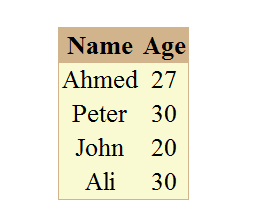
Happy programming
Ahmed Moosa