Debugging classic ASP web application with Visual Studio 2005

Finally, I got it; after a long and tiring evening of hit and trial I was able to hit a breakpoint in my asp page :)

So you might think how come I suddenly moved from asp.net and Reporting services to classic asp, a long story in short is that right now I am assigned a task to migrate our company's timesheet application from classic asp to asp.net. This is the first time I am working on asp application and in first look application looked like it's from some other world, but somehow I was able to get it working in VS 2005.

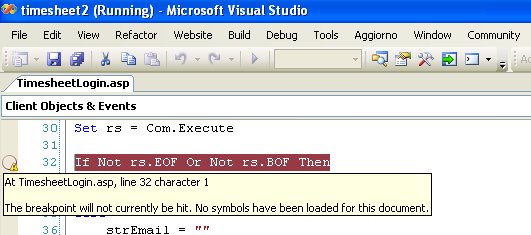
Now came the real twist, I was able to access the users page of timesheet but not the admin, every time I tried running any admin page I was redirected to client page. As an asp.net developer for the last 3 years I was so used to debug my application using VS debugger that I just added a breakpoint in application and hit F5(hoping that I will be able to step through the code); but what's this, breakpoints were never hit, no symbols were loaded :(
image

So as you can imagine I just did some hit and trial without any luck. After searching for a while I landed to a few useful links -

http://www.devx.com/tips/Tip/18204

http://msdn.microsoft.com/en-us/library/aa291223(VS.71).aspx

But even after following all these steps nothing happened. Finally I bumped (lucky me) into this thread

Visual Studio 2005 debugging not working for ASP pages

and as author said...VOILA it worked, breakpoint was hit, thank god.

So I just thought to note down steps I followed and what worked.

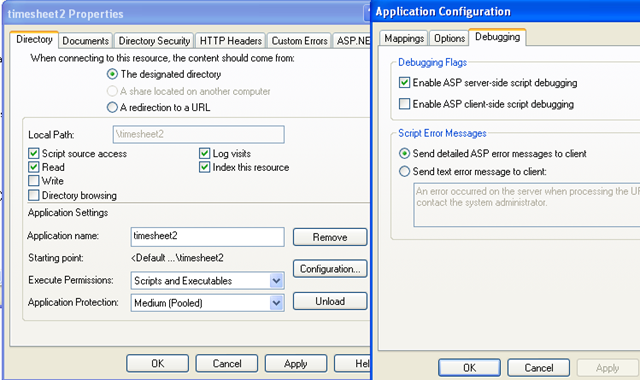
 1. Enable ASP server-side script debugging in website's configuration properties -
image

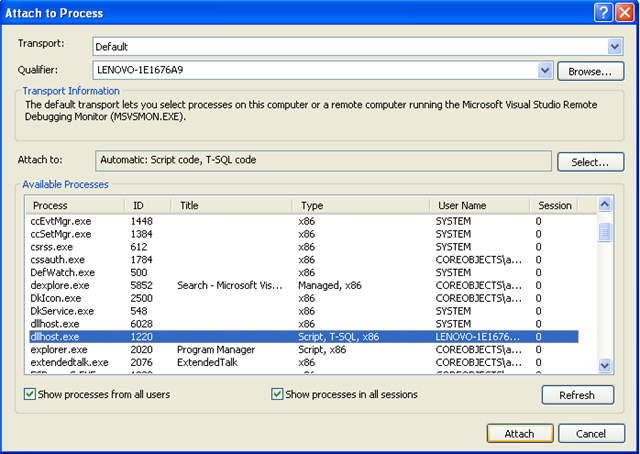
 2. Run the application (F5) and then attach to the Dllhost.exe process -

a. Go to Debug->Attach to process menu in VS.

b. Check "Show processes from all users" check box.

c. Select dllhost.exe (Script code, T-SQL code) and click attach.
image

That's it, breakpoints will get hit and you can debug your application.

But still there are some things which are not required but worth mentioning -

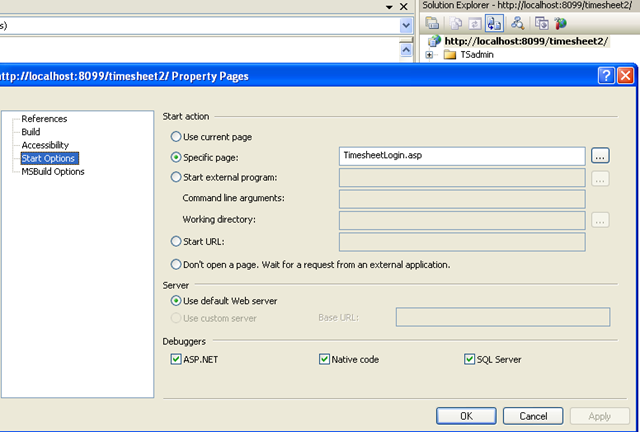
 1. Almost in all related articles it was mentioned that you need to enable asp debugging in your asp projects configuration properties, but in my scenario I had added my application as local IIS website and its properties didn't had any such option. Even, It's not required to enable native code Debugger.
image

 2. Its mentioned that you need to add your user account or IWAN_MACHINENAME account to your systems "Debugger Users" group, but I tried it without that and debugging worked perfectly.

image

I guess it was a good start to my new project, learned quite a few new/good things.

Published Wednesday, July 16, 2008 9:34 PM by akjoshi
Filed under: ,

Comments

# re: Debugging classic ASP web application with Visual Studio 2005

Thursday, July 17, 2008 7:11 AM by Javid

Fantastic work man. Working superb.

# re: Debugging classic ASP web application with Visual Studio 2005

Monday, August 11, 2008 2:07 AM by Samir

If you use IIS 7 you should attach to w3wp process instead dllhost.

# re: Debugging classic ASP web application with Visual Studio 2005

Tuesday, November 18, 2008 12:33 AM by Piyush Verma

Great Joshi very useful

# re: Debugging classic ASP web application with Visual Studio 2005

Friday, January 16, 2009 3:50 PM by tekknowledge

good stuff mayne, this took me a month to figure out on my own...wish i would have bumped into your post sooner. 4get response.write and response.end!! =(

# re: Debugging classic ASP web application with Visual Studio 2005

Thursday, March 05, 2009 3:41 PM by Edward Joell

Been there and done all that and debugging is still not working.  It said add IWAM to debuggers group? There is no Debuggers group on this machine.

# re: Debugging classic ASP web application with Visual Studio 2005

Saturday, March 07, 2009 11:16 AM by Omar

This is great stuff. well done mate. Working in classisc asp is very depressing. I also need to migrate an old legacy web application into ASP.NET and step through the old legacy code.

Omar

# re: Debugging classic ASP web application with Visual Studio 2005

Thursday, March 12, 2009 1:39 AM by akjoshi

Thanks everyone

@Samir - Thanks for the information, I am sure it will be helpful to many

@Omar - Yes its really tough to work in Classis ASP specially after working with asp.net; but one positive is that working in ASP helps you understand the real power of asp.net and appreciate it.

# re: Debugging classic ASP web application with Visual Studio 2005

Thursday, March 12, 2009 2:35 AM by akjoshi

Hi Edward,

I am sorry that your comment was not published on time, it was marked as possible spam by system. I am not sure why there's not debuggers group on your machine so can't help you much on that , but will definitely try to add this to post sometime later.

# re: Debugging classic ASP web application with Visual Studio 2005

Tuesday, March 24, 2009 11:51 PM by McFloyd

Thanks, quick, practical, and very useful!!

# re: Debugging classic ASP web application with Visual Studio 2005

Tuesday, December 29, 2009 2:14 AM by nitin

This blog is very useful. My problem was resolved..thanks a lot

cheers

# re: Debugging classic ASP web application with Visual Studio 2005

Thursday, April 08, 2010 2:19 AM by kannabirank

Hi,

DLLHOST is not listed in the "Attach to process" window. Do you know how to find it.

# re: Debugging classic ASP web application with Visual Studio 2005

Thursday, April 08, 2010 11:27 AM by Nik

What if dllhost.exe has no Script listed in Type column? It has just T-SQL and x86. What may be the reason for missing "Script"? Attaching in this case after manually selecting "Script" option results in "Unable to attach." error.

# re: Debugging classic ASP web application with Visual Studio 2005

Wednesday, June 09, 2010 3:03 AM by Nick

Thanks, that was a lifesaver! It did not work straight away for me though, but after reading the comment above about IIS7, I tried connecting to the w3wp process instead of dllhost, and hit success (note that I have no idea how to verify the version of IIS I'm running, but who cares, it works :-)).

# re: Debugging classic ASP web application with Visual Studio 2005

Thursday, August 19, 2010 10:24 AM by freeborn5

What if the Classic ASP calls a VB DLL ??

# re: Debugging classic ASP web application with Visual Studio 2005

Saturday, August 28, 2010 5:56 AM by Matt

I had to give the IWAN_MACHINENAME permission on the local directory where the website was stored as this was outside the inetpub/wwwroot folder structure. Then worked perfectly.

# re: Debugging classic ASP web application with Visual Studio 2005

Thursday, September 09, 2010 10:13 AM by Paul Scannell

I hope it isn't too late to ask a question on this two year old page, but here goes:

How do you make your loosely coupled .asp and .inc pages come through as a project or solution?  This wonderful tutorial starts out with that part already in place, apparently.

My eMail address is: PaulGScannell@verizon.net

Thanks,

Paul

# re: Debugging classic ASP web application with Visual Studio 2005

Tuesday, September 14, 2010 4:44 AM by Srinivas

Thank you very much it worked, even i refered all the urls which you refered but neither worked but this works gr8

# re: Debugging classic ASP web application with Visual Studio 2005

Thursday, November 11, 2010 11:14 AM by Sab

I follow all the step mention above.I m using IIS7 so i attach process to w3wp process instead dllhost.But i can't put the break point in my code.So can anybody tell me what is wrong.

Thanks

Sab

# re: Debugging classic ASP web application with Visual Studio 2005

Thursday, November 18, 2010 12:42 PM by David Matheson

I'm having the same trouble as Sab.  Windows 7, IIS 7, VS2010. It always tells me that "The code in the document is not loaded".  Can anybody help?

# re: Debugging classic ASP web application with Visual Studio 2005

Thursday, November 25, 2010 9:21 AM by Ravi Shankar

How to do the same in VS 2008 SP1 ? plz tell it is urgent.

# re: Debugging classic ASP web application with Visual Studio 2005

Thursday, December 16, 2010 1:21 AM by Kavitha

First we need to set the breakpoint and later we need to start the Debugging.

Other steps to debug are as follows(In case if dllhost.exe is not found in the list of Processes.

Step 1: Set the Breakpint.(Double clicking at the Line where you want to check the input)

Step 2: Debug -> Start without Debugging(Cntrl + F5)

       This will quickly open the Application in default Browser

Step 3: Now go to Debug -> Processes

       You can find a Lit of processes. You will find dllhost.exe process running.

       Select dllhost.exe and Attach option

Step 4: Debug -> F5

Step 5. Open the Application and Debug of .asp files works fine.

# re: Debugging classic ASP web application with Visual Studio 2005

Tuesday, March 01, 2011 4:42 PM by Asim

Thanks! I was trying it for so long

# re: Debugging classic ASP web application with Visual Studio 2005

Monday, March 21, 2011 6:44 AM by Srinivasa Sarma

Thanks dude..It is really helpful. I was looking for this from long time :)

Thanks again

# re: Debugging classic ASP web application with Visual Studio 2005

Saturday, April 02, 2011 3:40 AM by weblogs.asp.net

Debugging classic asp application with Visual Studio 2005.. Awesome :)

# re: Debugging classic ASP web application with Visual Studio 2005

Friday, April 15, 2011 10:36 AM by Pablo

Make sure you tick the "Show processes from all users" checkbox at the bottom-left of the "Attach to process" dialog as shown in the picture in step 2 above!

The DLLHOST process is usually be run by the asp application user (the one with your machine name and "IWAM" in it...) I think it depends on the way your asp app authenticates, but if you don't see DLLHOST in the list this is probably the case.

# re: Debugging classic ASP web application with Visual Studio 2005

Thursday, April 28, 2011 5:39 PM by weblogs.asp.net

Debugging classic asp application with Visual Studio 2005.. WTF? :)

# re: Debugging classic ASP web application with Visual Studio 2005

Monday, June 06, 2011 2:43 PM by Lok

This article is very helpful. Great work. Thanks.

# re: Debugging classic ASP web application with Visual Studio 2005

Saturday, June 11, 2011 6:10 PM by weblogs.asp.net

Debugging classic asp application with Visual Studio 2005.. Nifty :)

# re: Debugging classic ASP web application with Visual Studio 2005

Wednesday, June 22, 2011 11:19 AM by Jorge Estrada

Necesito ayuda.

tenia una aplicacion hecho en asp.net y mi maquina estaba con sistema operatiov WINDOWS XP, pero ahora me instalaron windows 7 y no me funciona al dar f5 no se me ejecata...............

# re: Debugging classic ASP web application with Visual Studio 2005

Wednesday, November 09, 2011 4:35 AM by Rajeev Kumar K R

Thanks.. this was very helpfull for me.. great!!

# re: Debugging classic ASP web application with Visual Studio 2005

Wednesday, August 08, 2012 7:38 PM by Angelo Di Varro

VS has never been good with remote ASP debugging. Maybe this will help fellow developers still debugging classic ASP. I've been using a tool for classic asp debugging called team remote asp debugger for over 8 years now, very highly recommended, I think it's the only classic asp debugger out there that actually allows remote asp debugging without attaching to process. I think the link is still the same http://www.remotedebugger.com In my opinion, this is the easiest way to debug classic asp, especially remotely.

Hope this helps.

Cheers,

Angelo

# re: Debugging classic ASP web application with Visual Studio 2005

Monday, August 13, 2012 9:09 AM by akjoshi

@Angelo - Thanks Angelo, this looks really useful; but unfortunately it's not free.

# re: Debugging classic ASP web application with Visual Studio 2005

Friday, August 24, 2012 11:35 AM by Albert

New, very easy possibilities for debugging Classic ASP have come up with WebMatrix (both 1 and 2). Just start your application in WebMatrix and at that moment you can attach Visual Studio to the iisexpress process. After attaching, you can set breakpoints and what not. Also, after starting WebMatrix and have Visual Studio running the error handling will ask which Visual Studio verion to use as debugger (I use 2005 and 2010) whenever an uncaught exception is thrown.

Leave a Comment

(required) 
(required) 
(optional)
(required)