Don't forget to check "Static content service" in IIS7 installation
Before a couple of days ,I started to work on Vista and IIS 7, and since the default installation for Vista doesn't includes IIS7 ,
I started by trying to install IIS 7.So I went to control panel, Programs and features, then to " turns windows features on or off",
After the dialog displayed , I navigate to application development features and checked asp.net and IIS management console,
then I selected to install them , after the installation finishes , I prompted to restart the computer and i did.
after i logged in a gain , and after i added an existing website to in IIS, i requested the website from the browser,then the problems started ,
the browser displayed an empty page with no images , no scripts ... I tried to restart, reinstall with no luck , after many hours I find it ,
I didn't checked the "Static Content service" , look at the red Box in the Image below :
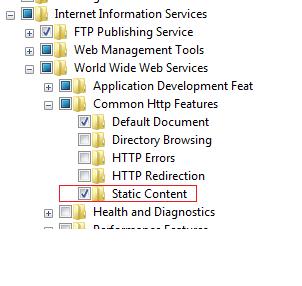
Note that the "static content" service is responsible for serving the Static contents like images, scripts , style sheets file, ....
In my opinion , if the user doesn't checked this option( which will be checked by default if you checked the " internet information service " root node ) windows vista must displays an alert or something , so that the user doesn't waste the time to know the problem ...
I have posted this problem and hoping to help some one in the future.
BTW: this problem still exists in windows 7 and window server 2008
Best Regards,
Anas Ghanem