Localization solution in Silverlight
Published 05 Feb 2009, by Anytao
© 2009 Anytao.com, A fun world for making tech as art.
Localization is a typcal keynote in Silverlight App. Unfortunately, silverlight 2 didn’t have enough support to localization. We can not get a solution complete same as ASP.NET Apps. So here give us a hot example show how to implement localization in Silverlight. Of course, I still expect improvement in next release.
Prepare the language resource
*.resx
At first, we need create different language resources files, here I get two languages included in Resources folder: en-US and zh-CN as follows,
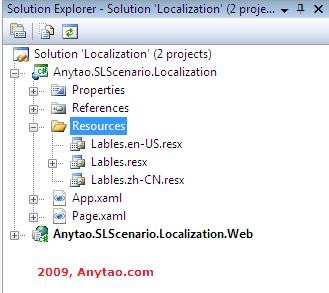
I create resource file named as Lables.resx, the two language resource are named as Labels.en-US, and Labels.zh-CN to support english and Chinese seperately. About the naming rules, please find Find more info in MSDN(http://msdn.microsoft.com/en-us/library/system.globalization.cultureinfo.aspx), or user CultureAndRegionInfoBuilder class to get culture and region info.
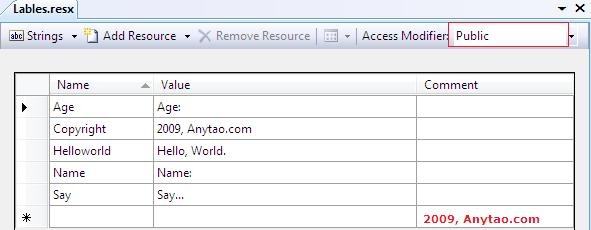
Note: Lables.resx should be assgined access modifier as Public, it will generate behind code to support ResourceManager call and use in next step.
Copy Labels.resx to get Labels.en-US, and Labels.zh-CN resx files.
*.csproj
In order to get resource files in *.xap, we should modify the *.csproj file SupportedCultures tag as follows:
<SupportedCultures>zh-CN;en-US</SupportedCultures>
That will help VS add resource dll into *.xap file and get localization support for siverlight runtime. We can Upzip the *.xap files to see the resource dll like,
*.xap

App.xaml
After generating the Resources files, we can start implements in silverlight app, at first, we should set current culture to current thread,
private voidApplication_Startup(objectsender,StartupEventArgse)
{
//Add localization control
CultureInfoculture=newCultureInfo("zh-CN");
Thread.CurrentThread.CurrentCulture=culture;
Thread.CurrentThread.CurrentUICulture=culture;
this.RootVisual=newBase();
}
*.cs
In our code mode, resouce will be call like this,
        private void UserControl_Loaded(object sender, RoutedEventArgs e)
        {
            tbCopyright.Text = Lables.Copyright;
        }
*.xaml
In our xaml mode, reource will be use as StaticResource, so we need add a new namespace include resource class,
xmlns:res="clr-namespace:Anytao.SLScenario.Localization.Resources"
At same time, add ResLables as resource in your page(*.xaml)
    <UserControl.Resources>
        <res:Lables x:Name="ResLables"></res:Lables>
    </UserControl.Resources>
Then, we can use lables as StaticResource,
    <Grid x:Name="LayoutRoot" Background="White">
        <StackPanel Orientation="Vertical">
            <TextBlock x:Name="tbName" Text="{Binding Name, Source={StaticResource ResLables}}" />
            <TextBlock x:Name="tbAge" Text="{Binding Age, Source={StaticeResource ResLables}}" />
            <Button x:Name="btnSayHello" Content="{Binding Say, Source={StaticResource ResLables}}" Click="btnSayHello_Click" />
            <TextBlock x:Name="tbCopyright" FontSize="15" Foreground="Red" />
        </StackPanel>
    </Grid>
Note: a serious exception will be caused by StaticResource binding in InitializeComponent: AG_E_PARSER_UNKNOWN_TYPE, because the auto-generate resouce class have a internal constrocutor, so you should change it into public manually, that’s another improvement of next Silverlight tools.
OKay, we can run F5 to get our silverlight localization app.

Configuration default culture
Getting culture dynamically is improtant to localization. Generally speaking, configuration is a common way to make it dynamically. Of course, the current culture can get by configuration in html page which host the silverlight, add culture and uiculture param for object:
*.html
        <object data="data:application/x-silverlight-2," type="application/x-silverlight-2" width="100%" height="100%">
            <param name="source" value="ClientBin/Anytao.SLScenario.Localization.xap"/>
            <param name="onerror" value="onSilverlightError" />
            <param name="background" value="white" />
            <param name="minRuntimeVersion" value="2.0.31005.0" />
            <param name="autoUpgrade" value="true" />
            <param name="culture" value="en-US" />
            <param name="uiculture" value="en-US" />
            <a href="http://go.microsoft.com/fwlink/?LinkID=124807" style="text-decoration: none;">
                 <img src="http://go.microsoft.com/fwlink/?LinkId=108181" alt="Get Microsoft Silverlight" style="border-style: none"/>
            </a>
        </object>
web.config
Of course, the current culture can also get from InitParams at Application_Startup,
            string currentCulture = e.InitParams["c"];

            //Add localization control
            CultureInfo culture = new CultureInfo(currentCulture);
            Thread.CurrentThread.CurrentCulture = culture;
            Thread.CurrentThread.CurrentUICulture = culture;
It’s important to config current culture in configuration web.config
    <appSettings>
        <add key="currentCulture" value="zh-CN"/>
    </appSettings>
*.aspx
and transfer the config tag by InitParameters in *.aspx Page_Load event,
        protected void Page_Load(object sender, EventArgs e)
        {
            if (!IsPostBack)
            {
                string c = ConfigurationManager.AppSettings["currentCulture"];
                this.anytaoSL.InitParameters = string.Format("c={0}", c);
            }
        }
That will integrate the silverlight app localization with Server localization in one style. Now, we can easily change current default culture in web.config and get our siverlight localization dynamically.
If you have more ideas about change culture, we can Switch language in URL, this will be next artical I’m thinking about.
Need to be more perfect
- It’s not easy to add supportedCultures value to csproj file and I expect improvement in next Silverlight 3.
- I’m not sure silverlight support how many lanuage in a project.
- When we generate behind code of resouce class, constructor will be generated as internal access modifier.
Tao | Inside Necessary .NET | www.anytao.com
Reference
terry and sly give us more option, but sorry for terry’s solution in Chinese.
terry, Silverlight 2中多语言支持实现(上)、Silverlight 2中多语言支持实现(下)
sly, Creating a localizable Silverlight 2.0 Application、Multi Langauge Silverlight 2.0 Application