Brian Ritchie's Blog

My ramblings on .NET & other development topics

News


Twitter

Blog Roll

Connect with me

Death to Windows Services...Long Live AppFabric!

Up until now, the only option for running always on/long running processes was to build a Windows Services.  While .NET made building Windows Services easier, they still come with their own set of headaches.  Windows Server AppFabric adds an Auto-Start/Always-Running feature which allows IIS hosted services to behave more like traditional Windows Services.  Services will automatically start when the computer boots, an application pool is started, or an IISRESET is performed.

Why use this feature? 

By hosting within IIS, applications receive the following benefits:

  • Single hosting framework for all application components.  Web sites, services, and long running services can be hosted using the same framework & management tools.
  • Improved deployment capabilitiesXCOPY deployment is now possible or use the new Web Deploy functionality.  Web Deploy is enough of a reason by itself!
  • Provide self-hosted management or monitoring web pages.  You can easily add ASPX web pages to your service to provide status on their work load.
  • Utilize IIS automatic management features.  Optionally configure your service to recycle on a given interval or based on memory usage, just like any other IIS hosted service.
So, how do you get started?

Step 1: Install the prerequisites

Step 2: Update Application Pool to Auto-Start

Start IIS Manager and access the configuration editor:
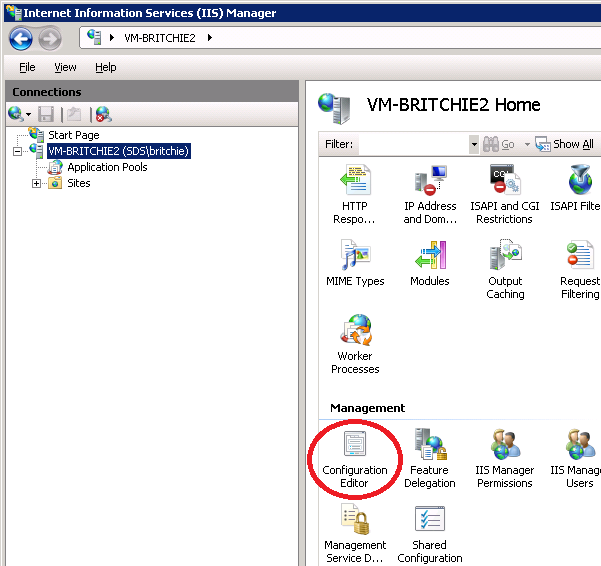


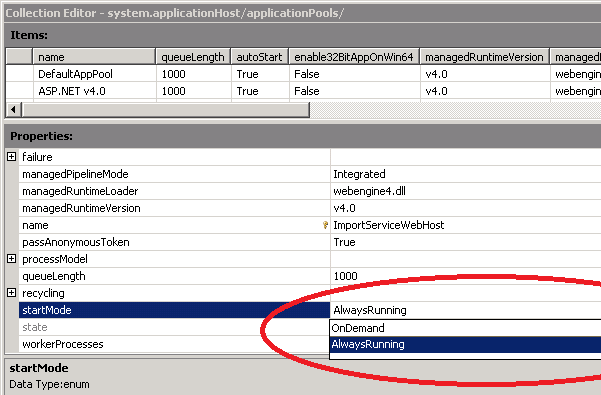
Select the system.applicationHost/applicationPools section and click the ellipsis by the application pool collection:


Select the application pool & change the start mode to “AlwaysRunning”. Once you close the popup, make sure you click the Apply button.


Step 3: Configure Site with Net.Pipe Binding

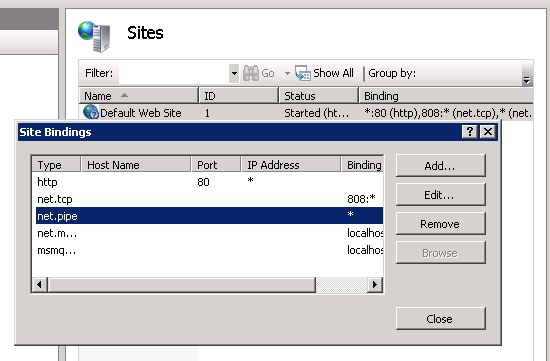
The net.pipe binding is used by AppFabric to control the hosted service.  Navigate to the site & click edit bindings.  Add net.pipe if it isn’t already there.


Step 4: Configure Application with Net.Pipe Binding

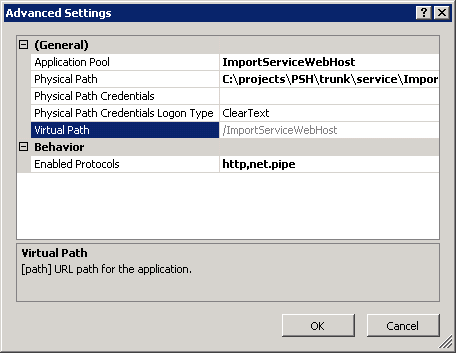
Access the advanced settings on the application (virtual directory) and make sure net.pipe is one of the enabled protocols.
 

Step 5: Configure Application with Auto-Start

Access the Configure WCF and WF option on the application.  Click on the Auto-Start tab & select “Enabled”.


Step 6: Make changes to the application code

Add your thread initialization to the AppStart class.  It is fired for both HTTP and non-HTTP activation (such as net.pipe).  Do not put the code in global.asax since it is only invoked for the HTTP pipeline.   You need to create a class called AppStart within App_Code directory.  It should have a public static method of AppInitialize. 

AppStart.cs (within App_Code directory)

   1:  namespace Payformance.Services.ImportService
   2:  {
   3:      public class AppStart
   4:      {
   5:          private static ImportServicePlugin servicePlugin;
   6:   
   7:          // Code that runs on application startup by ASP.NET infrastructure
   8:          public static void AppInitialize()
   9:          {
  10:              servicePlugin = new ImportServicePlugin();
  11:              servicePlugin.Start();
  12:          }
  13:   
  14:      }
  15:  }
  16:   

Step 7: Monitoring

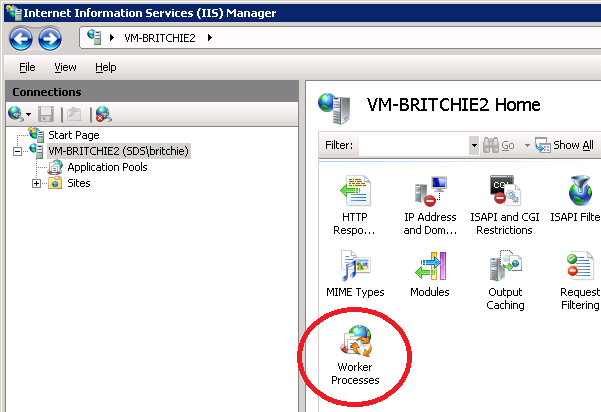
Since all services will be hosted under the w3wp.exe process name, you can see the Worker Process associated with your application pool within the IIS manager:


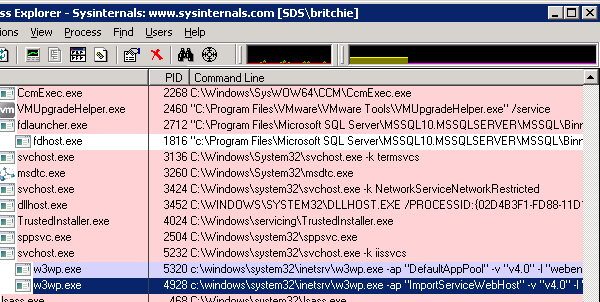
Another approach is to use the SysInternals Process Explorer free from Microsoft.  Add the “Command Line” column to the grid, and the application pool name will be listed after the –ap switch.


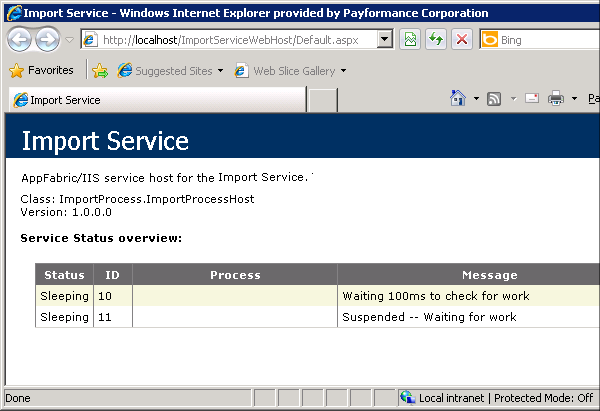
And my personal favorite, you can also add a web page to your service that provides information about your service. 
Hopefully you're as fired up as I am about these new possibilities...go try it out.

Comments

Rory Primrose said:

What happens in the auto start scenario where the AppPool shuts down due to inactivity? Does auto start kick it back up again?

# September 8, 2010 10:27 PM

The Morning Brew - Chris Alcock » The Morning Brew #682 said:

Pingback from  The Morning Brew - Chris Alcock  » The Morning Brew #682

# September 9, 2010 2:20 AM

rposbo said:

Very interesting concept and one that is worth  exploring. I'm not very familiar with webdeploy - could it be scripted to do all the configuration you're doing within IIS (steps 2-5)?

# September 9, 2010 4:32 AM

rposbo said:

I've tried this out but am getting a bit confused. The web application that you're setting to autostart - is this a .net web project or a windows service project?

Presumably it's a web project as I couldn't get this working with a windows service.

# September 9, 2010 6:58 AM

brian_ritchie said:

Rory: The inactivity shutdown is disabled when you turn on the "Always On" mode.

Rposbo: This is a web application.  Instead of putting your startup code (for kicking off threads, etc.) in the windows service class, you put it in the autostart class.

# September 9, 2010 8:42 AM

Ryan Ternier said:

Are there any caveats to this vs a windows service?

Windows services are not all that bad, especially if you add some plugins so you can debug them like regular apps.

But they work, and they're proven to work, and can run on any machine with the correct .net version.

# September 9, 2010 11:59 AM

koistya said:

That is a great feature! I was waiting it so long..

# September 9, 2010 1:26 PM

mkprilliman said:

Great post, Brian - this will really help me in my effort to sell the merits of AppFabric features to our PHBs.

BTW - I tried to subscribe to your blog, but your feed links seem to be broken.

# September 9, 2010 1:53 PM

Twitter Trackbacks for Death to Windows Services...Long Live AppFabric! - Brian Ritchie's Blog [asp.net] on Topsy.com said:

Pingback from  Twitter Trackbacks for                 Death to Windows Services...Long Live AppFabric! - Brian Ritchie's Blog         [asp.net]        on Topsy.com

# September 9, 2010 2:09 PM

SKOROZSI.NET said:

links for 2010-09-09

# September 9, 2010 5:03 PM

brian_ritchie said:

mkprilliman: Thanks for the heads up.  The feed should be fixed now.

Ryan: I haven't found any caveats so far.  I've converted one of my services over and it is working great.  I'll keep everyone posted if I start running into problems.

rposbo: Scripting with Web Deploy might be possible, but PowerShell would definitely work.

# September 9, 2010 10:10 PM

marcdormey said:

Thanks for the post. Exactly what I needed.

Btw... your header reminds me of Half Life.

# September 13, 2010 7:05 AM

John said:

Hi

Great post but i don't quite get how to get my project started in Visual Studio 2010? What kind of project are you using?

# October 13, 2010 2:27 PM

John (again) said:

Actually, if you could post a sample project to download that would be great!

# October 13, 2010 3:47 PM

zach bonham said:

This is exactly what I've been looking for, thank you!  I've been a big fan of WCF services in IIS (for all reasons you mention) and now I can get the same ease in batch services, too!

*Where* did you find the documentation for this feature??  This needs to be evangelized a bit more! :)

# October 28, 2010 6:50 AM

John said:

It would be great if you could post a working project! Thanks

# December 14, 2010 6:52 AM

Lars Wilhelmsen said:

Hey,

How did you create the web page described in the last section?

--larsw

# January 13, 2011 5:32 AM

Erlend Rotvik said:

I like this, but windows services also get a shutdown signal. What if we need to gracefully shutdown the application? Is there also a magic AppShutdown method to be put in the App_Code directory?

Erlend

# April 8, 2011 4:47 AM

Sean said:

One caveat appears to be use autostart to the initialize spring.net framework. It complains about Types from the object definitions, as if object signatures had changed.

# April 25, 2011 7:15 PM

Brian Ritchie's Blog said:

Today at the Jax Code Camp I gave a presentation on scaling out your .NET applications by leveraging

# August 27, 2011 1:30 PM

Brian Ritchie's Blog said:

Today at the Jax Code Camp I gave a presentation on scaling out your .NET applications by leveraging

# August 27, 2011 1:39 PM

Scaling Out .NET Presentation at Jax Code Camp 2011 said:

Pingback from  Scaling Out .NET Presentation at Jax Code Camp 2011

# August 28, 2011 12:20 AM

Scaling Out .NET Presentation at Jax Code Camp 2011 said:

Pingback from  Scaling Out .NET Presentation at Jax Code Camp 2011

# August 28, 2011 12:20 AM

Scaling Out .NET Presentation at Jax Code Camp 2011 said:

Pingback from  Scaling Out .NET Presentation at Jax Code Camp 2011

# August 28, 2011 1:20 AM

Scaling Out .NET Presentation at Jax Code Camp 2011 said:

Pingback from  Scaling Out .NET Presentation at Jax Code Camp 2011

# August 28, 2011 1:20 AM

Brian Ritchie's Blog said:

Thanks to everyone who came out for my presentation at the Jacksonville Developer User Group tonight

# October 5, 2011 10:02 PM

Hosting Windows Services in IIS Presentation at JAXDUG said:

Pingback from  Hosting Windows Services in IIS Presentation at JAXDUG

# October 6, 2011 11:20 AM

Per said:

Thanks Brian,

Once I realized that to shutdown/stop you can just implement IRegisteredObject Interface, then this is approach can definitely replace windows services

msdn.microsoft.com/.../sk726815.aspx

# October 22, 2011 8:01 PM

Use Server AppFabric to host a Service (similar to a Windows Service) | Kurt Heiz said:

Pingback from  Use Server AppFabric to host a Service (similar to a Windows Service) | Kurt Heiz

# November 24, 2011 4:51 PM

Use Server AppFabric to host a Service (similar to a Windows Service) | Kurt Heiz said:

Pingback from  Use Server AppFabric to host a Service (similar to a Windows Service) | Kurt Heiz

# November 24, 2011 11:33 PM

Andy said:

Is there a way to use AppFabric Monititoring to log information so it's visible in the Dashboard?

# April 23, 2012 1:13 PM

PROG (C#) WCF Selfhosted services said:

Pingback from  PROG (C#) WCF Selfhosted services

# March 17, 2013 8:26 AM

Waldron said:

This is a topic that's near to my heart... Cheers! Exactly where are your contact details though?

# April 2, 2013 4:38 AM

Knott said:

It is not my first time to go to see this

website, i am browsing this web page dailly and get pleasant data from here daily.

# April 17, 2013 2:42 PM

Matt Hersh said:

How did you create the page that shows the status of the service? The last step in your article.

It would be great if you could attach a sample project with the code!

# April 24, 2013 2:03 AM
Leave a Comment

(required) 

(required) 

(optional)

(required)