More ReSharper 3.0 Goodness

Found an interesting tidbit today. I had a piece of code with the word "bug" in a comment. It showed up like this in my IDE:

image

Lo and behold I found that ReSharper is finding keywords in my comments and colorizing them so they stand out.

It also does this with TODO and other keywords that you define. In the Tools options you'll find a leaf node called Todo Items. In there you can set up patterns. Here's the pattern for Bug:
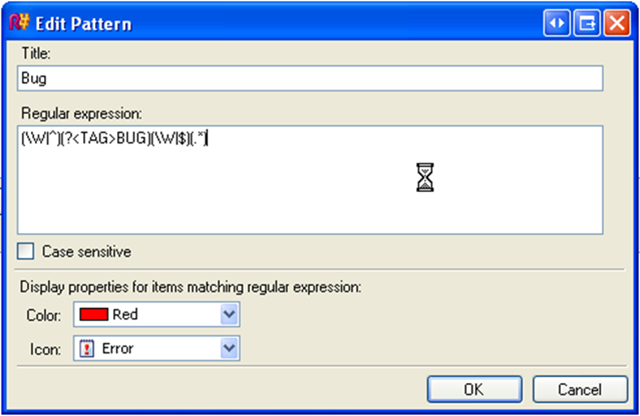
image

So any time it find "bug" (using the regular expression) it'll colorize it red and display the error icon on that line. The default items that are added are Todo, Note, and Bug. You can add your own so you might use this as a good way to highlight things in your code to junior developers (for example creating one called "Pattern" to highlight an implementation of a specific design pattern).

Note, this might not be a 3.0 thing but since I don't have 2.5 installed anymore I can't tell if it's been there all along.

Very neat!

Published Thursday, June 28, 2007 7:12 AM by Bil Simser
Filed under: ,

Comments

# re: More ReSharper 3.0 Goodness

Thursday, June 28, 2007 10:01 AM by JV

That feature is great, especially now that you also have a TODO list which will also contain these comments from your code. The standard VS TODO list doesn't do that :)

# re: More ReSharper 3.0 Goodness

Thursday, June 28, 2007 11:24 AM by Dave

It's a 3.0 thing, you're right.

# re: More ReSharper 3.0 Goodness

Thursday, June 28, 2007 1:16 PM by James Kovacs

No, this feature is new to ReSharper 3.0. It's called the ToDo List. The best part is that it shows up in ReSharper's right-hand margin beside the code allowing you to quickly scan a file for warnings, errors, or ToDos.

www.jetbrains.com/.../navigation_search.html

# re: More ReSharper 3.0 Goodness

Friday, June 29, 2007 2:33 AM by Wessam Zeidan

What was your machine doing when you took that screenshot? ;)

Leave a Comment

(required) 
(required) 
(optional)
(required)