Internet Explorer Keyboard? Shortcuts

I can’t say I’ve ever looked at the Internet Explorer help file (or any help file for that matter) but I turned to it when I wanted to see if there was a keyboard shortcut for switching between tabs. Here’s what I found:
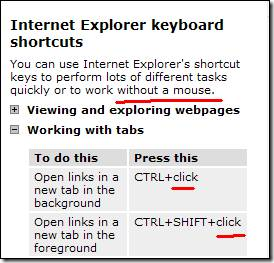
InternetExplorerKeyboardShortcuts

Okay, sure. If you’re using the keyboard assist mode you can use some keystroke to simulate a “click” (can’t remember what the keystroke is in that mode) but reading this just makes me wonder if anyone proofs this stuff.

Fail.

Published Wednesday, May 13, 2009 6:45 PM by Bil Simser
Filed under:

Comments

# re: Internet Explorer Keyboard? Shortcuts

Wednesday, May 13, 2009 9:19 PM by Stephen

To be fair, it does say to do tasks quickly OR work without a mouse. I think it was just saying you can use keys to do things more quickly.

# re: Internet Explorer Keyboard? Shortcuts

Wednesday, May 13, 2009 9:25 PM by brad

Does IE have a keyboard shortcut for opening the page in a real browser? ;)

# re: Internet Explorer Keyboard? Shortcuts

Wednesday, May 13, 2009 10:03 PM by Bil Simser

@Stephen: Agreed, it does say "or" but then it all seems very fine print-ish to me.

# re: Internet Explorer Keyboard? Shortcuts

Thursday, May 14, 2009 1:15 AM by Derek Keoughan

yeah, the "OR" gets them off the hook..

Try this in Vista with the keyboard... ALT-V... (View)... then R... Refresh, right?  No... it's also laRge icons... so it's confused, and does nothing...

Yep - proof-reading AND breaking the GUI rules... and it wasn't fixed with SP1, either...

-Derek

# re: Internet Explorer Keyboard? Shortcuts

Thursday, May 14, 2009 7:55 AM by Atlanta Private Investigator

That's funny although with all the docs to be proof-read it's understandable one or two goofs might slip through.

# re: Internet Explorer Keyboard? Shortcuts

Sunday, May 17, 2009 1:01 PM by mike

Title of the topic says "keyboard shortcuts," so the "or" doesn't actually get them off the hook. :-)

# re: Internet Explorer Keyboard? Shortcuts

Monday, May 18, 2009 7:49 AM by Zack Jones

Ctrl-Enter and Ctrl-Shift-Enter seem to work so I guess the enter key simulates a mouse click.

Leave a Comment

(required) 
(required) 
(optional)
(required)