Jawbone connected to Vista

I think people yacking on their bluetooth headsets in public places are rude. People also didn't care much for me calling them on my last  headset because half the time they couldn't understand what I was saying. With all of that I really didn't care much for replacing it after an unnamed member of my family washed it one day.

But not too long ago, Caleb was totally jazzed about his new Jawbone and I was once again getting fed up with wires tangling around me when I was making calls in the car. I also want to make Messenger voice calls when I'm in Spain next month for TechEd Europe to speak on WF, BizTalk and SharePoint. Since I wander while I make phone calls, I need a headset ... Reasons enough to once again try a bluetooth headset.

Amazon had the red one for less than $90 ... much better than the $139 Best But wanted.


Now getting it to work with Messenger was a little trickier that I thought it would be therefore and I wanted to save some other people the extra hassle. Here's how it goes:

  1. Pair the headset with your computer ... piece of cake in Vista
  2. You should also get notifications that a new Bluetooth device and a Hands-Free device were installed successfully.
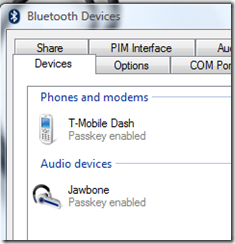
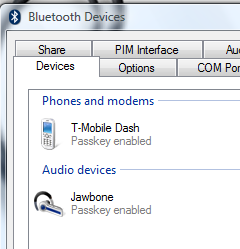
  3. Make sure it shows up as connected under Bluetooth devices
    image
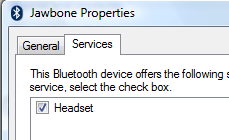
  4. Click on the Properties button.
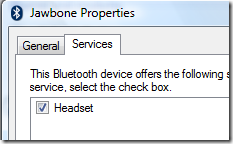
  5. Make sure the Headset Service is checked for the device.
    image 
  6. Don't got to Messenger yet, because you're not done yet. You still have couple of steps to go and it took me a little bit to figure out what's going on.
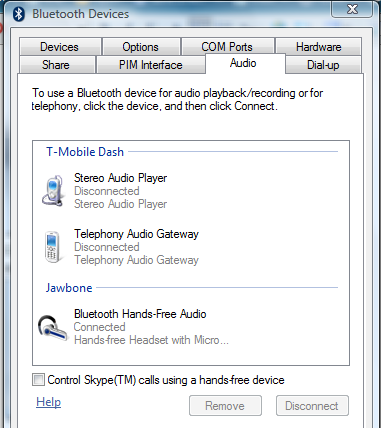
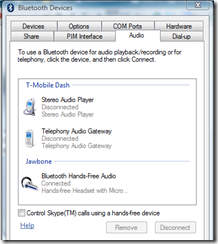
  7. Switch to the Audio tab and make sure the headset is listed and shows as connected.
    image
  8. Exit the Bluetooth devices dialog.
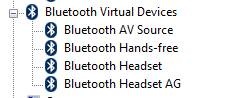
  9. Now comes the counter intuitive part. The headset did not yet show up as a Sound device in Device Manager under Sound, video and game controller. The bluetooth drivers were loaded device, which I confirmed once I selected "Show Hidden Devices":
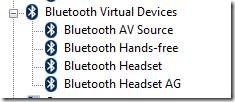
    clip_image002
  10. The missing part was the audio device driver that wasn't installed automatically.
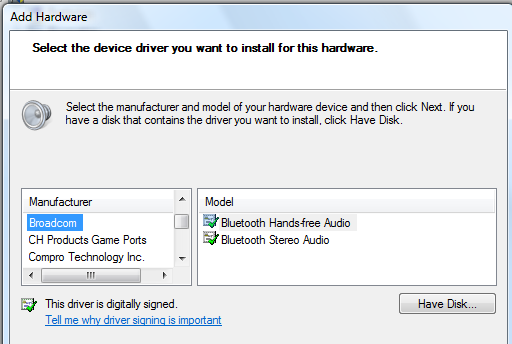
  11. Running the Add Hardware Wizard I added the Broadcom Bluetooth Handsfree Sound driver
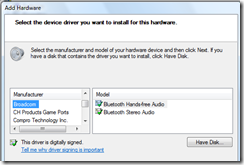
    image 
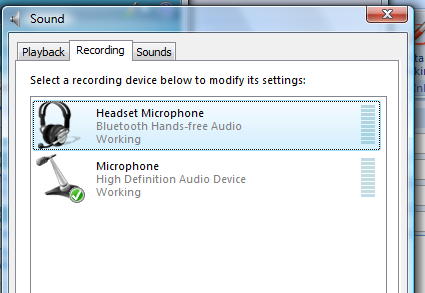
  12. Now the headset shows up as a Sound device in the Control Panel on the Recording tab.
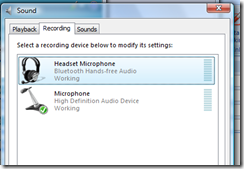
    image
    and you can use it as a microphone for Windows Messenger or Communicator.
And just to be complete. I did the ultimate Caleb test for the headset:

  1. Get in the car
  2. turn the fan on high
  3. lower the windows
  4. call you wife or you most vocal bluetooth headset critic and see if they complain.

The Jawbone does pass the test even without the noise cancelation!

Published Monday, October 15, 2007 7:05 AM by ChristophDotNet

Comments

# re: Jawbone connected to Vista

Wednesday, October 17, 2007 4:51 PM by Scott Hanselman

Great post! You beat me by two days, I was writing this up just now!

# re: Jawbone connected to Vista

Wednesday, October 31, 2007 11:18 PM by Caleb Jenkins

Glad that it passed the "Caleb" test... but it should really be called the "wife" test. I love being able to call without having to turn down the A/C. I never thought of using this as a Messenger microphone. Great idea! Have fun in Europe!

# re: Jawbone connected to Vista

Sunday, November 04, 2007 6:51 PM by Neal Mueller

Thanks for the post. Where do I find the broadcom driver? It doesn't appear to be included in my standard driver set.

# re: Jawbone connected to Vista

Tuesday, January 22, 2008 5:18 PM by Brian T

Any suggestions for someone running Vista 64 Bit

# re: Jawbone connected to Vista

Friday, January 25, 2008 7:31 AM by Stephanie

I got this working - thanks!  But one question - have you had blue screens of death while using this?  I get it with Skype after about a minute or so of usage. :(

# re: Jawbone connected to Vista

Tuesday, February 19, 2008 1:26 PM by CKutsmode

Got my Jawbone to work with my new Dell XPS running Windows VIsta with Skype and it worked fine for about 2 min then blue screen of death. Fortunately it came back to life but my computer kept wanting to download Broadcom drivers. When I tried, it would not accept them.I hope to try the suggestion above to see if that will work. Loved it when it worked for 2 min - mom said it sounded like I was on a land line!

# re: Jawbone connected to Vista

Wednesday, March 05, 2008 5:09 AM by FY

I tried the procedure above with my GG Telecom bluetooth headset but it doesn't work. The hidden bluettoh headset device is already using the broadcom drivers. But I followed your procedure to manually add it to the Sound, Game controller etc. I can do sound test and even see the sound bars going up and down but no sound through the bluetooth.

# re: Jawbone connected to Vista

Wednesday, March 12, 2008 3:34 PM by Stan

Can't find drivers for Vista !!!! Please help.

# re: Jawbone connected to Vista

Saturday, March 15, 2008 2:42 AM by LN

Great post....Worked like a magic !!

# re: Jawbone connected to Vista

Saturday, March 15, 2008 3:38 AM by LN

I did everything...all worked....but no sound on my headset....why is that? Any help appreciated..Checked my sys volume and headset volume..I tried to go into the sounds menu..I chose the Bluetooth headset as the default...when i right click and test it i cannot hear any sound. Please help Reply to lavanyanaren@gmail.com

# Caleb Jenkins | Developing UX » What the Jawbone Bluetooth headset needs to be perfect.

Pingback from  Caleb Jenkins | Developing UX » What the Jawbone Bluetooth headset needs to be perfect.

# re: Jawbone connected to Vista

Sunday, May 18, 2008 7:46 AM by Dave

Couldn't have done this without you.  Cheers

# should i leave my jawbone on all day

Tuesday, May 20, 2008 8:37 AM by should i leave my jawbone on all day

Pingback from  should i leave my jawbone on all day

# re: Jawbone connected to Vista

Friday, May 23, 2008 10:00 AM by cv

Where did you get the Broadcom driver from? The driver from the site is will not install unless it sees the device first. Which is what I am try to accomplish. Thanks

# re: Jawbone connected to Vista

Friday, May 30, 2008 3:18 PM by phiredrop

Hey, I don't know why it's giving me grief to get my Jawbone to work, but after pairing the headset with my laptop, the Jawbone won't actually connect, even though it shows up in my devices. It gives me a 'BtwApplExt' 'Parameter is incorrect' error. I have WIDCOMM 6 installed and tried installing 5 instead (cause I heard someone else say that worked) but it ended up making my computer freeze every time I booted. So back on WIDCOMM 6, it still will not connect. Any ideas would help a lot! Thanks!

# re: Jawbone connected to Vista

Wednesday, June 04, 2008 2:48 AM by Raoul

Same comment as someone else: Thanks for the post. Where do I find the broadcom driver? It doesn't appear to be included in my standard driver set.

Thanks in advance!

# re: Jawbone connected to Vista

Monday, June 30, 2008 1:49 PM by PUJ

For those of you who have followed the instructions but are still getting no sound try updating the bluetooth software from the following site.

www.broadcom.com/.../bluetooth_update.php

I had the same problem, i also didn't even have an audio tab as seen in the screenshots. After updating i had the tab and when i repeated the instructions it worked perfectly.

Thanks very much.

# jawbone ii bluetooth on after pairing

Thursday, July 10, 2008 2:15 AM by jawbone ii bluetooth on after pairing

Pingback from  jawbone ii bluetooth on after pairing

# re: Jawbone connected to Vista

Wednesday, July 30, 2008 10:22 AM by J Gut

After working with the computer immediately, my Jawbone stopped pairing with other devices. I called customer support and learned that Jawbone is voiding warranties of people who call to say that they have connected the Jawbone to a computer. I am talking to a representative in this moment. As soon as a mentioned "computer" they said: "that is missuse, we have your information, your warranty has been voided". Are they crazy? As if pairing a deBluetooth device could damage it... that signals poor engineering, not missuse. ANYWAY... after several hours it started pairing again, and now it is working properly with my phone and my computer.

# re: Jawbone connected to Vista

Friday, August 29, 2008 2:29 AM by Jeff

HELP!!! So when I download www.broadcom.com/.../bluetooth_update.php to update it tells me the device is not supported and doesn't let me install. SO I still have no driver for the Jawbone II. Technology sucks....especially vista! Heart surgery is more plug and play than Vista!

# re: Jawbone connected to Vista

Tuesday, September 09, 2008 1:17 PM by Wah Wah

@Jeff:

>> Technology sucks....especially vista! Heart surgery is more plug and play than Vista!

Dude, Microsoft's didn't make the device.  How is it MS's fault that you can't find a compatible driver?

# re: Jawbone connected to Vista

Tuesday, September 23, 2008 6:39 PM by Steve "I'm a PC"

I agree, why do people always blame MS for things they have no control over.  That being said, I am having the same error stating that the driver does not support the device, (origional Jawbone)

# re: Jawbone connected to Vista

Monday, November 03, 2008 7:20 PM by David

I don't get Broadcom as an option when I try to install it. ANy other suggestions?

# re: Jawbone connected to Vista

Thursday, December 25, 2008 7:09 AM by nanopino

I've gotten it to pair up correctly and it shows as an input device under sound and is selected as the default device, but when i try to record or use it in an app, no sound is recorded. I'm using vista 64

# re: Jawbone connected to Vista

Thursday, January 22, 2009 5:53 PM by Duff40

Has anyone got it to work on a Windows XP laptop?  It pairs with the jawbone but will not stay connected.  The screens look nothing like what is described in this post.

HELP!!!

# re: Jawbone connected to Vista

Wednesday, February 25, 2009 8:12 AM by Martin Dee

Thanks a lot for responding to the multiple questions of where you got the broadcom driver. Its not on the list of included Vista drivers. Maybe it was removed as part of SP1. If it was built in for your, a simple "it was on the list" would be nice.

Thanks for a tutorial that doesn't work. So in other words... thanks for nothing!

# re: Jawbone connected to Vista

Wednesday, February 25, 2009 3:52 PM by Tom John

Thanks for the guide.

I followed the instructions but did not get the additional options on the bluetooth dialog like other users here.

Vista pointed me at a url on the broadcom site that states no drivers until end of april 2009:

www.broadcom.com/.../bluetooth_update.php

However, did a bit of searching and found some broadcom drivers on the lenovo site for Vista 32/64 (I'm currently on 32):

www-307.ibm.com/.../MIGR-67866.html

Installed these and the Jawbone jumped into life. All the options described in the guide now available and I've just configured it to work with Skype... result.

Hope this helps others with driver problems.

# re: Jawbone connected to Vista

Wednesday, February 25, 2009 9:31 PM by Shawn

Thanks for hunting that link down!

# re: Jawbone connected to Vista

Friday, February 27, 2009 11:00 PM by Jim Rumora

Does anyone have the ASCII codes for the Jawbone functions.  In other words, puching the button to take a call should equate to some ASCII code.  Same with puching the power button to end a call.  Also pushing the Noise Asassin button to not take a call.  What are these codes.  I am trying to setup an interface to Skype.

# re: Jawbone connected to Vista

Tuesday, April 14, 2009 3:46 PM by David Mathurin

Thanks again.  I'm using Windows 7 release 7048 64 bit and your instructions worked like a charm

# re: Jawbone connected to Vista

Thursday, April 30, 2009 8:14 PM by Chester N.

Tom John You are the Greatest, I've been searching for drivers all day...Thanks for help...really appreciate

# re: Jawbone connected to Vista

Wednesday, May 06, 2009 2:09 PM by Dan

Mine says its connected under devices, but disconnected under audio. i just want to see the bars move!

# re: Jawbone connected to Vista

Thursday, May 28, 2009 11:25 AM by jstrain

I get an error when I try to run the broadcomm drivers - hangs on validating device.  Any ideas?

# re: Jawbone connected to Vista

Wednesday, June 17, 2009 10:33 PM by Thorr89

OMFG!!! YES!! after an entire day of trying to figure this BS out so i can use it while playing online games, and stuff, i am happy to say that i installed the drivers posted by the wonderous TOM JOHN!!! all hail!! Works for World of warcraft, working on SKYPE called my Sister she said I was Crystal Clear.. and FInally I'd like to give thanks for this Post!! So happy now 3 hours later...

Leave a Comment

(required) 
(required) 
(optional)
(required)