ASP.NET 3.5 Extensions History Control Tip

Originally introduced in the ASP.NET Futures package, the history control in the ASP.NET 3.5 Extensions preview comes with a few nice additions. One of the updates is the ability to change the page title when adding a history point. This is important because without updating the title, the history list isn't very much help after a few updates. To illustrate the problem, here is what the history list in IE could look like after adding a few history points:
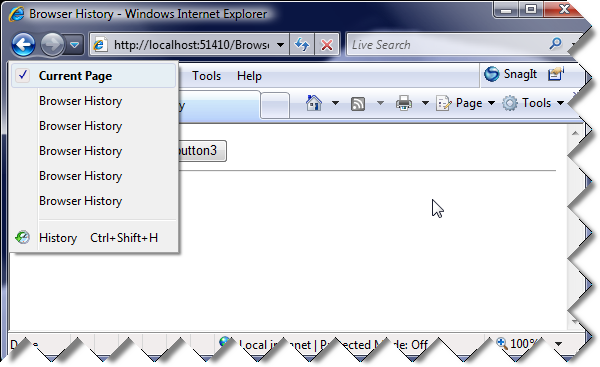
 

What happened?

Because all the entries are the same, the user is unable to distinguish between them, leaving the list to be pretty unhelpful.


Adding history from the server

To take advantage of this from the server, you simply include the page title for the new history entry in the AddHistoryPoint method. This will update the page title when you add a history point but it will NOT update it for you when the user clicks the browser Back or Forward buttons. To accommodate for this, you have to set the page title as well in the Navigate event. Here is both the HTML and code-behind for this example:

<asp:ScriptManager ID="TheScriptManager" runat="server" EnableHistory="true"
    EnableStateHash="false" OnNavigate="TheScriptManager_Navigated" />

<div>        

    <asp:UpdatePanel ID="UpdatePanel1" runat="server">
        <ContentTemplate>
            <asp:Button ID="Button1" runat="server" Text="Button1" OnCommand="Button_OnCommand" CommandArgument="1" />&nbsp;
            <asp:Button ID="Button2" runat="server" Text="Button2" OnCommand="Button_OnCommand" CommandArgument="2" />&nbsp;
            <asp:Button ID="Button3" runat="server" Text="Button3" OnCommand="Button_OnCommand" CommandArgument="3" />
            <hr />
            <asp:Label ID="Label1" runat="server" />            
        </ContentTemplate>        
    </asp:UpdatePanel>    

</div>


protected void Button_OnCommand(object sender, CommandEventArgs e)
{
    string buttonState = e.CommandArgument.ToString();
    Label1.Text = buttonState;
    string title = "Browser History " + buttonState;
    TheScriptManager.AddHistoryPoint("buttonState", buttonState, title);       
}

protected void TheScriptManager_Navigated(object sender, HistoryEventArgs e)
{
    string buttonState = e.State["buttonState"];
    Label1.Text = buttonState;
    Title = "Browser History " + buttonState;
}


Now, the history list can be used more effectively and will look something like this:
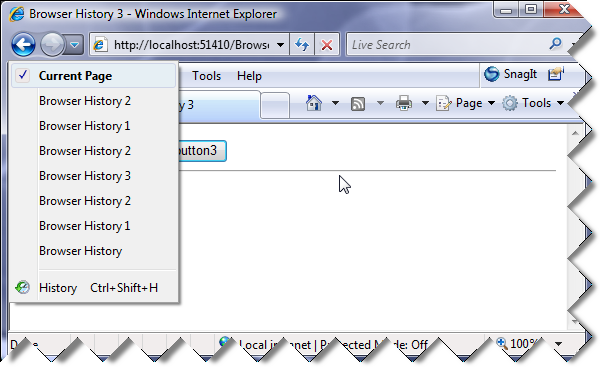
 

Meaningful history list


Adding history from the client

The same steps apply to managing history on the client:

  • Pass in the page title when adding a history point to update the list and title accordingly.
  • Update the page title in the handler for the navigate event.

Here is the code for the client example:

<asp:ScriptManager ID="TheScriptManager" runat="server" EnableHistory="true"
    EnableStateHash="false" />

<div>    
    <input type="button" value="button1" onclick="button_click(1);" />&nbsp;
    <input type="button" value="button2" onclick="button_click(2);" />&nbsp;
    <input type="button" value="button3" onclick="button_click(3);" />
    <hr />
    <span id="results" />    
</div>
<script type="text/javascript">

    Sys.Application.add_navigate(onNavigate);
    
    function onNavigate(sender, args){                                                            
        var buttonNumber = args.get_state().pageState || "";            
        $get("results").innerHTML = buttonNumber;
        document.title = "Browser History " +  buttonNumber;          
    }

    function button_click(buttonNumber){                    
        $get("results").innerHTML = buttonNumber; 
        var historyPoint = { pageState : buttonNumber };
        var title = "Browser History " + buttonNumber;           
        Sys.Application.addHistoryPoint(historyPoint, title);            
    }

</script>


Hope someone finds this interesting. :)

Published Friday, December 28, 2007 6:06 PM by davidbarkol
Filed under: ,

Comments

# re: ASP.NET 3.5 Extensions History Control Tip

Friday, December 28, 2007 10:08 PM by Mark Wisecarver

Yes it is interesting.

Nice cropped edge on those images too.

# re: ASP.NET 3.5 Extensions History Control Tip

Saturday, December 29, 2007 12:15 PM by Anonymous

Nice one, does this work in FF as well?

# re: ASP.NET 3.5 Extensions History Control Tip

Saturday, December 29, 2007 12:29 PM by davidbarkol

Yes, it works in FF and should also work in Safari but I have to admit I didn't test it in Safari yet.

# ASP.NET 3.5 Extensions Preview &laquo; See Joel Program

Saturday, December 29, 2007 5:33 PM by ASP.NET 3.5 Extensions Preview « See Joel Program

Pingback from  ASP.NET 3.5 Extensions Preview &laquo; See Joel Program

# Enlaces sobre: ASP.NET, ASP.NET AJAX, ASP.NET MVC, Visual Studio, IIS 7 &laquo; Thinking in .NET

Pingback from  Enlaces sobre: ASP.NET, ASP.NET AJAX, ASP.NET MVC, Visual Studio, IIS 7 &laquo; Thinking in .NET

# re: ASP.NET 3.5 Extensions History Control Tip

Sunday, February 03, 2008 2:26 AM by ar7uro

Esto es realmente MUY INTERESANTE!!!!

Thank you very much!!

# re: ASP.NET 3.5 Extensions History Control Tip

Thursday, April 10, 2008 10:45 PM by Nishanth Nair

Nice one.. Quite interesting !

# Visual Studio 2008 and .NET Framework 3.5 Service Pack 1 Beta

Monday, May 12, 2008 12:51 PM by ScottGu's Blog

Earlier today we shipped a public beta of our upcoming .NET 3.5 SP1 and VS 2008 SP1 releases.&#160; These

# Visual Studio 2008 and .NET Framework 3.5 Service Pack 1 Beta

Monday, May 12, 2008 1:01 PM by BusinessRx Reading List

Earlier today we shipped a public beta of our upcoming .NET 3.5 SP1 and VS 2008 SP1 releases.&#160; These

# Visual Studio 2008 and .NET Framework 3.5 Service Pack 1 Beta

Monday, May 12, 2008 1:30 PM by Mirrored Blogs

Earlier today we shipped a public beta of our upcoming .NET 3.5 SP1 and VS 2008 SP1 releases.&#160; These

# عالم التقنية &raquo; Blog Archive &raquo; اليوم صدور Services Pack 1 Beta الخاص برنامج Visual Studio 2008 .Net وإطار العمل Framework 3.5

Pingback from  عالم التقنية  &raquo; Blog Archive   &raquo; اليوم صدور Services Pack 1 Beta الخاص برنامج Visual Studio 2008 .Net وإطار العمل Framework 3.5

# Visual Studio 2008 and .NET Framework 3.5 Service Pack 1 Beta

Monday, May 12, 2008 5:18 PM by Blog

{Copy paste uiteraard....} Earlier today we shipped a public beta of our upcoming .NET 3.5 SP1 and VS

# Visual Studio 2008 and .NET Framework 3.5 Service Pack 1 Beta &laquo; .NET Framework tips

Pingback from  Visual Studio 2008 and .NET Framework 3.5 Service Pack 1 Beta &laquo; .NET Framework tips

# Visual Studio 2008 en .NET Framework 3.5 Service Pack 1 Beta

Thursday, May 15, 2008 4:47 AM by Scott Guthrie's Blog in Dutch

Eerder deze week brachten we een publieke betaversie uit van de komende .NET 3.5 SP1 en VS 2008 SP1.

# Visual Studio 2008 and .NET Framework 3.5 Service Pack 1 Beta &laquo; .NET Framework tips

Pingback from  Visual Studio 2008 and .NET Framework 3.5 Service Pack 1 Beta &laquo; .NET Framework tips

# Service Pack 1 Beta para VS 2008 y .NET Framework 3.5 &laquo; Thinking in .NET

Pingback from  Service Pack 1 Beta para VS 2008 y .NET Framework 3.5 &laquo; Thinking in .NET

# The Coolest SmartUgur KAZDAL's blog | HTML | JAVA | ASP | PHP | FLASH | SILVERLIGHT | CSS | C# | VISUAL STUDIO | MICROSOFT | GAMES | CHEATS

Pingback from  The Coolest SmartUgur KAZDAL's blog | HTML | JAVA | ASP | PHP | FLASH | SILVERLIGHT | CSS | C# | VISUAL STUDIO | MICROSOFT | GAMES | CHEATS

Leave a Comment

(required) 
(required) 
(optional)
(required)