Certificate error with Web Platform Installer

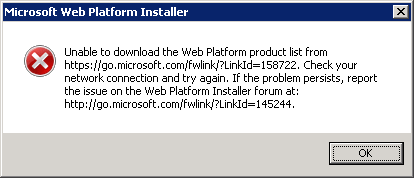
 A friend of mine was having an issue getting the Web Platform Installer to work on his Windows Server 2008 R2 box. He said there was some sort of cert error and asked me to try https://go.microsoft.com/fwlink/?LinkId=158722 on my local machine to see if I got the cert error.  I tried it and I did get a cert error on Windows 7 64bit. I happened to notice that that url simply redirects to https://www.microsoft.com/web/webpi/2.0/WebProductList.xml . Out of curiosity I dropped to a command line and tried to run .\WebPlatformInstaller.exe /? to see if there were any command line options. It gave an error that said invalid URI. So we tried running it with the product list url like: "WebPlatformInstaller.exe https://www.microsoft.com/web/webpi/2.0/WebProductList.xml" . This seems to get around the expired cert that is on go.microsoft.com.

 Here's a screen shot of the error:
 

Published Monday, March 08, 2010 7:49 PM by findleyd

Comments

# re: Certificate error with Web Platform Installer

Monday, March 08, 2010 9:10 PM by alastairw

Hi, I tried your method but I'm not really sure what I'm doing. I used Run in Win7 Home Premium 64bit, with the following command:

C:\WebPlatformInstaller.exe www.microsoft.com/.../WebProductList.xml

I just found the installer exe and added the url at the end, but I still got the same error. Any suggestion what I'm doing wrong?

Thanks!

# re: Certificate error with Web Platform Installer

Monday, March 08, 2010 9:34 PM by Johnathan

Thanks for the post David.

The work around is giving me the same issue.

Hence, it must not be getting around the bad cert.

Any ideas?

- Johnathan

# re: Certificate error with Web Platform Installer

Monday, March 08, 2010 10:18 PM by findleyd

alastairw, do a start->run and then: C:\Program Files\Microsoft\Web Platform Installer\WebPlatformInstaller.exe www.microsoft.com/.../WebProductList.xml

# re: Certificate error with Web Platform Installer

Monday, March 08, 2010 10:19 PM by findleyd

Johnathan, do you get the cert error when you just goto this url in your browser? www.microsoft.com/.../WebProductList.xml

# re: Certificate error with Web Platform Installer

Monday, March 08, 2010 10:26 PM by findleyd

Johnathan, another thing to try is passing the url without https e.g. http://www.microsoft.com/web/webpi/2.0/WebProductList.xml

# re: Certificate error with Web Platform Installer

Tuesday, March 09, 2010 4:28 AM by Ariel

It worked for me !  THANKS

# re: Certificate error with Web Platform Installer

Tuesday, March 09, 2010 2:43 PM by FSG

Thank you the work arround woked perfectly

# re: Certificate error with Web Platform Installer

Thursday, May 27, 2010 1:55 PM by mwhite

experienced same error on W2K8 R2 server.

ran the rootsupd.exe package ( www.microsoft.com/.../details.aspx )

and am no longer getting the error...

# re: Certificate error with Web Platform Installer

Saturday, July 10, 2010 3:26 AM by prince161079

<<<<<<<<<<<<<< Monday, March 08, 2010 10:26 PM by findleyd

Johnathan, another thing to try is passing the url without https e.g. www.microsoft.com/.../WebProductList.xml>>>>>>>>>>>>>

Great it worked :)

# re: Certificate error with Web Platform Installer

Monday, March 07, 2011 10:53 AM by Biju

Does any one know how this works for version 3, i am getting "Invalid command line arguments."  

# re: Certificate error with Web Platform Installer

Tuesday, July 12, 2011 1:10 PM by SidneyRoper

Worked for me ...

Start --> Run --> CMD

Enter the following exactly even with the quotes all as one line of text.

"C:\Program Files\Microsoft\Web Platform Installer\WebPlatformInstaller.exe" www.microsoft.com/.../WebProductList.xml

It will start the installer.  If it asks you to upgrade for now say no.  Get your PHP ON!!!

-Sidney Roper

# re: Certificate error with Web Platform Installer

Tuesday, September 20, 2011 12:06 PM by Murugesan Kumarasamy

I have tried the above said work around. But getting the "Invalid command line arguments" error. Could anyone help me to come out. Thanks

Leave a Comment

(required) 
(required) 
(optional)
(required)