Gunnar Peipman's ASP.NET blog

ASP.NET, C#, SharePoint, SQL Server and general software development topics.

Sponsors

News


DZone MVB

Links

Social

November 2008 - Posts

<asp:Chart>

Scott Guthrie had some good news almost week ago - there is new charting component for ASP.NET available now. Component is made by Microsoft and it is free to download. This component fills one important hole in ASP.NET components gallery. We have now very powerful charting component that is highly customizable and configurable. There is also available chart control add-on for Visual Studio 2008.

I suggest to start with chart control samples because this cotrol has a lot of features. Sample application gives you good overview about what you get and how chart control works. After downloading sample application you have to unpack it and open it with Visual Studio. After compiling you can run the application and browse through different chart types and samples.

My little sample

I made a quick sample application that shows human population growth using ASP.NET chart control. I took data from Wikipedia. There is an article titled as World population. I am using numbers divided by million. So if you take number from table then multiply it by million.

Year

Population

1750

791

1800

978

1850

1262

1900

1650

1950

2519

2000

6071

Now let's create web application with Visual Studio. Open default.aspx and add chart control to page. Modify page source so chart definition looks like this.


<asp:Chart ID="Chart1" runat="server" Width="500">
    <series>
         <asp:Series
                Name="Population"
                XValueMember="Year"
                YValueMembers="Population"
                IsVisibleInLegend="true">
        </asp:Series>
    </series>
    <chartareas>
        <asp:ChartArea
                Name="ChartArea1"
                Area3DStyle-Enable3D="true">
               <AxisX LineColor="DarkGray">
                   <MajorGrid LineColor="LightGray" />
               </AxisX>
               <AxisY LineColor="DarkGray">
                   <MajorGrid LineColor="LightGray" />
               </AxisY>
         </asp:ChartArea>
    </chartareas>
    <Legends>
        <asp:Legend></asp:Legend>
    </Legends>
</asp:Chart>

This is definition of our chart control. Now let's bind data to chart.


protected void Page_Load(object sender, EventArgs e)

{

    var table = new DataTable();

    table.Columns.Add("Year",typeof(int));

    table.Columns.Add("Population",typeof(long));

    table.Columns.Add("Lbl");


    var row = table.NewRow();

    row["Year"] = 1750;

    row["Population"] = 791;

    table.Rows.Add(row);


    row = table.NewRow();

    row["Year"] = 1800;

    row["Population"] = 978;

    table.Rows.Add(row);


    row = table.NewRow();

    row["Year"] = 1850;

    row["Population"] = 1262;

    table.Rows.Add(row);


    row = table.NewRow();

    row["Year"] = 1900;

    row["Population"] = 1650;

    table.Rows.Add(row);


    row = table.NewRow();

    row["Year"] = 1950;

    row["Population"] = 2519;

    table.Rows.Add(row);


    row = table.NewRow();

    row["Year"] = 2000;

    row["Population"] = 6071;

    table.Rows.Add(row);


    Chart1.DataSource = table;

    Chart1.DataBind();

}


Now let's run application. We should see something like this on our page.

Of course you can make charts look much better if you have patience to customize them. Now let's see how easy it is to make our chart cooler than it is. Let's add new attribute to ChartArea element: Area3DStyle-Enable3D="true". Now we have 3D chart like this.

Now we have 3D chart representing same data as before. And we did almost nothing - in hurry we just added one attribute to chart definition. Because charts are created as images we can use chart control also to generate static images for static reports.

Three signals of death march projects

Death march projects are standard in software development and they are usually the most complex ones to handle. It seems to me that this is more like question how to handle the chaos and how to survive it with as less losses as prossible. There are some signals of dangers I would like to share with you.

Insufficient analysis

I worked as a programmer in one death march projects where analysis was very insufficient. Of course, there were those nice UML diagrams and process descriptions. A lot of data but almost no information. Nobody in higher level of management saw no dangers to time schedules behind different processes. When I saw project schedule I almost got heart attack. How the hell it is possible to write and test complex state changing logic during three days? Analyst has all the information about danger points that may occure on development side. But still these danger points were not considered. If you see such kind of analysis and nobody agrees to change it then run and do it fast.

"Innovation"

There are always maniacs who load their guns with silver bullets and try to change the world with silver shoots. The most dangerous ones are those who try to use bleeding edge technologies that may be useful. The other type of those maniacs enter the meeting room and tell that they have very good book about some technology that looks promising. Okay, fine, but what if nobody in team has experiences with this technology?

In one of new technology projects I participated I saw this thing happening. Fortunately I was able to stop it. Why? Because same guy suggested some untested technologies for previous project and that project turns to be death march project very fast.

If you see one-man-initiated "innovation" happening and you cannot stop it then run.

Meetings are non-informative

If you have weak analyst in project and you are developer then higher level guys usually hope that you can be Atlas  carrying the world on your shoulders. They don't usually say it - they just expect it. If it happens then you have more questions in meetings with customer than you ever have expected.

If you don't get answers to those questions or you get insufficient answers no matter how hard you try then this project team is not for you. They will eat your mind, your brains, your time, your good feeling and everything that makes up you as a human being. I have seen meetings where customer is focused on some very little and technical aspect of system and it talks about it hours. And if I asked my questions so mere mortals can understand me I got no answers I expected. I asked it many different ways but no help at all. Of course, everybody understood the question but nobody wanted to handle these questions. Why? Because they were afraid of answers that may crush the holy time schedule.

If you see that there is nothing to do and nobody is interested in providing you with information then it is time to go - don't waste yourself.


I don't want to be crude and tell you that you should leave projects right away when you see anormal signals. Before you leave the projects make sure that this project is going to be death march for sure. And before you leave try to give your best to get all bad elements out of project. If you leave something then you are looser (at least for some guys) and if you make something better you are hero (for all guys).

TechEd 2008 Developers - Microsoft data center in Chicago

Although I'm hardware guy I heard some interesting facts about Microsoft data center in Chicago I want to share with you. As I understood this data center will run also Azure services, so it may also be interesting to see some non-official estimates about how much applications can run in this center.

Data center in Chicago will be made up of server containers like the one on the following picture. Three wires you can see on the picture are for network connection, cooling and power. Only HP maintenance engineers have access to this container and engineers will be there if at least 100 servers are in trouble. Meanwhile it is possible to move running applications to "cooler" parts of container(s). Data center in Chicago will cost about $500 million. There will 220 containers of servers. After some little computing we should get 440.000 servers as result.

Now let's think about Windows Azure a little bit. It was told on TechEd 2008 Developers that every virtual machine on Windows Azure operating system that runs applications uses one processor core. If servers have two processors with two cores then one container is able to run 8.000 and data center is able to run 1.760.000 virtual machines. If servers have eight processors with four cores then one container runs 64.000 and data center 14.080.000 virtual machines. NB! These numbers are here for estimation purposes. I have no idea which server there will be in Chicago data center.

Microsoft will buy every month about 10.000 servers - this is five containers like this. The other big players who are using this kind of containers are Google and Yahoo!

Posted: Nov 22 2008, 09:26 PM by DigiMortal | with no comments
Filed under: ,
TechEd 2008 Developers - Workflow Foundation 4.0

Windows WorkFlow Foundation 4.0 has some new cool things to offer. I visited one of David Chappell sessions where he told us about "Dublin", "Oslo" and WF 4.0. It was very interesting session and I got all information I expected.

I also digged some information from web and here is the list of main new features of 4.0.

  • Development of workflows is easier than before.
  • WF 4.0 has new workflow designer.
  • There will be new activities available (data accessing activities, PowerShell commands).
  • New workflow type - Flowchart. Flowchart is simpler than state-machine workflow and more complex than sequential workflow. It is something between those two.
  • All aspectes of workflow can be represented declaratively. This is achieved by using XAML as workflows mark-up language.
  • Performance of WF 4.0 should be very good when comparing to previous versions.

You can find some very good reading about WF 4.0 from Rick Garibay's blog: WF 4.0: Big Changes Ahead and More on WF 4.0. WF 4.0 ships with Visual Studio 2010.


kick it on DotNetKicks.com pimp it Progg it Shout it
Posted: Nov 22 2008, 07:00 PM by DigiMortal | with 5 comment(s)
Filed under: ,
TechEd 2008 Developers - How to start testing

TechEd_EMEA_100_BeThere_DEV (1) I visited Roy Osherove session at TechEd 2008 Developers (EMEA) where he spoke about how and why to test software. There was nothing new to me besides couple of things but I want to give you a little overview about the most painful topic for companies and developers - how to start testing. It was the best part of session I think and that's why I decided to blog about it.

So it is a short review of notes I made in this session. As af first thing, it is important to avoid making testing something large as hill. To become a good tester you have to practice testing all the time and you are making many mistakes when you are starting. There is no point to study testing for a long time without practicing it.

You can start your studies also on some system you are already developing. During your studies you can make the code of some existing system testable. Of course, there are systems where unit tests are not possible (let's take SharePoint by example). One thing you have to understand is: Test Driver Design means that software is built up so that it can be tested. I suggest you to also read the book Working Effectively with Legacy Code.

By the way, soon will be available testing book by Roy titled as The Art of Unit Testing. Just follow the last link I gave to get more information about the book.

TechEd 2008 - I'll be there

TechEd_EMEA_180_BeThere_DEVDevelopers! Developers! Developers! TechEd 2008 EMEA for developers is coming and I am glad to announce that I'll be there with all developers from my little company. I hope you are there too! :)

Last year was my first time in TechEd and from the first day I knew - this damn event is something I don't want to miss. It is something where new things happen. It is possible to meet cool professional guys there and find new friends.

This year I go to Barcelona for a weekend before TechEd. Just to see this beautiful city again. Believe me, Barcelona is one of the coolest cities in the world. There are a lot of things to see in Barcelona, so if you have time during event then go and see the old town, have some architecture trip and enjoy catalan kitchen.

If you want to meet me and my team then drop me a line through contact form. I will be at TechEd 2008 Developers all days.

Expert .NET 2.0 IL Assembler

Expert .NET 2.0 IL Assembler
If you want to know how .Net Framework works internally then there is very good book by Serge Lidin - Expert .NET 2.0 IL Assembler. Serge Lidin is author of IL Assembler, IL Disassembler. He is also one of those guys who wrote IL Assembler language specification. So I think he knows the topic very well.
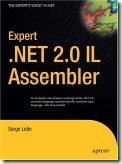

Although books concentrates more on IL Assembler, it gives you a very good review how lower layers of .Net Framework work and how these layers are built. For beginners this book is too heavy reading I think, because this book is fun if you have very good knowledge of .Net Framework.

If you don't know what is IL and you want to see how IL assembly language look then take a look at posting C# and var keyword. Second block of code there is in IL assembly language. Looks horrible but it is not so hard if you study it a little bit.

For me the most interesting topics were about how different .Net language compilers behave in different situations and what kind of code they are generating. Also there were some interesting pieces of information about limits of different compilators. By example, now I know what features of .Net Framework are used for global variables that VB.Net supports.

Expert .Net 2.0 IL Assembler is weird book. It is like mixture of good reading and manual. If you are writing IL Assembler code you can take this book on your table and you can be sure this book helps you. If you want to read about IL Assembler, again take this book and read. It works well in both cases.

Posted: Nov 06 2008, 09:12 PM by DigiMortal | with 3 comment(s)
Filed under: ,
More Posts