Gunnar Peipman's ASP.NET blog

ASP.NET, C#, SharePoint, SQL Server and general software development topics.

Sponsors

News


DZone MVB

Links

Social

Using NHibernate order-by attribute to sort names history

I am writing application that besides other cool things lets users insert information about business contacts. My system is able to keep names history of contacts. In this posting I will show you how to use NHibernate mappings to keep names ordered logically.

Here is fragment of my class diagram. It is working draft, so don’t take it as an example of perfect solution. (To find out more about class structure represented here read my blog posting Modeling people and organizations: Class Party).
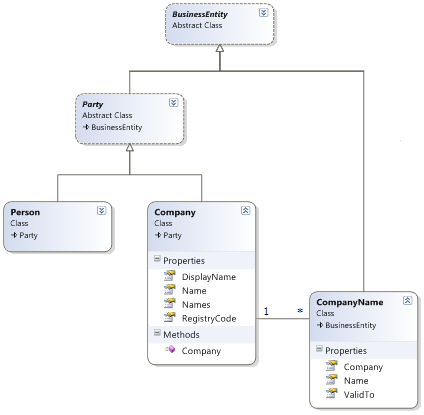
Company name history

Here is what I want to achieve. I took this screenshot from my working draft.
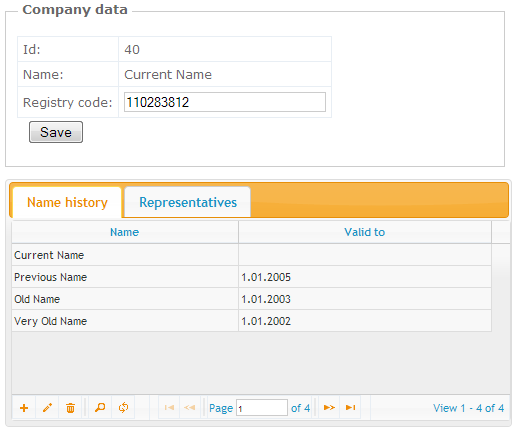
Company history data

The problem here is sort order of valid-to dates. If I just sort names by date to descending order then current name (we don’t know how long it is valid) is the last one. I needed order shown on the image above.

Here is how I achieved this order using NHibernate mapping file and MSSQL COALESCE function. The trick is simple – I used COALESCE to replace null with current date.


<?xml version="1.0" encoding="utf-8" ?>

<hibernate-mapping xmlns="urn:nhibernate-mapping-2.2">

  <joined-subclass

    name="OM.Core.Contacts.Company, OM.Core"

    extends="OM.Core.Contacts.Party, OM.Core"

    table="company"

  >

    <key column="party_id" />

    <property name="RegistryCode" column ="registry_code"/>

    <!-- more properties here -->


    <bag name="Names" table="company_names" cascade="all"
     
order-by="COALESCE(valid_to, GETDATE()) desc">

      <key column="company_id"/>

      <one-to-many class="OM.Core.Contacts.CompanyName, OM.Core"/>

    </bag>

  </joined-subclass>

</hibernate-mapping>


I think it is good solution for sorting because sorting is done in database and we don’t have to write additional code to DAL to get collection sorted. Of course, it is not recommended to change (reassign, reorder) collections monitored by NHibernate. What I did here was simple – I just added order-by attribute to Names bag definition and let NHibernate do the rest.

kick it on DotNetKicks.com pimp it 顶 Progg it Shout it
Shout it!

Comments

PimpThisBlog.com said:

Thank you for submitting this cool story - Trackback from PimpThisBlog.com

# December 27, 2009 11:55 AM

Twitter Trackbacks for Using NHibernate order-by attribute to sort names history - Gunnar Peipman's ASP.NET blog [asp.net] on Topsy.com said:

Pingback from  Twitter Trackbacks for                 Using NHibernate order-by attribute to sort names history - Gunnar Peipman's ASP.NET blog         [asp.net]        on Topsy.com

# December 27, 2009 11:55 AM

DotNetKicks.com said:

You've been kicked (a good thing) - Trackback from DotNetKicks.com

# December 27, 2009 11:58 AM

progg.ru said:

Thank you for submitting this cool story - Trackback from progg.ru

# December 27, 2009 12:02 PM

9eFish said:

9efish.感谢你的文章 - Trackback from 9eFish

# December 27, 2009 12:05 PM

Servefault.com said:

Thank you for submitting this cool story - Trackback from Servefault.com

# December 27, 2009 12:11 PM

Jonas Hovgaard said:

Thanks for the tip. I have actually been in the same situation, ending up doing much more dirty approach.

# December 27, 2009 12:21 PM

uberVU - social comments said:

This post was mentioned on Twitter by gpeipman: New blog post: http://tinyurl.com/ybou9la - Using NHibernate order-by attribute to sort names history

# December 27, 2009 1:54 PM

Jamie Ide said:

Neat solution but I'm not crazy about it for two reasons: 1) It's database specific and 2) Display order is the UI's concern, not the model's. Point 2 is the bigger worry because the sort is only in place when loading, it may be lost if the collection changes in memory.

# December 27, 2009 2:21 PM

DigiMortal said:

Thanks for feedback, Jamie! :)

1) there are always database specific things while databases have differences

2) nothing sais you cannot use different sort order or sorting in UI - it is up to you how you like to solve it.

In my case one sort order is enough and as it is web application new data is requested after each modification. In my case it is not problem because names table is not very large (when compared to some other tables).

# December 27, 2009 8:40 PM

Wygrac W Ruletke said:

Damn, that sound's so easy if you think about it.

# January 6, 2010 7:30 AM

ClickBase Business Intelligence Demo ?? data warehouse | Business Intelligence Wisdom said:

Pingback from  ClickBase Business Intelligence Demo ?? data warehouse | Business Intelligence Wisdom

# January 9, 2010 3:16 PM

Rulett szisztéma said:

I cannot believe this is true!

# January 13, 2010 4:00 PM

strategiak said:

I cannot believe this will work!

# February 1, 2010 6:04 PM