Gunnar Peipman's ASP.NET blog

ASP.NET, C#, SharePoint, SQL Server and general software development topics.

Sponsors

News


DZone MVB

Links

Social

Stepping into ASP.NET MVC source code with Visual Studio debugger

Using Visual Studio symbols and source files makes debugging much easier. I am specially happy about ASP.NET MVC 2 source files because I develop on ASP.NET MVC 2 almost every day. You may also find other useful symbols and source files. In this posting I will show you how to get ASP.NET MVC source to your computer and how to use it.

1. Debug options

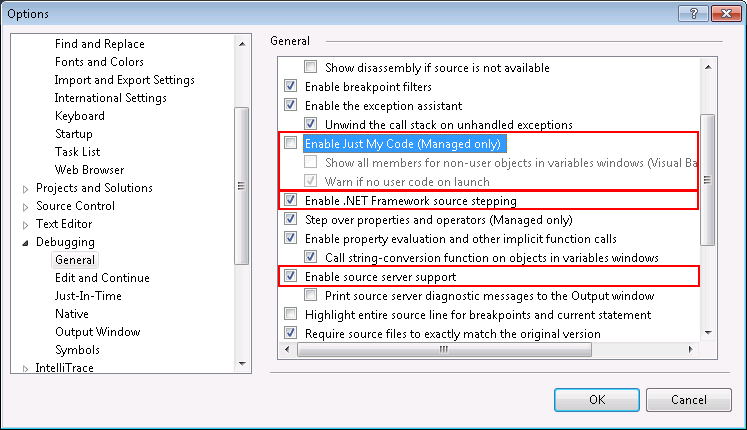
Open options dialog and make sure you have check boxes set as on following image in red boxes.
debugoptions

2. Download symbols and source

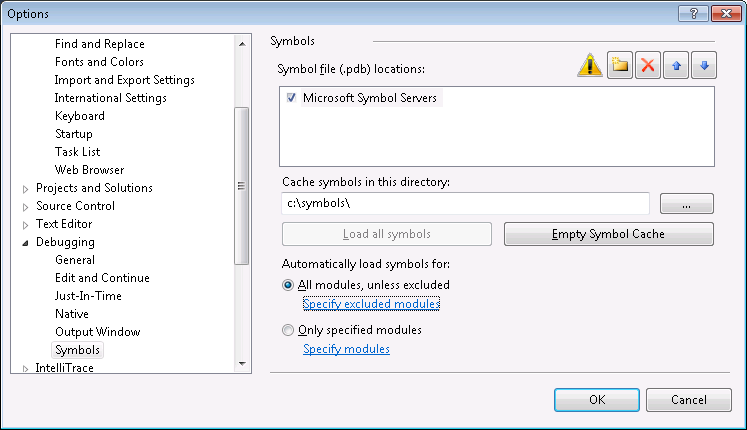
Now we have to allow downloading symbol files. By default the location of symbols is somewhere under application user data folder. I prefer some location on some drive root usually.
debugsymbols

NB! I chose “All modules, unless excluded” to get everything from symbol server. If you need only MVC symbols then choose “Only specified modules” and add System.Web.MVC there (you can also add other modules you need).

After clicking OK you see window like on following image. Make a cup of coffee and wait until symbols are downloaded. It takes a while.

downloadingpublicsymbols

3. Debugging

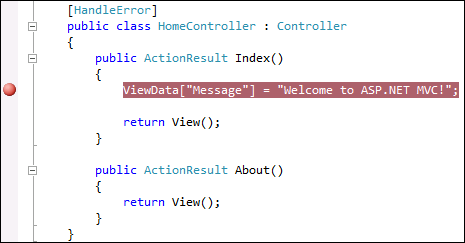
Open your ASP.NET MVC application, put breakpoint somewhere in code and run it. Wait until code execution hits the breakpoint.
aspnetmvcbreakpoint

When breakpoint is hit click Step-in and Step-over icons to go to some line where some method of ASP.NET MVC is called. On this method click Step-in.

4. Source code download

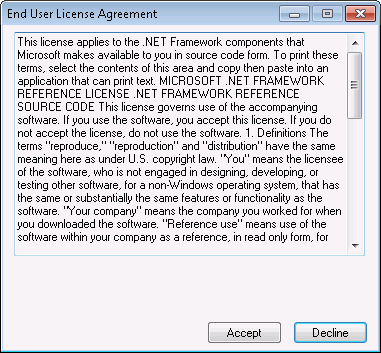
If ASP.NET MVC source is not there yet then you can see EULA windows like on the following image.
aspnetmvcsourceeula

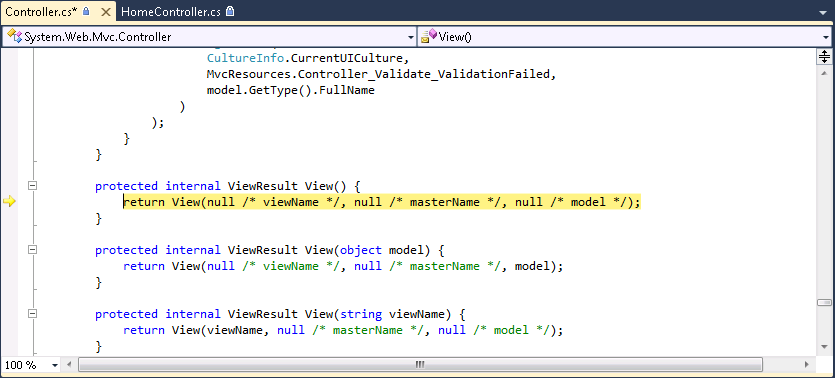
If you don’t plan to do anything illegal then click Accept button. You may get some warnings about file downloads and UTF-8 encoding. Say Yes and when ASP.NET MVC source is downloaded you can see something like on the following image.
aspnetmvccontrollersource

Well, we are in View() method of controller class. Not bad at all! :)

More symbols

You can find more symbols and source files from Microsoft Reference Source Code Center. For .NET Framework you can find only symbols right now. Hopefully source is also coming soon.

Comments

DotNetShoutout said:

Thank you for submitting this cool story - Trackback from DotNetShoutout

# July 4, 2010 3:10 PM

DotNetKicks.com said:

You've been kicked (a good thing) - Trackback from DotNetKicks.com

# July 4, 2010 3:11 PM

progg.ru said:

Thank you for submitting this cool story - Trackback from progg.ru

# July 4, 2010 3:44 PM

Twitter Trackbacks for Stepping into ASP.NET MVC source code with Visual Studio debugger - Gunnar Peipman's ASP.NET blog [asp.net] on Topsy.com said:

Pingback from  Twitter Trackbacks for                 Stepping into ASP.NET MVC source code with Visual Studio debugger - Gunnar Peipman's ASP.NET blog         [asp.net]        on Topsy.com

# July 4, 2010 3:49 PM

imran_ku07 said:

This will cause the debugging very slow. Easiest way to debug MVC source code is, first download the MVC project from codeplex and add this project in your solution and then just referenced this project.

    Another benefit of this approach is you can put break point inside MVC source code.

# July 5, 2010 12:31 AM

The Morning Brew - Chris Alcock » The Morning Brew #635 said:

Pingback from  The Morning Brew - Chris Alcock  » The Morning Brew #635

# July 5, 2010 3:39 AM

ASP.NET MVC Archived Blog Posts, Page 1 said:

Pingback from  ASP.NET MVC Archived Blog Posts, Page 1

# July 6, 2010 12:40 AM

HowTo: In das .NET Framework reindebuggen mit VS2010 | Code-Inside Blog said:

Pingback from  HowTo: In das .NET Framework reindebuggen mit VS2010 | Code-Inside Blog

# July 8, 2010 6:50 PM

ASPInsiders said:

Here is the latest in my link-listing series .  Also check out my VS 2010 and .NET 4 series and

# July 9, 2010 3:53 AM

Atta ur Rahman said:

Cool One

# July 9, 2010 8:43 AM

jacobzhang said:

nice work!

# July 13, 2010 9:19 PM

MisterFantastic said:

Very nice article. Good to know that we can debug the MVC source code.

Thanks,

Thanigainathan.S

# July 14, 2010 7:08 AM

ASP.NET Chinese Blogs said:

[原文发表地址]: July 9th Links: ASP.NET, ASP.NET MVC, jQuery, Silverlight, WPF, VS 2010 [原文发表时间]:2010/7/9,

# August 14, 2010 4:20 AM

ASPInsiders said:

Here is the latest in my link-listing series .  Also check out my VS 2010 and .NET 4 series and

# August 30, 2010 2:42 AM

Community Blogs said:

Here is the latest in my link-listing series .  Also check out my VS 2010 and .NET 4 series and

# August 30, 2010 8:19 AM

SKOROZSI.NET said:

links for 2010-08-31

# August 31, 2010 5:03 PM

August 29th Links: .NET, ASP.NET, IIS Express, Silverlight, Windows Phone 7 said:

Pingback from  August 29th Links: .NET, ASP.NET, IIS Express, Silverlight, Windows Phone 7

# September 26, 2010 11:37 PM

微软官方博客 said:

[原文发表地址]: August 29th Links: .NET, ASP.NET, IIS Express, Silverlight, Windows Phone 7 [原文发表时间]:2010/8

# September 27, 2010 12:55 AM

ASP.NET Chinese Blogs said:

[原文发表地址]: August 29th Links: .NET, ASP.NET, IIS Express, Silverlight, Windows Phone 7 [原文发表时间]:2010/8

# October 15, 2010 4:40 AM

Xavier said:

Thank you for your article. I would like to step into system.web.dll, but it didn't work for me.

Do you know whether it should work. Has someone been able to step into system.web (framework 4)?

# January 17, 2011 11:16 AM

DigiMortal said:

Xavier, if you have also available .NET 4.0 source code downloaded and System.Web is not available then check out if there is source available for this assembly.

# January 31, 2011 4:04 PM

MVC AntiForgeryToken and WIF gotcha | Erikbra’s Blog said:

Pingback from  MVC AntiForgeryToken and WIF gotcha | Erikbra’s Blog

# August 10, 2011 4:58 AM

And talking about the.net technology, using asp.net MVC source code debugging your application said:

Pingback from  And talking about the.net technology, using asp.net MVC source code debugging your application

# September 11, 2011 3:51 PM

Plamen Penchev said:

Thanks. It's really helpfull!!!

# September 14, 2011 7:56 AM