OpenID Authentication with ASP.NET MVC3 , DotNetOpenAuth and OpenID-Selector

I will introduce here how to extract and Integrate OpenID with MVC3 and Microsoft  Membership Provider .

By using DotNetOpenAuth and OpenID-Selector

Note: I will Introduce another article to Integrate OpenID with MVC3 and Custom Membership Provider.

Let us start :

1- Open Visual Studio 2010 go to File > New > Project > Web > ASP.NET MVC 3 Application:
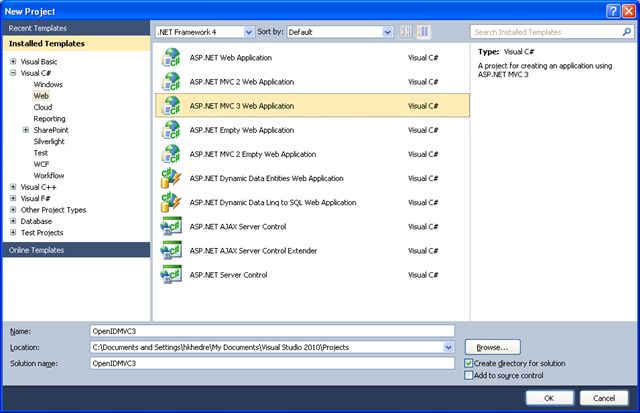
image

then Choose Internet Application be sure to have Razor as your View engine and Click Ok:
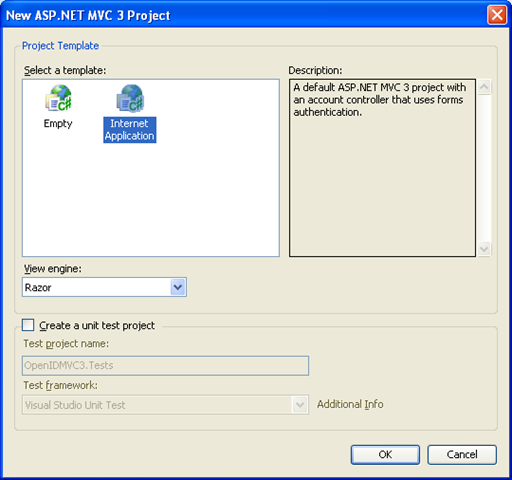
image

2- Download Assets folder , it contains DotNetOpenAuth dll and OpenID-Selector files that we will use ,

Feel free if you want to go to these projects and discover them in more details.

Extract it to the folder you want

      a - Add the DotNetOpenAuth.dll to references in your site.

      b- Delete all files/folders in Site Content folder.

      c- Copy Assets Content files/folders to the site Content .

      d- Copy the  Assets Script files to the site Script.

.

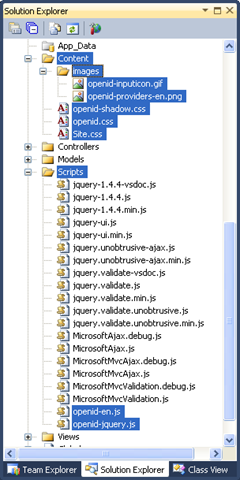
Your project  will look like this :


 image image


3- Go to Views > Shared > _Layout.cshtml and replace the <head> with this new head , we just added the new styles and scripts:

<head>
    <title>@ViewBag.Title</title>
    <link href="@Url.Content("~/Content/Site.css")" 
     rel="stylesheet" type="text/css" />
    <script src="@Url.Content("~/Scripts/jquery-1.4.4.min.js")"
     type="text/javascript"></script>
    <link href="@Url.Content("~/Content/openid-shadow.css")"
     rel="stylesheet" type="text/css" />
    <link href="@Url.Content("~/Content/openid.css")" 
     rel="stylesheet" type="text/css" />
    <script src="@Url.Content("~/Scripts/openid-en.js")" 
     type="text/javascript"></script>
    <script src="@Url.Content("~/Scripts/openid-jquery.js")" 
     type="text/javascript"></script>
    <script type="text/javascript">
        $(document).ready(function () {
            openid.init('openid_identifier');
        });
    </script>
</head>
 
4- Go to Models > AccountModels.cs  , navigate to public class LogOnModel
   and Add OpenID attribute that we will use it to hold the returned OpenID from OpenID-Selector
  your class will look like this:
 
public class LogOnModel
    {
        [Display(Name = "OpenID")]
        public string OpenID { get; set; }

        [Required]
        [Display(Name = "User name")]
        public string UserName { get; set; }

        [Required]
        [DataType(DataType.Password)]
        [Display(Name = "Password")]
        public string Password { get; set; }

        [Display(Name = "Remember me?")]
        public bool RememberMe { get; set; }
    }
navigate to public class RegisterModel and Add OpenID attribute 
public class RegisterModel
    {
        
        [Display(Name = "OpenID")]
        public string OpenID { get; set; }

        [Required]
        [Display(Name = "User name")]
        public string UserName { get; set; }

        [Required]
        [DataType(DataType.EmailAddress)]
        [Display(Name = "Email address")]
        public string Email { get; set; }

        [Required]
        [ValidatePasswordLength]
        [DataType(DataType.Password)]
        [Display(Name = "Password")]
        public string Password { get; set; }

        [DataType(DataType.Password)]
        [Display(Name = "Confirm password")]
        [Compare("Password", ErrorMessage =
        "The password and confirmation password do not match.")]
        public string ConfirmPassword { get; set; }
    }
Then go to Services section in AccountModels.cs
and Modify the CreateUser and Add GetUser to get the user by OpenID , your Interface 
will looks like this:
public interface IMembershipService
    {
        int MinPasswordLength { get; }
        bool ValidateUser(string userName, string password);
        MembershipCreateStatus CreateUser(string userName,string password,
                                          string email,string OpenID);
        bool ChangePassword(string userName, string oldPassword, string newPassword);
        MembershipUser GetUser(string OpenID);
    }
Add these using to AccountModels.cs
using System.Security.Cryptography;
using System.Text;
Then Add This Function to the AccountModels.cs , this function will be used to convert the OpenID to GUID
Note: feel free to use better hashing to your system , MD5 had some collision issues. 
public Guid StringToGUID(string value)
        {
            // Create a new instance of the MD5CryptoServiceProvider object.
            MD5 md5Hasher = MD5.Create();
            // Convert the input string to a byte array and compute the hash.
            byte[] data = md5Hasher.ComputeHash(Encoding.Default.GetBytes(value));
            return new Guid(data);
        }

Also Modify The CreateUser Function to look like this:

public MembershipCreateStatus CreateUser(string userName, string password, 
                                         string email , string OpenID)
        {
            if (String.IsNullOrEmpty(userName)) throw 
            new ArgumentException("Value cannot be null or empty.", "userName");
            if (String.IsNullOrEmpty(password)) throw 
            new ArgumentException("Value cannot be null or empty.", "password");
            if (String.IsNullOrEmpty(email)) throw
            new ArgumentException("Value cannot be null or empty.", "email");

            MembershipCreateStatus status;
            _provider.CreateUser(userName, password, email, null, null, true,
                                 StringToGUID(OpenID), out status);
            return status;
        }

Here we are using the MemberShip ProviderUserKey to store the OpenID and the trick here that we convert the OpenID string to GUID to be used by CreateUser and GetUser methods.

Now let us add this function to AccountModels.cs that will get the user by OpenID:

public MembershipUser GetUser(string OpenID)
        {
            return _provider.GetUser(StringToGUID(OpenID), true);
        }


5- go to Views > Account > LogOn.cshtml 
replace all the markup with this one ,we are integrating OpenID-Selector to LogOn View:
 
@model OpenIDMVC3.Models.LogOnModel
@{
    ViewBag.Title = "Log On";
}
<h2>
    Log On</h2>
<p>
    Please enter your username and password. @Html.ActionLink("Register", "Register")
    if you don't have an account.
</p>
<script src="@Url.Content("~/Scripts/jquery.validate.min.js")" type="text/javascript">
</script>
<script src="@Url.Content("~/Scripts/jquery.validate.unobtrusive.min.js")"
   type="text/javascript"></script>
<form action=
"Authenticate?ReturnUrl=@HttpUtility.UrlEncode(Request.QueryString["ReturnUrl"])"
 method="post" id="openid_form">
<input type="hidden" name="action" value="verify" />
<div>
    <fieldset>
        <legend>Login using OpenID</legend>
        <div class="openid_choice">
            <p>
                Please click your account provider:</p>
            <div id="openid_btns">
            </div>
        </div>
        <div id="openid_input_area">
            @Html.TextBox("openid_identifier")
            <input type="submit" value="Log On" />
        </div>
        <noscript>
            <p>
                OpenID is service that allows you to log-on to many different websites 
                using a single indentity. Find out <a href="http://openid.net/what/">
                 more about OpenID</a>and <a href="http://openid.net/get/">
                 how to get an OpenID enabled account</a>.</p>
        </noscript>
        <div>
            @if (Model != null)
            {
                if (String.IsNullOrEmpty(Model.UserName))
                {
                <div class="editor-label">
                    @Html.LabelFor(model => model.OpenID)
                </div>
                <div class="editor-field">
                    @Html.DisplayFor(model => model.OpenID)
                </div>
                <p class="button">
                    @Html.ActionLink("New User ,Register", "Register", 
                                         new { OpenID = Model.OpenID })
                </p>
                }
                else
                {
                    //user exist 
                <p class="buttonGreen">
                    <a href="@Url.Action("Index", "Home")">Welcome , @Model.UserName, 
                    Continue..." </a>
                </p>

                }
            }
        </div>
    </fieldset>
</div>
</form>

@Html.ValidationSummary(true, "Login was unsuccessful. Please correct the errors 
                                                    and try again.")
@using (Html.BeginForm())
{
    <div>
        <fieldset>
            <legend>Or Login Normally</legend>
            <div class="editor-label">
                @Html.LabelFor(m => m.UserName)
            </div>
            <div class="editor-field">
                @Html.TextBoxFor(m => m.UserName)
                @Html.ValidationMessageFor(m => m.UserName)
            </div>
            <div class="editor-label">
                @Html.LabelFor(m => m.Password)
            </div>
            <div class="editor-field">
                @Html.PasswordFor(m => m.Password)
                @Html.ValidationMessageFor(m => m.Password)
            </div>
            <div class="editor-label">
                @Html.CheckBoxFor(m => m.RememberMe)
                @Html.LabelFor(m => m.RememberMe)
            </div>
            <p>
                <input type="submit" value="Log On" />
            </p>
        </fieldset>
    </div>
}


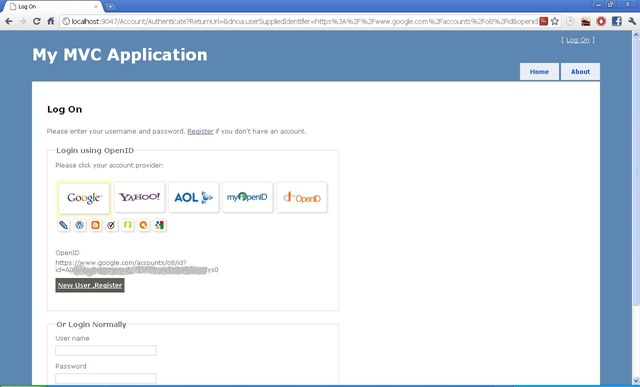
6- Now let us run the project , then click the [Log On] link , you will get like this page:
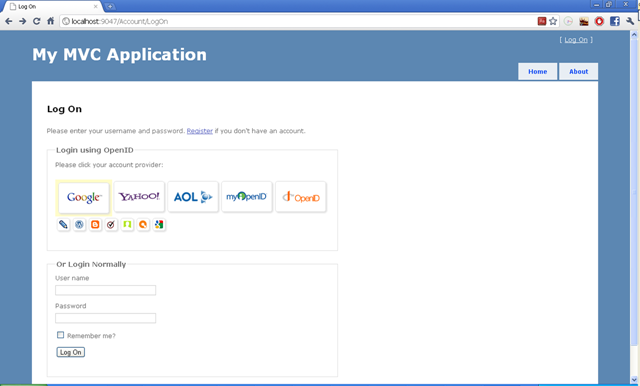
image


7- Go to Controllers > AccountController.cs and Add these using:
using DotNetOpenAuth.Messaging;
using DotNetOpenAuth.OpenId;
using DotNetOpenAuth.OpenId.Extensions.SimpleRegistration;
using DotNetOpenAuth.OpenId.RelyingParty;
using DotNetOpenAuth.OpenId.Extensions.AttributeExchange;

Then Add this Attribute to AccountController.cs:

private static OpenIdRelyingParty openid = new OpenIdRelyingParty();
Then Add this Function to AccountController.cs:
[ValidateInput(false)]
        public ActionResult Authenticate(string returnUrl)
        {
            var response = openid.GetResponse();
            if (response == null)
            {
                //Let us submit the request to OpenID provider
                Identifier id;
                if (Identifier.TryParse(Request.Form["openid_identifier"], out id))
                {
                    try
                    {
                        var request = openid.CreateRequest(
                                             Request.Form["openid_identifier"]);
                        return request.RedirectingResponse.AsActionResult();
                    }
                    catch (ProtocolException ex)
                    {
                        ViewBag.Message = ex.Message;
                        return View("LogOn");
                    }
                }

                ViewBag.Message = "Invalid identifier";
                return View("LogOn");
            }

            //Let us check the response
            switch (response.Status)
            {

                case AuthenticationStatus.Authenticated:
                    LogOnModel lm = new LogOnModel();
                    lm.OpenID = response.ClaimedIdentifier;
                    // check if user exist
                    MembershipUser user = MembershipService.GetUser(lm.OpenID);
                    if (user != null)
                    {
                        lm.UserName = user.UserName;
                        FormsService.SignIn(user.UserName, false);
                    }

                    return View("LogOn", lm);

                case AuthenticationStatus.Canceled:
                    ViewBag.Message = "Canceled at provider";
                    return View("LogOn");
                case AuthenticationStatus.Failed:
                    ViewBag.Message = response.Exception.Message;
                    return View("LogOn");
            }

            return new EmptyResult();
        }
 
8 - Now run the project click [Log On] link and click a provider like Google 
it may ask you to sign in or ask you to allow access to your information 
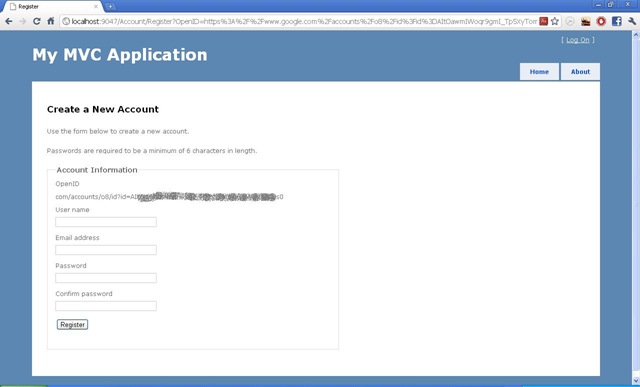
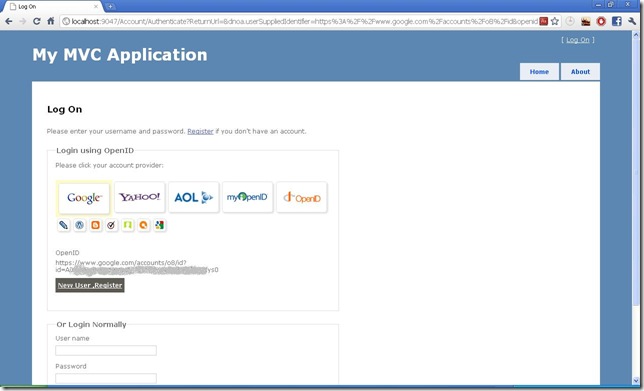
you will get a page like this :
untitled 

As you can see it displays your OpenID and a button that indicate that this is a new user not registered  yet,

before hitting [New User ,Register] button we need to modify the Register view and controller to access OpenID information.


9- Go to controllers > AccountController.cs replace the [ActionResult Register ()]  by this :

public ActionResult Register(string OpenID)
        {
            ViewBag.PasswordLength = MembershipService.MinPasswordLength;
            ViewBag.OpenID = OpenID;
            return View();
        }
And Modify the [ActionResult Register(RegisterModel model)] to use OpenID when 
creating users:
[HttpPost]
        public ActionResult Register(RegisterModel model)
        {
            if (ModelState.IsValid)
            {
                // Attempt to register the user
                MembershipCreateStatus createStatus =
                MembershipService.CreateUser(model.UserName, model.Password, 
                                             model.Email,model.OpenID);

                if (createStatus == MembershipCreateStatus.Success)
                {
                    FormsService.SignIn(model.UserName, false);
                    return RedirectToAction("Index", "Home");
                }
                else
                {
                    ModelState.AddModelError("",
                    AccountValidation.ErrorCodeToString(createStatus));
                }
            }

            // If we got this far, something failed, redisplay form
            ViewBag.PasswordLength = MembershipService.MinPasswordLength;
            return View(model);
        }

10- Go to Views > Account > Register.cshtml , replace the markup by this :

@model OpenIDMVC3.Models.RegisterModel
@{
    ViewBag.Title = "Register";
}

<h2>Create a New Account</h2>
<p>
    Use the form below to create a new account. 
</p>
<p>
    Passwords are required to be a minimum of @ViewBag.PasswordLength 
    characters in length.
</p>

<script src="@Url.Content("~/Scripts/jquery.validate.min.js")" 
  type="text/javascript"></script>
<script src="@Url.Content("~/Scripts/jquery.validate.unobtrusive.min.js")"
   type="text/javascript"></script>

@using (Html.BeginForm()) {
    @Html.ValidationSummary(true, "Account creation was unsuccessful.
                                            Please correct the errors and try again.")
    <div>
        <fieldset>
            <legend>Account Information</legend>
            @if (ViewData["OpenID"] != null)
            {
            <div class="editor-label">
                @Html.Label("OpenID")
            </div>
            <div class="editor-label">
                @Html.Label((string)ViewBag.OpenID)
            </div>
            }
            <div class="editor-label">
                @Html.LabelFor(m => m.UserName)
            </div>
            <div class="editor-field">
                @Html.TextBoxFor(m => m.UserName)
                @Html.ValidationMessageFor(m => m.UserName)
            </div>

            <div class="editor-label">
                @Html.LabelFor(m => m.Email)
            </div>
            <div class="editor-field">
                @Html.TextBoxFor(m => m.Email)
                @Html.ValidationMessageFor(m => m.Email)
            </div>

            <div class="editor-label">
                @Html.LabelFor(m => m.Password)
            </div>
            <div class="editor-field">
                @Html.PasswordFor(m => m.Password)
                @Html.ValidationMessageFor(m => m.Password)
            </div>

            <div class="editor-label">
                @Html.LabelFor(m => m.ConfirmPassword)
            </div>
            <div class="editor-field">
                @Html.PasswordFor(m => m.ConfirmPassword)
                @Html.ValidationMessageFor(m => m.ConfirmPassword)
            </div>

            <p>
                <input type="submit" value="Register" />
            </p>
        </fieldset>
    </div>
}


 11- Go to step 8 and let us hit [New User ,Register] button , you will get this :
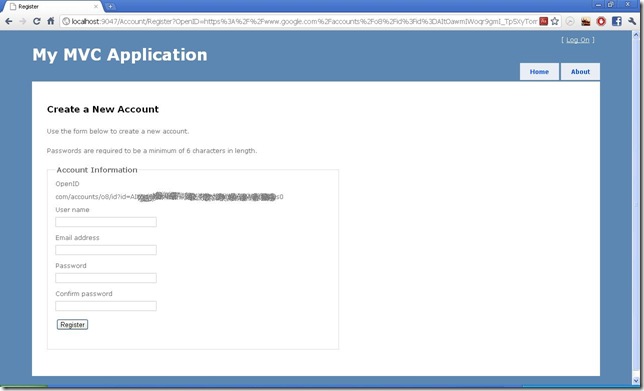
untitled2 
 
12- Register any account you want you will get like this page :
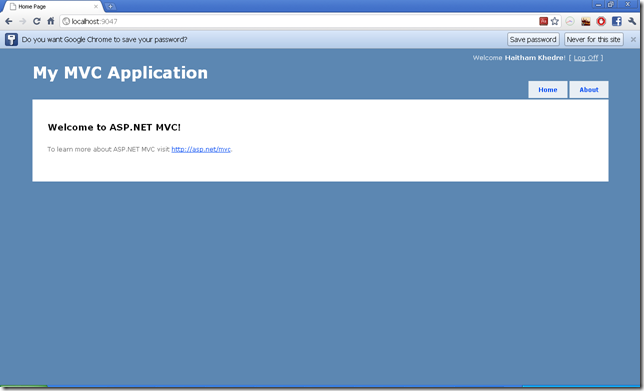
image 
 

13-  Click [Log Off]  and login again using the same OpenID , you will get like this page:

image

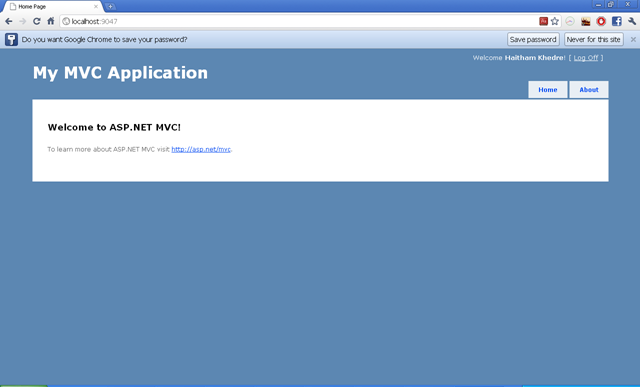
As you can see the welcome green button detect that this user is registered .

14- Click the green button you will get a page like this :
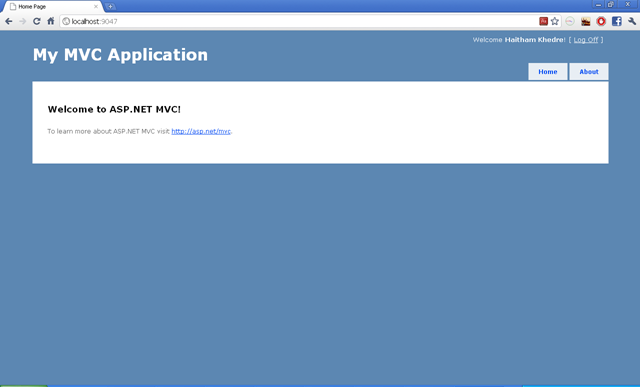
image 

Congratulation ! ,  now you had integrated OpenID to your project.


Download the complete project.

Published Sunday, March 13, 2011 1:05 AM by Haitham Khedre

Comments

# re: OpenID Authentication with ASP.NET MVC3 , DotNetOpenAuth and OpenID-Selector

Sunday, March 20, 2011 5:21 AM by vk_muse

it should be good add db scripts...

# re: OpenID Authentication with ASP.NET MVC3 , DotNetOpenAuth and OpenID-Selector

Monday, March 21, 2011 4:47 PM by Haitham Khedre

VS create the db automatically , hmmm.try to play with the connection string .

# re: OpenID Authentication with ASP.NET MVC3 , DotNetOpenAuth and OpenID-Selector

Saturday, April 02, 2011 11:51 AM by Chiliyago

I am getting this error when running your project.

Microsoft JScript runtime error: 'openid' is undefined

Line 92 on file openid-en.js

# re: OpenID Authentication with ASP.NET MVC3 , DotNetOpenAuth and OpenID-Selector

Thursday, April 07, 2011 2:07 AM by Leo

Getting issue with return new Guid(data); on line 127 in AccountMembershipService class. The data coming from the Google, GoogleProfile, Yahoo is longer then 16 bytes but above mentioned line requires exactly 16 characters. Trunkating for the first 16 characters does not make sense because that is general profiles.google.com/username. Any suggestions on how to fix this projec?

# re: OpenID Authentication with ASP.NET MVC3 , DotNetOpenAuth and OpenID-Selector

Friday, April 08, 2011 1:07 PM by Chiliyago

Why no Facebook login?  I would love to see it or add it myself somehow.

# re: OpenID Authentication with ASP.NET MVC3 , DotNetOpenAuth and OpenID-Selector

Monday, April 18, 2011 12:09 PM by Haitham Khedre

@Chiliyyago

check this :

developers.facebook.com/.../web

# re: OpenID Authentication with ASP.NET MVC3 , DotNetOpenAuth and OpenID-Selector

Wednesday, April 20, 2011 7:12 PM by Haitham Khedre

@Leo , actually MD5 return the 16 long array from any string so can you share your input that made this.

# re: OpenID Authentication with ASP.NET MVC3 , DotNetOpenAuth and OpenID-Selector

Saturday, April 23, 2011 11:24 PM by Keith Barrows

I am using SimpleMembership and the return _provider.GetUser(StringToGUID(OpenID), true); method call is returning a "not supported" error.  I am assuming it is not supported as it has no idea where, or even if, a column for ProviderKey is in use.  Any suggestions?

# re: OpenID Authentication with ASP.NET MVC3 , DotNetOpenAuth and OpenID-Selector

Wednesday, May 04, 2011 9:48 PM by Haitham Khedre

@Keith , share your code on google doc so I can see it and point you to the direction.

# re: OpenID Authentication with ASP.NET MVC3 , DotNetOpenAuth and OpenID-Selector

Friday, May 06, 2011 7:27 PM by Chris

for some reason the image dwas not showing up

# re: OpenID Authentication with ASP.NET MVC3 , DotNetOpenAuth and OpenID-Selector

Wednesday, May 25, 2011 6:18 PM by Haitham Khedre

@Chris , debug the js files responsible for images , check that the path inside is the same as the path in your folder structure

# re: OpenID Authentication with ASP.NET MVC3 , DotNetOpenAuth and OpenID-Selector

Thursday, May 26, 2011 4:23 PM by robin.curtisza

@Chiliyago

did you get the opernid is undefined error resolved?

# re: OpenID Authentication with ASP.NET MVC3 , DotNetOpenAuth and OpenID-Selector

Monday, May 30, 2011 1:54 AM by robin.curtisza

Great Article. I have followed the steps and it doesn't look like my membership database has updated with the Storage of the OpenID. The first time I register the user logs on fine with the OpenID, but for returning users it doesn't work. Any ideas where I can check to see if the OpenID is being added as part of the database?

# re: OpenID Authentication with ASP.NET MVC3 , DotNetOpenAuth and OpenID-Selector

Friday, June 03, 2011 5:39 PM by Bob

I got the error of Microsoft JScript runtime error: 'openid' is undefined, how to fix that?

# re: OpenID Authentication with ASP.NET MVC3 , DotNetOpenAuth and OpenID-Selector

Thursday, June 30, 2011 11:50 PM by mduregon

You can fix the script error simply by swapping the order in which the scripts are loaded in the _Layout.cshtml file to load the openid-jquery.js before openid-en.js.

# re: OpenID Authentication with ASP.NET MVC3 , DotNetOpenAuth and OpenID-Selector

Friday, July 01, 2011 1:40 AM by mduregon

How do you modify the request to the OpenID provider to request user attributes (email, name information, etc)?

# re: OpenID Authentication with ASP.NET MVC3 , DotNetOpenAuth and OpenID-Selector

Friday, July 01, 2011 3:23 AM by mduregon

Worked it out myself.

Modify request to include your requirements:

var request = openid.CreateRequest(Request.Form["openid_identifier"]);

var fetchRequest = new FetchRequest();

fetchRequest.Attributes.AddRequired(WellKnownAttributes.Contact.Email);

fetchRequest.Attributes.AddOptional(WellKnownAttributes.Name.First);

fetchRequest.Attributes.AddOptional(WellKnownAttributes.Name.Last);

request.AddExtension(fetchRequest);

return request.RedirectingResponse.AsActionResult();

Then get the information from the response:

var fetchResponse = response.GetExtension<FetchResponse>();

Too easy. Thanks for a great example!

# re: OpenID Authentication with ASP.NET MVC3 , DotNetOpenAuth and OpenID-Selector

Tuesday, July 12, 2011 7:32 PM by Haitham Khedre

@robin.curtisza , can you upload your project in shared google doc, so I can download it and look to it.

@mduregon , good work !.

# re: OpenID Authentication with ASP.NET MVC3 , DotNetOpenAuth and OpenID-Selector

Sunday, July 24, 2011 11:55 AM by Ravi

I'm getting This error while Registering :(

Help me please :(

String reference not set to an instance of a String.

Parameter name: s

Line 131:            MD5 md5Hasher = MD5.Create();

Line 132:            // Convert the input string to a byte array and compute the hash.

Line 133:            byte[] data = md5Hasher.ComputeHash(Encoding.Default.GetBytes(value));

Line 134:            return new Guid(data);

Line 135:        }

# re: OpenID Authentication with ASP.NET MVC3 , DotNetOpenAuth and OpenID-Selector

Sunday, July 24, 2011 12:03 PM by MVC Fan

I'm getting This error while Registering :(

Help me please :(

String reference not set to an instance of a String.

Parameter name: s

Line 131:            MD5 md5Hasher = MD5.Create();

Line 132:            // Convert the input string to a byte array and compute the hash.

Line 133:            byte[] data = md5Hasher.ComputeHash(Encoding.Default.GetBytes(value));

Line 134:            return new Guid(data);

Line 135:        }

Error Image link

http://imgur.com/sci71

# re: OpenID Authentication with ASP.NET MVC3 , DotNetOpenAuth and OpenID-Selector

Thursday, July 28, 2011 9:40 PM by Haitham Khedre

@Ravi @MVC Fan

try to make sure the md5 function get a string value

it seems you are passing a null string to the function

debug it and see why, upload your code and let me take a look on it.

# re: OpenID Authentication with ASP.NET MVC3 , DotNetOpenAuth and OpenID-Selector

Sunday, July 31, 2011 11:48 AM by Ravi

Hello i'm attaching my Code, I included UsersControll, UsersModel, Users (view)  

UsersControllers is AccountController,

www.mediafire.com

please help me, i struck in my proj :(

# re: OpenID Authentication with ASP.NET MVC3 , DotNetOpenAuth and OpenID-Selector

Monday, August 01, 2011 5:55 PM by Haitham Khedre

@Ravi , check if you did step 9 or not , also it is better to upload the project or create a sample for me so I can debug it.

# re: OpenID Authentication with ASP.NET MVC3 , DotNetOpenAuth and OpenID-Selector

Tuesday, August 02, 2011 1:11 AM by Ravi

i attached my whole project :(

please help me to proceed in the project,  waiting for your quick reply ;( :(

please help me ;(

www.mediafire.com

# re: OpenID Authentication with ASP.NET MVC3 , DotNetOpenAuth and OpenID-Selector

Tuesday, October 11, 2011 12:38 AM by Jace

Hi, I like your article, we are using it in agrows.com, can you tell me when is the membership run and the code class adapted to use it.

thanks

# re: OpenID Authentication with ASP.NET MVC3 , DotNetOpenAuth and OpenID-Selector

Sunday, October 16, 2011 12:27 AM by Haitham Khedre

@Ravi

contact me on : haitham.khedre at gmail dot com

# re: OpenID Authentication with ASP.NET MVC3 , DotNetOpenAuth and OpenID-Selector

Friday, October 21, 2011 5:29 AM by Ben

@mduregon

Re your question and answer about the user attributes. I added the items to the request, and pick up the response in in the Authenticate handler. Thus:

 MembershipUser user = MembershipService.GetUser(lm.OpenID);

 if (user != null)

 {

   lm.UserName = user.UserName;

   FormsService.SignIn(user.UserName, false);

 }

 var fetch = response.GetExtension<FetchResponse>();

fetch is always null. Any ideas?

# re: OpenID Authentication with ASP.NET MVC3 , DotNetOpenAuth and OpenID-Selector

Monday, October 24, 2011 4:34 AM by junto

Just in case anyone else is wondering, sometimes FetchResponse is not provided by an OpenID provider. In which case try ClaimsRequest and ClaimsResponse instead. Or try both and see which provides you with the answer!

# Logon Via DotNetOpenAuth &laquo; A Journeyman&#039;s Notes

Wednesday, October 26, 2011 12:02 AM by Logon Via DotNetOpenAuth « A Journeyman's Notes

Pingback from  Logon Via DotNetOpenAuth &laquo; A Journeyman&#039;s Notes

# re: OpenID Authentication with ASP.NET MVC3 , DotNetOpenAuth and OpenID-Selector

Monday, November 14, 2011 4:54 AM by sami

I have an asp.net web project with c# and i need this project to add to my website, how can i do that please help me?

# DotNetOpenAuth and asp.net MVC3 getting started | DIGG LINK

Saturday, December 17, 2011 12:14 PM by DotNetOpenAuth and asp.net MVC3 getting started | DIGG LINK

Pingback from  DotNetOpenAuth and asp.net MVC3 getting started | DIGG LINK

# re: OpenID Authentication with ASP.NET MVC3 , DotNetOpenAuth and OpenID-Selector

Wednesday, January 25, 2012 1:37 AM by Venkatesh Babu

Hello Haitham,

Great tutorial. The downloaded code has the following problem(also hinted above). In case of regular registration(one without openid), the code fails with exception since we try to hash the null openid. To reproduce the error

1. Start the App

2. Click Logon

3. Click Register

4. Type in any username, email and password. Click on Register.

Solution is to check if openid is null and if so to pass null instead of the hashed openid to the CreateUser call of the MembershipProvider.

# re: OpenID Authentication with ASP.NET MVC3 , DotNetOpenAuth and OpenID-Selector

Tuesday, January 31, 2012 2:45 AM by Mark

Trying to follow your instructions on MVC4. I get a JS error; Unexpected call to method or property access; on jquery-1.6.2.min.js when I click the Yahoo or Google provider.

# re: OpenID Authentication with ASP.NET MVC3 , DotNetOpenAuth and OpenID-Selector

Monday, February 06, 2012 8:38 PM by Lyman

This positively doesn't work. Tried with Google and Yahoo. Getting back complete URLs that this code is trying to convert into GUID and crashes:

www.google.com/.../id

I am getting an impression that the whole ClaimedIdentifier value should be used instead of GUID to identify user. Also, comparisons should be case sensitive.

# re: OpenID Authentication with ASP.NET MVC3 , DotNetOpenAuth and OpenID-Selector

Monday, February 06, 2012 10:03 PM by Lyman

Disregard above. I am having an issue with the MembershipProvider I am using. My apologies.

# re: OpenID Authentication with ASP.NET MVC3 , DotNetOpenAuth and OpenID-Selector

Sunday, February 19, 2012 11:43 AM by shyju

Is it possible to add twitter login also with this ? What change needs to be done with this ?

# re: OpenID Authentication with ASP.NET MVC3 , DotNetOpenAuth and OpenID-Selector

Sunday, March 04, 2012 5:44 PM by tinnitus causes

gjONvv I loved your blog article.Really looking forward to read more.

# re: OpenID Authentication with ASP.NET MVC3 , DotNetOpenAuth and OpenID-Selector

Sunday, March 04, 2012 5:44 PM by Nisreen

hey Guys thanks for the good work.does anyone try it with facebook

# re: OpenID Authentication with ASP.NET MVC3 , DotNetOpenAuth and OpenID-Selector

Sunday, March 04, 2012 6:40 PM by UlpfJgyciK

B1Ob3l Post brought me to think, went to mull over!!...

# Social Authentication for .NET &ndash; A Library Comparison &laquo; Marc Mezzacca&#039;s Notebook

Pingback from  Social Authentication for .NET &ndash; A Library Comparison &laquo;  Marc Mezzacca&#039;s Notebook

# re: OpenID Authentication with ASP.NET MVC3 , DotNetOpenAuth and OpenID-Selector

Tuesday, March 06, 2012 9:03 AM by gqYSRgSGpqrNbsB

Good! Wish everybody wrote so:D

# re: OpenID Authentication with ASP.NET MVC3 , DotNetOpenAuth and OpenID-Selector

Tuesday, March 06, 2012 9:11 AM by CQRxoqVksuGE

Honestly, not bad news!...

# re: OpenID Authentication with ASP.NET MVC3 , DotNetOpenAuth and OpenID-Selector

Tuesday, March 06, 2012 10:05 AM by ALuDeBzeixwAuRkihrE

I read and feel at home. Thanks the creators for a good resource..!

# re: OpenID Authentication with ASP.NET MVC3 , DotNetOpenAuth and OpenID-Selector

Tuesday, March 06, 2012 10:11 AM by DmmQdUkvcGgPznZA

Of course, I understand a little about this post but  will try cope with it!!...

# re: OpenID Authentication with ASP.NET MVC3 , DotNetOpenAuth and OpenID-Selector

Tuesday, March 06, 2012 11:17 AM by TmMBgttqWGg

Sent the first post, but it wasn`t published. I am writing the second. It's me, the African tourist.

# re: OpenID Authentication with ASP.NET MVC3 , DotNetOpenAuth and OpenID-Selector

Tuesday, March 06, 2012 11:33 AM by bwVSvskfvbXXHhQ

Hooray! the one who wrote is a cool guy..!

# re: OpenID Authentication with ASP.NET MVC3 , DotNetOpenAuth and OpenID-Selector

Tuesday, March 06, 2012 11:42 AM by mWgrtnbJYRgQ

Heartfelt thanks..!

# re: OpenID Authentication with ASP.NET MVC3 , DotNetOpenAuth and OpenID-Selector

Tuesday, March 06, 2012 1:07 PM by EORAsEtmXUzSWUcBN

I serched through the internet and got here. What a wonderful invention of the mankind. With the help of the network you communicate, learn, read !... That helped us to get  acquainted!...

# re: OpenID Authentication with ASP.NET MVC3 , DotNetOpenAuth and OpenID-Selector

Tuesday, March 06, 2012 1:41 PM by RUCNWxHSCRyk

It`s really useful! Looking through the Internet you can mostly observe watered down information, something like bla bla bla, but not here to my deep surprise. It makes me happy..!

# re: OpenID Authentication with ASP.NET MVC3 , DotNetOpenAuth and OpenID-Selector

Tuesday, March 06, 2012 1:59 PM by sXOefGJkxDvO

Left on my site a link to this post. I think many people will be interested in it..!

# re: OpenID Authentication with ASP.NET MVC3 , DotNetOpenAuth and OpenID-Selector

Tuesday, March 06, 2012 2:21 PM by wUPRRlTSNfNEYZvpz

Pleased to read intelligent thoughts in Russian. I`ve been living in England for already 5 years!...

# re: OpenID Authentication with ASP.NET MVC3 , DotNetOpenAuth and OpenID-Selector

Tuesday, March 06, 2012 2:38 PM by TuaaSkeZfJuZP

I am amazed  with the abundance of interesting articles on your site! The author - good luck and wish you the new interesting posts..!

# re: OpenID Authentication with ASP.NET MVC3 , DotNetOpenAuth and OpenID-Selector

Tuesday, March 06, 2012 2:55 PM by hTUiEdhvygu

52. "The road will be overcome by that person, who goes." I wish you never stopped and be creative - forever..!

# re: OpenID Authentication with ASP.NET MVC3 , DotNetOpenAuth and OpenID-Selector

Tuesday, March 06, 2012 3:09 PM by HMXJdzixJgaOovD

Yet, much is unclear. Could you describe in more details!...

# re: OpenID Authentication with ASP.NET MVC3 , DotNetOpenAuth and OpenID-Selector

Wednesday, March 07, 2012 1:04 PM by XeNLNoVPdtAbBTKtWGz

I read and feel at home. Thanks the creators for a good resource..!

# re: OpenID Authentication with ASP.NET MVC3 , DotNetOpenAuth and OpenID-Selector

Friday, March 16, 2012 3:14 PM by Tam Duong

I can't download source code and Assets folder of this article. Please help me to upload it again or send to me via following email:

dctamuittn@gmail.com

Thanks,

# re: OpenID Authentication with ASP.NET MVC3 , DotNetOpenAuth and OpenID-Selector

Tuesday, April 03, 2012 4:24 AM by sachin

i download this project but it is giving me error while registering

error-String reference not set to an instance of a String.

Parameter name: s

# re: OpenID Authentication with ASP.NET MVC3 , DotNetOpenAuth and OpenID-Selector

Saturday, April 21, 2012 5:58 AM by Fulvio

This OP has got to be kidding everyone. MembershipService? FormsService? Really? How about actually showing us how to implement such classes. I have no idea what I am meant to do in relation to the following: "Then go to Services section in AccountModels.cs and Modify the CreateUser and Add GetUser to get the user by OpenID, your Interface." Huh? What Services section? You're talking about creating an MVC 3 project from scratch. No such code exists.

# re: OpenID Authentication with ASP.NET MVC3 , DotNetOpenAuth and OpenID-Selector

Sunday, April 29, 2012 7:36 PM by ts12

Hello Haitham

Thanks for the demo project.  I've been able to get it up and working and have modified the openid-en.js and openid-jquery.js to disply only one large button and point it to MyOpenID.  It is functional but the Google icon is displayed instead of MyOpenId.  In general I have found that the following icons are dipslayed in this order depending on how many providers are setup in providers_large; Google, Yahoo, Aol, MyOpenID, OpenId.  How do I get it to display the MyOpenId first?  Seems to have something to do with the '" href="javascript:openid.signin(\'' + box_id + '\');"' code in openid-jquery.js.  Thanks  ts1278@att.net

# re: OpenID Authentication with ASP.NET MVC3 , DotNetOpenAuth and OpenID-Selector

Monday, May 14, 2012 1:34 PM by bridgetash

I am complete agreement with @Fulvio  

I have no Services section in my AccountModels.cs and The names 'MembershipService' and 'FormsService' do not exist in the current context.

# re: OpenID Authentication with ASP.NET MVC3 , DotNetOpenAuth and OpenID-Selector

Tuesday, May 22, 2012 4:56 AM by Rj

i am getting error at AccountController.cs at

MembershipUser user = MembershipService.GetUser(lm.OpenID);

NullReferenceException was unhandled by user code

Object reference not set to an instance of an object.

# re: OpenID Authentication with ASP.NET MVC3 , DotNetOpenAuth and OpenID-Selector

Tuesday, May 22, 2012 8:18 AM by Rj

I m getting error in downloaded project OpenIDMVC3

Unable to connect to SQL Server database.

# Where do you run openid selector generate-sprite.js | PHP Developer Resource

Pingback from  Where do you run openid selector generate-sprite.js | PHP Developer Resource

Leave a Comment

(required) 
(required) 
(optional)
(required)