Integration of jQuery DatePicker in ASP.NET Website (part 1)

In the previous days, I’ve been working on few jQuery DatePicker plug-ins.

The one I will be using in this blog post is the Keith Wood’s DatePicker plug-in which has a lot of features that can be easily extended. The source code of the plug-in you have it here, including some demos and examples, but also in the end of this blog post, I have posted link to the complete project on which I’m integrating this plug-in with some changes I have done so far.

Firstly, I would like to note that this plug-in is fully compatible with jquery-1.4.2.min.js, so that we can easily reference the link from the Microsoft Ajax CDN

<script src="http://ajax.microsoft.com/ajax/jquery/jquery-1.4.2.min.js" type="text/javascript"></script>

- Files in the Project
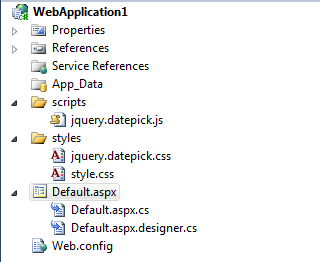

We have only one javascript jquery.datepick.js which is the plug-in itself.

Also, there are two CSS files:

  • jquery.datepick.css - which comes together with the plug-in
  • style.css - simple stylesheet that I have made to override some plug-in styles and formatting

And, one Default.aspx page where I'm doing the complete integration of this plug-in.


- Complete ASPX code

<%@ Page Language="C#" AutoEventWireup="true" CodeBehind="Default.aspx.cs" Inherits="WebApplication1._Default" %>

<!DOCTYPE html PUBLIC
"-//W3C//DTD XHTML 1.0 Transitional//EN" "http://www.w3.org/TR/xhtml1/DTD/xhtml1-transitional.dtd">

<
html xmlns
="http://www.w3.org/1999/xhtml" >
<
head runat
="server">
<
link rel="Stylesheet" type="text/css" href="styles/jquery.datepick.css"></link
>
<
link rel="Stylesheet" type="text/css" href="styles/style.css"></link
>
<
script src="http://ajax.microsoft.com/ajax/jquery/jquery-1.4.2.min.js" type="text/javascript"></script
>
<
script type="text/javascript" src="scripts/jquery.datepick.js"></script
>
<
script type
="text/javascript">
$(function() {
$('#startdate').datepick({ dateFormat: 'dd/mm/yyyy' });
$('#enddate').datepick({ dateFormat: 'dd/mm/yyyy' });
});
</script
>
</
head
>
<
body
>
<
form id="form1" runat
="server">
<
div id
="content">
From <asp:TextBox ID="startdate" class="field" runat="server"></asp:TextBox> -
To <asp:TextBox ID="enddate" class="field" runat="server"></asp:TextBox
>
</
div
>
</
form
>
</
body
>
</
html
>

Shortly, I have referenced the scripts and styles. There are two text boxes with ids: startdate and enddate. Also, these text boxes contains class=”fields” which is one of the classes in the style.css file.

But nothing would work as expected if we don’t have the six lines of jQuery code which do all the magic in our integration:

    <script type="text/javascript">
$(function() {
$('#startdate').datepick({ dateFormat: 'dd/mm/yyyy' });
$('#enddate').datepick({ dateFormat: 'dd/mm/yyyy' });
});
</script
>


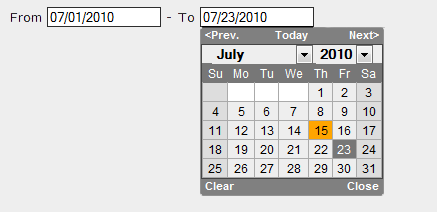
The result is


I have changed the default date format which is ‘mm/dd/yyyy’ to ‘dd/mm/yyyy’ just to test the way of how to manipulate the plug-in settings.

Here you can find the complete list of settings that this plugin supports: http://keith-wood.name/datepickRef.html

You can also easily modify the plug-in to localize in your local language, it has regional settings, part of the code:

this.regional = {
'': {
// US/English
monthNames: ['January', 'February', 'March', 'April', 'May', 'June',
'July', 'August', 'September', 'October', 'November', 'December'],
monthNamesShort: ['Jan', 'Feb', 'Mar', 'Apr', 'May', 'Jun', 'Jul', 'Aug', 'Sep', 'Oct', 'Nov', 'Dec'],
dayNames: ['Sunday', 'Monday', 'Tuesday', 'Wednesday', 'Thursday', 'Friday', 'Saturday'],
dayNamesShort: ['Sun', 'Mon', 'Tue', 'Wed', 'Thu', 'Fri', 'Sat'],
dayNamesMin: ['Su', 'Mo', 'Tue', 'We', 'Thu', 'Fr', 'Sa'],

Note: In one of the following blogs, I will cover an example on how to make complete localization of this plug-in in your own language, even though it’s already translated in most of the languages right now.


Few of the settings I have tested so far:

1. Animation of the calendar: the default animation the plug-in uses is ‘show’ – you can override it with any animation supported in jQuery

Example:

$('#startdate').datepick({ dateFormat: 'mm/dd/yyyy', showAnim:'fadeIn' });


2. Show speed of the calendar: the default is set to ‘normal’ – you can override it to fast or slow

Example:

$('#startdate').datepick({ dateFormat: 'mm/dd/yyyy', showSpeed: 'fast' });

3. minDate and maxDate: you can easily specify what should be the minimum and maximum date a user can select

$('#startdate').datepick({ minDate:'07/01/2010', maxDate:'07/15/2010' });
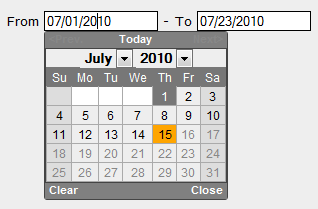
You see, the half of the month days are grayed because I have set the maxDate to 15 July 2010. Also, when clicking the Months dropdownlist, in this case there would be no month because I've set minDate to 1 July 2010.

So, this is the main way to integrate this interesting jQuery plug-in into an ASP.NET WebForms Website. The way does not differs much in MVC because we do almost everything in jQuery.

In the next blog, I will post some more examples where I will use some validation scripts I’ve written and do some post backs.

Hope this was interesting for reading.

Here is the complete source code so far. The next time I will post the source code with the modifications I will do.

Please write your comments and suggestions :).

Thank You,
Hajan

PART 2 - JS VALIDATION SCRIPT

Published Thursday, July 15, 2010 10:02 PM by hajan

Comments

# Integration of JQuery DateTimePicker in ASP.NET Website (part 1) - Hajan's Blog

Pingback from  Integration of JQuery DateTimePicker in ASP.NET Website (part 1) - Hajan's Blog

# Twitter Trackbacks for Integration of JQuery DateTimePicker in ASP.NET Website (part 1) - Hajan's Blog [asp.net] on Topsy.com

Pingback from  Twitter Trackbacks for                 Integration of JQuery DateTimePicker in ASP.NET Website (part 1) - Hajan's Blog         [asp.net]        on Topsy.com

# Integration of JQuery DateTimePicker in ASP.NET Website (part 1)

Saturday, July 17, 2010 4:28 AM by WebDevVote.com

You are voted (great) - Trackback from WebDevVote.com

# Integration of JQuery DatePicker on ASP.NET Website – JS Validation Script (part 2)

Tuesday, July 20, 2010 1:44 PM by Hajan's Blog - MKDOT.NET

Во првиот дел во неколку едноставни чекори прикажав како да се интегрира KeithWood JQuery DatePicker

# re: Integration of JQuery DatePicker in ASP.NET Website (part 1)

Wednesday, September 15, 2010 3:00 AM by gnosys

Hi Hajan,

Great post! I've implemented your date picker through and through. However, I have an issue and was wondering if you could enlighten me.

On the same control that I have the date picker, I also have an ajax update panel, with sync as well as asych triggers. The date pick works before I trigger any ajax, and doesn't work after. Any clue of a workaround here?

Thanks again.

# re: Integration of JQuery DatePicker in ASP.NET Website (part 1)

Wednesday, September 15, 2010 4:56 AM by hajan

Hi @gnosys,

It's not suggested to combine ajax/jquery frameworks and asp.net ajax on the same site, because, as in this example, it *kills* the JQuery. However, there are always some workarounds, some simple, other more complex :) - and here is what you need:

  <script type="text/javascript">

      $(function() {

          $('#startdate').datepick({ dateFormat: 'mm/dd/yyyy' });

          $('#enddate').datepick({ dateFormat: 'mm/dd/yyyy' });

      });    

  </script>

  <!-- above part you already have it, you need the bellow code snippet -->

  <script language="javascript" type="text/javascript">

      function load() {

Sys.WebForms.PageRequestManager.getInstance().add_endRequest(EndRequest);

      }

      function EndRequest() {

          $(function() {

              $('#startdate').datepick({ dateFormat: 'mm/dd/yyyy' });

              $('#enddate').datepick({ dateFormat: 'mm/dd/yyyy' });

          });

      }

  </script>

and, you should call the load() function i.e. <body onload="load()">

This should work.

Have in mind that you need to rebind your JQuery functions once the post back has triggered from inside the UpdatePanel.

Try it and write me your feedback.

Regards,

Hajan

# re: Integration of JQuery DatePicker in ASP.NET Website (part 1)

Wednesday, September 15, 2010 5:04 PM by gnosys

Thanks Hajan, it worked (jQuery + AJAX). In the future, I shall try to avoid such a conflict. But right now it works like a beauty. Thank you so much for your super-prompt response!

# re: Integration of JQuery DatePicker in ASP.NET Website (part 1)

Wednesday, September 15, 2010 5:50 PM by hajan

@gnosys, you are always welcome! ;)

I'm glad the problem got solved. However, you have additionally inspired me to analyze the way of how JQuery and ASP.NET AJAX partial postbacks can 'talk' more effectively. Besides the way I've proposed in my previous comment, you can also use the AJAX default pageLoad() {} function which triggers on every page partial postback. Therefor, you won't even need to include <body onload="load()"> and no need of creating event handler on EndRequest. Anyway, I'm glad this has worked flawlessly ;).

My next blog will be related to this issue, in order to have it documented. I'm expecting your comments on the next blog post too. Your comments are very valuable to me.

Thanks,

Hajan

# Integration of jQuery DatePicker in ASP.NET Website – Localization (part 3)

Tuesday, October 05, 2010 3:17 PM by Hajan's Blog

About two months ago, I’ve written two blog posts concerning the KeithWood’s jQuery DatePicker and its

# re: Integration of jQuery DatePicker in ASP.NET Website (part 1)

Tuesday, November 09, 2010 11:08 PM by daitran

I can't set

$('#startdate').datepick({ minDate:'07/01/1980', maxDate:'07/15/2100' });

value select year.

# re: Integration of jQuery DatePicker in ASP.NET Website (part 1)

Tuesday, February 08, 2011 5:13 AM by Deepak Sagta

DatePicker not working in IE 8 but it is working in IE 6 and mozilla so pls  check it out. I have check it in IE compatibility mode but it not working. So pls give me some sol.

# re: Integration of jQuery DatePicker in ASP.NET Website (part 1)

Tuesday, February 08, 2011 3:18 PM by hajan

@Deepak, it works fine in all IE 6+ versions. Create new clean web site and test the code... If it's not working within your application, the reason might be something else. If you can't get it working, then try the jQuery UI Datepicker...

# re: Integration of jQuery DatePicker in ASP.NET Website (part 1)

Thursday, February 10, 2011 2:37 AM by Param

Hello,

Is there a setting or a way where I could enable weekend selection. Right now if you click on a weekend, the highlight goes away. I need to be able to select the weekend dates as well.

thanks

# re: Integration of jQuery DatePicker in ASP.NET Website (part 1)

Thursday, February 10, 2011 3:16 AM by hajan

@Param,

If I understand your question well, you want to be able to select Saturday and Sunday days? I think it should work.

Otherwise if you want to select all the days in a week, you can use range selection by adding rangeSelect:true property... You can also stylize your datepicker to show the weeks - check the example in the following link: keith-wood.name/datepick.html scroll down a bit.

Hope this helps.

# re: Integration of jQuery DatePicker in ASP.NET Website (part 1)

Thursday, March 24, 2011 8:25 AM by Orion

Heya,

I've got it working so far in an ASP.NET webform, but when the form is posted, the values in the textboxes linked to the date picker are empty strings.  I assume this means they are not getting posted back.  is there an easy way around this?

- O8

# re: Integration of jQuery DatePicker in ASP.NET Website (part 1)

Thursday, March 24, 2011 2:55 PM by hajan

@Orion, if you use ASP.NET TextBoxes, the ViewState should help you in that... Simply, copy the code in my example and add this:

<asp:Button ID="btnSend" runat="server" Text="Send" OnClick="btnSend_Click" />

Then in code behind, paste this:

protected void btnSend_Click(object sender, EventArgs e)

{

   Response.Write("Hey..");

}

Once you click the button, the date values in the textboxes shouldn't be empty. If you do post to another page, than you will manage the state of the values by using some of the state management techniques.

Hope this helps.

# re: Integration of jQuery DatePicker in ASP.NET Website (part 1)

Sunday, April 10, 2011 7:34 PM by MOhan

Hi

Thanks for Nice article.

I have a question here, by default I can see years in calendar control from 2001 to 2021, end user will be in a confusion whether he can select dates prior to 2001 or not. So is there anyway I can enable a scroll bar in year drop downlist, so can display years till 1950 or 1900 by default...

Thanks in advance !!

MOhan

# re: Integration of jQuery DatePicker in ASP.NET Website (part 1)

Wednesday, April 13, 2011 12:48 AM by Rakesh B

Hi

Thanks for u r Article its very useful for me for navigating in years

# re: Integration of jQuery DatePicker in ASP.NET Website (part 1)

Thursday, May 19, 2011 7:33 PM by Cardo

For TextBoxes in FormViews, use the JavaScript example below:

<script type="text/javascript">      

 $(function() {            

 $('#<%= (FormView1.FindControl("TextBoxName")).ClientID %>').datepick({ dateFormat: 'yyyy/mm/dd' });

  });        

</script>

# re: Integration of jQuery DatePicker in ASP.NET Website (part 1)

Friday, May 27, 2011 9:23 AM by Dora743

Hi can i need this with having an image button near textbox and by clicking on that i would like popup the calendar instead of popping up on focus of textbox can any one give me for this

# re: Integration of jQuery DatePicker in ASP.NET Website (part 1)

Friday, May 27, 2011 12:05 PM by hajan

Hi Dora,

Add your calendar image (here is one: keith-wood.name/.../calendar.gif) and add the following HTML code:

<div style="display: none;">

   <img id="dpImg" src="img/calendar.gif" alt="Popup" class="trigger">

</div>

Then, on the text box where you want to create datepicker feature together with the calendar image, add this line of code:

$('#startdate').datepick({showOnFocus: false, showTrigger: '#dpImg'});

where 'dpImg' is the id of the img tag.

Hope this helps.

# 1600+ downloads of source code files

Saturday, June 04, 2011 5:28 PM by Hajan's Blog

For some of the blogs I have posted in the previous several months, I have included source code of the

# re: Integration of jQuery DatePicker in ASP.NET Website (part 1)

Tuesday, June 14, 2011 11:16 PM by jac

hi hajan, nice code

only one thing i found out is it doesn't work under master page. can u show a simple code that works for master page?

# re: Integration of jQuery DatePicker in ASP.NET Website (part 1)

Wednesday, June 15, 2011 5:46 AM by hajan

Hey jac,

Try adding startdate and enddate selectors like this:

$("#<%= startdate.ClientID %>").datepick({ dateFormat: 'dd/mm/yyyy' });

$("#<%= enddate.ClientID %>").datepick({ dateFormat: 'dd/mm/yyyy' });

This should make it work properly when your date-pickers are in pages that use Master pages.

Hope this helps.

# re: Integration of jQuery DatePicker in ASP.NET Website (part 1)

Monday, June 20, 2011 2:10 AM by jac

hi hajan,

thanks for code, it works! Btw, can u show how to disable the select date before today, and also disable the dropdrown for month and year?

# re: Integration of jQuery DatePicker in ASP.NET Website (part 1)

Tuesday, June 21, 2011 4:01 AM by hajan

Hi jac,

To disable month/year selection and set the min date to today (disable all dates before today), use the following code:

   <script type="text/javascript">

       $(function () {

           $('#<%= startdate.ClientID %>').datepick({

               dateFormat: 'mm/dd/yyyy',

               minDate: 'today',

               changeMonth: false

           });

           $('#<%= enddate.ClientID %>').datepick({

               dateFormat: 'dd/mm/yyyy'            

           });

       });

   </script>

Hope this helps.

# re: Integration of jQuery DatePicker in ASP.NET Website (part 1)

Wednesday, October 05, 2011 6:17 AM by Mark Henry

Great post and it was very helpful. While searching about I came across series of date picker articles which are just too good. So thought of sharing with your users.

jquerybyexample.blogspot.com/.../jQuery%20DatePicker

# re: Integration of jQuery DatePicker in ASP.NET Website (part 1)

Wednesday, October 05, 2011 8:05 AM by hajan

@Mark, thanks for the comment and for sharing the link. Well, jQuery UI DatePicker is also very good DP plugin. Afaik, the one I have shown in this blog post is used by the jQuery UI team for creating the jQuery UI Datepicker.

# re: Integration of jQuery DatePicker in ASP.NET Website (part 1)

Wednesday, October 05, 2011 6:01 PM by Vijay

Thanks!

Your article helped me a lot.

When integrating this control in asp.net updatepanel, I found one problem ie the date gets reset to empty string. But after goin in details this turned out to be asp.net state mgmt problem. I was using ReadOnly property of the textbox (to stop direct user input).

Then, adding attribute at Page_Load solved the issue e.g:

txtRegDate.Attributes.Add("readonly", "readonly");

# re: Integration of jQuery DatePicker in ASP.NET Website (part 1)

Wednesday, October 12, 2011 11:01 AM by Mainuddin molla

Thanks....

# re: Integration of jQuery DatePicker in ASP.NET Website (part 1)

Monday, October 24, 2011 12:33 PM by charan

Nice article Hajan. In my website I am using textbox1 as selector for datepicker but on my C# side (asp.net) I am having hard time getting textbox1.text. Please provide your help.

# re: Integration of jQuery DatePicker in ASP.NET Website (part 1)

Tuesday, October 25, 2011 6:39 PM by hajan

Hi charan, can you tell me what's the exact problem? I would be glad to help you resolve it... On the other hand, you can also post your questions to asp.net forums at http://forums.asp.net

# Jquery Datepicker URLs? &laquo; dotnetbrilliance

Friday, November 18, 2011 9:57 AM by Jquery Datepicker URLs? « dotnetbrilliance

Pingback from  Jquery Datepicker URLs? &laquo;  dotnetbrilliance

# re: Integration of jQuery DatePicker in ASP.NET Website (part 1)

Thursday, December 08, 2011 12:15 PM by hal9001

Hi,

How do I bind the DatePicker to an EntityDataSource column so that the date is selected from the database and updated back to the database?  I have the DatePicker working, and it is beautiful, but it isn't talking to my database.

Thanks!

# re: Integration of jQuery DatePicker in ASP.NET Website (part 1)

Thursday, December 08, 2011 1:22 PM by hal9001

I found the answer to my question.  All I had to do was bind the column to the TextBox control using the text property.  Works like a charm!

text='<%#Bind("MovementDate", "{0:d}") %>'

# re: Integration of jQuery DatePicker in ASP.NET Website (part 1)

Wednesday, December 14, 2011 8:14 AM by vijayasankar

in master page its not working

Leave a Comment

(required) 
(required) 
(optional)
(required)