User Credentials CommandDialog with SecureString password

Now that VS2005 and .NET 2.0 is on the street, I started to port some of my tools and projects from .NET 1.1. Since I was working on authentication in a Winform client application, one of the common scenarios is “credential gathering”. This is typically a dialog that asks the user credentials when logging on to the application or accessing some restricted area of it.So I went back to get my UICredentialsHelper class in NCrypto project and not only ported to v2.0 but redesign it and added dome goodies as well. You can download the code from here. Let’s summarize its features: 
  • Shows up the standard Windows dialog for credential gathering (see CredUIPromptForCredentials API).
  • Inherits from CommonDialog so it has a base standard API and IDE integration.
  • Return the sensitive information like the user password in a SecureString type.
  • Flexible to configure according to the features exposed by the CredUIPromptForCredentials API. 

Sample Usage

Let’s see the basic usage of this dialog:
  using (CredentialsDialog dialog = new CredentialsDialog()){      if (dialog.ShowDialog() == DialogResult.OK)      {            // validate credentials against an authentication authority            // ...            // If credentials are valid            // and the user checked the "remember my password" option            if (dialog.SaveChecked)            {                  dialog.ConfirmCredentials(true);            }      }}
 

The “dialog.ShowDialog()” function call will show up the following dialog:
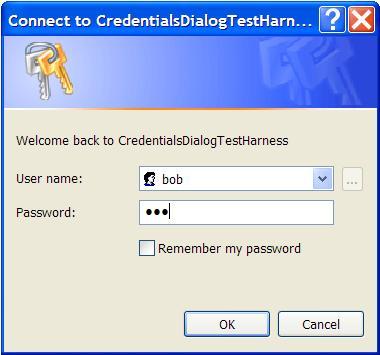
   An interesting sample that you have included in the downloaded solution is the one that can run a process under the credentials account supplied.Let’s see the sample: 
using (CredentialsDialog dialog = new CredentialsDialog()){      if (dialog.ShowDialog() == DialogResult.OK)      {            ProcessStartInfo info = new ProcessStartInfo("notepad.exe");            info.UseShellExecute = false;            info.UserName = dialog.User;            info.Password = dialog.Password;            info.Domain = dialog.Domain;            using (Process install = Process.Start(info))            {                  install.WaitForExit();                  Console.WriteLine(install.ExitCode);            }

      }

}

As you can see, is pretty straightforward to use this dialog and you even can customize its appearance like changing its caption, text message, banner bitmat or event setting the user textbox as read only. Enjoy it!

This posting is provided "AS IS" with no warranties, and confers no rights.

Published Monday, November 21, 2005 10:08 AM by HernanDL
Filed under:

Comments

# re: User Credentials CommandDialog with SecureString password

Wednesday, December 07, 2005 9:21 AM by J. Daniel Smith
This is pretty neat! Just what I was looking for... My only comment is that the unmanaged interop might be easier from C++/CLI rather than C#...

# re: User Credentials CommandDialog with SecureString password

Saturday, December 10, 2005 11:06 PM by J. Daniel Smith
The C++/CLI version is ~433 lines compared to ~514 for C#. Here it is:
-----
// Port of C# code from: http://weblogs.asp.net/hernandl/archive/2005/11/21/usercredentialsdialog.aspx

#include "StdAfx.h"

#include <vcclr.h>

using namespace System;
using namespace System::Drawing;
using namespace System::ComponentModel;
using namespace System::Collections;
using namespace System::Diagnostics;
using namespace System::Windows::Forms;
using namespace System::Security;
using namespace System::Security::Permissions;
using namespace System::Runtime::InteropServices;

namespace Security { namespace Windows { namespace Forms {

#pragma region UserCredentialsDialogFlags
/// <summary>
/// Specifies special behavior for this function.
/// This value can be a bitwise-OR combination of zero or more of the following values.
/// </summary>
// For more information of these flags see:
// http://msdn.microsoft.com/library/default.asp?url=/library/en-us/secauthn/security/creduipromptforcredentials.asp
// http://msdn.microsoft.com/library/default.asp?url=/library/en-us/dnnetsec/html/dpapiusercredentials.asp?frame=true
[Flags]
public enum class UserCredentialsDialogFlags
{
None = 0x0
, IncorrectPassword = CREDUI_FLAGS_INCORRECT_PASSWORD
, DoNotPersist = CREDUI_FLAGS_DO_NOT_PERSIST
, RequestAdministrator = CREDUI_FLAGS_REQUEST_ADMINISTRATOR
, ExcludesCertificates = CREDUI_FLAGS_EXCLUDE_CERTIFICATES
, RequireCertificate = CREDUI_FLAGS_REQUIRE_CERTIFICATE
, ShowSaveCheckbox = CREDUI_FLAGS_SHOW_SAVE_CHECK_BOX
, AlwaysShowUI = CREDUI_FLAGS_ALWAYS_SHOW_UI
, RequireSmartCard = CREDUI_FLAGS_REQUIRE_SMARTCARD
, PasswordOnlyOk = CREDUI_FLAGS_PASSWORD_ONLY_OK
, ValidateUsername = CREDUI_FLAGS_VALIDATE_USERNAME
, CompleteUserName = CREDUI_FLAGS_COMPLETE_USERNAME
, Persist = CREDUI_FLAGS_PERSIST
, ServerCredential = CREDUI_FLAGS_SERVER_CREDENTIAL
, ExpectConfirmation = CREDUI_FLAGS_EXPECT_CONFIRMATION
, GenericCredentials = CREDUI_FLAGS_GENERIC_CREDENTIALS
, UsernameTargetCredentials = CREDUI_FLAGS_USERNAME_TARGET_CREDENTIALS
, KeepUsername = CREDUI_FLAGS_KEEP_USERNAME
, Default = GenericCredentials |
ShowSaveCheckbox |
AlwaysShowUI |
ExpectConfirmation
, PromptValid = CREDUI_FLAGS_PROMPT_VALID
};
#pragma endregion

/// <summary>
/// Displays a dialog box and promts the user for login credentials.
/// </summary>
[ToolboxItem(true)]
[DesignerCategory("Dialogs")]
public ref class UserCredentialsDialog : public CommonDialog
{
#pragma region Fields

String^ user;
SecureString^ password;
String^ domain;
String^ target;
String^ message;
String^ caption;
Image^ banner;
BOOL saveChecked;

#pragma endregion

#pragma region Constructors
private:
void init(System::String^ target, System::String^ caption, System::String^ message, System::Drawing::Image^ banner)
{
Target = target;
Caption = caption;
Message = message;
Banner = banner;
}

public:
UserCredentialsDialog()
{
Reset();
}
UserCredentialsDialog(System::String^ target)
{
init(target, nullptr, nullptr, nullptr);
}
UserCredentialsDialog(System::String^ target, System::String^ caption)
{
init(target, caption, nullptr, nullptr);
}
UserCredentialsDialog(System::String^ target, System::String^ caption, System::String^ message)
{
init(target, caption, message, nullptr);
}
UserCredentialsDialog(System::String^ target, System::String^ caption, System::String^ message, System::Drawing::Image^ banner)
{
init(target, caption, message, banner);
}

#pragma endregion

#pragma region Properties

property System::String^ User
{
System::String^ get() { return user; }
void set(System::String^ value)
{
if (value != nullptr)
{
if (value->Length > CREDUI_MAX_USERNAME_LENGTH)
{
throw gcnew ArgumentException(String::Format(
"The user name has a maximum length of {0} characters.",
CREDUI_MAX_USERNAME_LENGTH), "User");
}
}
user = value;
}
}

property System::Security::SecureString^ Password
{
System::Security::SecureString^ get() { return password; }
void set(System::Security::SecureString^ value)
{
if (value != nullptr)
{
if (value->Length > CREDUI_MAX_PASSWORD_LENGTH)
{
throw gcnew ArgumentException(String::Format(
"The password has a maximum length of {0} characters.",
CREDUI_MAX_PASSWORD_LENGTH), "Password");
}
}
password = value;
}
}

property System::String^ Domain
{
System::String^ get() { return domain; }
void set(System::String^ value)
{
if (value != nullptr)
{
if (value->Length > CREDUI_MAX_DOMAIN_TARGET_LENGTH)
{
throw gcnew ArgumentException(String::Format(
"The domain name has a maximum length of {0} characters.",
CREDUI_MAX_DOMAIN_TARGET_LENGTH), "Domain");
}
}
domain = value;
}
}

property System::String^ Target
{
System::String^ get() { return target; }
void set(System::String^ value)
{
if (value != nullptr)
{
if (value->Length > CREDUI_MAX_GENERIC_TARGET_LENGTH)
{
throw gcnew ArgumentException(String::Format(
"The target has a maximum length of {0} characters.",
CREDUI_MAX_GENERIC_TARGET_LENGTH), "Target");
}
}
target = value;
}
}

property System::String^ Message
{
System::String^ get() { return message; }
void set(System::String^ value)
{
if (value != nullptr)
{
if (value->Length > CREDUI_MAX_MESSAGE_LENGTH)
{
throw gcnew ArgumentException(String::Format(
"The message has a maximum length of {0} characters.",
CREDUI_MAX_MESSAGE_LENGTH), "Message");
}
}
message = value;
}
}

property System::String^ Caption
{
System::String^ get() { return caption; }
void set(System::String^ value)
{
if (value != nullptr)
{
if (value->Length > CREDUI_MAX_CAPTION_LENGTH)
{
throw gcnew ArgumentException(String::Format(
"The caption has a maximum length of {0} characters.",
CREDUI_MAX_CAPTION_LENGTH), "Caption");
}
}
caption = value;
}
}

property System::Drawing::Image^ Banner
{
System::Drawing::Image^ get() { return banner; }
void set(System::Drawing::Image^ value)
{
if (value != nullptr)
{
if (value->Width != CREDUI_BANNER_WIDTH)
{
throw gcnew ArgumentException(
String::Format("The banner image width must be {0} pixels.",
CREDUI_BANNER_WIDTH), "Banner");
}
if (value->Height != CREDUI_BANNER_HEIGHT)
{
throw gcnew ArgumentException(
String::Format("The banner image height must be {0} pixels.",
CREDUI_BANNER_HEIGHT), "Banner");
}
}
banner = value;
}
}

property bool SaveChecked
{
bool get() { return saveChecked ? true : false; }
void set(bool value) { saveChecked = value; }
}

property UserCredentialsDialogFlags Flags;

#pragma endregion

#pragma region Public methods

void ConfirmCredentials(bool confirm)
{
(gcnew UIPermission(UIPermissionWindow::SafeSubWindows))->Demand();

pin_ptr<const wchar_t> pTarget = PtrToStringChars(target);
DWORD result = CredUIConfirmCredentialsW(pTarget, confirm);

if(result != NO_ERROR &&
result != ERROR_NOT_FOUND &&
result != ERROR_INVALID_PARAMETER)
{
throw gcnew InvalidOperationException(TranslateReturnCode(result));
}
}

/// <summary>
/// This method is for backward compatibility with APIs that does
/// not provide the <see cref="SecureString"/> type.
/// </summary>
/// <returns></returns>
String^ PasswordToString()
{
IntPtr ptr = Marshal::SecureStringToGlobalAllocUnicode(Password);
try
{
// Unsecure managed string
return Marshal::PtrToStringUni(ptr);
}
finally
{
Marshal::ZeroFreeGlobalAllocUnicode(ptr);
}
}


#pragma endregion

protected:
#pragma region CommonDialog overrides

protected: virtual bool RunDialog(IntPtr hwndOwner) override
{
if (System::Environment::OSVersion->Version->Major < 5)
{
throw gcnew PlatformNotSupportedException("The Credential Management API requires Windows XP / Windows Server 2003 or later.");
}

pin_ptr<const wchar_t> pCaption = PtrToStringChars(caption);
pin_ptr<const wchar_t> pMessage = PtrToStringChars(message);
CREDUI_INFO credInfo;
credInfo.cbSize = sizeof(CREDUI_INFO);
credInfo.hwndParent = static_cast<HWND>(hwndOwner.ToPointer());
credInfo.pszCaptionText = pCaption;
credInfo.pszMessageText = pMessage;
if (banner != nullptr)
{
IntPtr hBitmap = (gcnew Bitmap(banner,
CREDUI_BANNER_WIDTH, CREDUI_BANNER_HEIGHT))->GetHbitmap();
credInfo.hbmBanner = static_cast<HBITMAP>(hBitmap.ToPointer());
}
else
{
credInfo.hbmBanner = NULL;
}

WCHAR pszName[CREDUI_MAX_USERNAME_LENGTH+1];
WCHAR pszPwd[CREDUI_MAX_PASSWORD_LENGTH+1];
SecureZeroMemory(pszName, sizeof(pszName));
SecureZeroMemory(pszPwd, sizeof(pszPwd));

if (!String::IsNullOrEmpty(User))
{
if (!String::IsNullOrEmpty(Domain))
{
pin_ptr<const wchar_t> pDomain = PtrToStringChars(Domain + "\\");
wcscat_s(pszName, pDomain);
}
pin_ptr<const wchar_t> pUser = PtrToStringChars(User);
wcscat_s(pszName, pUser);
}
if (Password != nullptr)
{
pin_ptr<const wchar_t> pPassword = PtrToStringChars(PasswordToString());
wcscat_s(pszPwd, pPassword);
}

try
{
pin_ptr<const wchar_t> pTarget = PtrToStringChars(Target);
pin_ptr<BOOL> pSaveChecked = &saveChecked;
DWORD result = CredUIPromptForCredentials(
&credInfo, pTarget,
NULL /*Reserved*/, 0 /*dwAuthError*/,
pszName, CREDUI_MAX_USERNAME_LENGTH+1,
pszPwd, CREDUI_MAX_PASSWORD_LENGTH+1,
pSaveChecked, static_cast<DWORD>(Flags));
switch (result)
{
case NO_ERROR:
LoadUserDomainValues(pszName);
LoadPasswordValue(pszPwd);
return true;
case ERROR_CANCELLED:
User = nullptr;
Password = nullptr;
return false;
default:
throw gcnew InvalidOperationException(TranslateReturnCode(result));
}
}
finally
{
SecureZeroMemory(pszName, sizeof(pszName));
SecureZeroMemory(pszPwd, sizeof(pszPwd));
if (banner != nullptr)
{
DeleteObject(credInfo.hbmBanner);
}
}
}

/// <summary>
/// Set all properties to it's default values.
/// </summary>
public: virtual void Reset() override
{
target = Application::ProductName ? Application::ProductName : AppDomain::CurrentDomain->FriendlyName;
user = nullptr;
password = nullptr;
domain = nullptr;
caption = nullptr;// target as caption;
message = nullptr;
banner = nullptr;
SaveChecked = false;
Flags = UserCredentialsDialogFlags::Default;
}

#pragma endregion

#pragma region Private methods
private:
static const int CREDUI_BANNER_HEIGHT = 60; // "The bitmap size is limited to 320x60 pixels."
static const int CREDUI_BANNER_WIDTH = 320; // "The bitmap size is limited to 320x60 pixels."

static String^ UserCredentialsDialog::TranslateReturnCode(DWORD result)
{
return String::Format("Invalid operation: {0}", result.ToString());
}

void LoadPasswordValue(LPWSTR pPassword)
{
password = gcnew SecureString(pPassword, lstrlen(pPassword)); // avoid /w64 warning with wcslen()
password->MakeReadOnly();
}

void LoadUserDomainValues(LPCWSTR pPrincipalName)
{
WCHAR pszUser[CREDUI_MAX_USERNAME_LENGTH+1];
WCHAR pszDomain[CREDUI_MAX_DOMAIN_TARGET_LENGTH+1];
DWORD result = CredUIParseUserNameW(pPrincipalName,
pszUser, CREDUI_MAX_USERNAME_LENGTH+1, pszDomain, CREDUI_MAX_DOMAIN_TARGET_LENGTH+1);

if (result == NO_ERROR)
{
User = gcnew String(pszUser);
Domain = gcnew String(pszUser);
}
else
{
User = gcnew String(pPrincipalName);
Domain = Environment::MachineName;
}
}

#pragma endregion
};

}}}

# re: User Credentials CommandDialog with SecureString password

Saturday, December 10, 2005 11:27 PM by Hernan
Great. Thanks for the translation. However, perhaps just a 16% difference between each version may let developers easly choose the one that better fit the language personal preference, considering that performance/memory consumption may not be a big deal in this context (UI client scenario).

# re: User Credentials CommandDialog with SecureString password

Wednesday, December 14, 2005 10:53 PM by J. Daniel Smith
Yup, there isn't a whole lot of difference in lines-of-code. I like the C++/CLI version because it avoids duplicating Win32 structs/#defines in C#; otherwise the Interop is pretty much a wash in this sample.

What would be really neat is if there were a way for C# to read "simple" (say basic #defines and simple structs/classes) C++ .h files.

# Protect your passwords - The SecureString Class

Friday, April 18, 2008 2:27 PM by KevinsKorner

Protect your passwords - The SecureString Class

# Protect your passwords - The SecureString Class

Tuesday, June 03, 2008 4:04 PM by KevinsKorner

Protect your passwords - The SecureString Class

# re: User Credentials CommandDialog with SecureString password

Wednesday, June 25, 2008 12:45 PM by sandeep

Can u plese check the download link for the code it is not active or can u please send me the code at makhijani.sandeep@gmail.com. I am having the same problem and would like to use it.

thanks in advance

# re: User Credentials CommandDialog with SecureString password

Monday, October 20, 2008 4:16 AM by Melanie

Thanks a bunch for sharing. If I try to open the UserCredentialsDialog.cs in Designer I get: The designer must create an instance of type 'System.Windows.Forms.CommonDialog' but it cannot because the type is declared as abstract. It is compiling and working, but is there a solution to rid of this error?

# re: User Credentials CommandDialog with SecureString password

Friday, December 05, 2008 9:29 PM by Semil

<a href= spiritez.com ></a>

# re: User Credentials CommandDialog with SecureString password

Tuesday, December 23, 2008 2:54 PM by David Gauerke

Is it possible to show a domain/machine selection (combobox) similar to the main Windows login?

# re: User Credentials CommandDialog with SecureString password

Friday, December 26, 2008 4:16 AM by Olgunka-vv

<a href= membres.lycos.fr/maffals >genetic disorters</a>

# re: User Credentials CommandDialog with SecureString password

Friday, December 26, 2008 4:22 AM by elexx-cm

<a href= membres.lycos.fr/dertull >zx10r graphics</a>

# re: User Credentials CommandDialog with SecureString password

Saturday, February 28, 2009 9:38 PM by Olgunka-du

<a href= adultspeeddatingfinder.com >find partner</a>

# re: User Credentials CommandDialog with SecureString password

Saturday, February 28, 2009 9:38 PM by elexx-zn

<a href= adultspeeddatingfinder.com >find partner</a>

Leave a Comment

(required) 
(required) 
(optional)
(required)