in

ASP.NET Weblogs

This Blog

Syndication

Sponsors

News


Follow HosamKamel on Twitter

Hosam Kamel's Blog

[Resolved] Could not load file or assembly 'XXXXX' or one of its dependencies. An attempt was made to load a program with an incorrect format.

I have recently switched my development environment from 32-bit to 64-bit by installing Windows Server 2008 64-bit and modify it to be used as workstation as described here http://www.win2008workstation.com/ and I'm really amazed with it’s performance.

I have faced the problem mentioned in the post title when I'm trying to run a web application included in one of our development solutions.
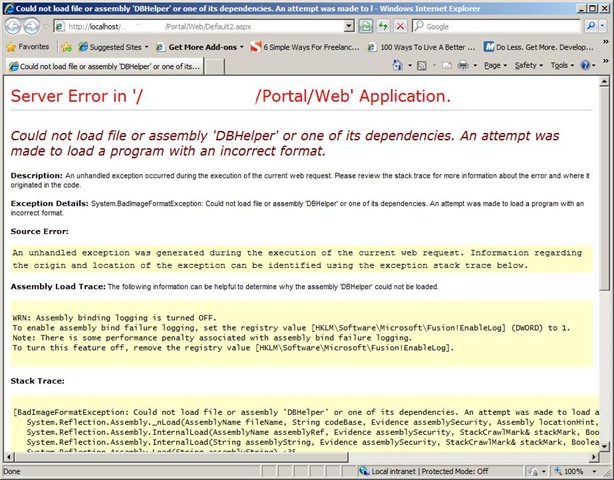
couldnot load

I have checked the project which has the DBHelper as it’s output and I’ve discovered that the project configured to target x86 platform and as I'm working with 64-bit it will have such ‘incorrect format’ error.

How to fix it:

Simply follow the steps below :

  • open project properties window.
  • select Build tab
  • Change it to ‘Any CPU’
  • Save your changes.
  • Compile your project and run :)

image

Comments


Twitter Trackbacks for [Resolved] Could not load file or assembly 'XXXXX' or one of its dependencies. An attempt was made to load a [asp.net] on Topsy.com said:

Pingback from  Twitter Trackbacks for                 [Resolved] Could not load file or assembly 'XXXXX' or one of its dependencies. An attempt was made to load a         [asp.net]        on Topsy.com

October 11, 2009 9:17 AM
 

Gopalakrishnan said:

Hi,

I have a web site project (VS 2008) that has the build configuration set to Any CPU but still getting the same error for an assembly. Any other steps to solve this?

Thanks,

Gopalakrishnan

October 18, 2009 6:45 AM
 

Hosam Kamel said:

Hello Gopalakrishnan,

please make sure you have did so for all dependencies your website uses.

You can also enable 32-bit mode on IIS and adjust your website and its dependencies to target 86x platform.

let me know if this doesn't work for you.

October 18, 2009 7:48 AM
 

Feras said:

Thank you so much your few lines, fix one day of failed research

I'm using Windows 7 64 bit , however it works fine when i switch to x86 !!!

December 31, 2009 12:59 AM
 

Mateo said:

Thanks a bunch.  Spent about an hour before finding this post. Glad I got luckly and didn't waste a day or more.

Changing the dependent project to 'Any CPU' worked for me.

March 1, 2010 4:34 PM
 

Yuri said:

I figured out it happened for my WCF project in case I added string

<endpoint address="mex" binding="mexHttpBinding" contract="IMetadataExchange" />

in my web.config inside service configuration section. As I remove it, everything works fine.

April 9, 2010 1:04 PM
 

Dean said:

Thanks man. Saved me some time with this post :)

D.

June 15, 2010 5:57 PM
 

DannyC said:

Thanks for the hint! Saved me hours of searching, had already invested a couple of hours trying everything else!

September 13, 2010 5:27 PM
 

[debug]???64bit IIS ??????32bit????????????????????????????????? | ????????????????????? said:

Pingback from  [debug]???64bit IIS ??????32bit????????????????????????????????? | ?????????????????????

June 28, 2011 5:03 PM
 

Installing a web site on a new server | The blog of Colin Angus Mackay said:

Pingback from  Installing a web site on a new server | The blog of Colin Angus Mackay

September 8, 2011 7:23 AM
 

manoj22184 said:

Thanks Man

September 30, 2011 11:07 AM
 

bubba said:

Great.  Thanks for the help!

November 3, 2011 10:29 AM
 

Could not load file or assembly ‘XXXXX’ or one of its dependencies. An attempt was made to load a program with an incorrect format. « D Says said:

Pingback from  Could not load file or assembly &#8216;XXXXX&#8217; or one of its dependencies. An attempt was made to load a program with an incorrect format. &laquo; D  Says

February 14, 2013 9:47 AM

Leave a Comment

(required)  
(optional)
(required)  
Add