Silverlight 3 Visual Studio 2008 Designer Preview

Documentation says that Design Preview in Silverlight 3 Tools for Visual Studio 2008 is away. The preview with Silverlight 2 was only read only and sucks. OK is bad but no preview is even worse. When you right click a XAML file there is still context menu “view Designer”.

So why? Cause designer is still here- but hidden!

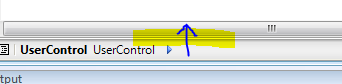
move mouse to bottom of XAML editor.
image

No mousecoursor is a double arrow which can be drag by mouse down to upper direction.
image

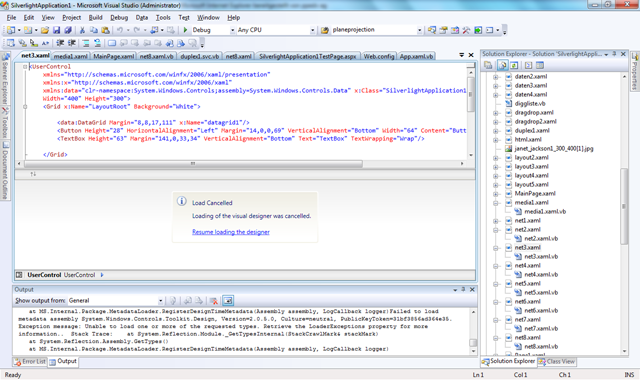
Now click relaod and ready.

After closing file- designer setting is away. Perhaps i find a solution somewhere in template settings.

Published Saturday, July 18, 2009 6:29 PM by preishuber
Filed under:

Comments

# Silverlight 3 Visual Studio 2008 Designer Preview – Hannes Preishuber | Design Graphics

Pingback from  Silverlight 3 Visual Studio 2008 Designer Preview – Hannes Preishuber | Design Graphics

# re: Silverlight 3 Visual Studio 2008 Designer Preview

Saturday, July 18, 2009 6:05 PM by jakubk

Now this is funny! It really works, thanks, Hannes.

# Silverlight 3 Visual Studio 2008 Designer Preview – Hannes Preishuber | Apex Designs

Pingback from  Silverlight 3 Visual Studio 2008 Designer Preview – Hannes Preishuber | Apex Designs

# re: Silverlight 3 Visual Studio 2008 Designer Preview

Sunday, July 19, 2009 11:43 AM by Ferry Meidianto

cool! thanks for the info ^^

# re: Silverlight 3 Visual Studio 2008 Designer Preview

Sunday, July 19, 2009 11:56 PM by ffs

i can only see horizontal no vertical... my house monitor doesnt tilt 90 degrees.

# re: Silverlight 3 Visual Studio 2008 Designer Preview

Monday, July 20, 2009 10:42 AM by Jon

The splitter is only like 1 pixel wide (vertically), so, unless you stop the mouse cursor right on top of it, you won't see the arrow.

# Silverlight 3 Visual Studio 2008 Designer Preview - Hannes Preishuber

Pingback from  Silverlight 3 Visual Studio 2008 Designer Preview - Hannes Preishuber

# re: Silverlight 3 Visual Studio 2008 Designer Preview

Monday, July 20, 2009 6:38 PM by Anon

Dude, this has already been blogged about....

# Silverlight Cream for July 21, 2009 - 2 -- #650

Tuesday, July 21, 2009 8:27 PM by Community Blogs

In this Issue: Ryan Shelby , Silverlight SDK , David Poll , Jesse Liberty ( 2 ), Scott Marlowe , Brad

# Silverlight 3 Visual Studio 2008 Designer Preview

Monday, September 21, 2009 3:53 AM by Team Silverlight

Silverlight 3 Visual Studio 2008 Designer Preview

# re: Silverlight 3 Visual Studio 2008 Designer Preview

Tuesday, September 22, 2009 3:19 AM by VenkatRamana-Tech Lead

Hi

It helped allot for my team.

Thanx

# re: Silverlight 3 Visual Studio 2008 Designer Preview

Thursday, September 24, 2009 7:16 PM by Carlos Ronny de Sousa

Great, is very helpful

# re: Silverlight 3 Visual Studio 2008 Designer Preview

Thursday, December 10, 2009 3:33 PM by Jon Bublic

This solution does not work for me (upgrade from Silverlight 3 to Silverlight 3, using Visual Web Developer 2008 Express Edition).

# re: Silverlight 3 Visual Studio 2008 Designer Preview

Thursday, December 10, 2009 5:24 PM by Jon Bublic

UPDATE: now it works in Visual Web Developer 2008 Express Edition).  You have to really strain to find the splitter bar just above the window, then expand it.  Ironically I downloaded Visual Studio 2010 Beta, installed it, the installation failed, then when I retried the suggestion on this page, I found the splitter bar.  It's a hair width and if you don't hover you mouse exactly over it, you'll miss it.

# zero.five » Blog Archive » No xaml Preview in Visual Studio 2008

Pingback from  zero.five  » Blog Archive   » No xaml Preview in Visual Studio 2008

# re: Silverlight 3 Visual Studio 2008 Designer Preview

Friday, February 19, 2010 2:52 PM by raja

thanks it really helped me..

# re: Silverlight 3 Visual Studio 2008 Designer Preview

Wednesday, November 17, 2010 2:34 AM by eXistenZ

Great! Thanks a lot!

# re: Silverlight 3 Visual Studio 2008 Designer Preview

Friday, December 24, 2010 6:54 AM by Manish C

Get the following error on clicking on Reload link. And also tried to repair VS20008, but still the same error. Any ideas?

Type 'MS.Internal.Permissions.UserInitiatedNavigationPermission' in Assembly 'PresentationFramework, Version=3.0.0.0, Culture=neutral, PublicKeyToken=31bf3856ad364e35' is not marked as serializable.

# re: Silverlight 3 Visual Studio 2008 Designer Preview

Thursday, May 12, 2011 3:36 AM by Priya

Thanks with this solution i m able to get the designer but after the xaml designer is opened it is still disabled. i mean i am not able to place any control on it like i used to do that using framwork 4.0 any idea ?

Leave a Comment

(required) 
(required) 
(optional)
(required)