Silverlight Twitter Client with authentication
Its not easy to access a cross domain RSS feed. But it is nearly impossible to do same with authentication. HTTP Client stack and HTTP browser stack in Silverlight 3 and beyond does not support authentication. All tricks with manipulating HTTP header throw some not implemented exception.
For my workaround I use a browser bridge built with Jscript.
First i created a twitter account and closed the RSS feed to “followers”. Which have the effect that when accessing the RSS with browser Login Dialog is poping up.
Next step is I add a AJAX Scriptmanager into the aspx page which is hosting Silverlight Plugin. Then i write the JScript code to access the Twitter url. The magic is inside the HTTP Header. You have to implement “username:password” base64 encoded in authorization header tag. This sample creates from SilverlightInsi:password the base64 string. The encoding will be done later in Silverlight application.
function anmelden(user) {
//  base 64 =U2lsdmVybGlnaHRJbnNpOnBhc3N3b3Jk
    var w = new Sys.Net.WebRequest();
    w.set_url("http://twitter.com/statuses/friends_timeline/61248865.rss");
    w.set_httpVerb("GET");
    w.get_headers()["Authorization"] = "Basic " + user;
    w.add_completed(WennFertig);
    w.invoke();
}
Now we code a button click in silverlight. With htmlpage helper we can invoke the Jscript RSS download function “anmelden” and pass the security credentials.
Private Sub Button_Click(ByVal sender As System.Object, ByVal e As System.Windows.RoutedEventArgs)
    Dim user As String = "SilverlightInsi"
    Dim pwd As String = "password"
    Dim daten() As Byte = System.Text.Encoding.UTF8.GetBytes((user + ":" + pwd))
    HtmlPage.Window.Invoke("anmelden", Convert.ToBase64String(daten))
When the data have arrived, Jscript calls function “WennFertig” in ASPX page. There you get the response data (the rss). To bring back the data to Silverligth application we call a managed code function calles Twitterloaded. To get the reference you have to find the Plugin (ID of object). And take the content and use the “sl” object. We will see the why and how a few lines later
 function WennFertig(executor, eventArgs) {
      if (executor.get_responseAvailable()) {
         var SL = document.getElementById("sl1");
          SL.Content.sl.TwitterLoaded(executor.get_responseData());

       }
 }
Now we are back in manged code of Silverligth. I register the plug for Jscript as “sl”. This allows Jscript in general to access the insides of the plugin
 Public Sub New()
        InitializeComponent()
        HtmlPage.RegisterScriptableObject("sl", Me)

    End Sub
We need a managed function which can be called from outside by Jscript. That is declarted by ScriptableMember Attribut. So function “Twitterloaded” can now be invoked from outside. The next lines are quit tricky. I use the Syndication class from Silverlight. This saves a lot of coding, cause I d not need to creat data classes or extra lists.
<ScriptableMember()> _
Public Sub TwitterLoaded(ByVal daten As String)
        Dim sr As StringReader = New StringReader(daten)
        Dim xr As XmlReader = XmlReader.Create(sr)
        Dim feed As SyndicationFeed = SyndicationFeed.Load(xr)
       datagrid1.ItemsSource = feed.Items.ToList
End Sub
One issue is left. The SyndicationItem is not a flat datatype. So I have to take in care in XAML binding to refer to right property, like Title.Text. The datagrid gets templatecolumns.
  <data:DataGrid.Columns>
       <data:DataGridTemplateColumn Width="200">
             <data:DataGridTemplateColumn.CellTemplate>
                 <DataTemplate>
                       <TextBlock Text="{Binding Title.Text}" />
                 </DataTemplate>
              </data:DataGridTemplateColumn.CellTemplate>
                    </data:DataGridTemplateColumn>
       <data:DataGridTemplateColumn Width="100">
             <data:DataGridTemplateColumn.CellTemplate>
                <DataTemplate>
                       <TextBlock Text="{Binding PublishDate}" />
                </DataTemplate>
       </data:DataGridTemplateColumn.CellTemplate>
    </data:DataGridTemplateColumn>
</data:DataGrid.Columns>
 </data:DataGrid>
At the end my application looks like that.
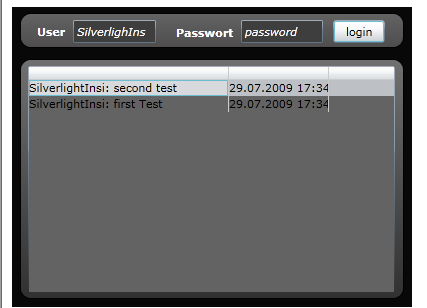
Was hard work, I hope you enjoy it. If you want to learn more you can attend my classes at ppedv AG.