Ohad's Blog

Lets talk about .net !

Mirror at:
blogs.microsoft.co.il

News

         Ohad Israeli's Facebook profile

Grab this badge here!

C# Code Snippts

Favorite Blogs

Israeli .Net Bloggers

Windows Server 2008 as Workstation

For years I've been working with windows server editions as my main development environments, the reasons are plenty and among of them you can find the stability and the lose of useless services at workstations versions.

Last week I've decided that enough it enough and I cannot stand Vista anymore and decided to downgrade to XP just before going through the downgrade I've received a notification from the Windows Server Beta that they finally made Windows Server 2008 RTM so I've decided to give it a try AND I LOVE IT !

The installation of Windows 2008 Server went much faster then i expected.

After the installation I've started modifying the base install and adapting the server for a high end workstation.

For anyone who might want to move like me here is my WIN2008Workstation list:

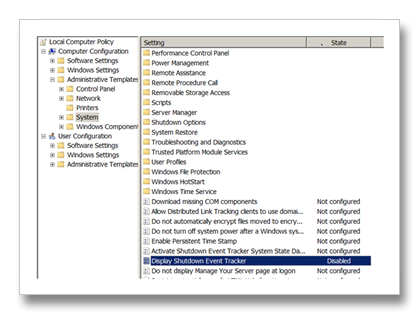
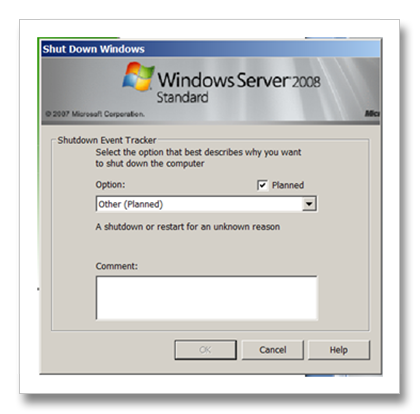
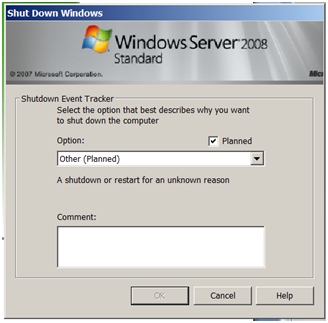
  1. Disable shutdown event tracker
    Start->Run->"gpedit.msc" -> Administrative tools->System-> Display Shutdown event tracked -> Disable
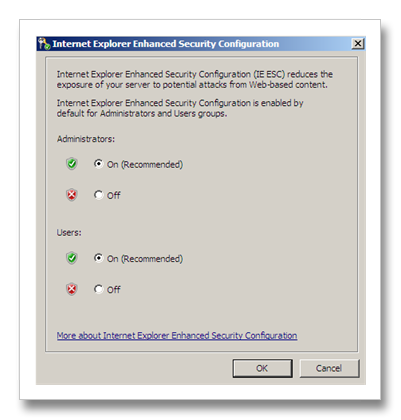
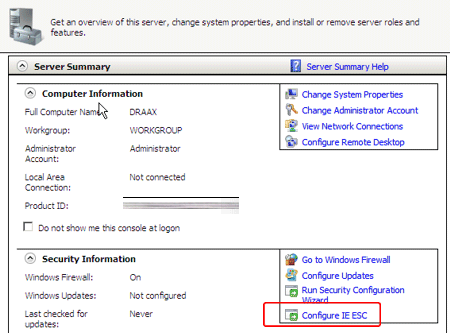
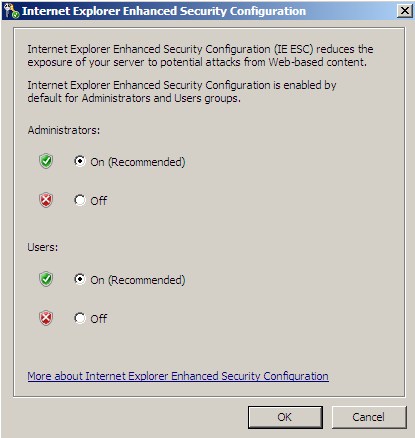
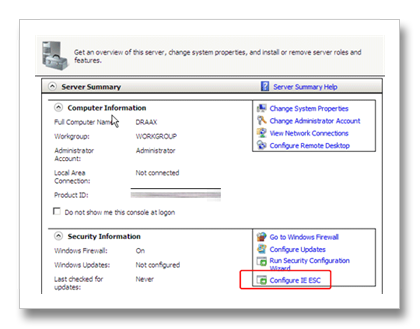
  2. Disable IE Security
    Start->Server Manager->Configure IE Sec->Off both options.
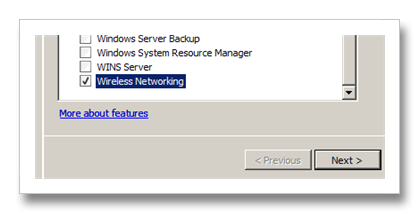
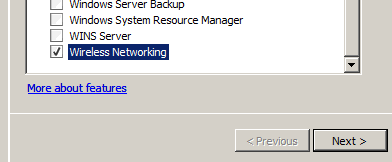
  3. Enable Wireless Support
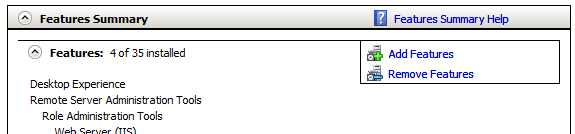
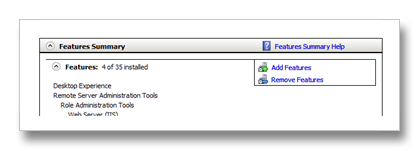
    Start->Server Manager->Features->Add Feature->Wireless LAN Services
  4. Enable Audio support
    Start->Run->"Service.msc"->Windows Audio -> Automatic
    Start->Run->Services.msc"->Windows Audio Endpoint Builder->Automatic
  5. Install hardware drivers
    I am using ThinkPad t60p so my driver list is here
    Note that mobility center is missing from windows 2008 server so there is no need to install it.
    IBM Network access connection will crash on you if you will not enable the wireless support (Look above)
  6. Enable Vista Experience (look & feel including Aero, Media Player etc.) 
    Start->Server Manager->Features->Add Feature->Desktop Experience

    More info including how to enable sleep support on windows 2008 server you may find over this kb: http://support.microsoft.com/kb/947036)
  7. Enable Themes
    Start->Run->"Service.msc"->Themes->Automatic
  8. Enable .NET 3.0
    Start->Server Manager->Features->Add Feature->.NET Framework 3.0 Features
  9. Enable Windows Search (for searching outlook emails)
    Start->Server Manager->Roles->Add Roles->File Services->Windows Search
  10. Enable SuperFetch
    Start->Run->"regedit"

    HKEY_LOCAL_MACHINE\SYSTEM\CurrentControlSet\Control\Session Manager\Memory Management\PrefetchParameters

    Add a new DWORD by the name of EnablePrefetcher and assign is the value of 3
    Add a new DWORD by the name of EnableSuperfetch and assign is the value of 3

    Start->Run->"services.msc"->SuperFetch->Automatic
  11. Install Messenger
    Latest Live Messenger will not install on Windows 2008 Server, you should install a former version (8.1 and not 8.5) and then you may copy the Live Messenger folder from a working machine and work with it.
    http://www.microsoft.com/downloads/details.aspx?FamilyID=d78f2ff1-79ea-4066-8ba0-ddbed94864fc&DisplayLang=en
  12. Install Skype
    Latest Skype version will crash 2 seconds after login, you need to install a former skype version Skype 3.1.0.152 works great.
    http://filehippo.com/download_skype/2473/
  13. Install Office 2007
  14. Install Visual Studio 2008
  15. Setting Processor Scheduling
    Start->Control Panel ->System ->Advanced system settings-> Advanced -> Performance -> Settings->Advanced->Adjust best performance->Programs
    update:
  16. Changing DEP Mode
    Start->Control Panel ->System ->Advanced system settings-> Advanced -> Performance -> Settings-> Data Execution Prevention-> Turn On DEP for essential Windows programs and services.
    update2:
  17. Fixing ASP.NET Development Server
    After installing visual studio you might want to start working with Casini, the asp.net dev server but it seems that the ie cant find it.
    Edit the hosts file located at: C:/windows/system32/drivers/etc

    comment the following line :
    ::1             localhost
    by replacing it with:
    #::1

    (the "::1" is use for the localhost for ipv6)
Comments

typeof.net said:

Regarding the point 12 - Skype, I had same problem and newer version 3.2.0.145 (comparing to 3.1.0.152 you mentioned) is working great too.

Thanks for "Disable IE Security", very useful for me!

# February 21, 2008 6:50 AM

DotNetKicks.com said:

You've been kicked (a good thing) - Trackback from DotNetKicks.com

# February 21, 2008 6:52 AM

steveclements said:

Why have you had enough of Vista?

I have been using Vista for a while and dont have any problems (until the network guys pissed about with WSUS!).

I dont get the hatred!

# February 21, 2008 7:01 AM

Will Green said:

Um, you do know that Vista and Windows Server 2008, unlike previous client/server releases, are based on the same code base, right?

Seems like a lot of work just to get back to a Vista experience.

# February 21, 2008 7:01 AM

Joe Chung said:

What's the advantage of running Windows Server 2008 RTM over Vista SP 1?

# February 21, 2008 7:08 AM

Ohad Israeli said:

Why i've decided to downgrade, well i've been working with vista from the earliest beta on a high end laptop and it was just too slow for me.

Why configure win2008 which is the same code base of vista and work with it, well because it comes with lots of vista services turned off and is tuned for performance it just runs much much much more quickly !

# February 21, 2008 7:18 AM

Ohad Israeli said:

As was a beta tester of vista sp1, it does improve vista's experiance but i can't even compared how fast and smooth my laptop is currently running then with vista sp1.

# February 21, 2008 7:20 AM

typeof.net said:

I think one important thing is missing on the list - setting Processor scheduling to 'Programs' instead of 'Background Services', which is default on server system.

Can be found under System Properties -> Advanced -> Performance [Settings] -> Advanced.

# February 21, 2008 7:42 AM

Mike Chaliy said:

Actually much more interesting pricing...

Windows Server 2008 Standard is $999

at the same time

Windows Vista Ultimate - $400

Windows Vista Business - $300

I do not think that $700 is reasonable here...

# February 21, 2008 8:21 AM

typeof.net said:

Joe Chung:

The advantage may be you can develop/test your software on "real" environment on which application will be deployed, in case of web apps for example without need of virtual machine.

Same applies for WSS which you cannot install on non-server version of OS.

I think some others also can be found, anyone ? :)

# February 21, 2008 8:28 AM

Mark Wisecarver said:

Very helpful, thanks.

# February 21, 2008 8:34 AM

typeof.net said:

Mike Chaliy:

You can access Microsoft ISV (or another partner program/MSDN subscription) and get all MS software for development for few hundred dollars or so...

# February 21, 2008 8:42 AM

Ohad Israeli said:

Indeed Windows Server 2008 cost much more then vista but well... i do own an MSDN Premium so the $$$ diff. does not play much for me.

Regarding why... well i do like as a developer to have all my options open, for example if i want to simulate working with active directory or develop server side service and be sure it will work as it should i find it very usefull to develop it on the operating systems that will run it by the end.

If you are looking at secure developments, which is another issue, by developing on the target platform i can be sure that i will not need to elevate the application permission when it comes to deployment as i will be facing most of the problems ahead while developing the service.

# February 21, 2008 8:43 AM

James said:

Ahh - I did the same thing when the Windows 2008 RC came round, then went back to Vista once I had SP1.  Have to say - I much prefer Windows Server 2008 - as a workstation - it ROCKS! - and that was the RC - now it's released, I'm sure it's improved.

One thing - how do I install LiveWriter on it?  LiveWriter is one of the more excellent products to come out of Redmond recently, so I would really like to continue using it.

# February 21, 2008 11:30 AM

Ohad Israeli said:

I used live writter to post this blog... instead of installing it just copy its dir from a working machine and run it.

# February 21, 2008 12:28 PM

PBZ said:

I've been using W2003 as a workstation for years now, it's imo faster and more stable than XP; and doesn't slow down with time. I've tried Vista and 2008RC and there's no comparison. 2008 is smooth and snappy. Vista is sluggish and quirky. Not sure if SP1 makes a difference.

I wish MS would have a 2008 developer license. Basically same price as Vista Ultimate but you would not be allowed to use it as a production server. I think there would be a lot of developers who would rather run the server edition than the desktop.

# February 21, 2008 1:08 PM

James said:

Great - I'll do that - but can't we get MS to provide a real workstation SKU?

Interesting that I always used the server product as a workstation - untill the release of XP which I thought was 'good enough'

Now I feel myself wanting to go back to the server product...

# February 21, 2008 1:46 PM

James said:

O - and is it worth running 64 bit with Hyper-V?

# February 21, 2008 1:52 PM

Ishai Sagi said:

The problem I had with 2008 on my laptop is that there is no bluetooth stack that works with it. Thanks for the skype thing - that really got me so pissed off I downgraded to vista sp1 - which works great!

# February 21, 2008 5:28 PM

thomasvochten.be said:

Windows Server 2008 on a laptop

# February 22, 2008 2:05 AM

Thomas said:

The Toshiba bluetooth stack seems to run just fine on my W2K8 laptop

# February 22, 2008 2:08 AM

Mind Gravy » Blog Archive » links for 2008-02-22 said:

Pingback from  Mind Gravy  » Blog Archive   » links for 2008-02-22

# February 22, 2008 7:30 AM

Aaron Steele said:

Found a bluetooth stack that worked for my Dell Latitude D830. Oddly the stack from Toshiba worked. the Chipset looks to be from Cambridge Silicon Radio.  It is marked as a Dell Wireless 360 Module.  The driver I downloaded from a Toshiba Europe site, hosted in Germany contained v51012T_20070531 of the Bluetooth stack. The drivers loaded up and I was able to pair with my Bluetooth mouse.  Also, the KB you mention support.microsoft.com/.../947036 says that things like Bluetooth and the Mobility device center do not work. I found the Mobile Device center to work right off an install for 64 bit Vista onto my Server 2008 laptop.   I have yet to be able to get the Sidebar working, though the KB above says it gets installed by the desktop experience pack.

# February 22, 2008 4:52 PM

karlmueller said:

Thanks very much for the Skype trick!

I am running Windows Server 2008 x86 for about ten days on my desktop workstation computer (P4 3,2 GHz, 2 GB RAM) and it runs very smooth.

Today I installed the x64 edition onto my brothers gaming machine (Core 2 Extreme, 2 GB RAM) and it is running there much better than XP Pro and Vista ever did. Even my brother now believes me that Server 2008 is much better than this crap called Vista.

But we've still got the following "issues":

-he would like to have the Sidebar, unfortunately I was unable to port it from Vista SP1 RTM to Server 2008 RTM in the way it was discribed for the Server 2008 release candidate. I have tried to port the Sidebar from Vista Ultimate SP1 x86 to both Server 2008 x86 and x64 both without any success :(

-my brothers MP3 player (Zen Vision:M 30 GB) is not recognized by Windows Server 2008 because it seems that those damn MTP stuff is not included in Server 2008

-the Skype bug which should be fixed by now thanks to your help :)

Does anybody know how to fix the problems described above?

Thanks

karlmueller

# February 23, 2008 5:15 PM

Tom nuen said:

Damn, I did exactly what you did on my MacBook. Love it!!!!

Vista -> XP SP3 RC -> Windows Server 2008 RTM

# February 26, 2008 1:09 AM

Kando said:

Great job. You saved me a lot of time.

# March 5, 2008 1:43 AM

Mogens Nielsen said:

Thank you very much for this list.

Looks like everything is working out for me..

# March 6, 2008 1:28 PM

Hok said:

Tried RTM Trial 32 bit on My DELL Latitude D630. All works just fine. It just like everyone says, it the best windows ever.

# March 9, 2008 7:40 AM

Dmitri said:

Do you know what antivirus software will work with Windows 2008 x64?

# March 9, 2008 2:06 PM

dstoker509 said:

Any thoughts about changing the DEP mode from Level 2 (server default to scan all processes) to Level 1 (XP SP2 and Vista default to scan only OS essential processes resulting in better performance).  It is a security / performance tradeoff, but it will match to the client default for a performance gain.

# March 10, 2008 1:09 AM

Ohad Israeli said:

dstoker - Yep i did change the DEP but forgot to update the list, thanks.

Dmitri - NOD works fine.

# March 10, 2008 2:18 AM

Amit said:

where Did u found te dell d630 chipset inter 965 drivers ?,thanks

amitrip@gmail.com

# March 10, 2008 5:37 PM

Code for Web » Windows Server 2008 said:

Pingback from  Code for Web » Windows Server 2008

# March 11, 2008 2:34 AM

blogue à part - mon journal d'architecture said:

Après le lancement, j'ai décidé que je configurerais mon ordinateur portable afin d'en faire une vraie

# March 11, 2008 9:38 PM

Noticias externas said:

Après le lancement, j'ai décidé que je configurerais mon ordinateur portable afin d'en faire

# March 11, 2008 10:11 PM

MSDN Blog Postings » Recette pour un poste de travail Windows 2008 said:

Pingback from  MSDN Blog Postings  » Recette pour un poste de travail Windows 2008

# March 11, 2008 10:52 PM

Mike said:

I have moved from Vista64 to Server 2008 and I am very happy but I have noticed that the option to change hardware acceleration - do you know how I get change it - it is disabled for me

# March 12, 2008 6:41 PM

Darek said:

Ok, but what about burning dvd/cd.

Now i can't do it. System doesn't detect by burner.

I can read files from it but not write.

# March 15, 2008 2:00 PM

Leon Meijer said:

I installed Windows Live Writer by copying from my Vista. It works without problems. This trick doesn't work for Live Messenger.

# March 15, 2008 3:28 PM

Saucy said:

My SONY Handycam DCR-HC26 connected by firewire is automatically detected and installed with Vista and Vista SP1.

However, switching the computer over to Server 2008 and it doesn't even know there's a camcorder attached. I did try with USB [instead of Firewire] and Server detects that's there's hardware there [and the even name] but doesn't install any drivers.

I lost my SONY install disk ages ago and SONY charges 30 bucks for the replacement CD - not including handling - which makes it awkward.

Seems like I will be switching the machine to Vista SP1. Oh well, because I liked Server 2008 as a workstation right off the bat.

BTW has anyone had success with camcorders and Server 2008?

# March 15, 2008 11:25 PM

Ohad Israeli said:

Leon - The trick for installing msgr is installing the former version and then using a copy of the new  version which works great.

Saucy - What you can try is have Vista installed somewhere, connect the CAM and check for the windwos\drivers for oem1.inf ... oem2.inf... oemX.inf till you find the right inf file, look at the inf which is a text file for what drivers it is using and where it puts them and you'll be able to move them to the windows 2008 server, most of the drivers for vista will work simlessly with windows 2008 server.

Darek - i've installed dvd burner software without a prob. you may check my former advise about the inf files and see if it helps you.

# March 16, 2008 12:42 AM

Ohad Israeli said:

Saucy - you may want to try getting the XP driver from here and try it :

members.driverguide.com/.../detail.php

# March 16, 2008 12:44 AM

Titof said:

Sorry, I don't know if my last comment was sendend because I wasn't logged in.

I have 2 questions:

  - How to activate the use of offline folders ?

  - How to activate de hibernate modes ?

Thanks in advance. Regards.

# March 17, 2008 6:37 AM

Leon Meijer's Weblog said:

Looking for a new workstation -update

# March 17, 2008 4:45 PM

Jeremy said:

Thanks for all the great advice above.  The only remaining problem I am running into is loading the Exchange 2003 management tools.  Microsoft apparently does not support this, and I have seen several hacks for getting it to work on vista.  

Does anyone have any advice on getting the Exchange 2003 management pack installed and working on Server 2008?  I'm mainly looking for the snapins for ADUC.  

# March 19, 2008 5:30 PM

Heath Provost said:

Offline Files in 2k8:

1. By default, 2k8 does not seem to create the C:\Windows\CSC folder, but all the other needed components are installed. If you do not have this folder, just create it manually before proceeding further.

2. Create/edit the following registry keys:

Key: KLM\System\CurrentControlSet\Services\CscService\Start

Type: REG_DWORD

Value: 2

Key: KLM\System\CurrentControlSet\Services\CSC\Start

Type: REG_DWORD

Value: 1

Key: KLM\System\CurrentControlSet\Services\CSC\Parameters\FormatDatabase

Type: REG_DWORD

Value: 1

Key: KLM\System\CurrentControlSet\Services\CSC\Parameters\CacheLocation

Type: REG_SZ

Value: \??\c:\Windows\csc (yes, with the weird looking question mark stuff)

Note: The \Parameters key above may not exist, you will have to create it if it doesn't.

3. Reboot and offline files should be functional.

# March 19, 2008 11:47 PM

  Windows Server 2008 as a Workstation by Kilroys Technology Services said:

Pingback from    Windows Server 2008 as a Workstation by Kilroys Technology Services

# March 20, 2008 9:22 PM

Ed said:

Anyone know how to get DVDs to play in WMP. Downloaded the Cyberlink DVD codec. I get Video but no audio. DVDs play well in Cyberlink power dvd premium. Also cant get any audio in DVR-MS files. I can however play them with VLC Media Player.

# March 27, 2008 4:14 PM

A2k said:

I was able to install the Windows Sidebar on Server 2008 64bit by downloading and following the instructions here:

www.win2008workstation.com/.../installing-the-vista-sidebar

I hope this helps others as it helped me after searching for about a week!

# March 27, 2008 10:13 PM

Michael said:

Great post and I appreciate the tips. However I have still been unable to figure out how to get the driver for the wireless nic in my Latitude D830 setup on server 2K8.

# March 28, 2008 11:35 PM

Alex said:

Just a note regarding "Offline Files in 2k8" post above.

All the tweaking steps can be reduced to:

1. Go to Control Panel -> Offline Files and click "Enable Offline Files" button.

2. Reboot.

# April 3, 2008 3:49 AM

Ian Suttle's Blog said:

Running Server 2008 as a Workstation

# April 23, 2008 5:14 PM

x9zero said:

Can someone help with cinepak cvid (cinepak by supermac)?

Copying of dll and editing of register does not work.

# April 24, 2008 3:51 PM

Basketball Chat » Blog Archive » Recette pour un poste de travail Windows 2008 said:

Pingback from  Basketball Chat  » Blog Archive   » Recette pour un poste de travail Windows 2008

# May 17, 2008 4:02 AM

Tech said:

Very nice. I did it and it worked better (reliable) than Vista. Same, maybe. Exactly the same. I doubt it. Mine was free from college MSDNAA program.

Join the engineering school. Yours is free as well.

Tech

# May 17, 2008 6:42 PM

Haresh.Joshi@ieee.org said:

Hi,

Over the last fifteen years, I have always found the Server OS to be better suited to people without the luxary of "messing around" time.

In each case I do miss the multimedia capabilities (in the case of Vista Ultmate the media centre).

I also went with the W2K8 vs Vista (even Ultimate).

I wish they's put in the Mulitmdeia stuff in the server system and the stability in the client OS - Especially since as someone said they are both built from th same code base!

By the way your step-by-step article on the installation is great! I wish I'd seen it earlier, would have saved me a lot of time.

(I am using T61P).

Haresh.

# May 19, 2008 4:27 PM

Haresh.Joshi@ieee.org said:

Hi,

Perhaps you could help me with W2K8 Dialup networking:

1. What is the simplest way of dialing up my ISP by using the old fashioned RAS?

2. Where are the phone numbers storred used for dialup in W2K8.

3. Can I just use my old phonebook entries from W2K3?

Thanks.

# May 19, 2008 4:52 PM

MetalPhreak said:

NOD32 standard home edition will not install (not for server use message). Business edition runs fine though :D

Also, good list of working apps here:

www.win2008workstation.com/wordpress

Down the bottom: "Applications Compatibility (x86) (x64)"

# May 20, 2008 5:44 PM

Thomas Goddard said:

Too many unknowns, when you have problems you're not sure if it's 2008 or something else, drivers not always functional, devices not recognized, graphics slower in some situations.  Back to Vista Ultimate for Me... I wouldn't notice a difference except Hyper-V management from remote.

# May 23, 2008 4:19 AM

Paul Munro said:

I just moved from Vista Ultimate to Server 2008, and following the various threads on the topic regarding optimizing the OS for a desktop experience have found Windows Server 2008 to be just about the best experience I have had on an MS OS to date (at least since Server 2003 anyways). Development tools seem snappier, the driver support is excellent (I used all my Vista drivers) and I have the luxury of running basic AD stuff in the background for a small home network. It's cool!

# May 25, 2008 6:53 AM

John said:

How were you able to get sleep functionality enabled on the Dell D630? I haven't been able to get the option enabled, despite the fact that it worked great in Vista, and all of my device drivers appear to be up to date.

# May 28, 2008 3:05 PM

Thomas Lee said:

I love these mods. I've got two of my systems, previously running Vista, converted. This really is what Vista should have been.

# May 30, 2008 10:33 AM

Felipe Zuñiga said:

Hi guys,

I installed Win2008 x64 on my HP Laptop and installed the Vista drivers for all devices.

It works great!!! (Even the fingerprint reader...)

# June 1, 2008 2:13 PM

Prince Kanago said:

Yes, I got opportunity to use Windows 2008 and its an experience, it surely helps the System Administrators and definitely soon companies would upgrade them to 2008,

# June 2, 2008 5:52 AM

Johann Hough said:

New version of Skype released 3.8.0.139. It works with Server 2008.

# June 11, 2008 1:47 AM

Spyware said:

Looking for even more good content on internet security and identity theft prevention tips then have a look here

# June 15, 2008 6:21 PM

Enterprise Software Development » Blog Archives » HOWTO Install Windows Live Writer on Windows Server 2008 said:

Pingback from  Enterprise Software Development  » Blog Archives   » HOWTO Install Windows Live Writer on Windows Server 2008

# June 18, 2008 10:40 AM

Derek Bartram said:

MSN Messanger won't install as standard, however the beta version 9 works and installs fine.

I can confirm that DreamScenes can also be made to work.

# June 23, 2008 4:47 PM

PC Security said:

For even more good info like this take a look at the free info on software and all kinds of free antivirus stuff.

# June 26, 2008 11:16 AM

Dmitri said:

Is there any web cam works under Win2008?

# July 3, 2008 10:46 AM

Dmitri said:

Looks like Skype 4 beta works with Win2008 x64

# July 3, 2008 4:55 PM

Rich Internet Applications and the Programmable Web said:

I configured my Lenovo 4 gigs/64bit 2.2 ghr dual core as Windows server standard 2008 workstation for

# July 11, 2008 3:26 PM

Basketball Chat » Blog Archive » windows 2008 Workstation Lenovo T61p said:

Pingback from  Basketball Chat  » Blog Archive   » windows 2008 Workstation Lenovo T61p

# July 11, 2008 5:04 PM

Lipitor and alcohol. said:

Side effects from lipitor. Lipitor the drug. Lipitor reviews. Lipitor.

# July 15, 2008 10:06 AM

The things that are better left unspoken said:

Looking at websites with appealing names like www.win2008workstation.com there seem to be (home) users

# July 19, 2008 6:15 AM

Data centres to Climbing centres » Using Windows Server 2008 as a workstation OS said:

Pingback from  Data centres to Climbing centres » Using Windows Server 2008 as a workstation OS

# July 21, 2008 11:49 AM

Steve said:

I've created a fairly complete guide on how to get Win2k8 running on Dell's XPS M1330 including Wireless LAN, full 3D video and audio support, working Bluetooth stack and much more.  You're all invited to have a look.

Steve

# July 21, 2008 3:45 PM

aglaser said:

Using Server 2008 since a few month as a workstation... and it runs as fast as on the first day.

# July 25, 2008 4:09 AM

Server 2008 and no audio - Computer Forums said:

Pingback from  Server 2008 and no audio - Computer Forums

# August 12, 2008 12:35 PM

Stuart said:

Latest version of Skype works OK now...

# August 18, 2008 4:15 AM

Ultracet. said:

Difference between percocet and ultracet. Ultracet addiction. Ultracet.

# August 25, 2008 3:22 PM

RuralPilot said:

I have successfully installed W2K8 on my Lenovo 3000 Laptop. Was still using XP/Kubuntu dualboot. Vista was running dreadfully slow. W2K8 rock !!!

But I still have 3 unknown devices in DM...tried all the triks to find drivers ...but invain :(

Thanks to Ohad for sharing his experience.

# August 28, 2008 9:19 AM

Mac: Installing Windows Server 2008 x64 on a Macbook Pro | Cypris' lookout said:

Pingback from  Mac: Installing Windows Server 2008 x64 on a Macbook Pro | Cypris' lookout

# August 31, 2008 12:25 PM

Dedicated server india said:

Atlast Windows 2008 comes with Hyper - V . Lets hope the security features in Win 2008 address the loopholes in win 2003

# September 2, 2008 10:49 AM

Grapjas said:

So I finally decided to move away from XP Pro a couple of days ago. Vista was a real contender for my

# September 3, 2008 2:52 AM

Kenneth said:

Hi there

I have installed Windows Messenger 8.5 on my Windows Server 2008 64 bit workstation/laptop and it works like in Vista. You just have to download the msi file and NOT the installer. Because it makes some validation and the msi file doesn't.

MSI file I used: www.softpedia.com/.../MSN-Messenger-8-Download-68149.html

Installation guide from: http://windowsitpro.com

"There are numerous methods to obtain the Live Messenger installer. First, you can go to a site such as www.softpedia.com and search for Install_WLMessenger.msi or Windows Live Messenger. Second, on a Windows Vista machine, you can perform an installation of Windows Live Messenger, then go into Windows Explorer and remove the option to hide protected OS files. Browse to C:\Program Files\Common Files\WindowsLiveInstaller\MsiSources, and copy the MSI file to your Server 2008 machine. The latter is the safest option because you know the source of the files you’re using."

Hope it works for you ;-)

Best regards

Kenneth

# September 24, 2008 3:38 AM

Crettetle said:

Hello.

:)  The natural photo of the new arrival, taken by Emma Tallulah's dad,

 Bye.

# October 16, 2008 3:33 AM

Mike said:

I have a Dell Dimension E520 with 4GB RAM and an Dell OEM (64) version of Server 2008.

I decided to strip out all of my PCI devices and the video card first to test out the OS with a "basic" system, eg., one that would present few driver issues, and then integrate each PCI devices one at a time.

The advantage of paring the OEM verions with manufactured PC is that the BIOS has a SLIC table entry and I don't have to register the OEM version. That was truely a bonus.

The installation was smooth as glass. All the drivers on a basic Dell platform are either part of the OEM OS or downloaded on update. I didn't need to go to the Dell site once, not that they currently offer any help for Windows 2008 Server drivers.

I did have some problems with virus scanners and tried a trick with AVG posted on the net, but in the end I purchased a 2-user server license for $79.

My experience after tweeking around (see above) is that Windows 2008 Server rocks. I've been an avid user of Vista Ultimate 64 for over a year and I understand how to tweak the heck out of Vista. But I could never tweak it to perform like Windows 2008 Server.

I use Hyper-V and have Linux, Windows XP, and Vista Business 32 Virtual Machines running on a 1TB drive.

So my vote is Windows 2008 Server as a Workstation, tweaked without cracks. No slow downs, excellent performance and for me the ultimate workstation OS.

Hardware drivers are still a pain in native OS, but the other VM Servers pick up the PCI devices without a problem.

# October 19, 2008 11:08 PM

HmH said:

Vista & Srv 2008 same thing after release Vista SP1 RTM, lot of time to nowere.

# November 17, 2008 3:48 AM

tom said:

i just installed a free copy of Server 2008 Standard x64 on my Thinkpad X61 (as a university student you can get it from Dream Spark).  I used XP X64 for 6 months and Vista Business x64.  I tweaked XP and Vista quite heavily.

This Server 2008 Standard thus far is much faster and seems a lot more stable.  It took a little easy tweaking and there is an automated program to make it into a desktop OS (see here) www.win2008workstation.com/wordpress).

I know the kernel and everything is supposed to be the same as Vista, but performance wise Win2008 is a fantastic OS.  Microsoft could easily change a few things and market it as Windows 2008 Professional (a successor to Win2k).

# November 18, 2008 2:59 AM

Elegant Code » Windows Server 2008 on My Dell m1330 said:

Pingback from  Elegant Code » Windows Server 2008 on My Dell m1330

# November 21, 2008 4:00 PM

Windows Server 2008 as a workstation « Random Windows Tips & Fixes said:

Pingback from  Windows Server 2008 as a workstation « Random Windows Tips & Fixes

# December 15, 2008 12:25 PM

Marat Bakirov [MSFT] said:

Так как руки уже чешутся поставить Windows 7, решил пока не поздно рассказать как ставил себе Windows

# January 30, 2009 1:26 AM

Using Windows Server 2008 as a workstation « Brian Farnhill said:

Pingback from  Using Windows Server 2008 as a workstation « Brian Farnhill

# February 11, 2009 1:53 AM

tush said:

Is it compulsory to set "Setting Processor Scheduling "???

Thanks for great help

tush

# March 3, 2009 3:18 AM

Shane Phillips said:

Everything works smooth with Windows Server 2008 and much awaited Hyper-V Harware Virtualization that is included in Windows Server 2008.

Regards,

Shane Phillips

# May 8, 2009 2:45 PM

System Center Spartan said:

Question for the author of this blog and/or anyone else:

Has anyone experienced issues with running Live Messenger (latest version) on Windows Server 2008 after applying Windows Server 2008 Service Pack 2?

I can no longer get the application (Live Messenger) to launch, where as before I had no issues...

Anyone experience this after installing SP2 for W2K8?

# June 2, 2009 10:04 AM

Philip Lloyd Roberts » Blog Archive » Windows box upgarde? said:

Pingback from  Philip Lloyd Roberts  » Blog Archive   » Windows box upgarde?

# August 21, 2009 1:41 PM
Thanks for sharing your feedback! If your feedback doesn't appear right away, please be patient as it may take a few minutes to publish - or longer if the blogger is moderating comments.
Leave a Comment

(required) 

(required) 

(optional)

(required)