How to quickly format a C# class file – Ctrl-K, Ctrl-D
In C# as you are typing in a class file the indenting of your code can easily get out of alignment making the code hard to read. Where does your class, if block, or method begin and end??
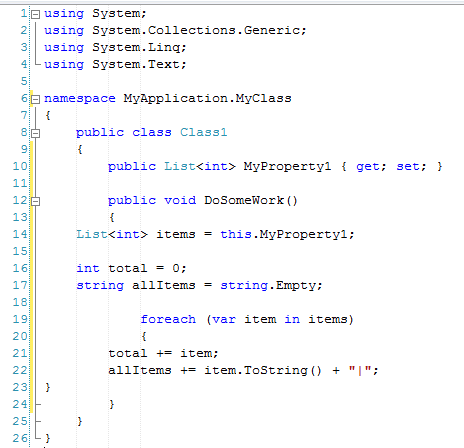
You can manually go and fix each line but there is a much simpler way to correct the indenting. You can use Ctrl-K, Ctrl-D to format the entire document. Now your code will be reformatted to the correct indenting for your page.
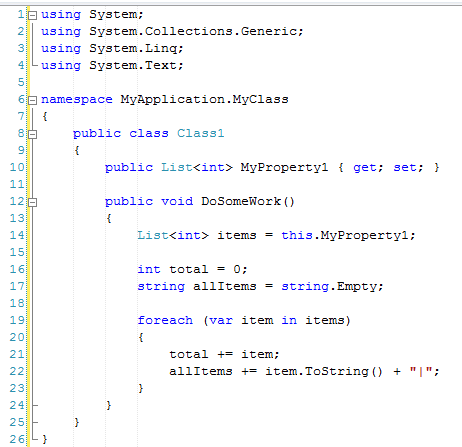
Couple things to note:
- If there are errors in the structure of your code (missing closing brackets, missing semi-colon, etc.) then this will not work. This will still work with other errors such as undeclared variables.
- If you are working on legacy code (for example fixing a bug) and there is a different indenting structure, it is good practice to stick with the legacy indenting and not modify the indenting of the entire file just because you fixed a bug in one line of code. You should try to minimize your code change to only what was necessary to fix the bug (don’t reformat the entire file). The next person that does a diff on your check-in with the previous check-in will thank you.
- I also leave the Visual Studio indentation settings alone and stick with the defaults. If you have a different indentation style than a code file that was previously checked, this process could also cause the subsequent diff to show lots of red.
- You can use Ctrl-K, Ctrl-F on smaller blocks of text, so if you have a strange indenting style then highlighting only your change can correct the indentation on the selected lines and not the entire file.
- These can be found under the Edit > Advanced Menu:

- Cutting and Pasting is also another way to get the content formatted quickly:
- Ctrl-A, Ctrl-X, Ctrl-V

Technorati Tags: Visual Studio Tip and Tricks