SQL Server 2008 Service Pack 1 and the Invoke or BeginInvoke cannot be called error message

When trying to install SQL Server 2008 Service Pack 1 to a SQL Server 2008 instance that is running on a virtual machine, the installer will start:
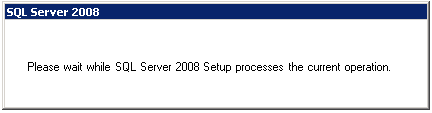
image 

But then after about 20 seconds I receive the following error message:
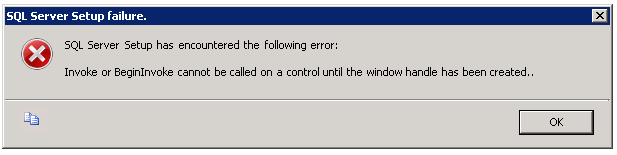
image

TITLE: SQL Server Setup failure.
-----------------------------
SQL Server Setup has encountered the following error:
Invoke or BeginInvoke cannot be called on a control until the window handle has been created.
------------------------------
BUTTONS:
OK
------------------------------

Searching for this issue I found that several people have the same problem and there is no clear solution.  Some had success with closing windows or Internet Explorer but that didn’t work for me; what did work is to make sure the SQL Server 2008 “Please wait while SQL Server 2008 Setup processes the current operation.” dialog is selected and has the focus when it first shows up.  Selected (with the current focus) it looks like this:
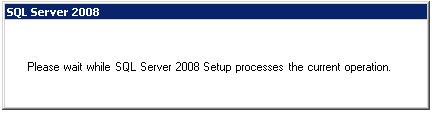
image 

Without focus the dialog looks like this:
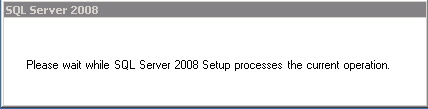
image

Add a comment if you find out any information about how to consistently get around this issue or why it is happening in the first place.

Published 30 May 2010 03:23 PM by Jeff Widmer
Filed under:

Comments

# Twitter Trackbacks for SQL Server 2008 Service Pack 1 and the Invoke or BeginInvoke cannot be called error message - Jeff Widmer's Blog [asp.net] on Topsy.com said on 30 May, 2010 05:13 PM

Pingback from  Twitter Trackbacks for                 SQL Server 2008 Service Pack 1 and the Invoke or BeginInvoke cannot be called error message - Jeff Widmer's Blog         [asp.net]        on Topsy.com

# Rolly Salonoy said on 02 June, 2010 05:18 AM

The easy way to get around this problem is to extract the file (SQLManagementStudio_x86_ENU application is in a compressed format) to a new folder, name the folder appropriately, and run the setup from there.

# Emil Nordén said on 07 June, 2010 06:41 AM

Thanks alot for this!

I found other sites saying that a reboot would be the solution, but it didn't work for me.

Making sure that dialog was focused did the trick!

# Udayarc said on 16 July, 2010 10:13 AM

Thanks.

Extracting the exe file worked for me

# Venkatx5 said on 27 July, 2010 05:01 AM

Thanks a lot.

I did the below.

1. Installed .net framework 3.5

2. Installed Power Shell (It wasn't installed before).

3. Restarted. ( :) SQL Server setup shown this as error)

4. Extracted the SQLServer Setup.exe to a folder and executed setup.exe in it.

It started working.. :D

# Mikle said on 14 September, 2010 08:50 AM

It's working! But you should not deactivate this window all the time while it's visible.

# denise said on 15 September, 2010 02:56 PM

I got this error installing sp1 on SQL Server 2008 standard ed. When I tried to redo it it won't. It says it's installed already.  How can I tell if it installed correctly, should I uninstall and reinstall everything?

Thanks very much.

# xptiger said on 26 January, 2011 08:49 AM

1) In the Installation Disc you will find a folder, x86 and x64

2) Select as per your OS and go inside the folder

3) Click on the LandingPage.exe

4) It will show the page, in that click on the second Option on the left hand menu "Installation"

5) Click on "Start Standalone installation from the menu at the right side

6) It will ask for the location files on the disc

7) Show the location, e.g. /SQL Server Enterprise 2008/x86

It will complete the installation successfully

# Instala????o do SQL Server 2008: erro bizarro, solu????o idem « goncin@wordpress.com:~$ _ said on 17 February, 2011 05:17 AM

Pingback from  Instala????o do SQL Server 2008: erro bizarro, solu????o idem « goncin@wordpress.com:~$ _

# Muhammed Mohsin Khan said on 17 March, 2011 03:43 AM

solution

go to your Dns server. Add the account from you installing sql in it.

# weblogs.asp.net said on 24 March, 2011 05:09 PM

Sql server 2008 service pack 1 and the invoke or begininvoke cannot be called error message.. Slap-up :)

# Nicke said on 01 April, 2011 09:21 AM

Hi, I had this problem when trying to update SQL Server running on a virtual machine.  It went away when I gave the VM more memory.

# SQL Server 2008 Service Pack 1 and the Invoke or BeginInvoke cannot be called error message « Michin's Blog said on 03 April, 2011 11:13 AM

Pingback from  SQL Server 2008 Service Pack 1 and the Invoke or BeginInvoke cannot be called error message « Michin's Blog

# Sam said on 24 August, 2011 12:28 AM

Thankyou the unpack first then run worked for me.

# pasha said on 17 November, 2011 04:00 PM

I followed as Mr. xptiger said It worked fine.

thanks for the support

Leave a Comment

(required) 
(required) 
(optional)
(required) 

Search

Go

This Blog

News

Syndication