"Windows cannot find 'http://www.google.com.' Make sure you typed the name correctly, and then try again."

Well, I've done it. I've gone and made Firefox my default browser on my home computer. One of the first things I noticed is that opening a URL as a “Start / Run” command pops up the following error before correctly loading the page:
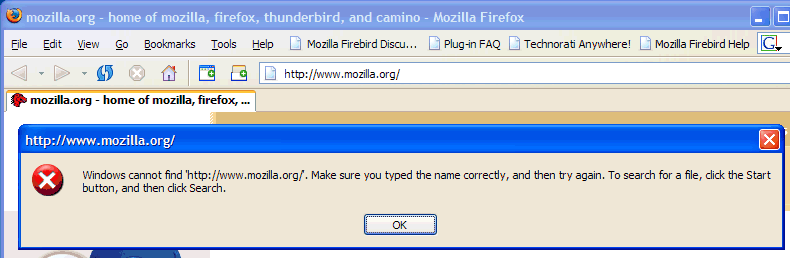
This is a bug in Firefox 0.9 that was supposed to have been fixed in 0.9.1, but still seems to be broken:
Bug 246078: Firefox does a lousy job of making itself the default browser (Funny bug description, no?)

Luke Hutteman describes a manual fix here.

John Haller goes one better with a reg file fix: [description] [ firefox_bug_246078.reg ]

Published Monday, June 28, 2004 9:28 PM by Jon Galloway

Comments

# re: "Windows cannot find 'http://www.google.com.' Make sure you typed the name correctly, and then try again."

Thanks mate, i searched google for this problem and instead of a mozilla link, i got yours fist, and it fixed my problem, cheers!

Friday, July 02, 2004 8:59 PM by Gusto

# re: "Windows cannot find 'http://www.google.com.' Make sure you typed the name correctly, and then try again."

Apparently this wasn't fixed in 0.9.1 -- I've had the problem since setting FireFox as my default browser, but the reg fixed corrected it (win xp).

Thanks!

Saturday, July 03, 2004 12:32 AM by crashed

# re: "Windows cannot find 'http://www.google.com.' Make sure you typed the name correctly, and then try again."

im still having this problem in 0.9.1 also (win xp pro).. bleh. About to appy fix, many thanks.

Saturday, July 03, 2004 12:45 AM by m

# re: "Windows cannot find 'http://www.google.com.' Make sure you typed the name correctly, and then try again."

Same as Gusto here. Thanks a lot for this one.

Sunday, July 11, 2004 7:47 PM by siman

# re: "Windows cannot find 'http://www.google.com.' Make sure you typed the name correctly, and then try again."

THANKS !! WORKS LIKE A CHARM !!!

Scott

Tuesday, July 13, 2004 6:14 PM by ScottW

# re: "Windows cannot find 'http://www.google.com.' Make sure you typed the name correctly, and then try again."

Thank you! Also searched google for this error, it's been bugging the shit out of me!

Tuesday, July 13, 2004 7:00 PM by Brandon Tallent

# re: "Windows cannot find 'http://www.google.com.' Make sure you typed the name correctly, and then try again."

There's always one isn't there. I just get a blank screen.

Mond

Wednesday, July 14, 2004 3:16 PM by Mond

# re: "Windows cannot find 'http://www.google.com.' Make sure you typed the name correctly, and then try again."

Works great, thanks!

Thursday, July 15, 2004 10:06 AM by -

# re: "Windows cannot find 'http://www.google.com.' Make sure you typed the name correctly, and then try again."

Worked for me as well. Thanks! I did notice that noone suggested which fix to choose, I used the second registry fix... Keep on Trucking!

Wednesday, July 21, 2004 2:47 PM by Nick Burns

# re: "Windows cannot find 'http://www.google.com.' Make sure you typed the name correctly, and then try again."

Worked a treat. Thanks!

Thursday, July 22, 2004 5:51 PM by Seumas Mor

# re: "Windows cannot find 'http://www.google.com.' Make sure you typed the name correctly, and then try again."

Wondered what the hell this was, had no such problem with 0.8.

Thanks for the info.

Monday, August 02, 2004 1:34 PM by Bishi

# re: "Windows cannot find 'http://www.google.com.' Make sure you typed the name correctly, and then try again."

Thank you very much for the fix!

Tuesday, August 03, 2004 10:44 PM by Bartosz Kijanka

# re: "Windows cannot find 'http://www.google.com.' Make sure you typed the name correctly, and then try again."

Thanks for the link to the Registry fix. The error was annoying hell out of me! It also cleared up a related issue with links in my emails where I was getting a Cannot Locate Link Browser.

Saturday, August 07, 2004 3:12 PM by Lynn Marshall

# FireFox as my default browser and a short lived technical problem

Wednesday, September 01, 2004 9:36 PM by TrackBack

# re: "Windows cannot find 'http://www.google.com.' Make sure you typed the name correctly, and then try again."

Great fix!  Your fix did the trick!  Thanks!

Monday, August 07, 2006 2:13 PM by Phil Cox

# re: "Windows cannot find 'http://www.google.com.' Make sure you typed the name correctly, and then try again."

What if I do not want to use Firefox?  How do I get this to stop?  Thanks

Wednesday, August 23, 2006 11:54 AM by Eunice

# re: "Windows cannot find 'http://www.google.com.' Make sure you typed the name correctly, and then try again."

What happens now is that when I double click a shortcut, I see a message :

Windows cannot find 'http://www. ADDRESS. Make sure you typed the name correctly,and try again. To

search for a file, click the Start button, and then click Search.

But while the message remains until I close it, the browser does actually open the web site

This happens with any shortcut to any of the web sites, and with newly created shortcuts too. But only on the first shortcut...subsequent ones simply open in a new tab without the error message.

Only happens when clicking a shortcut to open the browser the first time of each session.

Saturday, March 10, 2007 1:00 PM by james

# re: "Windows cannot find 'http://www.google.com.' Make sure you typed the name correctly, and then try again."

I am noushin tehrani I Have problem which windows live my country is netherlands age 21-9-1999 my city is Alkmaar my post cod is 1823VE my email is  noushintehrani@hotmail.com  

Wednesday, April 04, 2007 10:38 AM by noushin tehrani

# re: "Windows cannot find 'http://www.google.com.' Make sure you typed the name correctly, and then try again."

i have which msn windows live I install toolbar Googele  but no changing  toolbar windows live why my email is noushintehrani@hotmail.com august 27- 2004 open email age september 21-1999 first name is nik country is nederland city is amsterdam    

Wednesday, April 04, 2007 11:33 AM by noushin tehrani

# re: "Windows cannot find 'http://www.google.com.' Make sure you typed the name correctly, and then try again."

Cool great solution.

I have firefox 2.0 installed and IE7 is default browser but had the same problem and the same solution solved it

Many Thanks

Saturday, April 07, 2007 8:57 AM by Ali Fakoor

# re: "Windows cannot find 'http://www.google.com.' Make sure you typed the name correctly, and then try again."

me too have firefox 2.0 installed and IE7 installed but in my case firefox was the default browser

//any way i also had the same error msg every time i tried opening *.url files and so far it seems that the reg file solution solved it

thanks a lot!!

doron

Wednesday, April 11, 2007 6:15 AM by doron

# re: "Windows cannot find 'http://www.google.com.' Make sure you typed the name correctly, and then try again."

Yep, for me also, this problem was happening with Firefox 2.0.0.3 and the first fix seems to solve the problem.

Wednesday, April 11, 2007 5:24 PM by Lon Goldstein

# Good site

Ohh s nice site! ygptcf

<a href= http://follow-lolita.lolabuy.com/sweet-lolita-porno.html >sweet lolita porno</a> [url=http://follow-lolita.lolabuy.com/sweet-lolita-porno.html]sweet lolita porno[/url] <a href= http://follow-lolita.lolabuy.com/sweeten.html >sweeten</a> [url=http://follow-lolita.lolabuy.com/sweeten.html]sweeten[/url] <a href= http://lolita-tgp.lolabuy.com/sweet-child-of-mine-guns-n-roses-mp3-file.html >sweet child of mine guns n roses mp3 file</a> [url=http://lolita-tgp.lolabuy.com/sweet-child-of-mine-guns-n-roses-mp3-file.html]sweet child of mine guns n roses mp3 file[/url] <a href= http://dark-lolita.lolabuy.com/sweet-teen.html >sweet teen</a> [url=http://dark-lolita.lolabuy.com/sweet-teen.html]sweet teen[/url] <a href= http://sweet-lolita.lolabuy.com/guns-n-roses-sweet-child-o-mine-letras-en-castellano.html >guns n roses sweet child o mine letras en castellano</a> [url=http://sweet-lolita.lolabuy.com/guns-n-roses-sweet-child-o-mine-letras-en-castellano.html]guns n roses sweet child o mine letras en castellano[/url] <a href= http://lolita-tgp.lolabuy.com/sweet-lolitacom.html >sweet lolitacom</a> [url=http://lolita-tgp.lolabuy.com/sweet-lolitacom.html]sweet lolitacom[/url] <a href= http://follow-lolita.lolabuy.com/sweet-lolita-underage-images.html >sweet lolita underage images</a> [url=http://follow-lolita.lolabuy.com/sweet-lolita-underage-images.html]sweet lolita underage images[/url] <a href= http://follow-lolita.lolabuy.com/sweet-lolitas-nude.html >sweet lolitas nude</a> [url=http://follow-lolita.lolabuy.com/sweet-lolitas-nude.html]sweet lolitas nude[/url]

Good nb Luck Mate!

Friday, April 27, 2007 9:10 PM by orydoveas,orydoveas

# re: "Windows cannot find 'http://www.google.com.' Make sure you typed the name correctly, and then try again."

Many thanks John.......it worked a treat !

Sunday, July 22, 2007 4:35 PM by Pete Ryan

# http lolitas sweet

Pingback from  http lolitas sweet

Thursday, July 10, 2008 1:03 PM by http lolitas sweet

Leave a Comment

(required) 
(required) 
(optional)
(required)