Creating a User Defined Language in Notepad++


I just posted about adding PowerShell syntax support to Notepad++ by adding a User Defined Language definition. It's pretty simple; here's a quick overview of how I did it. For a more in depth overview of the User Defined Language system, check out the Notepad++ docs.

Like most of these editors, Notepad++ saves language definitions in an XML file, but Notepad++ includes front end (the User Defined Language editor), which makes it a lot easier to set it up. You can bring up the User Defined Language editor from the menu (View -> User Define Dialog...):
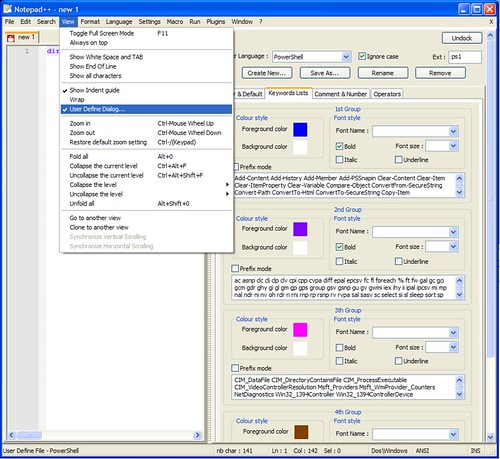
Notepad++ User Defined Language

There are four tabs to fill out - Folder (as in code folding), Keyword, Comment, and Operators. You may have to dig through the docs for the language you're adding to find these, but in a lot of cases it's not to hard to get a list of supported keywords. In the case of PowerShell, you can get a list of all commands by running the "get-command". Make sure to set the file extension and language name. There's no save button, which is a little confusing, but the changes take effect as you make them and the changes are saved to the userDefineLang.xml file when you close Notepad++. If you're just making the changes for your own use, that's it - you're done. But be a sport and share them, would you? It's not too hard - you just have to distribute your changes to the userDefineLang.xml file.

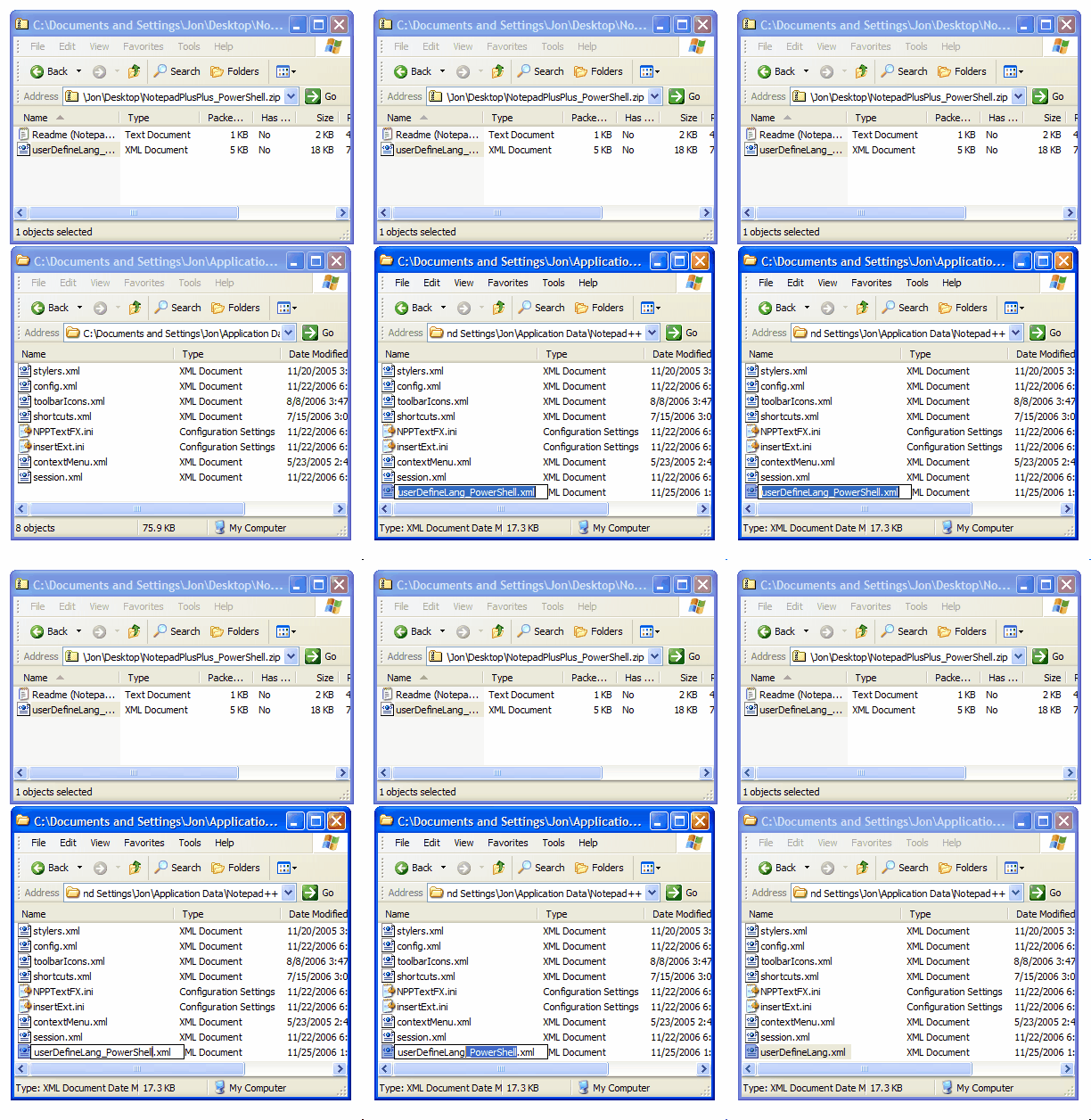
Installing a user defined language file that someone else has written is pretty simple as long as you haven't installed any previously - you just rename the file to userDefineLang.xml and drop it in your %APPDATA%\Notepad++\ directory as pictured below. If you've added other user defined languages, you need to merge the two XML files together. That's pretty bad on the user experience side, but if you're the kind of person who needs two user defined languages, you're a total geek who loves merging XML files anyways.
Published Saturday, November 25, 2006 3:38 PM by Jon Galloway
Filed under: ,

Comments

# Jon Galloway : PowerShell Language Definitions for Notepad++

Saturday, November 25, 2006 6:58 PM by Jon Galloway : PowerShell Language Definitions for Notepad++

# re: Creating a User Defined Language in Notepad++

I finally got a user-defined file to work that someone else wrote.  I had to re-install NP++ and  check the "Dont use %APPDATA%" option box.  THEN it finally worked.  I know of a couple of obscure types I'd like to add in addition to the mapserver file that I got from the link below (which now works).  Thanks for the article (It helped) !

mapserver.gis.umn.edu/.../notepad-syntax-file-for-map-files

Friday, October 12, 2007 4:13 PM by J.B. Churchill

# re: Creating a User Defined Language in Notepad++

Very usefull Jon, thank you for sharing it.

One question though, do you know how to merge say default html colour style with your custom "User Defined Language"?

Monday, January 14, 2008 9:26 PM by Cem Meric

# PowerShell : Quelques outils de développement adaptés

Pour tous ceux qui travaillent avec PowerShell , il est un fait clair : Il n'existe pas encore d'outil

Thursday, July 03, 2008 8:23 AM by Blog Technique de Romelard Fabrice

# PowerShell : Quelques outils de développement adaptés

Pour tous ceux qui travaillent avec PowerShell , il est un fait clair : Il n'existe pas encore d'outil

Thursday, July 03, 2008 8:50 AM by Blog Technique de Romelard Fabrice

# re: Creating a User Defined Language in Notepad++

How can I make the defined language a standard language, if the user defined language dont appear in the list of possible languages?

Preferences - New document - Standard language (default)

Tuesday, July 15, 2008 8:59 PM by Vagner Jeger

# re: Creating a User Defined Language in Notepad++

As someone said before, the userDefineLang.xml file can be located in %appdata% *or* in notepad++'s directory.

In my case, it didn't pick the userDefineLang.xml located in %appdata%, but the one in notepad++'s directory.

Wednesday, August 13, 2008 5:42 AM by Norz

# re: Creating a User Defined Language in Notepad++

Does anyone know if anyone has made a 4DOS implementation of Notepad++ language version? I would be keen to use that. At the moment I use batch language, but it is not that great since a variable in 4DOS would be %var, not %var% as in batch, but apart from that, all goodz.

Wednesday, October 15, 2008 10:57 PM by Nathan

# re: Creating a User Defined Language in Notepad++

I've installed the Autohotkey language file (available on the Notepad++ website) but for some reason it doesn't highlight Keywords if they are followed by a comma, is there any way around this?  Thanks in advance.

Friday, November 14, 2008 5:46 AM by RogueWolf

# re: Creating a User Defined Language in Notepad++

Does anyone know of a NPP language definition for MediaWiki syntax?

Monday, November 24, 2008 7:40 AM by John Doe

# re: Creating a User Defined Language in Notepad++

can i add more file extensions for an existing languages?

i want php styling for ctp extension.

ive added ctp here in langs.model.xml like this:

name="php" ext="php php3 phtml ctp"

but nothing happened.

Saturday, January 10, 2009 5:19 AM by ram

# re: Creating a User Defined Language in Notepad++

Thank you. Very useful tip for me.

Sunday, January 11, 2009 3:20 PM by tolga cam

# re: Creating a User Defined Language in Notepad++

Re: can i add more file extensions for an existing languages?

Yes. Add the extensions in langs.xml, not langs.model.xml

Monday, January 12, 2009 9:04 PM by jsbennett

# re: Creating a User Defined Language in Notepad++

How can I get syntax folding on asp files ?

Sunday, January 25, 2009 2:59 PM by Dee

# re: Creating a User Defined Language in Notepad++

I want to migrate my langage customisation from Editeur (development ended) to Notepad++

But something is stupid for me:

as user defined language are not in separated files, share and upgrade of user defined language will not be easy.

Is there a tool to merge different xml files ?

Tuesday, February 10, 2009 8:17 AM by Gegematic

# re: Creating a User Defined Language in Notepad++

I want to know how can I get syntax highlight for ASP files not only with VBscript code but with Jscript either. Thanks

Monday, March 30, 2009 12:34 AM by Diego

# re: Creating a User Defined Language in Notepad++

I have my userDefineLang.xml file (which I picked up from a website), and I have tried saving it both in the Notepad++ app directory (C:\Program Files\Notepad++) and in application data (C:\Users\Stewart\AppData\Roaming\Notepad++).  However, Notepad++ is refusing to see it at all.  Not appearing in my Language menu, and not highlighting files that have the right extension.  Neither is it offered to me in the Language Menu tab of Preference.  Can anybody suggest why this is happening?  (Notepad++ 5.2, Windows Vista.)

Tuesday, April 07, 2009 4:39 PM by Stewart

# re: Creating a User Defined Language in Notepad++

I am trying to create a user defined language for abaqus input files(.inp).

i need to define code folding such a way that, all lines that occur between the lines that start with a '*' are to be folded.

Friday, April 17, 2009 3:52 PM by bvindh

# re: Creating a User Defined Language in Notepad++

Have created my own User Defined Language. Great System. Is there any way to combine it into the install of NotePad++ so I can avoid telling users to install NotePad++ and then my  User Defined Language. ie Have one install only.

Sunday, June 28, 2009 10:03 PM by Jeff B

# re: Creating a User Defined Language in Notepad++

I've made one for snort rules:

travisgreen.net/2009_07_01_archive.html

Thursday, July 02, 2009 3:25 AM by travis

Leave a Comment

(required) 
(required) 
(optional)
(required)