SQL Server recovery model selection (or, what's this 3GB LDF file?!) - Jon Galloway

SQL Server recovery model selection (or, what's this 3GB LDF file?!)


SQL Server recovery models can be a bit tricky. By default, SQL Server databases are set to Full Recovery mode, which means they maintain sufficient logs to restore to any specific point in time. These logs can grow to several GB for a small, lightly used database over time. For a development workstation, especially if your database is under version control, I like to change the recovery mode to Simple (most cases) or Bulk-Logged at most. Then you can shrink the database, which will clear out the log file in Simple mode - you can do this in SQL Server Management Studio by right clicking on the database, selecting Shrink, then Database. Keep in mind that shrinking databases can be a little more complex that I've pointed out here, but that's not normally important on a developer workstation.
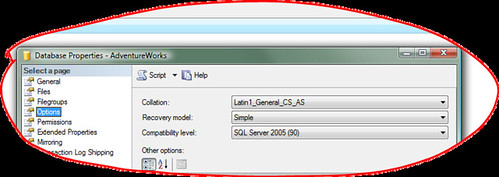
Now, that solves the problem for this one database, but it will crop again the next time you create a database. A good way to deal with this once and for all is to change the recovery mode of your Model database to Simple or Bulk Logged, since that setting will apply to all future databases you create. Just make sure to update the recovery mode when you database is deployed to a production environment.

This is just a simplistic solution for SQL Server running on a developer machine - see some more in depth information on the MS Support site.

Published Sunday, December 17, 2006 1:22 AM by Jon Galloway
Filed under: ,

Comments

# re: SQL Server recovery model selection (or, what's this 3GB LDF file?!)

Selecting the most appropriate recovery model was overlooked so often that we added it to our SQL Standards.  In my experience, it tops the list of steps typically missed when rolling a database. Two other big offenders are granting execute permissions and updating statistics.

Sunday, December 17, 2006 1:44 PM by Ben Griswold

# re: SQL Server recovery model selection (or, what's this 3GB LDF file?!)

Need sql server recovery software

Monday, December 10, 2007 8:39 AM by Megha

# ….::::GOKUSEN::::…. » Blog Archive » Freeing up drive space on Windows XP

Pingback from  ….::::GOKUSEN::::….  » Blog Archive   » Freeing up drive space on Windows XP

# re: SQL Server recovery model selection (or, what's this 3GB LDF file?!)

Nice article! I tried and it worked fine... thanks...

Friday, October 10, 2008 6:19 AM by Ratnakar Sinha

# re: SQL Server recovery model selection (or, what's this 3GB LDF file?!)

I found this file good. That helps me to  save my problem of shrinking database model on SQL Server 2005. Thank you.

Wednesday, February 04, 2009 12:28 PM by Hermann

# re: SQL Server recovery model selection (or, what's this 3GB LDF file?!)

Thanks for the post,

it was very helpful to me

i want to reduce some LDF files if my WSS 3.0

Friday, April 17, 2009 2:16 PM by Guy Vaknin

# re: SQL Server recovery model selection (or, what's this 3GB LDF file?!)

Excellent work. Very informative and nicely put together.

Look forward to reading more of your work in the future.

Wednesday, June 17, 2009 7:48 AM by Fun Anku

Leave a Comment

(required) 
(required) 
(optional)
(required)