Inkscape 0.45 Released
Inkscape 0.45 is now officially released and available for download.
Inkscape is an Open Source vector graphics editor, with capabilities similar to Illustrator, Freehand, CorelDraw, or Xara X using the W3C standard Scalable Vector Graphics (SVG) file format.
This release brings the exciting new features developed by the Google Summer of Code 2006 participants, as well as tons of other improvements across the board. Most notably is the new Gaussian Blur feature, which allow softly and naturally blurring Inkscape objects like path, shapes, groups, text, and images. Gaussian blur enables a wide range of photorealistic effects: arbitrarily shaped shades and lights, depth of field, drop shadows, glows, etc. Also, blurred objects can be used as masks for other objects to achieve the "feathered mask" effect.
For more information, please see the Inkscape 0.45 Release Notes.
[via Inkscape.org]
I've been a fan of Inkscape for a while. It's simple and intuitive (I gave my 11 year old nephew lessons on it tonight and he picked it up quickly), and it uses SVG as its native file format. I'm planning to do a more in-depth overview as time permits, but I wanted to at least mention the new release.
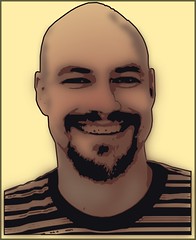
I've always liked the "trace bitmap" feature in Inkscape, and I love how the new blur tool compliments it. The combination allows me to trace edges on a bitmap image (jpg, png, gif, etc.) to smooth vectorized shapes, then blur the shadow layer(s) to soften them a bit, which makes for a nice effect. The dorky portrait on my site is an example of that effect - I autotraced a picture, cleaned up the lines a bit, and put a blur on the shadows. The result is hopefully a little more interesting than a simple picture I had before (I was told it made me look like a serial killer), but it's not as harsh and blocky as if it had been completely posterized.
I'll hopefully get time to write up an actual walkthrough with a prettier subject (probably one of my daughters), but here's a sample to show the idea: