Easier VPN connections from a Windows desktop - Jon Galloway

Easier VPN connections from a Windows desktop

Connecting to a VPN in Windows is a bit painful if you do it frequently. It's a relatively simple task, but it's "death by a thousand right clicks", and it takes a good fifteen seconds. If you're on and off VPN's frequently, it's worth taking the time to improve the process.

Disable VPN Progress Updates

The simplest thing you can do is disable progress updates while connecting. When updates are show, even fast VPN's take about 15 seconds to complete the connection process; with progress updates disabled the connection is nearly instantaneous. I know that there's still networking stuff going on, but I'm generally able to use the network right away in that case.
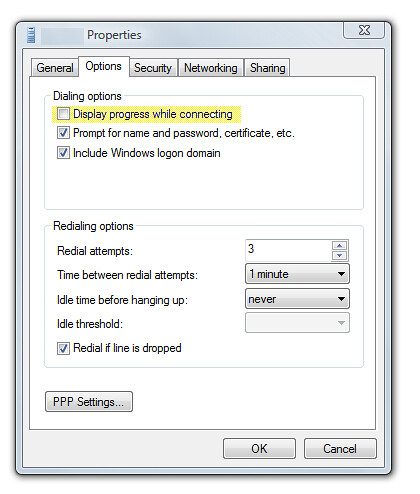
 VPN-Properties

Skip the Windows UI and VPN from the command line with RASDIAL.EXE

That's better, but it's still a slow clicky clicky process. You can create a shortcut to the VPN connection, but I usually skip that process and just create a one-line batch file for regularly used VPN's. That's easy, because RASDIAL.EXE is very simple. Old timers may remember RASDIAL for it's old purpose - handling dialup internet connections. It still does that, but nobody's using oldschool dialup anymore, are they? Dialup 2.0 is just phone-a-friend.

Keep in mind that RASDIAL won't allow you to set up a new VPN connection, which is fine because we don't need to do that. Set up the VPN as you always have, then use RASDIAL to connect and disconnect. There are really just three things you can do with RASDIAL - connect, disconnect, and check connection status.

Connecting

Here's the syntax to connect with RASDIAL: rasdial entryname [username [password|*]] [/DOMAIN:domain] (there are dialup switches, I didn't list them)

Note that you've got the option of saving your password. If you're connecting from a secure computer with a strong password, I don't see any problem with that... just keep in mind that you're saving your password in plain text. The benefit of saving your password is that you can just run the batch file and you're connected - there's no Windows UI to deal with at all. Here's an example of the sort of command I've used for this:

rasdial megacorp jgalloway !tricky®password! /domain:megacorp

Disconnecting

Disconnecting is even easier: rasdial [entryname] /DISCONNECT

So in the case above, I'd disconnect with this:

rasdial megacorp /disconnect

Checking connection status

That's super simple - running the command with no switches while connected will show you something like this:

C:\Documents and Settings\Jon>rasdial
Connected to
MegaCorp
Command completed successfully.

Setting up shortcuts

You can either set up shortcuts to rasdial with the above parameters, or you can create two batch files (vpn-megacorp-connect.bat and vpn-megacorp-disconnect.bat) and create shortcuts to them.

Script potential

I don't see any reason why you couldn't work this into a script that sets up what you'll want to do once connected, for instance, you could follow rasdial with mstsc to connect to remote desktop to a machine. Remember to throw the /console switch onto your mstsc call if you're connecting to a desktop that may have other sessions in use.

rasdial megacorp username password /domain:megacorp
mstsc megaserver.rdp /console

No rocket surgery, but if you're connecting to a VPN frequently then it's worth taking 30 seconds to lessen the pain.

Published Wednesday, September 05, 2007 12:11 AM by Jon Galloway
Filed under:

Comments

# re: Easier VPN connections from a Windows desktop

Especially useful if, like me, you always get the "Can't connect to VPN because there's no active internet connection" message in the Vista connection manager. Tre lame.

Wednesday, September 05, 2007 1:22 PM by kevindente

# re: Easier VPN connections from a Windows desktop

I am using RasDial combined with Start++, brandontools.com/.../StartPlusPlus.aspx, and it works great, you type windows key than a keyword and connection starts

Thursday, September 06, 2007 2:19 AM by lkempe

# Easier VPN connections from a Windows desktop - Jon Galloway - Laurent Kemp??

Pingback from  Easier VPN connections from a Windows desktop - Jon Galloway - Laurent Kemp??

# re: Easier VPN connections from a Windows desktop

Thx for the hint! Tried to connect to a VPN via a batch file for hours, until I finally found your post.

Tuesday, January 20, 2009 6:45 AM by saxx

# re: Easier VPN connections from a Windows desktop

<a href="world-secure-channel.com/.../a> - you can find more info here

Wednesday, February 25, 2009 11:03 AM by amirs

# re: Easier VPN connections from a Windows desktop

If the VPN connection fails it will still start the RDP session. How would you check if this VPN connection is active??

Monday, June 29, 2009 9:41 AM by martin

# re: Easier VPN connections from a Windows desktop

I tried this approach from W2k3 and get:

"Remote Access error 623 - The system could not find the phone book entry for this connection."

I googled it and found various solutions, none of which worked. Any suggestions?

Thursday, September 10, 2009 1:17 PM by Timker

# re: Easier VPN connections from a Windows desktop

I was recieving the same error message. I realized that my VPN profile name (the name that you create for your VPN in Network Connections) was 2 words. I changed it to 1 word and it seems to be working fine. Thanks, great post.

Monday, May 03, 2010 7:58 PM by Chris Scal

# re: Easier VPN connections from a Windows desktop

Restaurants in the United States. Search or browse list of restaurants. restaurants-us.com/.../32207

Sunday, October 03, 2010 3:24 PM by TypeTalaneria

# re: Easier VPN connections from a Windows desktop

Overview of US restaurants.  <a href="restaurants-us.com/.../">Jade Express Chinese Restaurant</a>

Friday, February 11, 2011 10:24 AM by ChetteEresy

# re: Easier VPN connections from a Windows desktop

People of every age and income bracket went for it, as Lucille Ball, who met her second husband, Gary Morton, on a blind date in a pizza parlor, could attest.

You can have two people enjoying a pizza or you can have a group."

Sunday, March 20, 2011 11:53 AM by Pizza

# re: Easier VPN connections from a Windows desktop

on top-end laptops you uhlsodnt notice a difference.  usually lower-end laptops (read: budget laptops) use slower hard drives which effectively decreases read-write speeds on the hard drive. another problem with laptops is that they are harder to upgrade.  Hard drives, and RAM are relatively simple to upgrade, but if you are looking to upgrade the processor or video card you will probably end up spending more than you bargained for, and your best bet at that point would be to buy a new laptop.Laptops also tend to get very hot when using them for extensive periods of time and may require additional cooling from an external unit if you plan to use the laptop for things like gaming or plan to use it as a desktop replacement.Even though i knock on laptops above, they are very useful too. They are compact for one thing.  They are great on college campuses, and if you travel they provide you with unlimited access to all your information, whether stored at home or work.looking for a gaming pc or something that is just as cpu intensive, i say go for a desktop.looking for portability and just having average joe applications (web browsing, email, word proccessor, dvd player, occasional gaming)  wherever you are, i say go for a laptop.   choosing also depends on your budget. but thats a big discussion on its own.

Saturday, March 24, 2012 2:11 PM by Megha

# re: Easier VPN connections from a Windows desktop

7FWfTX  <a href="nbqbtpjszypz.com/.../a>

Sunday, March 25, 2012 5:12 PM by ytwzikqexjf

# re: Easier VPN connections from a Windows desktop

Hi RoyQuick question   how do you get Live Writer to work with Squarespace? I tell it that I daaelry have a weblog set up, then give it the URL, UserID and Password, then it tells me that it is not able to automatically detect my blog settings.It then asks me to select the type of weblog I am using, and Squarespace is not in the drop-down list.You have obviously got it to work   what's your secret?!FYI, I found your blog through Googling  Squarespace Live Writer'Cheers in advancePete Matthew

Sunday, March 25, 2012 11:23 PM by Fabio

# re: Easier VPN connections from a Windows desktop

Monday, March 26, 2012 12:19 PM by quiemiSef

# re: Easier VPN connections from a Windows desktop

Monday, March 26, 2012 8:19 PM by quiemiSef

# re: Easier VPN connections from a Windows desktop

Monday, March 26, 2012 9:20 PM by Riganyday

# re: Easier VPN connections from a Windows desktop

Tuesday, March 27, 2012 7:43 AM by quiemiSef

# re: Easier VPN connections from a Windows desktop

<a href="itami-portal.net/.../">true religion outlet store</a>

Tuesday, March 27, 2012 11:01 AM by Wilkuplinna

# re: Easier VPN connections from a Windows desktop

Tuesday, March 27, 2012 7:55 PM by urbarkiva

# re: Easier VPN connections from a Windows desktop

<a href="www.4fx.com.pl/.../">gucci outlet store online</a>

Wednesday, March 28, 2012 1:48 AM by unimaTunc

# re: Easier VPN connections from a Windows desktop

Wednesday, March 28, 2012 4:42 AM by Usetsnips

# re: Easier VPN connections from a Windows desktop

Saturday, May 12, 2012 7:49 AM by offiviors

# re: Easier VPN connections from a Windows desktop

Потерто ...

_________________

цены верту [url=vip-telefony.ru/.../vertu.htm]здесь[/url]

Saturday, May 19, 2012 5:41 PM by oceabeBubrete

# re: Easier VPN connections from a Windows desktop

Ничего не понял

_________________

[url=chasu.ru/.../rolex.htm]rolex часы цена оригинал[/url]

Monday, May 21, 2012 4:40 PM by hersloyashy

Leave a Comment

(required) 
(required) 
(optional)
(required)