ASP.NET Menu and SiteMap Security Trimming (plus a trick for when your menu and security don't match up) - Jon Galloway

ASP.NET Menu and SiteMap Security Trimming (plus a trick for when your menu and security don't match up)

Summary

ASP.NET 2005 introduced a pretty solid menu which is integrated with a configuration driven sitemap. The cool part is that the menu can be hooked in with your security roles, so you don't have to worry about hiding or showing menu options based on the user - the menu options are automatically kept in sync with what the user is allowed to see. We'll talk about how to set this up, using an example from a website I worked on recently.

If you're familiar with ASP.NET sitemaps and menus, skip to the end to read a trick for working around cases when you want to do something more complex, such as have a page to be accessible to a user role, but not to show up in the menu.

The Video.Show site was originally planned to have only one class of user, with no user restrictions other than requiring a quick registration before commenting on videos or uploading videos. With that being the case, we just included a static menu in the masterpage, defined as <asp:MenuItem> elements. As we were gearing up for the first beta release, it became obvious that our user model was too simple. Hosted installations would probably want to allow users to register and begin commenting right away, not give all these users upload rights. That implied four classes of user now: unauthenticated, commenter, uploader, and also administrator (implied by the requirement to manage multiple user classes). That meant role management and new menu items to be kept in sync - the right time to move to a sitemap driven menu with security trimming.

Step One - Define The Sitemap

I'm using a static sitemap defined in a Web.sitemap file, and it's especially simple since there's no is no hierarchy involved. This uses the default XmlSiteMapProvider; there are other sitemap providers available on the internets, such as a SQL Sitemap Provider for database driven site structure, or you can implement your provider if you've got a custom situation.

<?xml version="1.0" encoding="utf-8" ?>
<siteMap xmlns="http://schemas.microsoft.com/AspNet/SiteMap-File-1.0" >
  <siteMapNode roles="*">
    <siteMapNode title="Home" url="~/Default.aspx" />
    <siteMapNode title="Videos" url="~/Tags.aspx" />
    <siteMapNode title="Members" url="~/MemberList.aspx" />
    <siteMapNode title="My Page" url="~/MyPage.aspx" />
    <siteMapNode title="My Recent Views" url="~/RecentViews.aspx" />
    <siteMapNode title="Upload a Video" url="~/Upload.aspx" />
    <siteMapNode title="Administer Users" url="~/AdministerUsers.aspx" />
  </siteMapNode>
</siteMap>

Note that the IntelliSense for a .sitemap file is misleading:
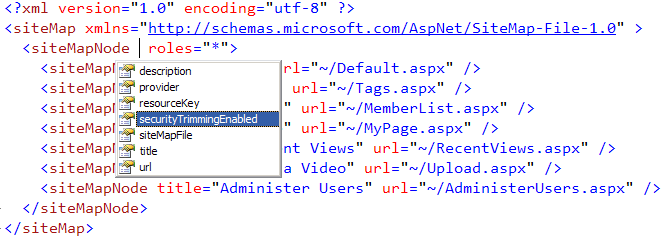
Sitemap Intellisense

While the XSD for .sitemap files (from which the IntelliSense is derived) includes "securityTrimmingEnabled" attribute, it's incorrect. It's the result of an old VS 2005 bug that's still around. That value should be set in web.config; we'll take care of that next.

Step Two - Declare The Sitemap in web.config

A few things to notice here:

  • I define the provider type as System.Web.XmlSiteMapProvider
  • I specify the siteMapFile as the Web.sitemap file we've just discussed
  • I set securityTrimmingEnabled="true"
<siteMap enabled="true">
  <providers>
    <clear/>
    <add siteMapFile="Web.sitemap" name="AspNetXmlSiteMapProvider" type="System.Web.XmlSiteMapProvider" securityTrimmingEnabled="true"/>
  </providers>
</siteMap>
This is really just overriding the default sitemap settings from %windir%\Microsoft.NET\Framework\v2.0.50727\CONFIG\web.config, which also uses the name AspNetXmlSiteMapProvider, but which doesn't include security trimming.

Step Three - Set required roles for the pages

This section of the web.config looks long, but you'll see it very repetitive. MSDN's information on setting up authorization rules is pretty well written, so take a look there if you'd like more info. The high points:

  • Rules are processed top to bottom. For example in the Upload.aspx case, a user in the Uploader role is allowed right off the bat, everyone else is denied.
  • Pages which are displayed to all authenticated users just need to deny unauthenticated users, like this: <deny users=?">
  • There's no wildcard for roles, so you can't say something like <allow roles="*">.
  • Role based permissions is configured by default in machine.config (using both AspNetSqlRoleProvider and AspNetWindowsTokenRoleProvider). The Sql Role Provider assumes a database connectionstring named LocalSqlServer, so if your profile information is stored somewhere else you'll need to make sure the rolemanager is configured correctly.
<location path="Upload.aspx">
  <system.web>
    <authorization>
      <allow roles="Uploader"/>
      <deny users="*" />
    </authorization>
  </system.web>
</location>
<location path="Profile.aspx">
  <system.web>
    <authorization>
      <deny users="?" />
    </authorization>
  </system.web>
</location>
<location path="MyPage.aspx">
  <system.web>
    <authorization>
      <deny users="?" />
    </authorization>
  </system.web>
</location>
<location path="RecentViews.aspx">
  <system.web>
    <authorization>
      <deny users="?" />
    </authorization>
  </system.web>
</location>
<location path="AdministerUsers.aspx">
  <system.web>
    <authorization>
      <allow roles="Administrator"/>
      <deny users="*"/>
    </authorization>
  </system.web>
</location>

Step Four - Add A Sitemap Data Source and a Menu to your Master Page

<asp:SiteMapDataSource runat="server" ID="siteMapDataSource" ShowStartingNode="false" />
<asp:Menu runat="server" ID="MainMenu" Orientation="Horizontal" DataSourceID="siteMapDataSource" />

 
You'll probably want to style the menu, too. I'm a fan of the CSS Friendly Control Adapters, which changes the HTML output to use clean UL. Without the Control Adapter, the Menu control outputs nested tables manipulated by JavaScript. Here's what the above menu looks like for a user who's logged in but isn't in the Administrator or Uploader roles:
 Video.Show Menu

The Payoff - Everything is Managed In One Place

That may seem like a lot to configure, and you might be wondering if it isn't easier to just write write your own code to handle access and menu management.

First off, the above actually goes pretty quickly - hopefully this post or others I've linked to make it a little faster.

Secondly, the real payoff is that you've now got a reliable, maintainable solution to controlling page access, and it's all automatically kept in sync. Let's say we want to add a new page that's only visible to users with Uploader rights - maybe a page (MyVideos.aspx) where they can edit or delete videos they've previously uploaded. I'd only need to add one page to the sitemap file, set the access rule in web.config to allow Uploaders and deny everyone else, and the page will only show up in the menu when an Uploader has logged in. This is a good application of the Don't Repeat Yourself philosophy. We don't have one set of logic determining what pages users are allowed to view and another set which determines what pages they should see in the menu; these are both the same list and should be handled that way.

Tip - Use a Url Mapping to alias pages when your access and menu visibility are more complex

I wanted to point out one other tip that came in handy here. Before we realized the need for different user types, we had one page called Member.aspx, which served two purposes. If the querystring contained some other user's userid, it would show their public profile and a list of their videos. We also repurposed it as My Page, determined by navigating to the page as a logged in user without using a querystring.

When we hooked up the menu and page access, we had a problem. We only wanted to show My Page in the menu when a user was logged in, but we needed the Member.aspx page to be viewable by anonymous users, because it was used for public user profiles, too. The simple solution was to set up a Url Mapping which created a virtual MyPage.aspx (mapped to Member.aspx). Now we could set different access rights to MyPage.aspx and Member.aspx, as shown in the Step Three code sample - Member.aspx is public, and MyPage.aspx requires authentication. Here's how the Url Mapping was set up:

<urlMappings>
  <add url="~/MyPage.aspx" mappedUrl="~/Member.aspx"/>
</urlMappings>
Published Saturday, January 26, 2008 10:03 PM by Jon Galloway

Comments

# ASP.NET Menu and SiteMap Security Trimming (plus a trick for when your menu and security don&#8217;t match up) | videositemap.com

Pingback from  ASP.NET Menu and SiteMap Security Trimming (plus a trick for when your menu and security don&#8217;t match up) | videositemap.com

# re: ASP.NET Menu and SiteMap Security Trimming (plus a trick for when your menu and security don't match up)

Good stuff and nice trick!

My main project is on 1.1, but the security/sitemap system we created allows a very similar maneuver.

What security mechanism do you use for actions controlling CRUD as well as special permissions on pages?

Sunday, January 27, 2008 2:16 AM by Jeff Handley

# re: ASP.NET Menu and SiteMap Security Trimming (plus a trick for when your menu and security don't match up)

Video.Show is interesting. Is this an attempt to create a video sharing site like YouTube, only using Silverlight?  

Sunday, January 27, 2008 2:49 AM by rrobbins

# ASP.NET Menu and SiteMap Security Trimming plus a trick

You've been kicked (a good thing) - Trackback from DotNetKicks.com

Sunday, January 27, 2008 10:14 AM by DotNetKicks.com

# re: ASP.NET Menu and SiteMap Security Trimming (plus a trick for when your menu and security don't match up)

Cool trick!

I just know it's a bug.

Tuesday, February 12, 2008 10:10 PM by Diane

# re: ASP.NET Menu and SiteMap Security Trimming (plus a trick for when your menu and security don't match up)

There's no context for the samples provided.  

e.g. if i were to add the location nodes to my web.config, where do i do this?  Why force me to go and look for the information on another site when you could have specified this in one line of text?  The same goes for the other configuration elements mentioned here.  Otherwise, thanks for the info about the bug.

Sunday, May 11, 2008 8:08 PM by dotnetdoc

# re: ASP.NET Menu and SiteMap Security Trimming (plus a trick for when your menu and security don't match up)

The Video.Show site was originally planned to have only one class of user, with no user restrictions other than requiring a quick registration before commenting on videos or uploading videos. With that being the case, we just included a static menu in the masterpage, defined as <asp:MenuItem> elements. As we were gearing up for the first beta release, it became obvious that our user model was too simple. Hosted installations would probably want to allow users to register and begin commenting right away, not give all these users upload rights. That implied four classes of user now: unauthenticated, commenter, uploader, and also administrator (implied by the requirement to manage multiple user classes). That meant role management and new menu items to be kept in sync - the right time to move to a sitemap driven menu with security trimming.

Monday, May 12, 2008 3:21 AM by Ahamed

# re: ASP.NET Menu and SiteMap Security Trimming (plus a trick for when your menu and security don't match up)

Hi Jon,

In the middle of a similar problem where css adapters may help.  I notice that when I run:

http://videoshow.vertigo.com/

choose Members, it leaves Members nicely highlighted.  Once I choose a member to look at, I lose the context.  That is, neither Home, Videos or Members remains highlighted.  

My problem is I have two rows of nav.  Primary row is category, secondary row is details of that category.  I always want to keep primary highlighed and secondary when person goes in.

If you have an ideas, feel free to post.  Hopefully, I'll figure it out and post on my blog.  This is all about the new code camp site.  Did I mention that?  Silicon Valley Code Camp is 11/8-9.  :)

Sunday, May 18, 2008 7:50 PM by pkellner

# re: ASP.NET Menu and SiteMap Security Trimming (plus a trick for when your menu and security don't match up)

Hi, where abouts in the Web.Config do you put the location nodes?  Thanks

Wednesday, June 04, 2008 10:44 AM by wilbo

# re: ASP.NET Menu and SiteMap Security Trimming (plus a trick for when your menu and security don't match up)

buenos dias uuna pregunta

como pedo desabilitar un sitio de mapa  por codio echo de esta forma

Thursday, September 04, 2008 10:37 AM by Pedro Bedoya

# re: ASP.NET Menu and SiteMap Security Trimming (plus a trick for when your menu and security don't match up)

//This fixed everything for me in the StaticSiteMapProvider

       public override bool IsAccessibleToUser(HttpContext context, SiteMapNode node)

       {

           foreach (string role in node.Roles)

               if (context.User.IsInRole(role))

                   return true;

           return false;

           //return base.IsAccessibleToUser(context, node); //seems to always return true;

       }

Tuesday, September 16, 2008 10:47 AM by john

# re: ASP.NET Menu and SiteMap Security Trimming (plus a trick for when your menu and security don't match up)

A couple comments on this.  First, if you are already using membership/role-based security for your site, it seems like the location blocks listed in step 3 are not necessary (unless you want to control access at the file level).

Also, I implemented this feature on a horizontal menu with 2 static levels.  I had all of the level 2 nodes configured without URL properties, because I just wanted them to act as menu titles (with the links in the dynamic levels).  I found if you do not have a url attribute set for the sitemapnode, that the entire node tree is trimmed.  So I just used urlmapping (as suggested, thanks!) to designate a default page within that menu to go to in case the user clicks on the menu title.  That seemed to work.

However, I would prefer to NOT specify a URL attribute for my level 2 nodes, but still be able to trim them.  Does anyone have a workaround?

To answer questions about the context of the tags:

<sitemap> goes in <configuration><system.web>

<location> goes in the root of the web.config

Wednesday, November 26, 2008 12:57 PM by cmarkworth

# re: ASP.NET Menu and SiteMap Security Trimming (plus a trick for when your menu and security don't match up)

how to add a url with multiple querystring values in sitemap file in .net2.0

Thanks & Regards

Rajesh Yadav

Thursday, January 08, 2009 7:21 AM by rajesh yadav

# re: ASP.NET Menu and SiteMap Security Trimming (plus a trick for when your menu and security don't match up)

You have a link to a non-existent page that is part of this explanation, labelled

"make sure the rolemanager is configured correctly."

Thursday, May 14, 2009 1:58 PM by Jimbo

# re: ASP.NET Menu and SiteMap Security Trimming (plus a trick for when your menu and security don't match up)

I'm trying to get my blog running on MySQL but the problem is that it is taking it long time trying to load the page but nothing happens !!!

one more thing I have modified at the connection string which is the provider I used MySql provider instead of MSSQL

any clue why am I getting the strange behavior ?

Sunday, May 24, 2009 11:09 AM by ZK@Web Marketing Blog

# re: ASP.NET Menu and SiteMap Security Trimming (plus a trick for when your menu and security don't match up)

This is a wonderful post, very clear and well-written. I was able to implement this right away.

Tuesday, June 09, 2009 10:21 AM by Liz

# re: ASP.NET Menu and SiteMap Security Trimming (plus a trick for when your menu and security don't match up)

Big thx for this step-by-step tutorial. I am facing a problem that my menu is not updated (nodes shown/hidden)correctly when i switch the role while i am on a page used in location path in web.config.

It gets only updated when i click the menu a second time, or reload the page.

When i switch the role while i am on a site not mentioned in the webconfig (allowed to be accessed by every user) and i switch my role the menu gets updated correctly.

Anybody else faced the problem?

Saturday, June 27, 2009 1:00 PM by thomas

# re: ASP.NET Menu and SiteMap Security Trimming (plus a trick for when your menu and security don't match up)

Why roles dosn't works for second level menu ?

how to diable menu for         <siteMapNode url="~/About.aspx" title="About"  description="" roles="UnavailableGroup" /> ?

<?xml version="1.0" encoding="utf-8" ?>

<siteMap xmlns="schemas.microsoft.com/.../SiteMap-File-1.0" >

   <siteMapNode  roles="*">

       <siteMapNode url="~/Default.aspx" title="Default"  description="" roles="MyGroup"/>

       <siteMapNode url="~/About.aspx" title="About"  description="" roles="UnavailableGroup" />

   </siteMapNode>

</siteMap>

Thursday, August 20, 2009 1:02 PM by Guest

# re: ASP.NET Menu and SiteMap Security Trimming (plus a trick for when your menu and security don't match up)

This solution is not working for second level of folders. It works correctly only for pages in root folder, tried many solutions but no progress.

Friday, October 23, 2009 10:16 AM by Kris

# re: ASP.NET Menu and SiteMap Security Trimming (plus a trick for when your menu and security don't match up)

I've sorted problem of nested folders not working correctly basically it cannot take "~/" and the folder name needs to be like this:

<location path="Sub1/AdminOnly.aspx" allowOverride="false">

<system.web>

<authorization>

<allow roles="Administrator"/>

<deny users="*"/>

</authorization>

</system.web>

</location>

AND NOT like

<location path="~/Sub1/AdminOnly.aspx" allowOverride="false">

<system.web>

<authorization>

<allow roles="Administrator"/>

<deny users="*"/>

</authorization>

</system.web>

</location>

Regards

Kris

Friday, October 23, 2009 10:29 AM by Kris

# re: ASP.NET Menu and SiteMap Security Trimming (plus a trick for when your menu and security don't match up)

Why You Are Not Giving A Demo Code !!!

Thursday, May 20, 2010 5:24 AM by Rakesh

# re: ASP.NET Menu and SiteMap Security Trimming (plus a trick for when your menu and security don't match up)

Hi Jon,

I'm trying to understand the use of the "roles" attribute of the siteMapNode:

<siteMapNode title="Administer Users" url="~/AdministerUsers.aspx" roles="Administrators" />

Shouldn't this show this menu item to only Administrators? I can't get that to work.

This should be independent of the "<location path="AdministerUsers.aspx">" code, which is important in itself (prevents adventurous users from guessing your url and getting into an admin page) but should not be necessary when turning menu options on or off.

Thanks,

-Tom.

Sunday, May 30, 2010 6:50 PM by Tom van Stiphout

# ASP.NET Menu and SiteMap security trimming

ASP.NET Menu and SiteMap security trimming

Saturday, June 12, 2010 10:27 PM by Wuji Wonders

Leave a Comment

(required) 
(required) 
(optional)
(required)