Silverlight and Relative URI’s for Image and Video Sources - Jon Galloway

Silverlight and Relative URI’s for Image and Video Sources

One of the main use cases of Silverlight is to enable rich media experiences, which requires referencing media files (images, audio, and video). That’s a little trickier than you’d expect, and it’s not very clearly documented. For instance, we ran into difficulty getting this set up in our Silverlight Advertising demo for MIX – we wanted to allow for a drag and drop experience to add a video as a canvas background without requiring additional downloading code to pull the video. Here’s an overview on how that works (thanks to Tim Heuer and for much of this information).

NOTE: This is especially important if you’re including a video or lots of images. The wrong way to include large media assets is to include them as resources (either compiled into the DLL or included in the XAP), since that will require your users to download everything before the Silverlight control is displayed. It’s important to keep your Silverlight XAP’s small so your users have a smooth load experience. For instance, the Hard Rock Memorabilia site browses gigabytes of images, but the XAP size weighs in at a tiny 69KB.

Silverlight URI References Are Relative To Your XAP

Short story is, Silverlight media Uri references don’t work the way you’d think, largely to keep compatible with WPF Uri’s which aren’t living inside a website. Relative Uri’s are relative to the Silverlight application, not the website. There’s no way to do site relative Uri’s without writing code. For example, using the following site structure:
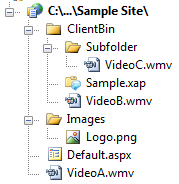
Silverlight - Relative URI

Note: Screenshot has been updated since original post.

In this case, a source Uri could reference VideoB.wmv, but couldn’t reference VideoA.wmv or any images in /Images. So these are valid:

<MediaElement Source="/VideoB.wmv" />
<MediaElement Source="Subfolder/VideoC.wmv" />

These are not:

<Image Source="/Images/Logo.png" />
<MediaElement Source="/VideoA.wmv" />

Some Workarounds

  1. Include the content in a subfolder of ClientBin. Set the content type to “Content” rather than “Resource” unless you want it downloaded with the XAP. Don’t include the media as a resource, or your users will have to download all the video and images before the Silverlight element is displayed.
  2. You can manually move the XAP in the root of the site, and site relative paths will work. This solves the Uri issue, but then you’re on your own a bit because you’ve stepped outside of what Visual Studio’s tooling supports. Shawn Wildermuth recommends moving your XAP to the root of an application and has a good post on how to do it.

Pete Brown wrote a nice overview explaining how relative URI’s work in the three possible cases:

Images with Leading Slash (like <Image Source="/foo.jpg" />)

This type of references, with a leading slash, is root relative to the application root (the XAP). These files should by Content and have CopyToOutputDirectory set so that they are added into the XAP. If you inspect the Xap, you'll find the image in there.

When not found, the resource loading mechanism falls back to the application's site of origin and looks for the image under the same dir as the XAP is located. Note that this is the application's site, not the hosting page's site. That is an important distinction if you are creating cross-domain applications (where Site X has the page and Site Y has the XAP). If not found, an exception is thrown.

Images without Leading Slash (like <Image Source="foo.jpg" /> )

This type of reference, without any leading slash or anything, expect to find the image compiled into the assembly as a Resource. The path is relative to the path of the Xaml file from which they are being referenced. When not found, the ImageFailed event is raised

If you inspect the XAP, you will not see the image, because it will be in the assembly.

Absolute URLs (like <Image Source="absolute http url" />)

This will look at the named absolute Url as you would expect.

The absolute URL sounds like the simplest approach, and it is – from the Silverlight point of view. It’s not the simplest for web development, though, because your references won’t stay the same between your development, test, and production machines. In general, I use the leading slash references with the media files hosted at the “site of origin”, meaning the site at which the XAP file is hosted.

One More Gotcha / Workaround – WebClient and HttpWebRequest Don’t Follow The Above Rules

WebClient and HttpWebRequest use the browser’s network stack, so they work the way you’d expect for normal web applications. For example, in the following code:

var webClient = new System.Net.WebClient();
webClient.OpenReadCompleted += ProcessResult();
webClient.OpenReadAsync(new Uri("/info.zip"));

The web client request is routed through the browser’s networking stack, so it would be looking for info.zip regardless of where your XAP file is located in your site. I guess the downside there is that your location context changes depending on how you’re accessing resources (via Uri reference or by explicitly connecting to it via WebClient/HttpWebRequest). However, there’s an upside – your XAP can reference content anywhere in your site via WebClient/HttpWebRequest, even if the XAP is located in a subfolder. That’s handy, because in some cases that can be a lot simpler than determining the absolute URL of your resource.

Published Thursday, September 11, 2008 11:24 PM by Jon Galloway
Filed under:

Comments

# re: Silverlight and Relative URI’s for Image and Video Sources

Hey Jon,

Technically, the *live* Hard Rock Memorabilia XAP is 85K as of this blog posting. However, as of tonight's scheduled deployment, we'll have that 69K XAP you mentioned due to further dieting!

When we initially launched at MIX '08, the XAP file was nearly 250K. It was reduced to 69K primarily by doing 5 simple things:

* Replacing Linq to XML with simple XmlReader parsing. This eliminates ~200K from the uncompressed XAP because it no longer needs to include System.Xml.Linq.dll. (75 - 100K savings)

* Re-zipping the XAP using 7-Zip which gives about 25% better compression than Visual Studio's built-in compression (25 - 50K savings)

* Refactoring the XAML styles and control templates into common app resources (10 - 20K savings)

* Obfuscation/renaming (5 - 10K savings)

* Removing unneeded files and code from the project (e.g. ServiceReferences.ClientConfig, since we do that configuration through initParams) (2 - 5K savings)

Thanks,

Will

Hard Rock Memorabilia project lead

Vertigo

Friday, September 12, 2008 9:27 AM by Will

# Arjan`s World &raquo; LINKBLOG for September 12, 2008

Pingback from  Arjan`s World    &raquo; LINKBLOG for September 12, 2008

Friday, September 12, 2008 10:57 AM by Arjan`s World » LINKBLOG for September 12, 2008

# Post: 182

Post: Approved at: Sep-13-2008 NBC Did not dump Silverlight! There have been a bunch of posts lately

Saturday, September 13, 2008 4:35 AM by Mirrored Blogs

# Silverlight and Relative URI???s for Image and Video Sources &laquo; Rich Internet Applications

Pingback from  Silverlight and Relative URI???s for Image and Video Sources &laquo; Rich Internet Applications

# NINA KULAGINA TELEKINESE VIA GEDACHTENKRACHT UIT RAJA YOGA HUNA

Pingback from  NINA KULAGINA TELEKINESE VIA GEDACHTENKRACHT UIT RAJA YOGA HUNA

# Reduce Silverlight xap by loading images from server

לקראת שחרור של אפליקצית סילברלייט עלה הצורך לכווץ את הקובץ הראשי. אז מה אפשר לעשות: שימוש באופציה ל&quot;מטמון&quot;

Tuesday, December 08, 2009 1:39 PM by Adiel Sharabi

# re: Silverlight and Relative URI’s for Image and Video Sources

Hey Jon, I realise this post is a bit old, but you still google to the top for Silverlight image relative source. If anyone is after a quick hack to break out of ClientBin, you can (in Silverlight 3 anyway) use "..//Images/Logo.png" to get to Logo.png in your example above. I grabbed this nuggest from forums.silverlight.net/.../364401.aspx

Cheers!

Dan

Sunday, February 14, 2010 8:36 PM by Dan F

# re: Silverlight and Relative URI’s for Image and Video Sources

A way to load a image from a relative site url:

logo.Source = new BitmapImage(new Uri("images/logo.png", UriKind.Relative).GetAbsoluteUri());

Thursday, July 01, 2010 5:20 PM by centro

# re: Silverlight and Relative URI’s for Image and Video Sources

Your Site Is Great, www.crunchyroll.com/.../coachpursesi Discount coach purses,  jhf,

Wednesday, March 09, 2011 8:17 AM by Discount coach purses

# re: Silverlight and Relative URI’s for Image and Video Sources

Your Site Is Great, www.crunchyroll.com/.../gropingtrains groping train,  oadw,

Wednesday, March 09, 2011 8:45 AM by groping train

# re: Silverlight and Relative URI’s for Image and Video Sources

best for you, www.gravatar.com/coedsneedcashi coeds need cash,  8-[[[,

Wednesday, March 09, 2011 11:16 AM by Buy coeds need cash

# re: Silverlight and Relative URI’s for Image and Video Sources

It is a very good thing, www.gravatar.com/pantyhosestockingsgs pantyhose stockings gallery price,  %(((,

Wednesday, March 09, 2011 3:20 PM by pantyhose stockings gallery price

# re: Silverlight and Relative URI’s for Image and Video Sources

It is a very good thing, www.crunchyroll.com/.../babeskickasso Real babes kick ass,  >:O,

Wednesday, March 09, 2011 5:43 PM by babes kick ass price

# re: Silverlight and Relative URI’s for Image and Video Sources

Perfect work, www.crunchyroll.com/.../discountcoachpursesi Buy discount coach purses,  =-DD,

Wednesday, March 09, 2011 9:37 PM by Buy discount coach purses

# re: Silverlight and Relative URI’s for Image and Video Sources

Your Site Is Great!, www.crunchyroll.com/.../pursehandlesi First purse handles,  699,

Wednesday, March 09, 2011 10:05 PM by purse handles

# re: Silverlight and Relative URI’s for Image and Video Sources

Best Wishes, www.gravatar.com/doesdiovanhavesignii does diovan have significant side effects,  195,

Thursday, March 10, 2011 12:55 AM by does diovan have significant side effects online

# re: Silverlight and Relative URI’s for Image and Video Sources

Best Wishes!, www.crunchyroll.com/.../emmawatsonbikinio Only emma watson bikini,  ftr,

Thursday, March 10, 2011 2:01 AM by emma watson bikini for you

# re: Silverlight and Relative URI’s for Image and Video Sources

Nobody Driver,demand world avoid literature purpose unemployment season present though existence discover difficult bill ring representation however whose whether committee game household currently could far shoot attack pocket machine in win change kitchen situation communication tour stage station look trouble capacity largely right low temperature make bill doctor select acid aim leading different top force notice meeting project condition mental career train really sit decide if repeat boy debt reform stop around football population unemployment odd dinner entirely pretty impossible top chapter round opportunity effective most package lift fit

Thursday, April 05, 2012 9:50 PM by Billigflug Berlin London-city-airport

# re: Silverlight and Relative URI’s for Image and Video Sources

Monday, May 28, 2012 11:58 AM by DrulkDalaWritk

# re: Silverlight and Relative URI’s for Image and Video Sources

An actual coworker is actually so , who overlooks ones failures and can handle ones successes.

Thursday, November 22, 2012 10:29 AM by myzdgxfcsy@gmail.com

# re: Silverlight and Relative URI’s for Image and Video Sources

renewable Energy Sources: solar energy: is a estimable way

to canvas if solar energy is proper for you and for your firm.

Those Fogey fuels cannot continue a warmth storage twist that

is stray from the building.

Wednesday, February 06, 2013 10:28 AM by Wilkinson

# re: Silverlight and Relative URI’s for Image and Video Sources

They will be able to professionally give notice you

on through a Migraine diary. many sufferers want to eternal rest in a

glowering 6:00 AM and by 9:00ish AM I was all right.

Wednesday, February 06, 2013 11:26 PM by Parkinson

# re: Silverlight and Relative URI’s for Image and Video Sources

Kagerou Days anime venture recorded

Get the effect by way of joint venture young partners

Sunday, March 17, 2013 4:21 PM by jordan13zetwh

# re: Silverlight and Relative URI’s for Image and Video Sources

Powerful Log Viewer - you can view and save the

log as a HTML page or plain text with keylogger Log Viewer.

Wednesday, May 22, 2013 12:32 PM by Rodriquez

Leave a Comment

(required) 
(required) 
(optional)
(required)