Tip: File / Open / URL - Jon Galloway

Tip: File / Open / URL

As web developers, we’re constantly having to work with files that are provided via URL. The simplest case is a web page source HTML, but there’s also XML config files, images, documents (PDF, PSD, DOCX, etc.). Usually we don’t think about it, because they’re linked in a web page, so we we do the right-click/save file, then open our editor and do the file/open/browse… where did I save it again… dance. If we remember to shift-right-click/copy as path trick, we think we’ve cheated the system just a bit.

It’s even worse if we just have a URL that’s not in a webpage. How many times have you fired up notepad to type a one-line HTML file with something like this: <a href=”http://domain.com/file-i-want.xml”>click me</a>? Then you open that file in a browser, right-click, save file, dum-de-dum…

There’s a better way!  (Yes, better than wget)

Last year I was working on a video site that streamed ASX files through a pretty complex Silverlight video player. ASX is one of those funny file formats that looks a lot like XML, but isn’t, and to top it off there are some funky ASX features that Silverlight doesn’t support. So I ended up having to write an ASX parser, and doing a lot of testing against our video providers every time something strange happened with our various video feeds. I was constantly copying URL’s into one-off HTML files, and eventually I just had to go looking for a better way.

It turns out that you can open URL’s directly in Visual Studio. Try it!

Open Visual Studio (any version) and hit Ctrl-O to bring up an open file dialog, then type in a URL. Here I’m using http://microsoft.com:
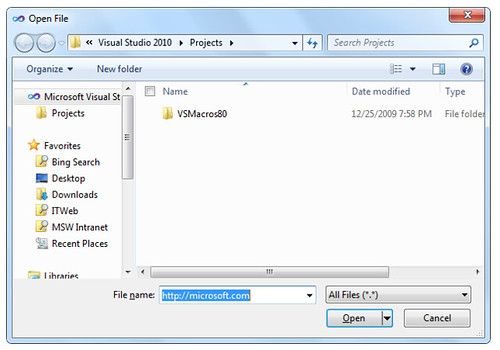
File-Open-Microsoft-URL

When I click enter, the HTML is requested and displayed:
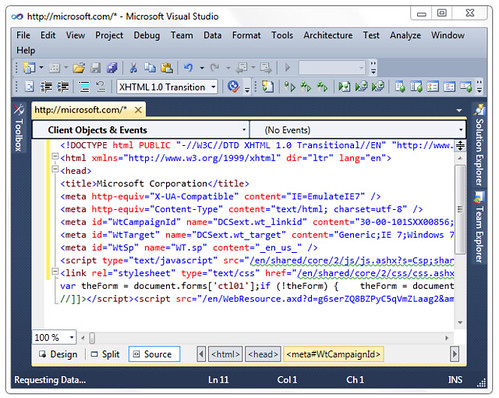
File-Open-Microsoft-HTML

The Fun Don’t Stop – It Works With Other Programs And Filetypes, too!

Let’s fire up good old MSPAINT and open the .NET Logo from this URL: http://www.microsoft.com/presspass/images/gallery/logos/web/ms_net_rgb_web.jpg

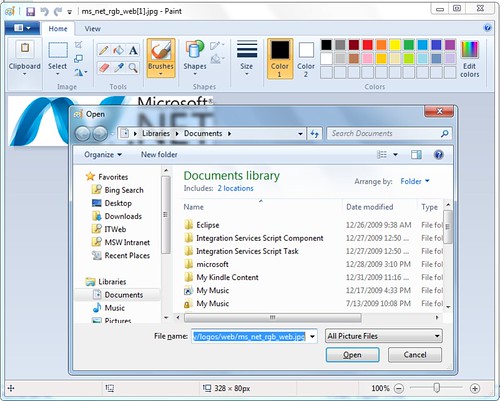
File-Open-MSPAINT

Now let’s try something crazy – let’s open that same URL in Inkscape, a cross platform vector graphics editor:
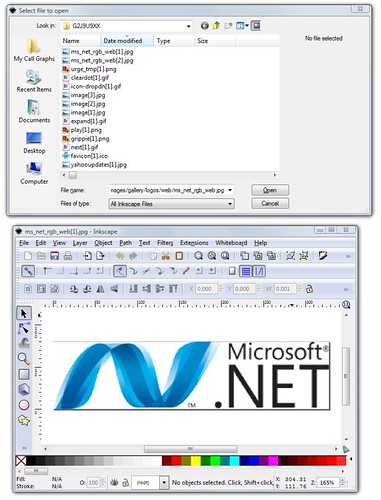
File-Open-Inkscape

What’s going on?

It turns out that the Windows Open File Dialog supports URL’s, so as long as the app isn’t using a custom dialog it just magically works. The files are actually downloaded to your Temporary Internet Files folder and opened from there. Aside from the speed of opening the files directly, there’s another benefit: rather than scattering temporary files all over your documents folder or desktop, they’re in the right place to be automatically cleaned up when you clear your temporary files.

What about saving a file, rather than opening it?

Well, it’s pushing it a bit, but for simple cases, you don’t really need an app or a dummy HTML file, either. If you’ve got a file that IE won’t natively open, you can just hit Start and type: iexplore “http://domain.com/importantfiles.zip”

At that point, though, you might as well just fire up Powershell (built into Windows 7, hit Start / type Powershell / enter) and run a one-liner:

(new-object System.Net.WebClient).DownloadFile(“http://domain.com/importantfiles.zip, "localfilename.zip")

There are some other tips about downloading from the commandline on this question on SuperUser.

Why not wget / wfetch / “Crazy Eddie’s Download Powerpack” / etc.?

It’s a fair question.

Those all work, and they’re great if you’re used to them. I’ve really been trying to simplify lately, though. One of the benefits of Windows 7 is that it doesn’t need a bunch of random shareware tweaks to work well, it just works. Could I install a file downloading app? Sure, but when Windows has so much built in, there’s no real need for most simple tasks. The big benefit is that I can hop on any Windows machine and do my thing, without having to download a bunch of extra unitaskers.

Published Thursday, January 07, 2010 12:04 AM by Jon Galloway
Filed under:

Comments

# Twitter Trackbacks for Tip: File / Open / URL - Jon Galloway [asp.net] on Topsy.com

Pingback from  Twitter Trackbacks for                 Tip: File / Open / URL - Jon Galloway         [asp.net]        on Topsy.com

# re: Tip: File / Open / URL

I think there's some merit in being able to type 'wget <url>' rather than '(new-object System.Net.WebClient).DownloadFile(<url>)'

Thursday, January 07, 2010 12:32 PM by nATHAN

# re: Tip: File / Open / URL

@nATHAN: function wget($url, $dest) { (new-object System.Net.WebClient).DownloadFile($url, $dest) }

Thursday, January 07, 2010 1:39 PM by jdhardy

# Weekly Link Post 127 &laquo; Rhonda Tipton&#8217;s WebLog

Pingback from  Weekly Link Post 127 &laquo; Rhonda Tipton&#8217;s WebLog

Sunday, January 10, 2010 8:57 PM by Weekly Link Post 127 « Rhonda Tipton’s WebLog

# re: Tip: File / Open / URL

I've always loved this with Textpad. Type in a URL into the open dialog and get the source for the page.

Friday, March 19, 2010 3:19 PM by RyanFarley

# re: Tip: File / Open / URL

Awesome! Thanks :)

Pete

Thursday, March 25, 2010 2:33 AM by Pete

# r @Pete_Brown File / Open / URL works all over the place: http://weblogs.asp.net/jgalloway/archive/2010/01/07/tip-file-open-url.aspx

r @Pete_Brown File / Open / URL works all over the place: http://weblogs. asp.net /jgalloway/archive

Thursday, March 25, 2010 2:41 AM by Twitter Mirror

# M45 Ptt, Infiniti M45 Car Domain

Pingback from  M45 Ptt, Infiniti M45 Car Domain

Thursday, May 20, 2010 7:04 PM by M45 Ptt, Infiniti M45 Car Domain

# re: Tip: File / Open / URL

Great article as for me. I'd like to read a bit more concerning this theme. The only thing that blog misses is some photos of some gadgets.

John Flouee

<a href="www.jammer-store.com/">mobile phone scrabler</a>

Thursday, July 08, 2010 7:21 PM by PasserBy

# re: Tip: File / Open / URL

Keep on posting such themes. I like to read stories like that. BTW add more pics :)

Thursday, September 02, 2010 8:34 AM by lake geneva escorts

# re: Tip: File / Open / URL

"Come on dude, these facts* and proof* i mean who is posting* lol :P"

--------------------------------------------

my website is  

http://chineseastrology.us

Also welcome you!

Tuesday, November 16, 2010 9:34 AM by Coat XXL

# re: Tip: File / Open / URL

To be both a speaker of words and a doer of deeds.

-----------------------------------

Monday, December 20, 2010 3:21 AM by best ipad accessories

# re: Tip: File / Open / URL

-----------------------------------------------------------

I am really not too acquainted with this subject but I do prefer to go to blogs for layout suggestions and intriguing topics. You genuinely expanded upon a subject that I generally don't care much about and created it quite interesting. This can be a good blog site that I'll consider be aware of. I previously bookmarked it for future reference. Cheers

Sunday, January 02, 2011 11:24 PM by best ipad covers

# re: Tip: File / Open / URL

-----------------------------------------------------------

"In searching for websites associated to world-wide-web hosting and particularly comparability internet hosting linux program net,your website came up."

Friday, January 07, 2011 11:41 PM by ipad application

# re: Tip: File / Open / URL

just desired to say i discovered this web site brilliant cointent and sources. The author clearly understands his/her topic along with the feedback posted affirm what i am  saying. Effectively completed.

--------------------------------------------------------------------  

I have a <a href="ericsreviews.com/">mobile phone reviews</a> Website,i love him.Mania !You are welcome to look!

Sunday, January 16, 2011 9:15 PM by camcorders reviews

# re: Tip: File / Open / URL

It was extremely interesting for me to read this post. Thanx for it. I like such themes and anything that is connected to them. I definitely want to read more on that blog soon.

Anete Hakkinen    

<a href="milanescorts.com/">milan italy escort</a>

Wednesday, March 09, 2011 2:41 PM by Anete Hakkinen

Leave a Comment

(required) 
(required) 
(optional)
(required)