Server installation options for ASP.NET MVC 2 - Jon Galloway

Server installation options for ASP.NET MVC 2

I’ve answered several questions about installing ASP.NET MVC 2 on a server lately, and since I didn’t find a full summary I figured it was time to write one up. Here’s a look at some of the top options:

  • WebPI
  • Bin deploy
  • Run the full AspNetMVC2_VS2008.exe installer
  • Command-line install with aspnetmvc2.msi

WebPI

WebPI has quickly become my favorite way to install Microsoft web platform software (including development tools) on my development machine, and it’s a great option for installing on the server as well. I like WebPI for a lot of reasons – here are the top three:

  • It’s a tiny download (less than 2 MB)
  • It figures out which dependencies you need and which you already have installed, so you get the smallest download and fastest install possible
  • It’s one place to go to get all the new releases

So if you have desktop access to the server, probably the best option is to install ASP.NET MVC 2 via WebPI.

Bin Deployment

ASP.NET MVC was designed so you can use it without needing install permissions, e.g. working with a hosting provider who didn’t have ASP.NET MVC installed. Phil Haack wrote up instructions for Bin Deploying an ASP.NET MVC 1.0 application, and it’s only gotten easier since then. If your server has ASP.NET 4 installed, you’ll just need to set the reference to System.Web.Mvc to “Copy Local”:
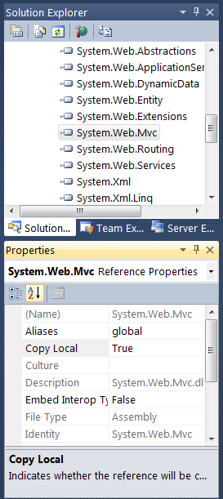
Bin Deploy for System.Web.MVC

If you’re running on .NET Framework 3.5 SP1, you’ll need to include System.ComponentModel.DataAnnotations.dll (by setting it to Copy Local as well):

  • System.ComponentModel.DataAnnotations.dll
  • System.Web.Mvc.dll

And if you don’t have .NET Framework 3.5 SP1, you’ll also need to include System.Web.Abstractions.dll and System.Web.Routing.dll, so the full list to Bin deploy ASP.NET MVC 2 on .NET Framework 3.5 without SP1 is:

  • System.ComponentModel.DataAnnotations.dll
  • System.Web.Abstractions.dll
  • System.Web.Mvc.dll
  • System.Web.Routing.dll

For a full walkthrough on this, see Phil’s blog post.

Run the full AspNetMVC2_VS2008.exe installer

The AspNetMVC2_VS2008.exe installer installer is available from Microsoft Downloads at the following (quite memorable) URL: http://www.microsoft.com/downloads/details.aspx?FamilyID=c9ba1fe1-3ba8-439a-9e21-def90a8615a9

I’ll confess that I sometimes forget GUIDs, though, so I always just browse to http://asp.net/mvc and click on the Installer link near the top:
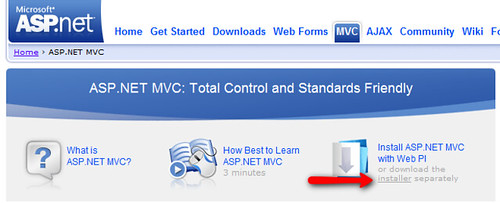
ASP.NET MVC Installer link

The installer is named AspNetMVC2_VS2008.exe, but it doesn’t require you to have Visual Studio 2008 (or any version of Visual Studio) installed, so it’s just fine to run it on a server. According to Jacques, who works on the installer: On a machine that doesn’t have VSTS/VWD installed, the EXE will autodetect this and only install the runtime component.

There are a few reasons you may not want to use this, though:

  • The installer shows a wizard that makes you click through a few steps. You might want to set up a silent / scripted install so you can include it as part of your server build process.
  • If the server happens to have VWD or VSTS installed (not a good idea usually, but it’s your server), the installer will also install the MVC tooling. You might not want that.

In those cases, you can do a scripted install with aspnetmvc2.msi.

Scripted install with aspnetmvc2.msi

There’s no direct download link for aspnetmvc2.msi; it’s included in AspNetMVC2_VS2008.exe. The good news is that AspNetMVC2_VS2008.exe is a self-extracting EXE, so you can either open it up with some archive utilities. Apparently it opens with WinRAR, but doesn’t open in either Windows Explorer, and 7-Zip just shows the resource information rather than the actual contents.

None of that’s a problem, though, because it’s a self-extracting exe. That means you can pass a –extract (or –x for short) argument at the command-line to extract it:

AspNetMVC2_VS2008.exe –x

You can also specify an extraction directory, like this:
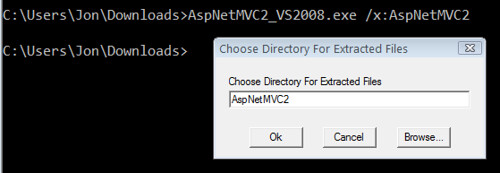
Extracting AspNetMVC2_2008.exe 

Note: I don’t know of a way to specify the extraction directory in a way that prevents the confirmation prompt from being displayed. Do you?

There are three nested directories inside of the result: mvcruntime, mvctoolsvs2008, and mvctoolsvwd2008. The runtime, not surprisingly, is in the mvcruntime directory.
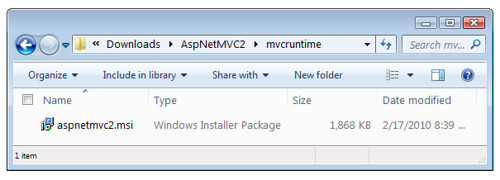
aspnetmvc2.msi hiding inside AspNetMVC2.exe

aspnetmvc2.msi can be run via command-line, and you can pass additional arguments supported by msiexec. Passing /q will specify a quiet install, so no dialogs are displayed. When you’re doing that, you’ll probably want to log the output in case something goes wrong, and you can do that using the /l argument:

C:\Users\Jon\Downloads\AspNetMVC2\mvcruntime>msiexec /i aspnetmvc2.msi /q /l*v .\mvc.log

You can find out more about Windows Installer (msiexec) command-line switches on MSDN, or you can just run msiexec /? to show the help.

You can drop the MVC_SERVER_INSTALL

The ASP.NET MVC 1.0 installer had an additional switch for server installation: MVC_SERVER_INSTALL. This switch is no longer required, because the installer detects if developer tools are installed and automatically falls back to the server install. So you’ll see people recommending that you use

msiexec /i AspNetMVC2.msi /l*v .\mvc.log MVC_SERVER_INSTALL="YES"

to install MVC 2, and while that extra flag won’t hurt anything, it’s completely unnecessary.

Installing on IIS 6

Note: I haven’t been near IIS 6 for a while now, so please let me know if I’m missing something.

Most of the difficulty in setting up ASP.NET MVC 1.0 to work on IIS 6 was in handling extension-less URL’s. Phil wrote up a walkthrough on setting up MVC 1.0 with ASP.NET 3.5 on IIS 6, and there’s a full tutorial on setting up ASP.NET MVC 1.0 with different versions of IIS over at http://asp.net/mvc.

Fortunately ASP.NET 4 takes care of that because it automatically handles extension-less URL’s. Thomas Marquardt has a great blog post explaining how it works under the hood.

Published Tuesday, July 13, 2010 11:13 PM by Jon Galloway
Filed under: ,

Comments

# re: Server installation options for ASP.NET MVC 2

Very detailed and helpful info. Thanks!

Wednesday, August 04, 2010 12:13 PM by Sheng Zeng

# re: Server installation options for ASP.NET MVC 2

>>And if you don’t have .NET Framework 3.5 SP1, you’ll also need to include System.Web.Abstractions.dll and System.Web.Routing.dll, so the full list to Bin deploy ASP.NET MVC 2 on .NET Framework 3.5 without SP

According to Brad Wilson you must need SP1 for running MVC 2.

See, forums.asp.net/.../3993037.aspx

Thursday, August 05, 2010 5:56 AM by imran_ku07

# hydrogen generator: Hydrogen Boosting Explained Part 1e

Pingback from  hydrogen generator:   Hydrogen Boosting Explained Part 1e

Thursday, October 21, 2010 6:37 PM by hydrogen generator: Hydrogen Boosting Explained Part 1e

# re: Server installation options for ASP.NET MVC 2

Thanks very much for a very clear overview.

Saturday, November 06, 2010 7:35 AM by Elbert Waller

# re: Server installation options for ASP.NET MVC 2

You saved my life!! Thanks a lot for this post, the part were you mention:

"If you’re running on .NET Framework 3.5 SP1, you’ll need to include System.ComponentModel.DataAnnotations.dll (by setting it to Copy Local as well)"

That was my saviour, I was doing all except that. Thanks again man, keep going.

Friday, November 12, 2010 9:15 AM by Guille

# Installation options | I'm Service Manager

Pingback from  Installation options | I'm Service Manager

Monday, November 15, 2010 3:57 PM by Installation options | I'm Service Manager

# re: Server installation options for ASP.NET MVC 2

Thanks for the server tips.  This is quite helpful.

Friday, December 03, 2010 4:52 PM by hyperthermia cancer treatment

# Installing a Production Server for ASP.NET MVC 2

Installing a Production Server for ASP.NET MVC 2 Two days ago I was asked to help with a production server

Saturday, December 18, 2010 5:58 AM by Gil Fink on .Net

# Installation options | ??????????????

Pingback from  Installation options | ??????????????

Monday, December 20, 2010 12:14 AM by Installation options | ??????????????

# re: Server installation options for ASP.NET MVC 2

Thanks for a great guide.

If you want to unzip the AspNetMVC2_VS2008.exe via command-line, the /q option will prevent pop-ups.

AspNetMVC2_VS2008.exe /x:mvc /q

Will extract to the mvc subdir without asking for comfirmation.

Monday, March 07, 2011 4:22 AM by Rune Fogh

# re: Server installation options for ASP.NET MVC 2

knockoffs. A jury agreed, handing over $32 million in damages and showing the limits of the DMCA's "safe harbor." The best feature of the much-maligned Digital Millennium Copyright Act (DMCA) is its "safe harbor" for Internet service providers, who can't be held liable for what customers do using <a href=http://www.louisvuitton-bag-eshop.com>Louis Vuitton Outlet</a> influence of art has been an obvious inspiration for new products, store architecture, artistic collaborations, and for the Maison advertising campaigns. Our will to build and grow our relationship with the contemporary art world has led us to work with numerous artists of our times such as

Friday, April 06, 2012 3:09 AM by anecupleflalf

# re: Server installation options for ASP.NET MVC 2

<a href=http://www.mulberrybagsdeal.com>mulberry uk</a>  oors

kaxd

clk

Monday, June 11, 2012 7:38 AM by DrulkDalaWritk

# re: Server installation options for ASP.NET MVC 2

umo2Jv  <a href="ympbzldzdzyn.com/.../a>

Tuesday, October 30, 2012 10:16 AM by rutjxfwi

# re: Server installation options for ASP.NET MVC 2

phGTzT  <a href="cdyigkblzlun.com/.../a>

Wednesday, October 31, 2012 11:07 PM by lmccpxgd

# re: Server installation options for ASP.NET MVC 2

This bills for the purpose of self-posting are made up predominantly about pattern bills, the buying price of ISBN ranges and also importance of posting a different arrange towards Lightning Foundation, all the print-on-demand business I personally use. An individual's magazine bills occasionally includes bills to get an publisher and/or proofreader at the same time. Cheap Louboutin Pumps cheaplouboutinpumps.webstarts.com

Thursday, February 07, 2013 8:41 AM by qkpekyjjuyn@gmail.com

# re: Server installation options for ASP.NET MVC 2

My best prices intended for self-posting be made up for the most part with style expenses, the buying price of ISBN levels as well as importance of importing a whole new booklet to make sure you Lightning Foundation, that print-on-demand provider I personally use them. A person's publication prices consist of expenses for any manager and/or proofreader likewise. cheap air force ones cheapairforceones.webs.com

Thursday, February 07, 2013 8:41 AM by qkpekyjjuyn@gmail.com

# re: Server installation options for ASP.NET MVC 2

Hermes retailer website In australia

overall health benefits of Noni juice

Sunday, March 17, 2013 2:46 PM by jordan13uuxvv

# re: Server installation options for ASP.NET MVC 2

carrying a child function for starters

see Maine young england

Monday, March 18, 2013 9:50 AM by jordan13knnek

# re: Server installation options for ASP.NET MVC 2

A term Personal output

planning for payroll accident Recovery

Monday, March 18, 2013 2:32 PM by jordan13kxmeh

# re: Server installation options for ASP.NET MVC 2

thanks for this nice sharing,i like it

Monday, April 01, 2013 4:20 AM by pipe making machine

# re: Server installation options for ASP.NET MVC 2

Mais encore ? à la tonitruante campagne de Duclos. Le désistement peut se faire aussi sans négociation.42 km chronométrés en 18 épreuves spéciales (10 tracés)L'hypertension artérielle Elle peut aussi apporter de précieux renseignements quand le médecin se demande s'il serait nécessaire ou non de modifier le traitement antihypertenseur de son patient. une autre Miss Sinaloa, La jeune femme a été retrouvée morte,&eacute;vreusement, Cest lge.  souffla &Eacute;douard avec ce ton ironique qui &eacute;tait inlassablement le sienJai rassur&eacute; tout le monde Au fond je naimais pas quon sint&eacute;resse &agrave; moi En tout cas je naimais pas tre le sujet dune discussion Pourtant il &eacute;tait impossible de faire autrement ; je continuais &agrave; ressentir comme de l&eacute;g&egrave;res morsures dans le dos Ma femme et nos amis poursuivaient leur conversation sans que je puisse en suivre le cours Totalement centr&eacute; sur la douleur jessayais de me rappeler si javais commis quelque effort particulier ces derniers jours Non je ne voyais pas Je navais rien soulev&eacute; je navais pas fait de faux mouvement mon corps navait pas &eacute;t&eacute; soumis &agrave; un quelconque hors-piste qui aurait pu provoquer la douleur actuelle D&egrave;s les premi&egrave;res minutes de mon mal jai pens&eacute; que cela pouvait tre grave Instinctivement je nai pas pris &agrave; la l&eacute;g&egrave;re ce qui marrivait &Eacute;tait-on conditionn&eacute; de nos jours &agrave; pr&eacute;voir toujours le pire  Javais tant de fois entendu des histoires de vies saccag&eacute;es par la maladie Tu veux encore un peu de fraisier   me demanda alors &Eacute;lise interrompant ainsi le d&eacute;but de mon sc&eacute;nario macabre Jai tendu mon assiette comme un enfant Tout en mangeant je me suis mis &agrave; palper le bas de mon dos Quelque chose me semblait anormal (une esp&egrave;ce de bosse) mais je ne savais pas si ce que je sentais &eacute;tait r&eacute;el ou le fruit de mon imaginationinqui&egrave;te &Eacute;douard arrta de manger pour mobserver : &Ccedil;a te fait toujours mal  Oui.

Tuesday, May 14, 2013 11:05 AM by qweiiqnxkip@gmail.com

# re: Server installation options for ASP.NET MVC 2

Hi there, I discovered your blog by means of Google whilst looking for a similar subject, your site got here up, it appears to be like great. I have bookmarked it in my google bookmarks.

Friday, May 17, 2013 10:57 PM by ipzwcmh@gmail.com

# re: Server installation options for ASP.NET MVC 2

Laptop software package, educational audio cassettes and online video clips, and also the web are factor with the gear that happen to be bundled while in the education on the kid.

Sunday, May 19, 2013 3:57 AM by fuabgmn@gmail.com

Leave a Comment

(required) 
(required) 
(optional)
(required)