WCF MediaTypeProcessor + Speech API = SpeechProcessor fun
One of my favorite features in the new WCF Web API’s support for Media Type Processors. WCF Media Type Processors offer a really powerful way to build some sophisticated services with minimal configuration – or code, for that matter – because they leverage the media support and content-type negotiation features that are built into HTTP.
Media Type Processors allow you to expose data in a variety of formats – think HTMK, JSON, ATOM, RSS, plain old XML, PNG, PDF, etc. – and allow clients of your service to select via the HTTP Accept header. For instance, the Contact Manager sample included with the WCF Web API’s download on CodePlex registers a JSON and a PNG response processor, and will return either contact information in JSON format or based on the Accept header passed to the request.
Steve Michelotti wrote a nice followup showing how to write a more advanced Media Type Processor to serve up HTML using simple views processed by the Razor template engine when a client sends an accept header of "text/html".
I decided to try extending the Contact Manager sample to handle requests for audio as well. Here’s the game plan:
- We’ll take a look at how the Contact Manager sample and see how the JSON and PNG Media Processors work
- We’ll build a SpeechProcessor which returns content in WAV format using the Speech API
- We’ll see how it works in Fiddler, media players, and the <audio> tag
Getting up to speed with the basics - the Contact Manager sample’s use of JSON and PNG processors
Media processors are registered in a configuration class which extends the HostConfiguration base class. In the sample, that class looks like this:
public class ContactManagerConfiguration : HostConfiguration
{
    public override void RegisterRequestProcessorsForOperation(HttpOperationDescription operation,
                            IList<Processor> processors, MediaTypeProcessorMode mode)
    {
        processors.Add(new JsonProcessor(operation, mode));
        processors.Add(new FormUrlEncodedProcessor(operation, mode));
    }

    public override void RegisterResponseProcessorsForOperation(HttpOperationDescription operation,
                            IList<Processor> processors, MediaTypeProcessorMode mode)
    {
        processors.Add(new JsonProcessor(operation, mode));
        processors.Add(new PngProcessor(operation, mode));
    }
}
Nothing too complex here. Two methods are being overridden – RegisterRequestProcessorsForOperation registers request processors (which handle input) and RegisterResponseProcessorsForOperation registers response processors (which handle output). Notice that the JsonProcessor handles both – we accept requests in JSON format, and can send responses in JSON format as well. The other two formats are unidirectional – form posts only work on input, and PNG’s are only used for output.
The ContactManagerConguration class is registered with our service route registration in the Application_Start event since this example is running in an ASP.NET context. (random thought in passing: It could probably also be registered via the PreApplicationStartMethod or using WebActivator if you wanted to do this outside of Global.asax – if, for example, you wanted to include this in a library or deliver it via a NuGet package). Here’s the Application_Start code:
public class Global : System.Web.HttpApplication
{
    protected void Application_Start(object sender, EventArgs e)
    {
        var configuration = new ContactManagerConfiguration();
        RouteTable.Routes.AddServiceRoute<ContactResource>("contact/", configuration);
        RouteTable.Routes.AddServiceRoute<ContactsResource>("contacts", configuration);
    }
}
If you’ve used ASP.NET MVC or used the routing feature with ASP.NET Web Forms, that route syntax should look pretty familiar. Note that this setup is per-application, not per processor, so adding a new processor to the list requires adding just one additional line of code to our Host Configuration class.
Okay, so we’ve seen that service routes take a configuration reference, and the configuration class holds a list of Request and Response processors. There’s one more piece to the puzzle – defining the media types each processor will respond to. That’s defined by each processor’s SupportedMediaTypes property. Here’s the entire code for the PngProcessor, which processes responses from clients which accept PNG media type:
public class PngProcessor : MediaTypeProcessor
{
    public PngProcessor(HttpOperationDescription operation,
            MediaTypeProcessorMode mode) : base(operation, mode)
    {
    }

    public override IEnumerable<string> SupportedMediaTypes
    {
        get
        {
            yield return "image/png";
        }
    }

    public override void WriteToStream(object instance, Stream stream, HttpRequestMessage request)
    {
        var contact = instance as Contact;
        if (contact != null)
        {
            var path = string.Format(CultureInfo.InvariantCulture,
            @"{0}bin\Images\Image{1}.png",
            AppDomain.CurrentDomain.BaseDirectory, contact.ContactId);

            using (var fileStream = new FileStream(path, FileMode.Open))
            {
                byte[] bytes = new byte[fileStream.Length];
                fileStream.Read(bytes, 0, (int)fileStream.Length);
                stream.Write(bytes, 0, (int)fileStream.Length);
            }
        }
    }

    public override object ReadFromStream(Stream stream, HttpRequestMessage request)
    {
        throw new NotImplementedException();
    }
}
There’s some code there for reading image files and writing them to a stream, but I think that’s remarkably simple and clean – a processor has a SupportedMediaTypes property which defines which media types it will handle. It’s an enumerable value, since a processor can handle more than one media format. Other than that, we just need to override ReadFromStream and WriteToStream as applicable.
We can see that in action pretty easily, either using Fiddler or by using clients with different Accept headers.
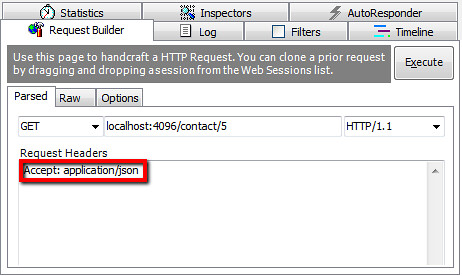
First, let’s look in Fiddler. When we set an Accept header of JSON, the PNG formatter ignores the response because it hasn’t registered that it can handle that media type:
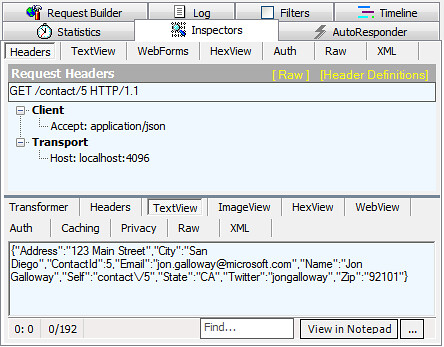
When we execute that, we get the following response:
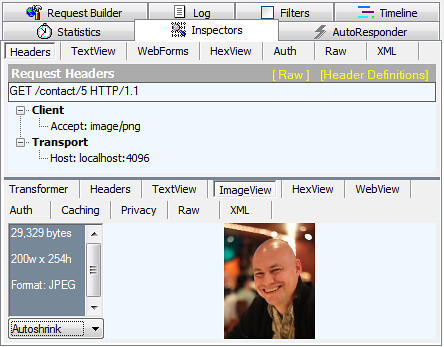
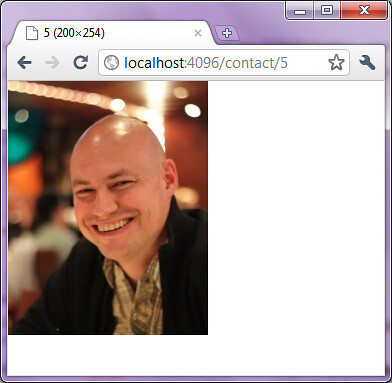
And when we change the Accept header to PNG, the PNG formatter responds (instead of the JSON formatter – more on that later) and sends a PNG with the appropriate content headers.
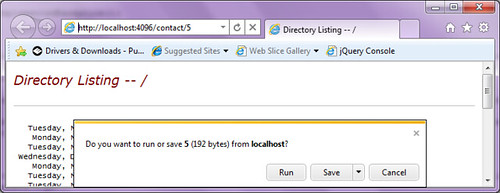
We can easily see this in action in a the browser as well, since IE and Chrome have different Accept headers. The IE9 accept header (Accept: text/html, application/xhtml+xml, */*) accepts both JSON and PNG, so it takes the first listed processor (JSON) prompts to save the JSON content. Note: See Eric Lawrence's post describing why the IE Accept header works as it does, lists some precautions against using it in browser-based scenarios.
Here’s the actual JSON data returned: {"Address":"123 Main Street","City":"San Diego","ContactId":5,"Email":"jon.galloway@nospamplease.com","Name":"Jon Galloway","Self":"contact\/5","State":"CA","Twitter":"jongalloway","Zip":"92101"}
The Chrome Accept header (Accept: application/xml,application/xhtml+xml,text/html;q=0.9,text/plain;q=0.8,image/png,*/*;q=0.5) prefers PNG over an unspecified content type, because it’s assigned PNG a quality factor of 1 (the default quality value) while unspecified content types (*/*) are weighted at .5.
Summary so far:
- Media Type Processors let your services respond to requests based on the content types the client says prefer
- Creating a Media Type Processor requires the following:
- Create a class that extends MediaTypeProcessor
- List the media types your processor supports
- Override the ReadFromStream and / or WriteToStream methods as applicable
- Registering your Media Type Processor is as simple as adding it to the list of processors in the Host Configuration class used to define the routes.
- Once that’s set up, your service will respond based on the Accept header provided by clients of your service
Creating a SpeechProcessor
I’ve seen other processor examples which focus on browser scenarios. That makes some sense, since they’re easy to demonstrate and conceptualize, but a key point of WCF is that your services may be responding to non-browser clients. For example, I’ve made use of WCF in the broad context of an MVC application, but the WCF service was used by a Silverlight client to retrieve images and metadata for a Deep Zoom experience. In that case, the request was coming from Silverlight rather than the browser’s networking stack.
Going further, though, let’s assume we wanted to create voice responses for a telephony system or messaging system with no browser involvement whatsoever?
Let’s walk through the steps above, building out a SpeechProcessor that responds to requsts for audio/x-wav content.
Step 1: Create the SpeechProcessor class
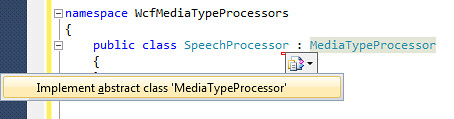
We’ll start by creating a new SpeechProcessor class which implements the MediaTypeProcessor abstract class. You can do that manually, but in Visual Studio you can take advantage of the “Implement abstract class” feature:
That gives us a grab bag of NotImplementedException happy time:
public class SpeechProcessor : MediaTypeProcessor
{
    public override object  ReadFromStream(Stream stream, HttpRequestMessage request)
    {
         throw new NotImplementedException();
    }

    public override IEnumerable<string>  SupportedMediaTypes
    {
        get { throw new NotImplementedException(); }
    }

    public override void  WriteToStream(object instance, Stream stream, HttpRequestMessage request)
    {
         throw new NotImplementedException();
    }
}
We’ll start with the SupportedMediaTypes section. All we need to do there is return the MIME type we’re handling. A quick look at Wikipedia (hi, Jimmy Wales!) tells us that our MIME type is audio/x-wav, so our SupportedMediaTypes property getter just looks like this:
public override IEnumerable<string> SupportedMediaTypes
{
    get { yield return "audio/x-wav"; }
}
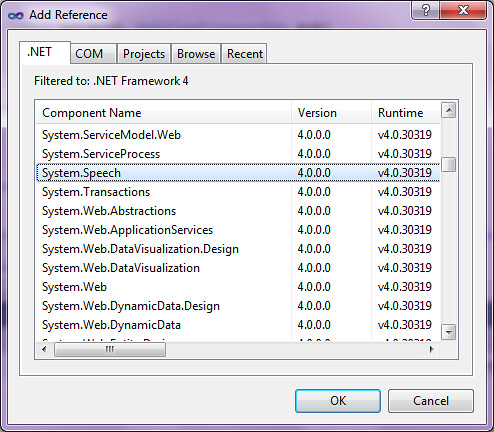
We’re not going to accept input in this processor (although accepting audio requests would be pretty cool) so we can leave the ReadFromStream as not implemented. We just need to handle the WriteToStream method. In order to create a speech response, we’ll add a reference to System.Speech like this:
Now the WriteToStream bit is embarrassingly easy (although we’ll make it slightly more complex in a minute):
public override void WriteToStream(object instance, Stream stream, HttpRequestMessage request)
{
    var contact = instance as Contact;
    if (contact != null)
    {
        var speech = new SpeechSynthesizer();
        speech.SetOutputToWaveStream(stream);

        string message = "{0} can't come to the phone right now. " +
                         "Try e-mail at {1} or on Twitter at {2}.";
        speech.Speak(string.Format(
                message,
                contact.Name,
                contact.Email,
                contact.Twitter));
    }
}
We’ve got one more step – we need to register it. Remember, that’s just one line of code:
public override void RegisterResponseProcessorsForOperation(HttpOperationDescription operation, IList<Processor> processors, MediaTypeProcessorMode mode)
{
    processors.ClearMediaTypeProcessors();
    processors.Add(new SpeechProcessor(operation, mode));
    processors.Add(new JsonProcessor(operation, mode));
    processors.Add(new PngProcessor(operation, mode));
}
I’m adding it to the top of the list because I want it to take precedence for clients which can handle audio. We can see that in action in Fiddler by setting the Accept header to audio/x-wav.
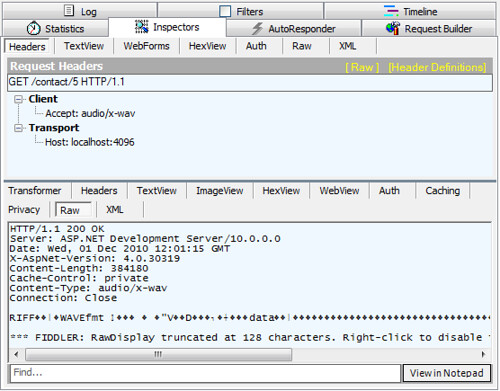
That’s showing the RIFF header that we all know and love. Well, those of us who have played with audio programming, anyhow. Oh, you actually wanted to listen to the audio? Easy enough, we can fire up an audio player and open the audio by URL. I’m using Windows Media Player here, but you’re welcome to use VLC or whatever else you’d like. This works because Windows Media Player sends an Accept header of */* so our service will serve it up as the first listed Media Type Processor.
Once Windows Media Player is running, you can open a URL by pressing Ctrl-U, they typing in the same service URL we’ve been using all along:
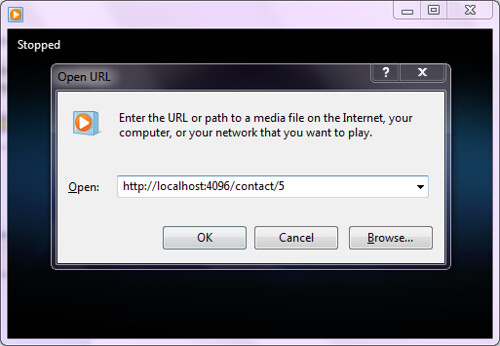
Note: This is actually pretty fun to hear it reading out the info. You can’t tell from the picture above, but it’s easy enough to download the attached code and give it a spin. I think it’s worth it. You can of course change the URL to /contact/4, /contact/3, etc. You can also open up the ContactRepository class and add your name to the list for bonus fun time and embarrassment when it cracks you up and you have to explain to your coworkers / family / friends / coffee shop mates why you’re laughing and what a Media Type Processor is.
Megabonus: Trying this out with the HTML5 <audio> tag
I’ve been keeping an eye on the audio and video tags since back when you had to download nightly builds of Firefox to play with them, and I’m really excited to see them come to the mainstream. So let’s take a look to see if we can play the audio in a browser (even though I said that wasn’t the main purpose earlier).
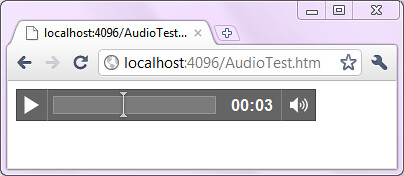
To do that, I’m just creating an HTML page called AudioTest.htm with an audio tag:
<!DOCTYPE html>
<html>
<audio controls="controls" autoplay="autoplay">
    <source src="/contact/5" />
    Your browser does not support the audio element.
</audio>
</html>
This didn’t work for me in IE9, but it did work in Chrome.
Un-bonus: anticlimactic filename extension filtering epilogue
Dropping my processor at the top of the list might be a problematic long-term strategy, since we’ll run into conflicts as we want to add more processors in the future. We may also want to allow specifying that we want audio via the URL as well. One way to handle that now is to allow a request to something like /contact/5.wav. Here’s how to do that (with some thanks to Glenn Block for cleaning up my code).
First, we change the ContactResource Get method to parse out the file extension:
[WebGet(UriTemplate = "{id}")]
public Contact Get(string id, HttpResponseMessage response)
{
        int contactID = !id.Contains(".")
        ? int.Parse(id, CultureInfo.InvariantCulture)
        : int.Parse(id.Substring(0, id.IndexOf(".")), CultureInfo.InvariantCulture);

    var contact = this.repository.Get(contactID);
    if (contact == null)
    {
        response.StatusCode = HttpStatusCode.NotFound;
        response.Content = HttpContent.Create("Contact not found");
    }

    return contact;
}
Next, we make a change to the WriteToStream method so it only responds to requests which include a .wav extension:
public override void WriteToStream(object instance, Stream stream, HttpRequestMessage request)
{
    var contact = instance as Contact;
    if (request.Uri.AbsoluteUri.EndsWith(".wav", StringComparison.InvariantCultureIgnoreCase) && contact != null)
    {
        var speech = new SpeechSynthesizer();
        speech.SetOutputToWaveStream(stream);

        string message = "{0} can't come to the phone right now. Try e-mail at {1} or on Twitter at {2}.";
        speech.Speak(string.Format(message, contact.Name, contact.Email, contact.Twitter));
    }
}
Everything works as before, but now our SpeechProcessor only responds to requests of the form /contact/5.wav.
Code
You can download a sample project with above code (plus Steve Michelotti’s very cool Razor template processor) here.