Large ViewState & ViewState chunking (maxPageStateFieldLength)
The ViewState Chunking mechanism allow you to split the ViewState content into several chunks/hidden fields. The reason behind using this feature is that some proxies and firewalls will deny access to the aspx page that contains a huge ViewState size by enabling the chunking mechanism that will allow you to bypass this policy.
You can enable ViewState chunking by setting the MaxPageStateFieldLength property the web.config of your asp.net application, this property should be added to the "pages" section in the web.config and it will specify the maximum size of the ViewState in bytes.
If the ViewState size is larger than the value of the MaxPageStateFieldLength than it will be splitted automatically into several hidden fields.
Set the property in the web.config as per the following:
<pages maxPageStateFieldLength="5">
ViewState Example: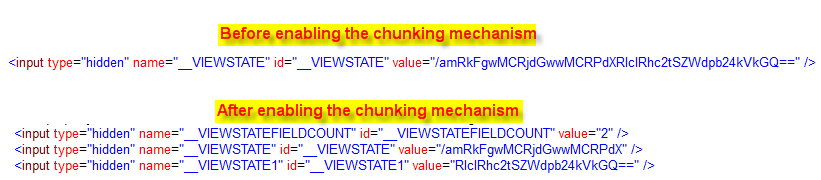
Note that you should reconsider the way you are using the ViewState (ViewState optimization, maybe disabling it in some cases) when it has large size.
Reference:
http://msdn.microsoft.com/en-us/library/ms178577%28v=vs.85%29.aspx