Find/Replace in Visual Studio with Regular Expressions and Variables

This can be a major time saver when you want to find some text and perhaps duplicate it or manipulate it throughout a bunch of files in your project.

In my case, I was asked to take all the AlternateText properties on Image controls, and duplicate them to ToolTip attributes.  There are ways to accomplish this without actually changing the markup at all, but I wanted to see if Visual Studio could do it for me, and my good friend and colleague, Alex Cibotari, cooked up a solution.


Find: AlternateText='{[^']+}'

Replace With: AlternateText='\1' ToolTip='\1'

You can see that the \1 serves as a variable placeholder for the contents of the first regular expression block in the Find field.

I haven't had the chance to try this out with multiple variables yet, but it makes sense that it would work.
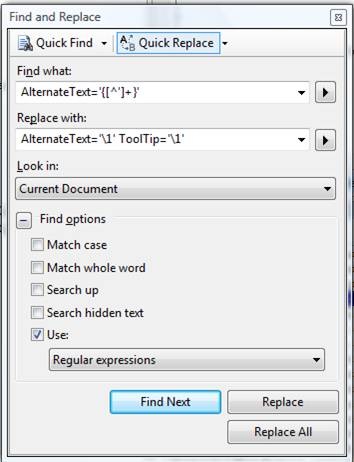
 

clip_image001


How awesome is that?  Thanks, Alex! 

There are lots of other ways this can be used - let me know if you come up with any cool ones.

Published Tuesday, March 25, 2008 8:02 AM by joelvarty
Filed under: ,

Comments

# re: Find/Replace in Visual Studio with Regular Expressions and Variables

Wednesday, December 17, 2008 9:20 AM by Patric Mc

By now, I have made it a habit to use biterscripting alongside. It can find regular expressions in all files in any top directory. It can even split and edit several code files simultaneously in batch mode. For example, if you want to change a class name from class1 to class2 in all files in your project in C:/myproject, I can do that with just one script command.

script Change.txt "class1" "class2"

(Ask me for the code for script Change.txt - just a few lines.)

I believe biterscripting is free, although I have not downloaded for a while. (You can try it at http://www.biterscripting.com .)

Patrick

# re: Find/Replace in Visual Studio with Regular Expressions and Variables

Sunday, December 21, 2008 9:14 PM by Ergo Ratio

I recently had to switch the values of two parameters for a few hundred lines of code. I used the following expression:

Find: {[0-9]+}, {[0-9]+}

Replace: \2, \1

So that all the lines of code that looked like this:

this.Add("EMAIL", 218, 40);

Became something like this:

this.Add("EMAIL", 40, 218);

# re: Find/Replace in Visual Studio with Regular Expressions and Variables

Thursday, August 06, 2009 10:37 AM by smokeyhotpot

some website use this character "|" as a border on menus or phone number, what is the command to specify this character? enclosure for this is possible right? but what is that?

# re: Find/Replace in Visual Studio with Regular Expressions and Variables

Wednesday, December 09, 2009 5:26 PM by Tim Cartwright

Tried this, it did not work, really wish it did.

# re: Find/Replace in Visual Studio with Regular Expressions and Variables

Friday, March 05, 2010 10:14 AM by daveblack

Does anyone know how to use a regex in the "Replace with" without using a literal?  I'm trying to replace all instances of variables declared as all uppercase to all lowercase beginning with an underscore.

TIA

Leave a Comment

(required) 
(required) 
(optional)
(required)