Force IE7 Compatibility Mode in IE8 with IIS settings

There a ton of examples on the web of how you can force IE8 into IE7 compatibility mode using a meta tag in the header. 

This tag needs to be first in the <head> (before any css):

<meta http-equiv="X-UA-Compatible" content="IE=7" />


That really stinks if you need to add that to a lot of pages or sites.  It’s much easier just to add the header as real HTTP Header via IIS.  This can be done via IIS 6 or 7.


IIS 6

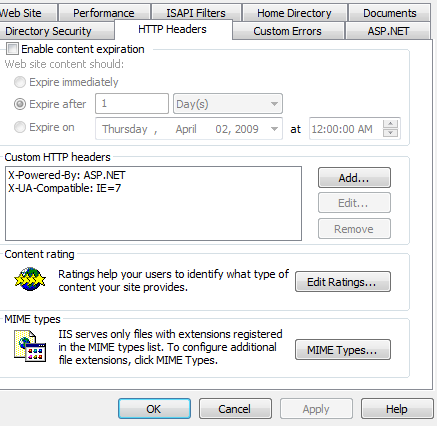
Go to the website, bring up the properties for it, and click on the HTTP Headers tab.
 

image

 HTTP Headers tab of an IIS 6 Website


Then, add a new header as below:
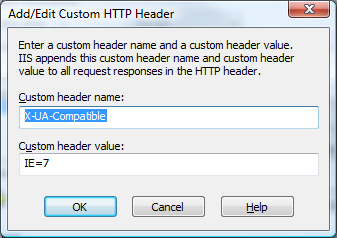
imageAdd custom HTTP Header 


IIS 7

IIS 7 is much the same.  Just go to the site and click on “HTTP Response Headers”.
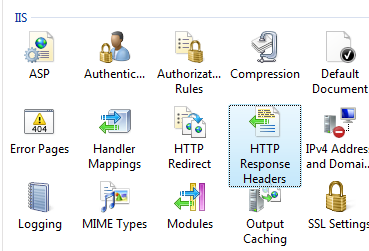
 

imageIIS 7 Website Properties – IIS Section 

Then, just add the header:
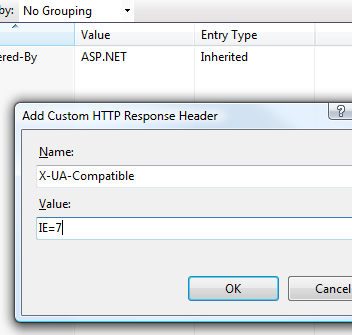
image Add custom HTTP Header 

Incidentally, this just sets a value in the web.config, as below:
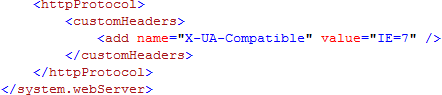
 

image

More later - jv

Published Monday, March 23, 2009 1:56 PM by joelvarty

Comments

# IE7 Kompatibilitätsmodus für den IE8 über den IIS erzwingen

Tuesday, March 24, 2009 3:38 AM by Jürgen Gutsch

(via: Joel Varty’s Blog ) Joel Varty zeigt in seinem Weblog eine Möglichkeit, wie der IE7 Kompatibilitätsmodus

# re: Force IE7 Compatibility Mode in IE8 with IIS settings

Tuesday, March 24, 2009 5:43 PM by Adrian Bateman [MSFT]

I would recommend that you use the value IE=EmulateIE7 instead of IE=7. This is because IE=7 will force all pages to use IE7 compatibility mode including quirks pages. IE=EmulateIE7 will ensure quirks pages render in quirks mode and standards pages in IE7 mode. Rendering quirks pages in IE7 mode will likely make them look very broken. It's not called "quirks" mode for nothing. :o)

# re: Force IE7 Compatibility Mode in IE8 with IIS settings

Tuesday, March 24, 2009 8:49 PM by joelvarty

Thanks for the tip, Adrian.  I will definately make that change.  I haven't noticed any issues, tho, so maybe the sites I have been working with are quirks-friendly....

# re: Force IE7 Compatibility Mode in IE8 with IIS settings

Tuesday, March 31, 2009 4:43 PM by John Moore

I am glad I came across this post.  My company is not yet supporting IE8 but this will provide us with a great solution for making IE8 look good for now.

Keep passing on the great information, thanks.

John

johnfmoore.wordpress.com

# re: Force IE7 Compatibility Mode in IE8 with IIS settings

Wednesday, April 01, 2009 8:57 AM by John Moore

A quick follow-up.  This worked great for my site as long as I use the IE=EmulateIE7 value.  Trying to use the IE=7 resulted in my site essentially hanging when run on IE8.  

John

johnfmoore.wordpress.com

# re: Force IE7 Compatibility Mode in IE8 with IIS settings

Thursday, April 09, 2009 2:05 PM by NYC Go

I did not work for us. We spied on MSN.com source and see it is working great for them so we are assuming its due to the fact that they use "Strict" and we are using "Traditional" tags.

# re: Force IE7 Compatibility Mode in IE8 with IIS settings

Tuesday, May 05, 2009 9:52 AM by Eoin

I could not get this to work.  My pages still required me to click on compatibility mode when I used it.  I am using a Joomla based site, any help anyone?

# re: Force IE7 Compatibility Mode in IE8 with IIS settings

Tuesday, May 05, 2009 11:37 AM by joelvarty

@Eoin: Can you provide a URL?

# re: Force IE7 Compatibility Mode in IE8 with IIS settings

Friday, May 08, 2009 5:57 PM by @Eoin

The meta tag has to be the first thing under the <head> tag in your Joomla! template for it to work. It cannot come after the title or other meta tags. I had it beneath some other meta tags and it was a no go. Moved it ahead of the others and it worked.

# re: Force IE7 Compatibility Mode in IE8 with IIS settings

Tuesday, May 19, 2009 12:43 PM by Pimentel

I'm working with Joomla 1.0 and 1.5 for my clients, and seams that this meta tag is perfect for "no budget" clients. It's a risky solution cause you don't know what microsoft wild do about this issue, but works for now.

Just put the tag under the <header> and there you go.

# re: Force IE7 Compatibility Mode in IE8 with IIS settings

Thursday, May 28, 2009 4:34 PM by abssd

great work. Thanks!

# re: Force IE7 Compatibility Mode in IE8 with IIS settings

Wednesday, June 10, 2009 7:21 AM by Ilia101

This definitely works via IIS 6. Web.config and other solutions did not work.

# re: Force IE7 Compatibility Mode in IE8 with IIS settings

Thursday, June 18, 2009 8:49 AM by nucleardragon

This works in IIS 5.1 as well, but only the IE=7 value. The IE=EmulateIE7 value does not.

# re: Force IE7 Compatibility Mode in IE8 with IIS settings

Saturday, July 25, 2009 10:02 AM by Elias Sahyouni

Thanks!

# IE8 Compatibility Mode &laquo; BlogMill

Tuesday, October 20, 2009 11:15 PM by IE8 Compatibility Mode « BlogMill

Pingback from  IE8 Compatibility Mode &laquo;  BlogMill

# re: Force IE7 Compatibility Mode in IE8 with IIS settings

Wednesday, December 23, 2009 12:30 PM by Josh

What happens if the user has IE6 and this is set?

# re: Force IE7 Compatibility Mode in IE8 with IIS settings

Monday, January 11, 2010 9:10 PM by Austin Web Designer

hey thanks just starting doing this and this will really  help me. nice short tutorial

# re: Force IE7 Compatibility Mode in IE8 with IIS settings

Friday, January 29, 2010 4:00 PM by Jason

IE6 ignores it.  IE6 is POR where I work, but some people are using IE8.  My site is very broken in IE8 so this works great using EmulateIE7.

# re: Force IE7 Compatibility Mode in IE8 with IIS settings

Thursday, February 04, 2010 5:36 AM by Samarjeet Singh

I am facing same problem but when I add header in IIS it is working fine.

Thanks.......

# The Internet Explorer 8 Problem : Amadeus Consulting

Wednesday, February 24, 2010 4:47 PM by The Internet Explorer 8 Problem : Amadeus Consulting

Pingback from  The Internet Explorer 8 Problem  : Amadeus Consulting

# IE8 e o modo de compatibilidade | Bruno Pires :: dev-blog

Pingback from  IE8 e o modo de compatibilidade | Bruno Pires :: dev-blog

# re: Force IE7 Compatibility Mode in IE8 with IIS settings

Tuesday, March 16, 2010 11:22 AM by Rob Ralston

Found I had a compatibility problem on a DotNetNuke v4.9.5 portal. Adding the custom header at the website level appears to be working well. I used the IE=EmulateIE7 value. Just set it up, but so far looks good. Thanks for the tip.

# re: Force IE7 Compatibility Mode in IE8 with IIS settings

Thursday, April 01, 2010 12:05 AM by steph

I can't get the compatability mode to force on this site.  You'll notice if you hover over the top menu items the red bar beneath them covers some options.  This does not occur in ie7 or when using compatibility mode.

# re: Force IE7 Compatibility Mode in IE8 with IIS settings

Thursday, April 01, 2010 8:58 AM by stephanie

Nevermind. I got it. Thanks!

# re: Force IE7 Compatibility Mode in IE8 with IIS settings

Tuesday, May 04, 2010 4:51 AM by Sathiesh

Hi its working well. thanks.

How can i setup this using code in asp.net c#

# Windows 7 compatibility

Friday, May 14, 2010 11:44 AM by Windows 7 compatibility

Pingback from  Windows 7 compatibility

# Force IE7 Compatibility for IE8 via IIS

Monday, May 17, 2010 8:25 PM by DustinClonch.com

Force IE7 Compatibility for IE8 via IIS

# re: Force IE7 Compatibility Mode in IE8 with IIS settings

Wednesday, June 16, 2010 3:26 AM by Sathish Kumar.R

Hi, I used meta tag to force IE8 compatability..It works gr8.. When will the IE & Other browsers compatability will solve?

# wysiwyg html editor icons disappear

Friday, June 18, 2010 10:36 AM by wysiwyg html editor icons disappear

Pingback from  wysiwyg html editor icons disappear

# re: Force IE7 Compatibility Mode in IE8 with IIS settings

Friday, July 23, 2010 10:58 AM by Alison

How to keep the compatible IE7 mode setting after the browser closed?

Thanks.

Alison

# re: Force IE7 Compatibility Mode in IE8 with IIS settings

Friday, August 13, 2010 3:53 AM by Michael J

When I used "IE=7", I got problem in displaying layers (div) IE8 installed in Windows 7 OS. But it is working in Windows XP - IE8. Finally I used "IE=EmulateIE7". Now it is working fine. Thanks.

# re: Force IE7 Compatibility Mode in IE8 with IIS settings

Monday, September 06, 2010 5:38 AM by gforce

I wish there are no IE browsers. They always make us look bad.

# re: Force IE7 Compatibility Mode in IE8 with IIS settings

Wednesday, September 29, 2010 4:21 PM by Scott M

This code is not working in SAP BSP web pages. I have tried pretty much all the variations that have been posted so far... Any Ideas?

# re: Force IE7 Compatibility Mode in IE8 with IIS settings

Monday, October 11, 2010 10:51 AM by Brian C.

IE8 incorrectly renders a nasty black border around the main table on our Internet site unless compatibility mode is enabled, even though the border attribute is correct.  Early testing on our dev site using IE=EmulateIE7 shows that the compatibility forced setting is working, though it does nothing to remove the border in Firefox or Chrome.  Not sure what changed in IE8/FF/Chrome, but they need to fix it.  Thanks for the tip!

# For??ando o IE executar a p??gina em modo de compatibilidade

Thursday, November 04, 2010 4:08 PM by For??ando o IE executar a p??gina em modo de compatibilidade

Pingback from  For??ando o IE executar a p??gina em modo de compatibilidade

# re: Force IE7 Compatibility Mode in IE8 with IIS settings

Friday, November 05, 2010 3:31 PM by prakash

i have added the meta tag to my page that I want to display with IE7 settings in IE8 but it does not work....any help???

I have added the following line after the head tag

<meta http-equiv="X-UA-Compatible" content="IE=EmulateIE7"/>

# Salient Digital Techno Blog &raquo; Blog Archive &raquo; How to Fix: Flash displays over ColorBox in IE

Pingback from  Salient Digital Techno Blog  &raquo; Blog Archive   &raquo; How to Fix: Flash displays over ColorBox in IE

# re: Force IE7 Compatibility Mode in IE8 with IIS settings

Tuesday, January 18, 2011 9:35 PM by Paul Evans

Had been struggling with this problem for several hours.  Found many posts that mentioned using the meta tag, but yours was the first I saw saying that it had to be right after the head tag and before any CSS.  Moving the tag up did the job.  Thanks.  

# re: Force IE7 Compatibility Mode in IE8 with IIS settings

Wednesday, January 26, 2011 9:30 PM by Srigurusankar

Great Help, Thanks,

# re: Force IE7 Compatibility Mode in IE8 with IIS settings

Thursday, February 10, 2011 5:49 AM by mcpyx@hotmail.com

Thanks Thanks

# re: Force IE7 Compatibility Mode in IE8 with IIS settings

Monday, February 21, 2011 11:37 PM by sudhir

Div tags are not working in IE8 ,i have developed my application in IE6.Can any one help? more over i need to forcefully click on compatibility button ,its not coming automatically.

# re: Force IE7 Compatibility Mode in IE8 with IIS settings

Monday, March 07, 2011 4:40 AM by Steven

works great - thanks

# re: Force IE7 Compatibility Mode in IE8 with IIS settings

Thursday, March 10, 2011 4:13 PM by Arkangel

Man! I've been looking for this fix for two years!!

THX!!!

# re: Force IE7 Compatibility Mode in IE8 with IIS settings

Thursday, March 24, 2011 1:51 PM by John Vorwerk

Many thanks for the instructions! I couldn't get the tags to work properly with masterpage, however, with this directive, my EmailUnlimited Online is finally working again on IE9!

It's a shame that you need these hacks...why can't IE9 be a bit more like...Firefox 4...which simply works like a charm?

# Why are users logged out when they toggle compatibility mode in IE? Drija

Pingback from  Why are users logged out when they toggle compatibility mode in IE? Drija

# Moved my ASP.NET app to a Windows 2008 server, now DropDownList SelectedIndexChanged events don&#8217;t fire - Programmers Goodies

Pingback from  Moved my ASP.NET app to a Windows 2008 server, now DropDownList SelectedIndexChanged events don&#8217;t fire - Programmers Goodies

# Internet Explorer 9: Vista de compatibilidad por defecto para sitios de Intranet

Friday, December 30, 2011 7:21 AM by Santiago J Porras Rodríguez

Escenario: Estos días he estado realizando una web pública http://www.boPlace.com para una aplicación

# How to Set IE7 Compatibility Mode in IE8

Thursday, October 18, 2012 7:35 AM by Hossein Zahed

How to Set IE7 Compatibility Mode in IE8

# Navigating the changing IE landscape | Flogging English

Sunday, October 28, 2012 3:39 PM by Navigating the changing IE landscape | Flogging English

Pingback from  Navigating the changing IE landscape | Flogging English

# Image-Buttons verursachen Fehler im Internet Explorer 10 - "Eingabezeichenfolge hat das falsche Format"

Wednesday, April 03, 2013 4:43 AM by The bright side of life

Image-Buttons verursachen Fehler im Internet Explorer 10 - "Eingabezeichenfolge hat das falsche Format"

Leave a Comment

(required) 
(required) 
(optional)
(required)