Tuesday, August 12, 2008 9:49 AM djsolid

ASP.NET Browsers Filter!!

Yesterday .NET SP1 released and many new features for ASP.NET where added. But yesterday i also discovered a feature that ASP.NET has from version 2.0

Let's say we have a button. We can decide what value will the properties have for different browsers!!! And we can do that with this way...

<asp:Button ie:Text="IEText" runat="server" mozilla:Text="FFText" />

The result in IE will be a button with IEText and in Firefox FFText.
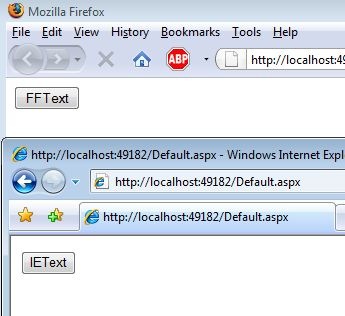
Capture

The above works with all properties like OnClientClick!

This could be useful i.e. at file upload control where each browser handles different the rendering of the tag.

Cool eh?

kick it on DotNetKicks.com


Filed under: , , , ,

Comments

# ASP.NET Browsers Filter!!

Tuesday, August 12, 2008 2:55 AM by DotNetKicks.com

You've been kicked (a good thing) - Trackback from DotNetKicks.com

# funny wallpaper &raquo; ASP.NET Browsers Filter!!

Tuesday, August 12, 2008 3:33 AM by funny wallpaper » ASP.NET Browsers Filter!!

Pingback from  funny wallpaper &raquo; ASP.NET Browsers Filter!!

# carnewsservice.info &raquo; ASP.NET Browsers Filter!!

Tuesday, August 12, 2008 3:49 AM by carnewsservice.info » ASP.NET Browsers Filter!!

Pingback from  carnewsservice.info &raquo; ASP.NET Browsers Filter!!

# re: ASP.NET Browsers Filter!!

Tuesday, August 12, 2008 4:52 AM by nmattheij

Interesting, however, I've not been able to succesfully change it to work for IE6. Apparently you have to use a specific UserAgent string to create IE6-specific options in the web.config, which is only good for 10% of the actual IE6 users.

This would be a good way to repair IE6 styles and javascript issues, which I now do manually.

# re: ASP.NET Browsers Filter!!

Tuesday, August 12, 2008 3:18 PM by rrobbins

Cool! Another hidden feature of ASP.NET 2.0 which was not mentioned in any of the books I've read.

# Set Browser Specific ASP.NET Server Control Properties and Taking an ASP.NET Site Offline

Thursday, August 14, 2008 3:00 AM by Ryan Farley

Isn't it great when you work with a tool day after day and you thought you knew everything there was to know about it? Then find out something that has been there for a long time that you somehow missed? Here's two things that have been in ASP.NET since

Leave a Comment

(required) 
(required) 
(optional)
(required)