Fix: Add an Existing Entity Framework .edmx File to Visual Studio 2013
One of my older code samples for RainWorx AuctionWorx uses Entity Framework and SQLCE to bulk import AdventureWorks products as sample auction, classified, and fixed price listings into the system.
When I created the EF files, all the scaffolding was
handled by Visual Studio's EF tooling.
To use the sample, developers need to incorporate the
EF files into their RainWorx.FrameWorx.MVC project. That's
where I hit a snag.
If you add AdventureWorksSQLCE.edmx as an existing
item in VS2013, the IDE doesn't generate all the supporting
files. It does create AdventureWorksSQLCE.Designer.cs which
contains this advice:
// To enable legacy code generation, change the value
of the 'Code Generation Strategy' designer
// property
to 'Legacy ObjectContext'. This property is available in the
Properties Window when the model
// is open in the
designer.
Okay let's try that.
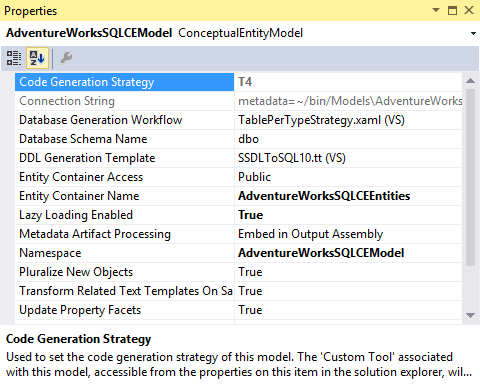
Oops. The Code Generation Strategy is read-only and set to T4. How do I change it?
The solution is to open the .edmx file in the XML
(Text) Editor.
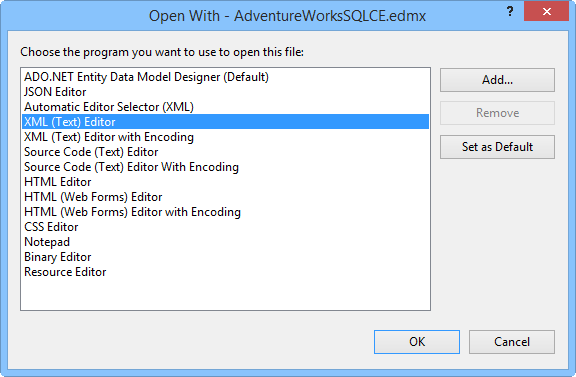
Look for the UseLegacyProvider property and set it to True
<edmx:Options>
<DesignerInfoPropertySet>
<DesignerProperty Name="ValidateOnBuild" Value="True"
/>
<DesignerProperty
Name="EnablePluralization" Value="True" />
<DesignerProperty Name="IncludeForeignKeysInModel"
Value="True" />
<DesignerProperty Name="UseLegacyProvider"
Value="True" />
<DesignerProperty
Name="CodeGenerationStrategy" Value="None" />
</DesignerInfoPropertySet>
</edmx:Options>
Save the file and close the XML Editor.
Open the .edmx file in the Model Browser and check the properties again. The Code Generation Strategy property is no longer read-only so you can set it to Legacy ObjectContext.
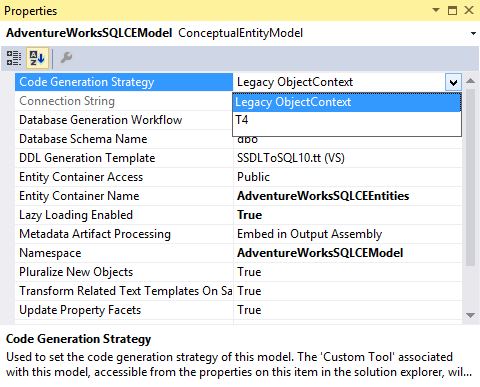
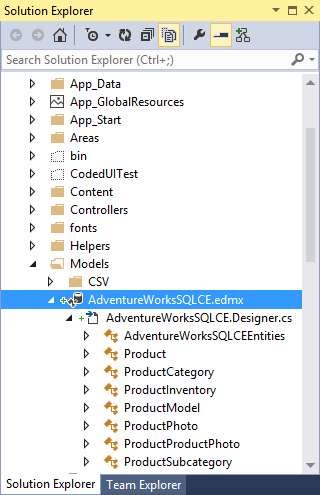
Build your project, refresh Solution Explorer, and you'll find that the tools have generated your code.
Like most things in software development, it's an easy fix once you know how to do it! Perhaps you won't lose time on this like I did?