June 2009 - Posts

Asynchronous Agents

Rick Molloy, one of the masterminds behind the new concurrency runtime (concrt) and parallel patterns library (PPL), has written an article in the latest issue of MSDN Magazine demonstrating the new asynchronous agents library with the classic dining philosophers problem.

Concurrent Affairs: Solving The Dining Philosophers Problem With Asynchronous Agents

Enabling C++ developers to write highly concurrent applications is a major focus of Visual Studio 2010. The beta release includes the Concurrency Runtime, parallel libraries, and development tools aimed at addressing several common problems preventing developers from unlocking the performance potential inherent to multicore hardware. Notably, this includes ensuring that developers can identify and take advantage of opportunities for concurrency in their code, productively manage shared state and its side effects, and not having to worry about building low-overhead concurrency infrastructure that is scalable at run time on a variety of hardware.

In this article, I'm going to demonstrate how to use the new Asynchronous Agents Library included as part of Visual C++ 2010 to manage the difficulties that can arise with shared state. To show you how this works, I will walk through an implementation of a classic concurrency problem: Djikstra's Dining Philosophers. You'll see how the actor-based programming construct of an agent in combination with asynchronous message-passing APIs can be used to provide a correct and easy to understand solution to this problem that doesn't rely directly on threading or synchronization primitives.

Enjoy!

Posted by KennyKerr with no comments
Filed under: ,

Lost Carrier Pigeon

What do you when a carrier pigeon lands in your back yard seemingly lost?

It has bracelets around its feet with numbers but no email address.   :)

It’s pretty tame and let me pick it up to inspect its markings.

Posted by KennyKerr with 4 comment(s)

Windows with C++: Introducing Direct2D
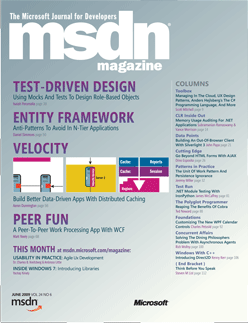
I’ve been away from my computer for a few days working on a house renovation project and didn’t notice that my latest Windows with C++ column came out until the mail man delivered a copy of the June 2009 issue of MSDN Magazine.

In this issue I introduce a new technology that I’m very excited about. I’ve been waiting for Direct2D for some time. When Microsoft started pushing WPF as the “one true path” (TM) I just couldn’t persuade myself to buy the sales pitch. If you felt the same way then read on. This just might make your day.

Windows with C++: Introducing Direct2D

With the introduction of Windows Vista a few years ago, it was clear that the era of the Windows Graphics Device Interface (GDI) was coming to an end. GDI, even with the help of GDI+, had been showing its age especially when compared to the superior graphics capabilities of Windows Presentation Foundation (WPF). As if that weren't enough, GDI lost its hardware acceleration while WPF took advantage of Direct3D's abundance of hardware acceleration.

However, if you want to develop high-performance and high-quality commercial applications, you'll still look to C++ and native code to deliver that power. That's why few things excite me more about Windows 7 than the introduction of Direct2D and DirectWrite. Direct2D is a brand new 2D graphics API designed to support the most demanding and visually rich desktop applications with the best possible performance. DirectWrite is also a brand-new API that complements Direct2D and provides hardware-accelerated text, when used with Direct2D, and high-quality text layout and rendering with advanced support for OpenType typography and ClearType text rendering.

In this article, I will explore these new technologies and give you an idea of why it matters and how you can start using them today.

Big thanks to Mark Lawrence and Ben Constable, from the Direct2D team, for their feedback on the article as well as for providing a side bar discussing rendering performance.

Stay tuned for more Direct2D articles in my upcoming Windows with C++ columns.

If you’re looking for one of my previous articles here is a complete list of them for you to browse through.

Produce the highest quality screenshots with the least amount of effort! Use Window Clippings.

Posted by KennyKerr with 8 comment(s)
Filed under: , ,
More Posts