Getting Started With Facebook C# SDK
In my previous post, I’ve mentioned a relatively new Facebook SDK available for .NET. Here’s a quick example of how to install and use it to post a message to an FB user’s wall and then Like it, using an MVC application.
Install Facebook C# SDK via NuGet.
1. First add a package reference to your project.
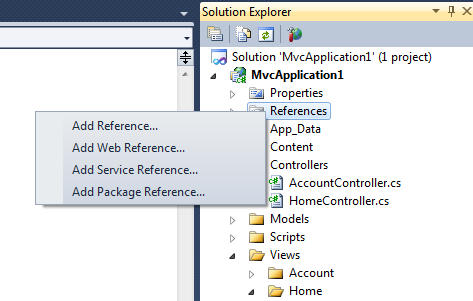
2. Filter packages by “Facebook” and install: Facebook, FacebookWeb, and FacebookWebMvc.

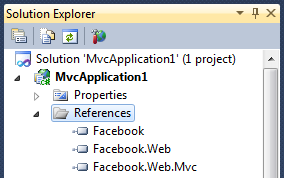
3. Check that references were added to your project:
Configure web application:
Most of these settings get added to the web.config when you add the Facebook package references. However, you may need to add the canvas settings yourself.
  <configSections>
    <section name="facebookSettings" type="Facebook.FacebookConfigurationSection"/>
    <section name="canvasSettings" type="Facebook.Web.CanvasConfigurationSettings"/>
  </configSections>
  <facebookSettings
    apiKey="1111111111111111111111111111111"
    apiSecret="22222222222222222222222222222222"
    appId="3333333333333"
    cookieSupport="false" />
  <canvasSettings
    canvasPageUrl="http://apps.facebook.com/mvc_application_one/"
    authorizeCancelUrl="" />
  <system.webServer>
    <validation validateIntegratedModeConfiguration="false"/>
    <modules runAllManagedModulesForAllRequests="true"/>
    <handlers>
      <add name="facebookredirect.axd" verb="*" path="facebookredirect.axd"
           type="Facebook.Web.FacebookAppRedirectHttpHandler, Facebook.Web" />
    </handlers>
  </system.webServer>
Posting a message to user’s wall/feed.
The Site.Master view:
Per this discussion, the authorization process is not included in this SDK, therefore you can write your own extension to do so or just use Facebook’s JavaScript SDK. I prefer to use what’s already available. So here’s a simple FB init call that lets us access the currently logged in user’s session (this assumes the user is already logged in and is obviously missing the authentication functionality).<script type="text/javascript"> $(document).ready(function () { FB.init({ appId: '<%:FacebookSettings.Current.AppId %>', status: true,
cookie: true, xfbml: true }); }); var getAccessToken = function () { var accessToken = null; var session = FB.getSession(); if (session != null) { accessToken = session.access_token; } return accessToken; }; </script>
The Index view:
Ideally, the Ajax call’s post URL is relative to your application root, so disregard this ugliness.
    <script type="text/javascript">
        var postId = null;

        $(document).ready(function () {

            $('#postTest').click(function () {
                $.ajax({
                    url: 'http://localhost/MvcApplication1/Home/Post',
                    data: { message: 'Hi, how are you?',
                            accessToken: getAccessToken() },
                    success: function (response) {
                        alert(response);
                        postId = response;
                    },
                    error: function (e) {
                        alert(e.responseText);
                    }
                });
            });

        });
    </script>

    <p>
        <input type="button" id="postTest" value="Post it" />
    </p>


    <div id="fb-root"></div>
    <script src="http://connect.facebook.net/en_US/all.js"></script>
The action method in the Home controller, which is invoked by our Ajax call:
public JsonResult Post(string message, string accessToken)
{
    FacebookApp app = new FacebookApp(accessToken);

    var args = new Dictionary<string, object>();
    args["message"] = message;
    args["caption"] = "This is caption!";
    args["description"] = "This is description!";
    args["name"] = "This is name!";
    args["picture"] = "http://itsmagic.files.wordpress.com/2009/11/stewie1.jpg";
    args["link"] = "http://apps.facebook.com/mvc_application_one";

    JsonObject result = (JsonObject)app.Api("/me/feed", args, HttpMethod.Post);

    return new JsonResult { Data = (result as dynamic).id,
                            JsonRequestBehavior = JsonRequestBehavior.AllowGet };
}
Note here that an access token needs to be passed into the FacebookApp contructor, as this helps maintain Facebook’s session state and thus the user’s authorization between requests, which is most likely required to post to the user’s wall. The access token was retrieved from FB user’s session object on the client side (see getAccessToken above).
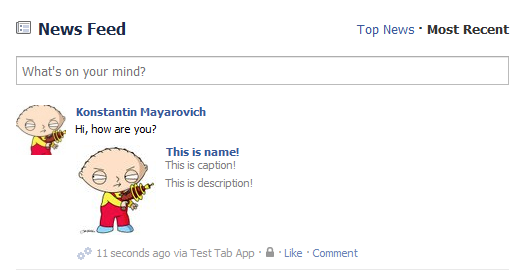
The returned result is our new post’s ID. And our wall/feed post looks like this:
I did mention that I’d show how to Like a post, didn’t I?
A new button:
<input type="button" id="likeTest" value="Like it" />
Another Ajax call:
Note that we’re reusing the postID that was returned from the initial Post call – that’s what we’re going to Like.
$('#likeTest').click(function () {
    var session = FB.getSession();
    var accessToken = null;

    if (session != null) {
        accessToken = session.access_token;
    }

    $.ajax({
        url: 'http://localhost/MvcApplication1/Home/Like',
        data: { postId: postId, accessToken: getAccessToken() },
        success: function (response) {
            alert(response);
        },
        error: function (e) {
            alert(e.responseText);
        }
    });
});
A new action method:
public JsonResult Like(string postId, string accessToken)
{
    FacebookApp app = new FacebookApp(accessToken);

    bool result = (bool)app.Api(String.Format("/{0}/likes", postId), null,
                                HttpMethod.Post);

    return new JsonResult { Data = result,
                            JsonRequestBehavior = JsonRequestBehavior.AllowGet };
}
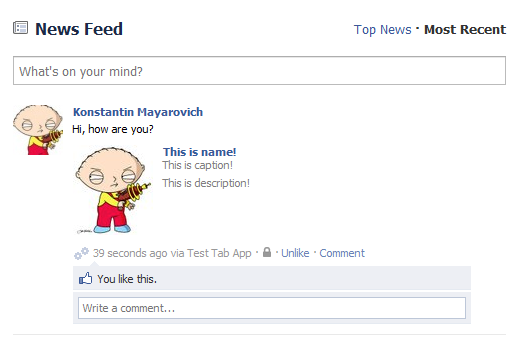
And once executed, the post looks like this: