March 2007 - Posts
Here is a bunch of links to customize your Zune :
Dave Child from www.ilovejackdaniels.com has created a very nice set of cheat sheets on various dev topics.
By looking around I found different ones from other web site.
These are really useful as they fit in one printed page to show all the features.
I put them all together so my links covers every subject that an ASP.NET developer deals with on his day to day job :
- ASP.NET AJAX Library
- Regular Expressions
- CSS
- XHTML
- JavaScript
- HTML Character
- .NET Format String
- VS 2005 Built-in Code Snippets (C#)
- VS 2005 Keyboard Shortcuts (C#)
- VS 2005 Keyboard Shortcuts (VB)
Each Cheat Sheet is available to download and print.
Some of them are really awesome like the "ASP.NET Page LifeCycle", check them out!!
You'll find all the links on the left column of my blog, as I keep them updated there.
Do you know another one, comment !
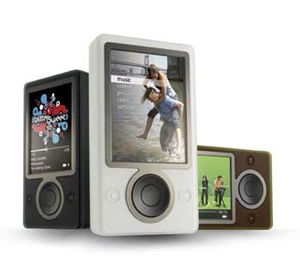
I came back from the Summit at Seattle with a brand new Zune.
After 2 weeks of use, I found that I could be interesting to share my experience with the device, so here is my test !
Cons
- It is like an iPod, but uglier. None of the 3 colors version are attractive to me. Looks like a piece of plastic, cheap (one's man opinion).
- Can't use wireless to transfert music from my computer : SO SO SO BAD!!!!!!!
- Do not play DivX or XviD : BAD BAD BAD!!!
- Do not work with DRM other than Microsoft
- Do not display date or time, not a big deal but it would be nice. My 1998 cellular phone do it.
- Use a software on top of Windows Media Player. I would prefer Media Player only and that's all, thanks.
- No podcast section on software or device
- Earphones are so cheap! Real music lovers have to change them quickly.
- Current listening music is stopped while sharing songs wireless : this is SOOoo bad!!!! Why would I share music this way ?? I want to LISTEN to my music first.
- Accessories are VERY expensives.
- Battery life is so short while playing videos!!
- When you have a LOT of music like me, search is not efficient at all, in albums view, you can sort by artists/genres/albums/single/playlists but you can't jump to a specific letter... The Creative Zen Vision has a far better system for that.
- Do not provide data storage (external drive) by default, but there is a hack for that purpose.
- Movies only plays on landscape format, this is ok but I'd like the screen to switch automatically landscape/portrait layout while watching pictures/movies, like my Canon Ixus digital camera.
- Only 1 zoom level on pictures
- Do not keep track of last played song
- Proprietary USB cable
- Case is too slim to be usable
- Software/firmware needs an update the day you buy it, it's a Microsoft product ;-)
Pros
+ Screen is just perfect!!
+ Accesories are cool
+ 30 Gb
+ UI and menus are impressive, specially for pictures
+ Zune do not exist in the country where I live : geek effect garanteed!
+ Works with Vista
+ Auto software and firmware update
+ Display music tags and information
+ Display album art!
+ Less expensive than iPod (note this is the only comparison point with an iPod here)
+ Scroll long titles: little detail but important to me
+ RDS tuner: radio displays station and tunes names
+ Video player can resume any previous played movie
Conclusion
Is it good ? is it bad ?
Read my list above to help make yourself an idea, reality is Zune is a young product and there is a LOT to do to beat an iPod, because this is the only goal, right? I would definitly not (yet) recommand it to "standard" user (dad or sisters). Go buy an iPod nano and you'll be just fine.
Anyway I like my Zune because it does exactly what I expect : allows me to keep a lot of music anytime, and watch movies/webcasts in public transportation. It takes care of my existing Windows Media Player library and plays wmv videos files.
Some features like pictures zoom levels, date and time, external drive, podcast sync, will probably comes with next software/firmware updates.
Moreover I'm not a "standard" user, I'm a Microsoft geek, I hate mov and Quicktime and I will never install iTunes. So I'm currently happy with my Zune! Hope to get lots of updates soon...
Final words
If you also have a Zune, you should be happy to learn that the Zune team is waiting for your feedback!
Look at the bottom of each page on Zune.net and click "feedback". Or, here's the Direct Feedback link. I'm going to send them a link to this post.
Note
I do not work either for Microsoft or with the Zune team, this post express my personal opinion, comments are welcome, but constructives comments only please.
For those in Montreal area, this is tomorrow.
| Language(s): | English. |
| Product(s): | BizTalk Server, SQL Server, Visual Studio and Windows. |
| Audience(s): | Developer and IT Professional. |
| Related Industry: | Education,Financial Services,Government,Professional Services,Telecommunications. |
Event Overview
Winter Tour 2006 – Application Platform
Keeping up with the latest tools, techniques and best practices is tough when your fulltime job keeps you in the trenches and heads down. Take this opportunity to learn the best practices in designing, developing, testing, deploying and managing data driven applications. If you are working with the Microsoft based platform or technologies such as SQL Server, Windows, Visual Studio or BizTalk, then this event will help you! The four sessions will look at real world scenarios of building and deploying an internet application and walk through common challenges and solutions that many companies and individuals face. You will leave this event with a better understanding of the key Microsoft based technologies and best practices to help you with your job and provide you with a great opportunity to network with your peers in the industry.
There will be a common session in the morning; followed by two separate afternoon tracks to allow for a deeper discussion on role specific needs.
Morning Sessions (combined audiences):
Session 1 – Designing the architecture
Session 2 – Building, deploying and maintaining the application
MSDN Afternoon Track (for developers)
Session 3 – Developing a web based application on the Microsoft-based applicationplatform
Session 4 – Building a strong data foundation to your application
TechNet Afternoon Track (for IT Pros)
Session 3 – Enhancing Scalability and Availability of the Microsoft Application Platform
Session 4 – Managing and Monitoring the Microsoft Application Platform
AGENDA
8:00 AM Registration
9:00 AM Presentation
Event Overview
Winter Tour 2006 – Application Platform
Keeping up with the latest tools, techniques and best practices is tough when your fulltime job keeps you in the trenches and heads down. Take this opportunity to learn the best practices in designing, developing, testing, deploying and managing data driven applications. If you are working with the Microsoft based platform or technologies such as SQL Server, Windows, Visual Studio or BizTalk, then this event will help you! The four sessions will look at real world scenarios of building and deploying an internet application and walk through common challenges and solutions that many companies and individuals face. You will leave this event with a better understanding of the key Microsoft based technologies and best practices to help you with your job and provide you with a great opportunity to network with your peers in the industry.
There will be a common session in the morning; followed by two separate afternoon tracks to allow for a deeper discussion on role specific needs.
Morning Sessions (combined audiences):
Session 1 – Designing the architecture
Session 2 – Building, deploying and maintaining the application
MSDN Afternoon Track (for developers)
Session 3 – Developing a web based application on the Microsoft-based applicationplatform
Session 4 – Building a strong data foundation to your application
TechNet Afternoon Track (for IT Pros)
Session 3 – Enhancing Scalability and Availability of the Microsoft Application Platform
Session 4 – Managing and Monitoring the Microsoft Application Platform
AGENDA
8:00 AM Registration
9:00 AM Presentation
https://msevents.microsoft.com/cui/eventdetail.aspx?culture=en-ca&eventid=1032319202
After Vista Desktop Manager with 3D Cube effect!! here is Switcher.
Switcher requires Vista with Aero enabled and comes with 2 views: tile and dock.
via Benjamin Gauthey
These days I work a lot with Reporting Services and an ASP.NET application which serve reports on an aspx page.
The first implementation was to put a button on the page and call the Reporting Services web service to render the report.
But now the customer asked to change the file name of the generated pdf reports, more than this he wants the file name to change dynamically depending on parameters.
By default the exported report file name is the name of the report (the rdl file), and I don't see anything on the Reporting Web Service to change this.
But RS web service also expose one method to render the report as an array of bytes. So I created a HttpHandler to fetch the report's bytes and flush it in the response content. The HttpHandler allows me to control the generated file name.
The problem is pdf is a known file type so the browser open Adobe Acrobat instead of asking the user to save the file. I knew this is possible so I was happy to google and find this entry from Andrew L. Van Slaars :
Forcing an "open, save" prompt for known file types
Hope this will bring more exposure to the tip.
I end up with this piece of code for my HttpHandler :
public class ReportHandler : IHttpHandler
{
public void ProcessRequest(HttpContext context)
{
string reportName = context.Request["reportName"];
string fileName = string.Empty;
byte[] buffer = null;
// Method from the business layer
// Get the report as an array of bytes
// Build the file name
buffer = GetQuoteReportAsPdfUrl(reportName, out fileName);
context.Response.Clear();
context.Response.ContentType = "application/pdf";
// This line opens the Save prompt instead of Adobe Acrobat
context.Response.AddHeader("Content-Disposition",
"attachment;filename=" + fileName);
context.Response.AddHeader("Content-Length",
buffer.Length.ToString());
context.Response.OutputStream.Write(buffer,0,buffer.Length);
context.Response.End();
}
public bool IsReusable
{
get { return true; }
}
}
The Visual Studio 2005 Service Pack 1 Update for Windows Vista addresses areas of Visual Studio impacted by Windows Vista enhancements.
For anyone using Visual Studio 2005 on Windows Vista, it is highly recommend to install this update as it solves some key bugs that you might be running into.
Apply this on top of VS2005 SP1.
http://www.microsoft.com/downloads/details.aspx?familyid=90e2942d-3ad1-4873-a2ee-4acc0aace5b6&displaylang=en
Uninstall the beta first if needed.
Via Your Websites, Our Passion!
This is awesome!!
Yod'm 3D (Yet anOther Desktop Manager 3D): this little piece of software allows you to have virtual desktops with a 3D cube effect for the transitions. Note that it works on XP and Vista. It behave very well on my laptop and is not CPU consuming.
[edit: this is no more free...]
More info and download :
http://www.otakusoftware.com/deskspace/index.html
Someone to write this in WPF to have vectorial rendering and live preview during cube spinning ?
Today I was stuck for the first time with this:
System.InvalidOperationException: Mutex could not be created.
Context:
In a VPC I installed and launched VS2005, installed IIS, then created a new ASP.NET 2.0 website.
Short solution by Google:
Restart the server
Long explanation by Jerry Orman:
http://blogs.msdn.com/jorman/archive/2006/07/24/system-invalidoperationexception-mutex-could-not-be-created.aspx
More Posts
Next page »