Blend 2.5 march preview: Where is the Silverlight DataGrid ??
[Post written as of Silverlight 2 beta 1 and Expression Blend 2.5 march preview]
Strange that the DataGrid is not in Expression Blend 2.5 march preview toolbox, but only in VS2008 !?
If you add a DataGrid in VS2008 and then switch to Blend that will break your designer.
It seems like there are problems with these assemblies references in Blend 2.5:
System.Windows.Controls.dll
System.Windows.Controls.Data.dll
System.Windows.Controls.Extended.dll
Remember that controls are not part of the runtime, they are part of the SDK and must be distributed with each application. Here are the different folders:
- Runtime: "C:\Program Files\Microsoft Silverlight\2.0.30226.2"
- SDK: "C:\Program Files\Microsoft SDKs\Silverlight\v2.0\Libraries\Client"
Thanks to Michael Sync from the Silverlight forums, you can fix this:
1. Fix the reference in Blend:
Add reference to "System.Windows.Controls.Data.dll" from the SDK folder.
2. Add this markup in <UserControl declaration:
xmlns:data="clr-namespace:System.Windows.Controls;assembly=System.Windows.Controls.Data"
3. then, you can add a DataGrid like that:
<data:DataGrid></data:DataGrid>
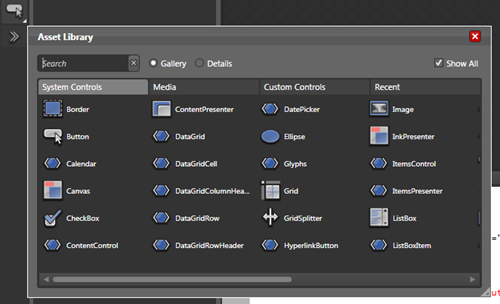
Now you can find the DataGrid in Blend 2.5 Toolbox :
- Click on "Asset Library" (bottom of toolbox)
- Check "Show All"