Why don't file uploads work during async postbacks?

As many people have noticed in their AJAX-enabled pages, file uploads do not work when doing an async postback. To my knowledge there's no way to support this scenario due to the browser's security restrictions. To understand why the upload doesn't work it's important to understand how async postbacks are performed and how that's different from how the browser performs a regular postback.

When the browser performs a regular postback it has the benefit of being actual code with no security restrictions running on the client computer. When you submit a form it creates a web request with all the form fields. When it encounters an <input type="file"> it examines the file the user chose, reads it from disk, and adds it to the web request.

When the AJAX JavaScript code is running in the browser it can do the first part about creating a request with all the form fields. However, when it gets to <input type="file"> fields it doesn't have the necessary security permissions to read those files from disk. Imagine what would happen it it could read those files: You could create a page that when visited will upload the user's c:\passwords.txt to a remote server! And we all know that every user has a file called passwords.txt on their C: drive. I bet just now you renamed it so my evil code couldn't run :)
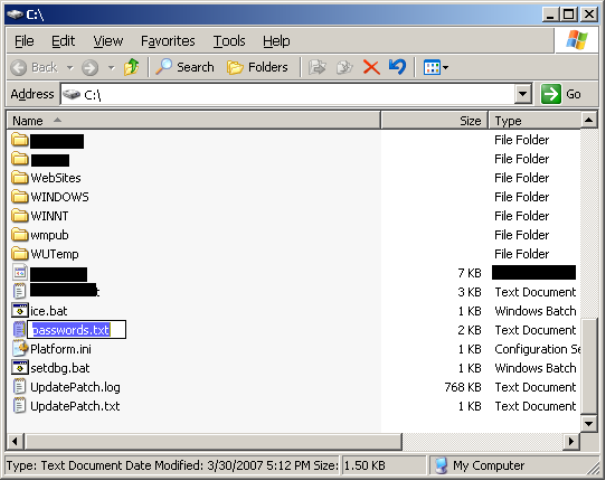
So what's the workaround? Well, quite simply, the workaround is to do anything that doesn't involve a file upload during an async postback. Here are some solutions:

  1. Have a dedicated "Upload" button that does a regular postback instead of an async postback. You can achieve this using several techniques: Have the button be outside all UpdatePanels; have the button be the target of an UpdatePanel's PostBackTrigger; or call ScriptManager.RegisterPostBackControl() on it.
  2. Have a dedicated file upload page that doesn't have any UpdatePanels. Many web sites already do this anyway.

And now you might wonder, "why don't ASP.NET AJAX and the UpdatePanel handle this better?" We did give this a fair bit of thought and we decided that doing nothing was the best solution. One option we had was to throw some error from JavaScript if we detected any filled out <input type="file"> tags. But what if you wanted to do an async postback that had nothing to do with the file upload? Or perhaps only detect file uploads in certain regions of the document? That would involve even more expensive DOM tree walks that are already causing some performance degradation with UpdatePanels.

In conclusion, if you want a secure browser, you're not going to get file upload functionality from UpdatePanels. If you don't want a secure browser, please get your head checked. If you want to do file uploads, just use one of the two solutions I provided.

PS: This is the first blog post I've written using Windows Live Writer. I used to use the editor built in to Community Server and was extremely unhappy with it. Live Writer is so easy to use not only for writing and formatting text, but even for adding images to the post. It even creates a nice looking thumbnail automatically with many customization options.

Published Friday, March 30, 2007 5:25 PM by Eilon
Filed under: , , ,

Comments

# re: Why don't file uploads work during async postbacks?

Friday, March 30, 2007 8:56 PM by InfinitiesLoop

My c:\passwords.txt file just says "U l33t HAXXOR!!1111oneoneone"

You know just to throw them off. What they don't realize is that IS my password. Muahahah.

# re: Why don't file uploads work during async postbacks?

Friday, March 30, 2007 11:36 PM by Joe

Couldn't it be done through creative iframe use?  Similar to this way of AJAX downloading: http://encosia.com/index.php/2007/02/23/ajax-file-downloads-and-iframes/

# re: Why don't file uploads work during async postbacks?

Saturday, March 31, 2007 9:46 AM by Wallym

How does gmail support the async file uploads?

# re: Why don't file uploads work during async postbacks?

Monday, April 02, 2007 8:27 AM by rodrigo

I think gmail uses the iframe trick..Its how lot of people did async operations before the XMLhttpRequest object was supported in all browsers.

# re: Why don't file uploads work during async postbacks?

Monday, April 02, 2007 11:54 AM by Darren Kopp

Our company just uses iframes. but we also have our own ajax framework.

# re: Why don't file uploads work during async postbacks?

Monday, April 02, 2007 12:19 PM by Mark Hildreth

The issue I've run into is that it is desirable to use async postbacks to the extent possible. Unfortunarely, RegisterAsyncPostBackControl() and RegisertPostBackControl() must be done on the server when it would really be ideal to be able to make this decision on the client - depending on whether the user is actually uploading a file or not.

If you have a FileUpload control (ID=FileUpload1) and a Button (ID=Button1) that performs the postback, you can set the OnClientClick property of the Button1 to "ChoosePostBack();" and add the following javascript block to your page:

// BEGIN CODE

function ChoosePostBack(){

   var FileUpload1 = window.document.getElementById('<%= FileUpload1 .ClientID %>');

   if(FileUpload1 != null && FileUpload1 .value.length > 0){

       Sys.WebForms.PageRequestManager.getInstance()._originalDoPostBack('<%= Button1.UniqueID %>', '');

       return false;

   }

   return true;

}

// END CODE

This is a bit of a hack so I will defer to Eilon as to whether this is a good idea or not, but it's a start. Hope this helps!

-Mark

# re: Why don't file uploads work during async postbacks?

Monday, April 02, 2007 2:37 PM by Tim

The iFrame trick is the only way you can do it, however I do believe their are so IE hacks to make it happen with pure Ajax but users have to have security settings set at the very lowest

# re: Why don't file uploads work during async postbacks?

Monday, April 02, 2007 5:49 PM by Alex

Wouldn't the user still have to select their password file before a postback (async or not) could upload it?  It seems like this is not the reason for not supporting file upload via the HTTPXMLRequest object.

# re: Why don't file uploads work during async postbacks?

Monday, April 02, 2007 10:57 PM by Jody

I find the 'security' and 'dom traversing' explanations techically inaccurate.  Is it not the real reason why it doesn't work is that Microsoft's Ajax doesn't support mixing or changing encoding per request... I wrote a detailed adverse explanation and would like an actual technical explanation of how an input type or this particular input type would be a more of a security risk or require any additional traversing the DOM than other suported input types...

http://tech-review.org/blogs/.net_2.0/archive/2007/04/02/file-uploads-in-ajax-why-i-think-the-reason-it-can-not-is-baloney.aspx

No offense, but I am not realizing the technical merits of your explanation....

# re: Why don't file uploads work during async postbacks?

Tuesday, April 03, 2007 1:42 PM by Eilon

Hi Jody,

I just read your post and I think there's one key point that's being missed. For an AJAX request (e.g. an UpdatePanel's async postback), how do you craft the POST request that contains those bytes? You have to detect the <input type="file"> tag, get its value (all this is possible), and then *read the file from disk*.

That last part is obviously impossible. That's where my "insecure browser" comment came in as well as the C:\passwords.txt. If JavaScript running in the browser could read arbitrary files under default Internet security zone settings then it could just grab your passwords.txt file and transmit them to http://www.example.org/***.aspx . But it can't do that, and that's why UpdatePanel can't do it either.

AJAX requests use the XmlHttpRequest object, which in addition to other settings, has a request body that you can set. For POST requests the request body contains the form fields, including textbox values, dropdown list selections, and uploaded file content.

Unless you use a trick such as a hidden IFRAME, which ends up not being an XmlHttpRequest, but a regular browser request, there's no way to craft the response through JavaScript. The problem with UpdatePanel using the IFRAME trick is that it wouldn't be compatible at all with existing ASP.NET pages, which is contrary to the goal of UpdatePanel. (And no, I'm not saying UpdatePanel is 100% compatible, but it tries!)

- Eilon

# re: Why don't file uploads work during async postbacks?

Tuesday, April 03, 2007 4:52 PM by Fabio Galante Mans

<form id="form1" runat="server">

   <div>

       <asp:ScriptManager ID="ScriptManager1" runat="server">

       </asp:ScriptManager>

       <asp:UpdatePanel ID="UpdatePanel1" runat="server">

           <ContentTemplate>

               <asp:FileUpload ID="FileUpload1" runat="server" /><br />

               <br />

               <br />

               <asp:Button ID="Button1" runat="server" OnClick="Button1_Click" Text="Button" /><br />

               <br />

               <br />

               <asp:Label ID="Label1" runat="server" Text="Label"></asp:Label>

           </ContentTemplate>

           <Triggers>

               <asp:PostBackTrigger ControlID="Button1" />

           </Triggers>

       </asp:UpdatePanel>

   </div>

   </form>

protected void Button1_Click(object sender, EventArgs e)

   {

       Label1.Text = FileUpload1.FileName;

   }

# re: Why don't file uploads work during async postbacks?

Tuesday, April 03, 2007 11:34 PM by Jeffrey Zhao

Hi Eilon,

I've implement a component to give UpdatePanel the ability to upload the file in AJAX style. Here's the post on my blog. There're 5 articles in series. Could you give some advice for it?

http://www.jeffzon.net/Blog/archive/2007/03/31/Let-UpdatePanel-support-file-uploading-Lets-Get-Started.aspx

Jeffrey

# re: Why don't file uploads work during async postbacks?

Sunday, April 08, 2007 8:17 PM by Jody

Hi Elion, thanks for the repsonse...That enlightens me a bit... but have to admit... I do not truly understand why it can not be done.... I am no javascript programmer (well once was but gave way to .Net)...

The original point of my blog post was that it is an input type just like any other.  And I will further admit that programming it within a regular postback I understand that the user selects a file and clicks the associated button... the file is sent to the server and not on any other form field request.

.Net kinda caches that particular request so that when subsequent actual form submit is made the file can be accessed by the memory stream.  

Since on the server side everything is still processed as if it is a postback (it is only asynch on the client)... I wonder if you guys are trying to hard to manipulate everything in script instead of allowing proper bypasses for binary transfers (which is how I understand uploading and downloading works - it opens a second connection and streams the data)...One can place a download file function within a UpdatePanel.... and it still requires the user to manually select where to save it or if at all...  I see no real relative difference - I can't from the server side force a file to be downloaded and saved without user interaction (without doing some severe hacking which I would imagine wouldn't be too nice of me anyways), and it certainly is not a XmlHttpRequest object...

While perhaps not as in tuned to the logic behind Ajax - it seems to me that if Ajax had the logic to detect it was a input type of 'file' then it would do 2 things:

1. Mark on the client that a file was transmited for purposes of validation etc...Whatever is needed to make it work with the regular scenario of file was submitted and the server holds that cached until something is actually done with it by the overall form...

2. Merely on its own - not process the file upload as if it was asynch postback at least and allow the serverside to handle it as it would in a normal non-Ajax scenario. Instead of coding to the reasons of how Ajax should handle it (and it shouldn't handle it at all) - allow it to bypass and just update whatever normal viewstate would occur ....

Afterall, the real magic in regards to Ajax is truly on the server side... on the client side anything can be done...but its the abaility of the scriptmanager / update panel to allow the asynch process without us having to actually mplement ICALLBACK handlers and the likes to make it work..

I still truly do not see less the XmlHttpRequest requirements - which - let's be honest here - its the requirement for JSON, AJAX , Soap etc... but its not even used in the pre-Web 2.0 browsers (non XML compliant browsers) for file uploads or downloads... so why would suddenly Ajax be any different?  And to even contridict myself - check out this article: http://www.15seconds.com/issue/010522.htm while obviously dated before the adoption of Ajax - it clearly illustrates how to use XML to upload binary files....

Even if on the serverside we had to adopt a different method of accepting files this would make life tremendously easier considering Web 2.0 is aout communication and the sharing of data ....

So, I understand the point you are coming from, but at least it really is not about the security it is about Ajax not being able to identify the type of communication...Which was always my number one point...

# re: Why don't file uploads work during async postbacks?

Monday, April 09, 2007 12:52 PM by Eilon

Hi Jody,

The example you link to is using IE-only functionality that requires that you disable some security settings (hence the insecure browser thing I mentioned, and in fact the article mentions it as well under "Security and System Consideration").

During regular posts all file uploads happen in the same connection as the post itself. There is no separate data stream, TCP connection, HTTP request, or anything. Even if UpdatePanel could somehow split the request into two, it wouldn't be compatible with regular postbacks since they only use one request. The server would have to somehow combine two requests into one and that's begging for a bug farm.

Now if you really want a treat, Jeffrey Zhao has a great series of articles on how to trick UpdatePanel into allowing file uploads during async posts. He uses some clever techniques that ASP.NET AJAX enables to reroute the requests. Please note that I haven't run the sample, and direct all questions about it to Jeffrey's site.

Thanks,

Eilon

# re: Why don't file uploads work during async postbacks?

Tuesday, April 10, 2007 11:09 PM by Dave

In response to the earlier post about using the method I describe in my IFRAME file download code:

When I was working on my IFRAME workaround example for Atlas file downloads, I briefly played around with a similar technique for uploads and had no success.  

I didn't even get to the point of embedding the IFRAME, because, even in a standalone document,  FireFox and IE both thwarted every attempt I made at automating an <input type=file> element OnLoad.  FireFox threw a security error and IE silently refused to allow write access to the input's value to set the path.

The XmlHttpRequest technique is probably the best way to go for this.

# re: Why don't file uploads work during async postbacks?

Wednesday, April 11, 2007 1:29 PM by Tony

The trick to using an IFrame for 'async' uploads is to change the form's target.  After initially reading this post from Eilon (nice job BTW), I decided to try out some IFrame workarounds.  I did a quick POC and posted it to my blog (http://blogs.infragistics.com/blogs/tony_lombardo/archive/2007/04/09/file-uploads-where-s-the-ajax.aspx).  Again, the trick is to use existing input fields, but change the target of the post to open in the iframe.

# re: Why don't file uploads work during async postbacks?

Sunday, May 06, 2007 10:58 AM by cyril DURAND

Hi, for those who speak french I have implement a new FileUpload Control (it can be use with tagmapping) that support UpdatePanel.

You can read about it here : http://blogs.developpeur.org/cyril/archive/2007/05/06/ajax-et-upload-part-2-utilisation-d-un-updatepanel-et-d-un-fileupload.aspx and here are the code sample : http://www.aspfr.com/codes/ASP-NET-AJAX-UPDATEPANEL-FILEUPLOAD_42589.aspx

the whole zip can be downloaded at : http://www.beaujolaisdurand.com/divers/CSAjaxUpload.zip

# re: Why don't file uploads work during async postbacks?

Monday, May 14, 2007 1:04 PM by Pedro Rui Silva

<p>You can upload a file with a UpdatePanel, just do like they say in ajax documentation set the PostBackTrigger to the control that will upload the file.</p>

<asp:UpdatePanel id="updatePanel" runat="server">

<ContentTemplate>

<asp:FileUpload id="fileUpload" runat="server" ></asp:FileUpload>

<asp:Button id="buttonImportar" onclick="buttonImportar_Click" runat="server" Text="Importar"></asp:Button>

</ContentTemplate>

<Triggers>

<asp:PostBackTrigger ControlID="buttonImportar" />

</Triggers>

</asp:UpdatePanel>

# FileUpload control will not work in ASP.Net Ajax during async postback

Monday, June 11, 2007 10:34 AM by Fredrik Normén's NSQUARED²

As many of you have notice the FileUpload control will not work in an UpdatePanel during an async postback.

# FileUpload control will not work in ASP.Net Ajax during async postback

Wednesday, June 13, 2007 8:17 AM by Cornerstones utvecklarblogg

As many of you have notice the FileUpload control will not work in an UpdatePanel during an async postback.

# re: Why don't file uploads work during async postbacks?

Thursday, June 14, 2007 11:54 PM by Nergal
Someone may help me on the same problem but using the Infragistic UltraWebTab and the File Upload control? ,it seems that the fileUpload control does not work with the following configuration from the WEBTAB: AsyncOptions EnableLoadOnDemand="True" ResponseContext="IncludeSelectedTab".

# re: Why don't file uploads work during async postbacks?

Tuesday, June 26, 2007 9:32 PM by Victor

Hi Elion,

I see why it's not possible to upload files with AJAX, but why is it possible to upload files with Flash? It seems to me that Flash shouldn't have security permissions to access file system. Is there something I'm missing?

Thanks,

Victor

# re: Why don't file uploads work during async postbacks?

Tuesday, June 26, 2007 10:17 PM by Eilon

Hi Victor, that's a great question. While I'm not familiar with Flash's implementation for accessing the file system, I can describe how Silverlight 1.1 allows access to the file system.

In Silverlight 1.1 you can't directly access the file system, however, you can invoke the "Open File" common dialog and then the Silverlight runtime gives the developer a stream to read from the file. The developer won't know the exact file details and has no write access. The developer cannot trick it into opening any file other than the user selected through the dialog. For more info, as well as an example, check out the Silverlight QuickStarts:

www.silverlight.net/.../Upload.aspx

If I had to guess, I'd imagine that Flash has similar limitations, but you'd have to consult their documentation to see for sure.

Thanks,

Eilon

# re: Why don't file uploads work during async postbacks?

Wednesday, July 18, 2007 4:22 PM by Drew

Flash is all Client side.

It uses an async way to communicate with other server side languages.

I don't think Flash can really access your file system unless you grant privileges.

# re: Why don't file uploads work during async postbacks?

Friday, September 14, 2007 11:39 AM by Vyas Bharghava

Drew, Flash is a "signed" ActiveX control.  It literally has "COMPLETE" access to your machine.  Whether Flash allows delegates its privilege to Javascript through scripting [and whether it implements IObjectSafety amongst others] is another matter altogether [I haven't tried].  

Elion, Even the regular HTML &lt;input&gt; file=".." &lt;/input&gt; opens a file dialog.  So it should not matter.  So, we can live with that.

ArindSoft has a async file upload control that claims to solve this problem of async upload.  Whether they're using an hidden IFRAME, I'm not sure.

Thanks,

Vyas

# re: Why don't file uploads work during async postbacks?

Friday, November 09, 2007 6:33 AM by Mendes

In page load even add something like this:

ScriptManager1.RegisterPostBackControl(uploadButton)

ScriptManager1 // instance of ScriptManager

uploadButton   // button that trigger the upload (like a command button or a linkButton) something like that

# [轉載]让UpdatePanel支持文件上传

Wednesday, November 28, 2007 10:20 PM by 巍巍边疆

來源:老趙www.cnblogs.com/JeffreyZhao 让UpdatePanel支持文件上传(1):开始 UpdatePanel从一开始就无法支持AJAX...

# re: Why don't file uploads work during async postbacks?

Thursday, December 20, 2007 5:16 PM by Luis Abreu

old code that needs to be ported, but in the past, i've built an extender which uses an iframe to work like gmail. I'll try to port it when i have time:

msmvps.com/.../uploading-files-without-a-full-postback.aspx

# re: Why don't file uploads work during async postbacks?

Thursday, January 17, 2008 12:30 PM by Geoff

IIts easy enough to create the PostBack trigger to make the appropriate button to a full postback if all you are using in a normal form, but what do you do when you are using a FormView or other such template based control? How do you handle it then since you cannot create the proper trigger now?

# 更新:让UpdatePanel支持上传文件

Saturday, May 03, 2008 4:30 AM by Jeffrey Zhao

在一年多前我发布了一系列文章(

# re: Why don't file uploads work during async postbacks?

Friday, May 23, 2008 10:44 AM by santosh lokhande

   <Triggers>

   <asp:PostBackTrigger ControlID ="imgbtnAddCustomAppln" />

   </Triggers>

I have faced the same problem for uploading file with ajax update panel but

i just added the trigger fot the ImageButton "imgbtnAddCustomAppln" as shown in abaove line and my code started working

I have used First option from above two options ....thnx have a great fun

# The future of ASP.NET AJAX | Encosia

Tuesday, July 15, 2008 3:42 AM by The future of ASP.NET AJAX | Encosia

Pingback from  The future of ASP.NET AJAX | Encosia

# The Future of ASP.NET AJAX @ ZDima.net

Wednesday, July 16, 2008 6:52 AM by The Future of ASP.NET AJAX @ ZDima.net

Pingback from  The Future of ASP.NET AJAX @ ZDima.net

# 让UpdatePanel支持文件上传

Wednesday, October 01, 2008 12:34 AM by nacarat

让UpdatePanel支持文件上传(1):开始 UpdatePanel从一开始就无法支持AJAX的文件上传方式。EilonLipton写了一篇文章解释了这个问题的原因。文章中提供了两个...

Leave a Comment

(required) 
(required) 
(optional)
(required)