Associations in EF Code First: Part 6 – Many-valued Associations
| This is the sixth and last post in a series that explains entity association mappings with EF Code First. I've described these association types so far: Support for many-valued associations is an absolutely basic feature of an ORM solution like Entity Framework. Surprisingly, we’ve managed to get this far without needing to talk much about these types of associations. Even more surprisingly, there is not much to say on the topic—these associations are so easy to use in EF that we don’t need to spend a lot of effort explaining it. To get an overview, we first consider a domain model containing different types of associations and will provide necessary explanations around each of them. Since this is the last post in this series, I'll show you two tricks at the end of this post that you might find them useful in your EF Code First developments. |
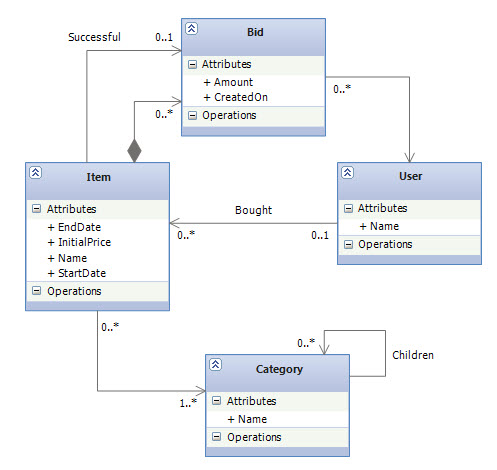
Many-valued entity associationsA many-valued entity association is by definition a collection of entity references. One-to-many associations are the most important kind of entity association that involves a collection. We go so far as to discourage the use of more exotic association styles when a simple bidirectional many-to-one/one-to-many will do the job. A many-to-many association may always be represented as two many-to-one associations to an intervening class. This model is usually more easily extensible, so we tend not to use many-to-many associations in applications.Introducing the OnlineAuction Domain ModelThe model we introducing here is related to an online auction system. OnlineAuction site auctions many different kinds of items. Auctions proceed according to the “English auction” model: users continue to place bids on an item until the bid period for that item expires, and the highest bidder wins. A high-level overview of the domain model is shown in the following class diagram: |
|
Each item may be auctioned only once, so we have a single auction item entity named
Item. Bid is associated directly with Item.
The Object ModelThe following shows the POCO classes that form the object model for this domain: |
public class User { public int UserId { get; set; } public string Name { get; set; } public virtual ICollection<Item> BoughtItems { get; set; } } public class Item { public int ItemId { get; set; } public string Name { get; set; } public double InitialPrice { get; set; } public DateTime StartDate { get; set; } public DateTime EndDate { get; set; } public int? BuyerId { get; set; } public int? SuccessfulBidId { get; set; } public virtual User Buyer { get; set; } public virtual Bid SuccessfulBid { get; set; } public virtual ICollection<Bid> Bids { get; set; } public virtual ICollection<Category> Categories { get; set; } } public class Bid { public int BidId { get; set; } public double Amount { get; set; } public DateTime CreatedOn { get; set; } public int ItemId { get; set; } public int BidderId { get; set; } public virtual Item Item { get; set; } public virtual User Bidder { get; set; } } public class Category { public int CategoryId { get; set; } public string Name { get; set; } public int? ParentCategoryId { get; set; } public virtual Category ParentCategory { get; set; } public virtual ICollection<Category> ChildCategories { get; set; } public virtual ICollection<Item> Items { get; set; } } |
The Simplest Possible AssociationThe association from Bid to Item (and vice versa) is an example of the simplest possible kind of entity association. You have two properties in two classes. One is a collection of references, and the other a single reference. This mapping is called a bidirectional one-to-many association. The property ItemId in the Bid class is a foreign key to the primary key of the Item entity, something that we call a Foreign Key Association in EF 4. We defined the type of the ItemId property as an int which can't be null because we can’t have a bid without an item—a constraint will be generated in the SQL DDL to reflect this. We use HasRequired method in fluent API to create this type of association: |
class BidConfiguration : EntityTypeConfiguration<Bid> { internal BidConfiguration() { this.HasRequired(b => b.Item) .WithMany(i => i.Bids) .HasForeignKey(b => b.ItemId); } } |
An Optional One-to-Many Association Between User and Item EntitiesEach item in the auction may be bought by a User, or might not be sold at all. Note that the foreign key property BuyerId in the Item class is of type Nullable<int> which can be NULL as the association is in fact to-zero-or-one. We use HasOptional method to create this association between User and Item (using this method, the foreign key must be a Nullable type or Code First throws an exception): |
class ItemConfiguration : EntityTypeConfiguration<Item> { internal ItemConfiguration() { this.HasOptional(i => i.Buyer) .WithMany(u => u.BoughtItems) .HasForeignKey(i => i.BuyerId); } } |
A Parent/Child RelationshipIn the object model, the association between User and Item is fairly loose. We’d use this mapping in a real system if both entities had their own lifecycle and were created and removed in unrelated business processes. Certain associations are much stronger than this; some entities are bound together so that their lifecycles aren’t truly independent. For example, it seems reasonable that deletion of an item implies deletion of all bids for the item. A particular bid instance references only one item instance for its entire lifetime. In this case, cascading deletions makes sense. In fact, this is what the composition (the filled out diamond) in the above UML diagram means. If you enable cascading delete, the association between Item and Bid is called a parent/child relationship, and that's exactly what EF Code First does by default on associations created with the HasRequired method.In a parent/child relationship, the parent entity is responsible for the lifecycle of its associated child entities. This is the same semantic as a composition using EF complex types, but in this case only entities are involved; Bid isn’t a value type. The advantage of using a parent/child relationship is that the child may be loaded individually or referenced directly by another entity. A bid, for example, may be loaded and manipulated without retrieving the owning item. It may be stored without storing the owning item at the same time. Furthermore, you reference the same Bid instance in a second property of Item, the single SuccessfulBid (take another look at the Item class in the object model above). Objects of value type can’t be shared. |
Many-to-Many AssociationsThe association between Category and Item is a many-to-many association, as can be seen in the above class diagram. a many-to-many association mapping hides the intermediate association table from the application, so you don’t end up with an unwanted entity in your domain model. That said, In a real system, you may not have a many-to-many association since my experience is that there is almost always other information that must be attached to each link between associated instances (such as the date and time when an item was added to a category) and that the best way to represent this information is via an intermediate association class (In EF, you can map the association class as an entity and map two one-to-many associations for either side.).In a many-to-many relationship, the join table (or link table, as some developers call it) has two columns: the foreign keys of the Category and Item tables. The primary key is a composite of both columns. In EF Code First, many-to-many associations mappings can be customized with a fluent API code like this: |
class ItemConfiguration : EntityTypeConfiguration<Item> { internal ItemConfiguration() { this.HasMany(i => i.Categories) .WithMany(c => c.Items) .Map(mc => { mc.MapLeftKey("ItemId"); mc.MapRightKey("CategoryId"); mc.ToTable("ItemCategory"); }); } } |
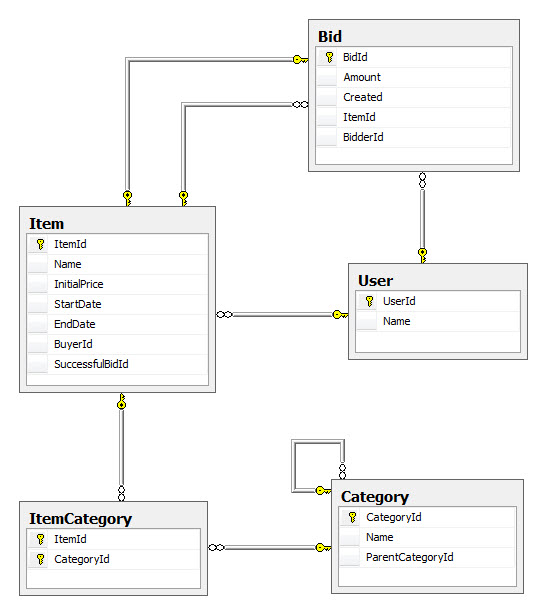
SQL SchemaThe following shows the SQL schema that Code First creates from our object model: |
|
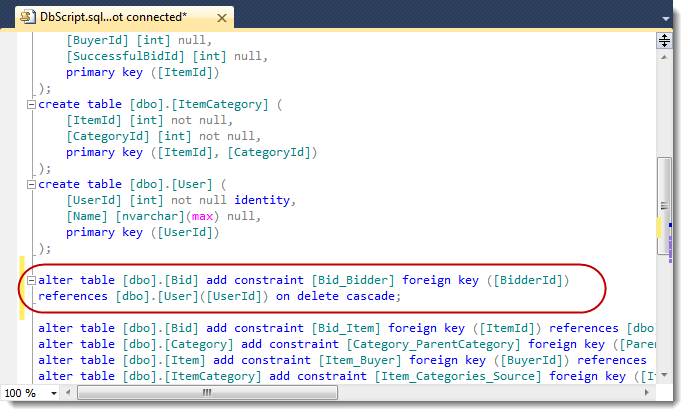
Get the Code First Generated SQL DDLA common process, if you’re starting with a new application and new database, is to generate DDL with Code First automatically during development; At the same time (or later, during testing), a professional DBA verifies and optimizes the SQL DDL and creates the final database schema. You can export the DDL into a text file and hand it to your DBA. CreateDatabaseScript on ObjectContext class generates a data definition language (DDL) script that creates schema objects (tables, primary keys, foreign keys) for the metadata in the the store schema definition language (SSDL) file (in the next section, you'll see where this metadata come from): |
using (var context = new Context()) { string script = ((IObjectContextAdapter)context).ObjectContext.CreateDatabaseScript(); } |
| You can then use one of the classes in the .Net File IO API like StreamWriter to write the script on the disk. |
|
Note how Code First enables cascade deletes for the parent/child relationship between Item and Bid
Get the Runtime EDMOne of the benefits of Code First development is that we don't need to deal with the Edmx file, however, that doesn't mean that the concept of EDM doesn't exist at all. In fact, at runtime, when the context is used for the first time, Code First derives the EDM (CSDL, MSL, and SSDL) from our object model and this EDM is even cached in the app-domain as an instance of DbCompiledModel. Having access to this generated EDM is beneficial in many cases. At the very least, we can add it to our solution and use it as a class diagram for our domain model. More importantly, we can use this EDM for debugging when there is a need to look at the model that Code First creates internally. This EDM also contains the conceptual schema definition language (CSDL) something that drives the EF runtime behavior. The trick is to use the WriteEdmx Method from the EdmxWriter class like the following code: |
using (var context = new Context()) { XmlWriterSettings settings = new XmlWriterSettings(); settings.Indent = true; using (XmlWriter writer = XmlWriter.Create(@"Model.edmx", settings)) { EdmxWriter.WriteEdmx(context, writer); } } |
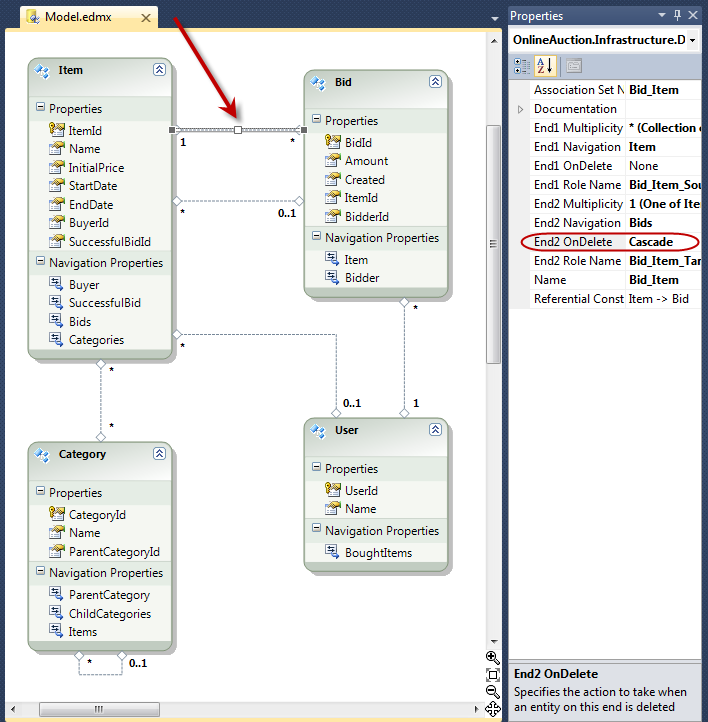
| After running this code, simply right click on your project and select Add Existing Item... and then browse and add the Model.edmx file to the project. Once you added the file, double click on it and visual studio will perfectly show the edmx file in the designer: |
|
Also note how cascade delete is also enabled in the CSDL for the parent/child association between Item and Bid.
Source CodeClick here to download the source code for the OnlineAuction site that we have seen in this post. |
SummaryIn this series, we focused on the structural aspect of the object/relational paradigm mismatch and discussed one of the main ORM problems relating to associations. We explored the programming model for persistent classes and the EF Code First fluent API for fine-grained classes and associations. Many of the techniques we’ve shown in this series are key concepts of object/relational mapping and I am hoping that you'll find them useful in your Code First developments. |