Using of JSON Result in Asp.net MVC 1.0
In a post few month back , i showed how can i simulate a callback using JQuery and ASP.NET with my experimental FlickrXplorer project. More detail on this can be found at the following URL
Now, what i have done here is basically, i did an AJAX call to the controller and rendered the view result in a div. One thing about this way is that i am able to make the view strongly typed as i first rendered view using standard way with all the strongly type ViewData.Model. It is nice for rendering views with small amount of html in it (Like , tag lists), but slow for big outputs. The best practice for all these is to use the JSONResult. Here, i will show a small example of how i render the comment list in FlickrXplorer using JSON result and JQuery $.get in conjunction to make the AJAX request.
First, let’s see how the controller looks like. Assume that there is a controller named CommentController and we have an action named List
[AcceptVerbs(HttpVerbs.Get)]
public ActionResult List(string photoId, int ? index, int? page)
{
    int skip = index == null ? 0 : index.Value*page.Value;
    int take = page == null ? int.MaxValue : page.Value;

    PhotoCommentViewData comments = new PhotoCommentViewData();

    try
    {
        comments = model.GetComments(photoId, skip, take, false);
        return Json(comments);
    }
    catch (Exception ex)
    {
         /// do some exception tracking
    }
}
As it seems, it gets the list of comment from its underlying model and then pass it through JSON result. Optionally, i limited that the action should only be accepting GET calls as it is a list request.
Now, coming back to JavaScript we first need to do a GET request to this action and syntax for doing it in JQuery style:
$.get(url, { index: index, page: page }, function(result) {

   processComments(url, result, index, page, loaderTarget, contentTarget); [strike though is not covered in the post]

 }, "json");
The first argument is the comment list URL, this is constructed in server side using Url.Action and then passed in the JS that also ensures the routing setup, second is the JSON string for params, third is the callback for the result it fetches and final is the type of response it should contain.
Inside processComments , i basically do some DOM operations to build the necessary html block
$("#layout") .append($("<tr/>") .css({'vertical-align' : 'top'}) .append($("<td/>") .attr("class", "said") .append($("<strong/>") .append($("<a/>") .attr("href", "/Photo/NsId/" + comment.Author) .css({ 'color': '#0063DC', 'text-decoration': 'none'}) .append(comment.AuthorName)) .append(" says: ")) .append($("<br/>")) .append(comment.Text)));
So, there is a “layout” panel in the comment container where i am to add the dynamic html. jQuery has this nice way of adding html in a chain and elements under it. For example i want to render a html link with some custom CSS and i want to point that to some URL as well.
Using jQuery , i would do
$("<a/>")
 .attr("href", "/Photo/NsId/" + comment.Author)
 .css({ 'color': '#0063DC', 'text-decoration': 'none' })
 .append(comment.AuthorName)
This will render a html tag something like
<a href=”/photo/NsId/x@y” style=”color:#0063DC, text-decoration:none”>Mehfuz </a>
The rule is that you start a element with $(…) in XHTML style then add necessary attributes, styles and text and it will automatically give you a well-formed html, moreover you can nest it as you like with other elements.
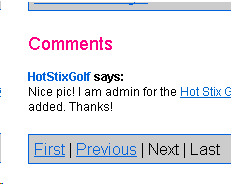
The above block finally produces a look similar to
There are few other JS that is responsible for generating the pager control which is not covered in this post, for this and more you can take a look at the latest bits of FlickrXplorer under www.codeplex.com/flickrXplorer .That’s so far and if you have some cool ideas to share on this, let me know.
Hope that helps.