WebPart Tip: How to quickly view the public key for an assembly in the output window

I saw this handy little helper function being used on a MOSS screencast by Todd Bleeker and decided to figure out how he did it :). Basically it allows you to view the public key token of an assembly from within Visual Studio's output window, which saves time when you need to grab the key for use with the safe control entries in the web.config for example.
First step, fire up your copy of Visual Studio 2005 and open up a webpart class library project. Then from the Tools menu select External Tools. This will bring up the following dialog:
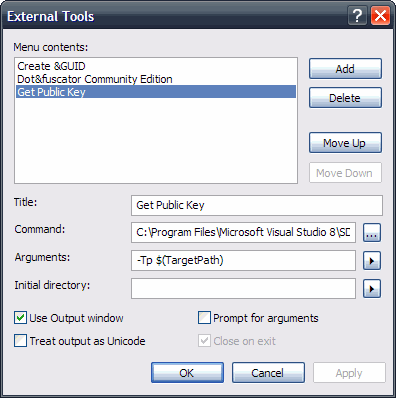
From the options, click Add and then give your utility a title. Now all we're doing here is essentially grabbing the output from the sn.exe command, so you will need to provide the path to your local sn.exe file. Mine was located in the following folder:
C:\Program Files\Microsoft Visual Studio 8\SDK\v2.0\Bin\sn.exe
Now, just like if we were running the strong name utility from the command line, we're going to need to pass in the correct arguments. Firstly we'll need to pass the -Tp argument, as we want to get the token for the public key, together with the public key itself. Then we need to specify the target assembly, which can be done by clicking on the button to the right of the Arguments field and selecting 'Target Path'. This basically gets the full qualified path to item which is being built, in our case a webpart assembly. Lastly just tick the 'Use Output Window' checkbox and then click ok and you're good to go :)
The new utility you've just created should now show up in the Tools menu, you can go ahead and click it and you should now see the output window popup with the details of the public key. This is a really nice feature of Visual Studio and I'm sure this can be tailored for many other uses.