Adding Silverlight Toolkit Controls to the Visual Studio Toolbox
Some great news, the latest version of the Silverlight Toolkit (November 08) has been made available to download on CodePlex. This release includes a host of new controls for Silverlight including TreeView, AutoCompleteBox, DockPanel and one I've been eagerly awaiting - WrapPanel.
Once you've downloaded the toolkit you'll probably want to add the controls to the Visual Studio toolbox. This can be achieved by the following steps:
(Note: I'm doing this on an installation of Visual Studio 2008 SP1 with the latest Silverlight Tools RTW installed)
- Extract the Toolkit zip file to a location on your computer
- Open up a Silverlight project in Visual Studio 2008 SP1
- Open up a XAML file and ensure that the Visual Studio toolbox is visible (if not it can be turned on via View > Toolbox or Ctrl+Alt+X)
- Right click on one of the toolbox headings and select Choose Items... (Note: The dialog took quite a while to load up on my machine)

- From the Choose Toolbox Items dialog, click on the Silverlight Components tab and then click Browse. Navigate to the folder where you extracted the Silverlight Toolkit and open the Binaries folder and select one of the assemblies and click Open. In this example I selected Microsoft.Windows.Controls.dll. Then on the Choose Toolbox Items dialog you should see that new controls have been added to the list and preselected (AutoCompleteBox, DockPanel etc.)

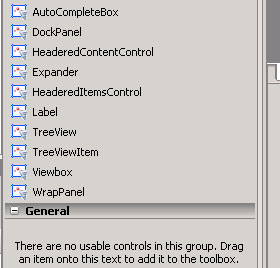
- Click OK and you should then see the new controls available in the toolbox.
- Repeat these steps for the other assemblies included with the Toolkit and you're good to go :)