Nannette Thacker ShiningStar.net

ASP.net Web Application Development

Sponsors

News

See all Blog Posts by Nannette.

Nannette Thacker, consultant and owner of Shining Star Services LLC, specializes in development of custom dynamic database driven web applications utilizing ASP.net technologies. Nannette has been developing ASP sites since 1997. Nannette has written numerous articles on web development techniques and tutorials.

Nannette is the owner and developer of ChristianSinglesDating.com.

 Subscribe in a reader


View Nannette  Thacker's profile on LinkedIn

Ajax Control Toolkit Installation in Visual Web Developer

by Nannette Thacker

Update 11/24/2011: For Visual Studio 2010 4.0 Framework users:

My blog post was written a  few years ago for 3.5 SP1. I needed to install the Ajax Control Toolkit for Visual Studio 2010 4.0 Framework and wanted to make sure there were no problems, so I googled "install ajax control toolkit visual studio 2010" and found this step by step guide:

 http://www.asp.net/ajaxlibrary/act.ashx

It installed perfectly for me the first time, so I'd recommend following the above link. There were just a few steps and voila!

Thanks! Nannette

Original Blog Post continues below for Ajax Control Toolkit Installation in Visual Web Developer:

To install the Ajax Control Toolkit, first download the zip file from http://www.asp.net/ajax/.

3.5 SP1 Release is here.

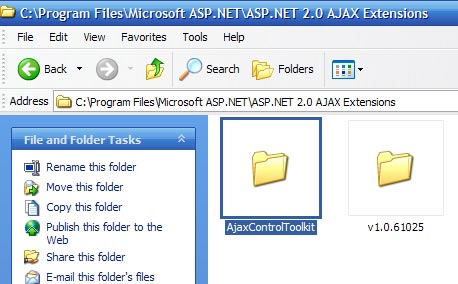
Unzip the files into any directory. Give it a name like "AjaxControlToolkit." 


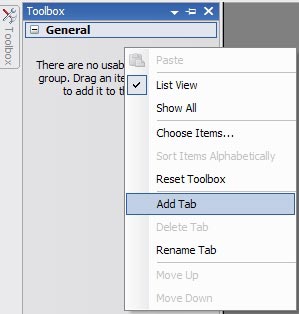
Open your Visual Web Developer and right click in the Toolbox area. Select "Add Tab." 


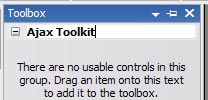
Name the tab with something like "Ajax Tookit." 


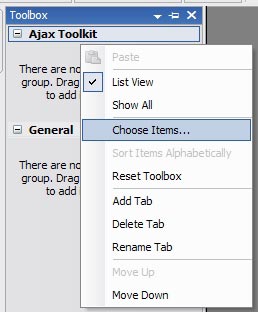
Right click the new tab area, and select "Choose Items..." 


This will bring up a dialog box to "Choose Toolbox Items." Select the "Browse" button. 
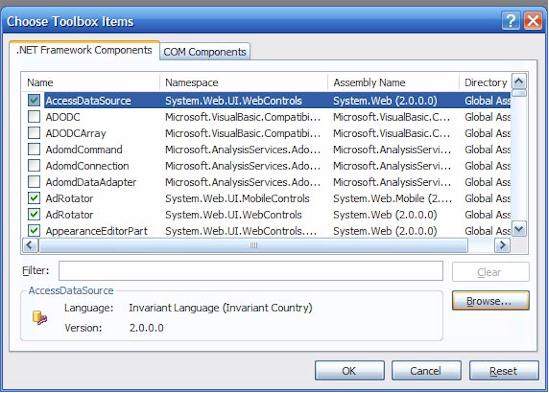


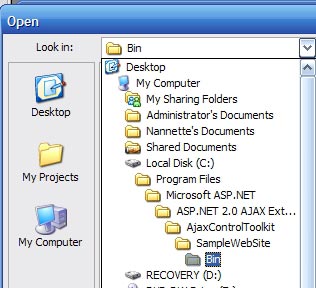
Browse to the directory where you unzipped the Ajax Toolkit files. There is a "SampleWebSite" directory within your "AjaxControlToolkit" directory. Browse to the "Bin" directory within the "SampleWebSite" directory. 


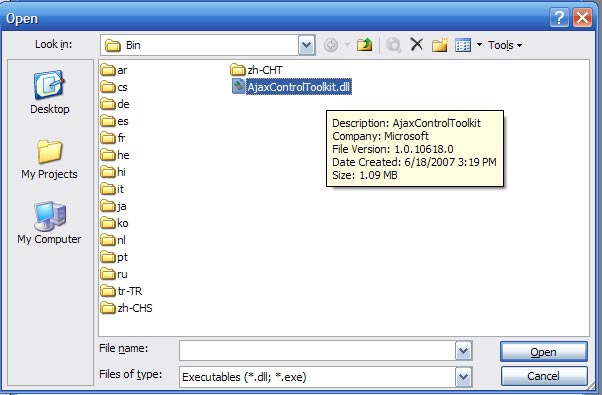
Find and select to open the "AjaxControlToolkit.dll" file. 


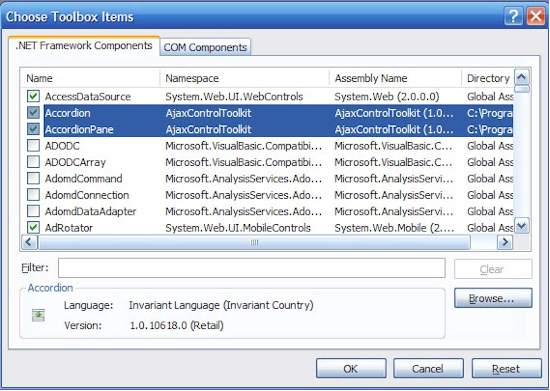
The Choose Toolbox Items dialog will appear, this time with the Ajax Tookit controls selected. Select the "OK" button. 


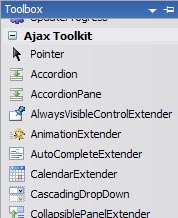
Open or create a web form within your project. Now when you open your toolbox, you will see all of the Ajax Control Toolkit controls, ready for use within your applications. 

May your dreams be in ASP.net!

Nannette

Comments

ScottGu's Blog said:

Here is the latest in my link-listing series .  Also check out my ASP.NET Tips, Tricks and Tutorials

# February 17, 2008 2:01 PM

Aakash said:

Nice post! Thanks.

# February 18, 2008 6:35 AM

skain said:

Am I the only one who thinks it is utterly ridiculous that we're supposed to use a dll from the WebSite project as the main reference for the toolkit?  Why isn't this in a separate class library project?

# February 18, 2008 11:27 AM

nannette said:

skain,

I fully agree. I think it should automatically be in the toolkit, or at least an option you can turn on or off without having to download a project and grab a .dll.

I would suspect in future versions of VWD that the toolkit will be an automatic part of the release. But who knows?

# February 18, 2008 11:47 AM

Enlaces 17 de Febrero: ASP.NET, ASP.NET AJAX, Visual Studio, .NET « Thinking in .NET said:

Pingback from  Enlaces 17 de Febrero: ASP.NET, ASP.NET AJAX, Visual Studio, .NET « Thinking in .NET

# February 18, 2008 12:49 PM

bassjock said:

Thanks, Nannette.  This is just what I was looking for.

# February 19, 2008 9:48 AM

trytocatch said:

excelent post

thanks u!!

# February 19, 2008 11:52 AM

Visual Studio Links #2 : Mostly Programming Stuff said:

Pingback from  Visual Studio Links #2 : Mostly Programming Stuff

# February 20, 2008 7:32 AM

Ajax said:

A good article by Nannette Thacker on how to install the Ajax Control ToolKit Read More

# February 22, 2008 4:41 AM

Arun said:

Helped me a lot,Thank u Keep on Posting

# February 24, 2008 9:23 AM

sorcerdon said:

Do you need to any of this in VS2008? or is it all built in and done for you?

# February 25, 2008 2:40 PM

nannette said:

Sorcerdon,

I can't answer that. I hope someone else knows the answer.

# February 25, 2008 3:05 PM

Jason Green said:

I don't believe the AjaxControlToolkit is built into VS2008.  Ajax components are, but not everything that's in this toolkit.

Great post Nannette.  

# February 29, 2008 2:46 PM

nannette said:

I do have Visual Studio 2008 installed now, and no, the Ajax toolkit is not a part of it.

Nannette

# February 29, 2008 2:57 PM

Manoj Gajjar said:

Way you describe is very nice. every one can undestand easily

# March 12, 2008 3:39 AM

Brenda said:

Thanks for this post.  Good grief, couldn't the ajax site told us how to do this?

# March 20, 2008 10:27 AM

Cindy said:

I did these instructions and browsed to the dll - clicked OK and got error message about "... error loading types from assembly "path of the file" ... the system cannot find the file specified" - any ideas?

Thanks-

C

# April 1, 2008 5:55 PM

nannette said:

Cindy,

I have two computers. I tried installing this on my new computer, which does not have a Microsoft ASP.net folder. And I get the same error.

I don't know what is causing that and why it does not work on this other computer. I also don't know why there is not an ASP.net folder, although I do asp.net development on this computer all that time.

Maybe someone more knowledgeable can offer guidance.

Nannette

# April 1, 2008 6:50 PM

wildgoosed said:

I am also getting the same assembly error as nannette and cindy with vs2008. any ideas?

# April 3, 2008 11:46 PM

wildgoosed said:

Cindy and Nannette I have figured out the problem.

With VS2008, you must download/use the .dll from the Ajax Control Toolkit Framework 3.5 package.

# April 3, 2008 11:50 PM

Aaron said:

Wow... If anyone is *still* having problems after all this, the issue might be caused by your wireless Microsoft mouse. Yes. I thought it was far-fetched as well, but the solution at the appended URL actually worked for me. Very strange...

forums.microsoft.com/.../ShowPost.aspx

# April 10, 2008 3:40 PM

Nannette said:

# April 11, 2008 1:30 PM

skiah said:

Thanks. I can't believe how much time I wasted looking for this!

# April 24, 2008 4:50 PM

Isaac said:

Thanks so much for posting this. I've been looking through MS and Codeplex docs for something like this. Wouldn't you know that it ain't in plain sight. Oh well, thank you just the same. A very very very helpful blog posting.

As far as appearing in MS's default install of VWD or VS 2008, this toolkit is a community-built thing. It's not a MS thing, so they're not going to load it for you out-of-the box, however comma, they should at least help users by doing a simple explanation as to how to load the controls.

Nannette, send them a bill for our pain and suffering.

# April 25, 2008 3:41 PM

Harsha said:

Thanks very very much............

# April 26, 2008 12:58 PM

Dan Jones dan.jones@portofportland.com said:

Thank you.   End of Day Friday.....and Ajax Toolkit disappeared.  Thanks for the instructions.

# May 9, 2008 7:03 PM

Vijendra said:

I have VWD 2005

and did these instructions and browsed to the dll - clicked OK and got error message about "... error loading types from assembly "path of the file" ... the system cannot find the file specified"

# May 10, 2008 3:23 AM

D-himan said:

" it is utterly ridiculous that we're supposed to use a dll from the WebSite project" Even I thought the same. initially i thought that this url provides a way around .There must be some other way. It was very odd that you need to specify the tab name by yourself. I got convinced after seeing the comments that i am not the only one to be fooled.

# May 14, 2008 10:18 AM

Tim said:

Seriously, you saved my bacon, i was ready to throttle joe stagner! :)  (his video is singularly unclear)

# May 24, 2008 1:41 AM

sepid said:

Thanks  Nannette. It helps me alot.Could You Please Post Articles About how to use these Components in a Web Site.

Thanks alot

# May 25, 2008 1:39 AM

Niraj said:

Thanks, Provide a best way to for a begginer

# May 26, 2008 6:27 AM

zahidzia said:

Gosh..nice post buddy ..saved my hours to figure this damn thing out how to add toolkit controls as I've heard from someone that AJAX is a part of visual studio 2008 but cudnt see the ajax controls tab there...once again thanks for saving hours of effort.

# May 31, 2008 8:13 AM

sa said:

thx a lot.  ^__^

# June 17, 2008 12:50 PM

IrianGald said:

Nice post!!! Thank you very much. XD

# June 19, 2008 12:51 AM

Mehdiyev Turgut said:

Nice post! Thank u... :)

# June 23, 2008 2:56 AM

closeguy2005 said:

Thanks a lot ........ I wonder Microsoft has nowhere mentioned about this........

It helped me as i was searching all over the forum.asp.net for it.

# July 31, 2008 10:34 AM

Vishal said:

I got to know lot of people getting error ..

This is because you have to install ONLY and ONLY

AjaxControlToolkit-NoSource.zip

DO NOT try to install AjaxControlToolkit-Framework3.5

# July 31, 2008 10:40 AM

karthikeyan said:

its great and very helpful for all the starter in .net..thanks great work..keep going...

# August 23, 2008 5:12 AM

madhu said:

It is good to understand how to install ajax control tool kit.

# August 26, 2008 2:13 PM

Brad said:

Thank you! I been looking for this..

# August 28, 2008 6:33 PM

Cosmo said:

This is exactly the manual I was looking for, after spending hours on google trying to figure things out..

Great Success!

# September 4, 2008 6:52 PM

Rajesh said:

great post.. this is what i have been looking for.. and it works for me too..

# September 14, 2008 1:30 AM

Cheujip Wekop Serge said:

Pretty Cool!!!!

As i just started to work on AJAX that's really what i was searching for, Thank's Nannette

# September 22, 2008 3:27 PM

Felipe said:

Thanks , is a great post, was very usefull for me

# September 29, 2008 9:20 AM

meraj said:

Thanks lot for given a helpful layout. It is very helpful. I got the ajax controls.

# October 5, 2008 5:27 AM

Daniel said:

Thank you ;-)

# October 6, 2008 12:53 PM

dotnetguts said:

Good, Check out for more detail on topic.

dotnetguts.blogspot.com/.../ajax-control-toolkit-vsnet-2008.html

# October 21, 2008 9:46 AM

Yanesh Tyagi on ASP.Net said:

If after installing Ajax Control Toolkit on your system, you found that the conrols are disable, you need to restart your VWD or your machine. You can also trying deteting .pdb files from the VWD's 9.0 folder.

# October 27, 2008 11:07 AM

rhiana said:

Thanks Nannette, however I have a problem upon uploading it in the toolbox... It gives this error Message:

The was an error loading types from assembly 'D:\Program Files....

'Could not load file or assembly 'System.Web.Extensions, Version=3.5.0.0, Culture=nuetral............ or one of its dependencies. The system cannot find the file specified.'

How can I resolve this issue? thanks in advance

anybody who knows how to resolve the issue??? Please help

# November 4, 2008 11:06 PM

nannette said:

rhiana,

I was able to reproduce your error by attempting to load the toolkit into a non 3.5 web site.

Make sure you have created your website under 3.5 framework if you are using the 3.5 toolkit. Otherwise, download the older toolkit to go with the right framework.

Nannette

# November 11, 2008 4:58 PM

nannette said:

rhiana,

I noticed I had loaded the toolkit successfully, and then went in and it was missing. So when I tried to load it again, it failed with same error, even though the project was 3.5

I closed down some other VS2008 windows to free up memory and it worked fine.

So try making sure you have everything else closed out.

Nannette

# November 11, 2008 5:10 PM

Ezeamama said:

thanks a lot but why didn't you reference Joe stagner (MVP) of microsoft who first created the solution in a video presentation/format.Thaks a lot

# November 12, 2008 7:44 AM

nannette said:

Do you have a link to that video?

# November 12, 2008 2:47 PM

Yalini said:

Really i tried lot of ways to install this toolkit  all the way are failiure u r way of explanation is very good ...

# November 21, 2008 11:51 AM

sergeysat@mail.ru said:

Thanks :)

# December 17, 2008 6:48 AM

Anuj Tripathi said:

Excellent job.

# December 18, 2008 5:26 AM

sudarushca14@mail.ru said:

Thanks :)

# December 18, 2008 7:53 AM

jamello said:

thanks a lot for the post. Your solution applies to vs2008.

I have vs2005 on my machine.

When I try to load the various controls to my tool box by pointing to the ajaxtoolkit dll, an error appears that goes like this "'There was an error loading types from assembly C:\programfiles\...ajaxtoolkit.dll' Could not load file or assembly 'Systems.web.extensions version=1.61025.0 culture=neutral, public token=... or one of its dependencies. The system cannot find file specified"

Please do you have any ideas.

# December 19, 2008 9:21 AM

da_kutuzow@inbox.ru said:

Wow, very nice... Thanks!

# December 22, 2008 5:01 AM

lol@bk.ru said:

Thanks, very interesting

# December 22, 2008 9:52 AM

william colombia said:

muchas gracias  parcero

# December 22, 2008 1:26 PM

Richa said:

Thank you so much

As I don't know anything about AJAX, I was trying to learn from last 5 days, and today I was so frustrated but after getting this scennshot contained example of ajax installer, I am so happy

Thanks again

Richa

# December 22, 2008 9:42 PM

loshar3000@mail.ru said:

Thanks, very interesting


# December 23, 2008 7:47 AM

man9988-77@mail.ru said:

Very interesting article, I will wait for continuation

# December 26, 2008 6:36 AM

zaika_aleka@mail.ru said:

Great article, thanx for information :)

# December 29, 2008 5:07 AM

nazar_killer666@mail.ru said:

Very interesting article, I will wait for continuation

# December 29, 2008 6:42 AM

monsyr90 said:

Well, very interesting article … thanks

# January 2, 2009 4:53 AM

Bill Borrero said:

I have installed the Ajax Control Toolkit and have gotten it to stay put in Visual Web Developer 2008 (as it would not be in VWD on the next restart).  I can drag and drop components to my page, but when I try to build it, I get an error: "Unknown server tag".

Can anyone help?

# January 2, 2009 7:01 AM

ekaterinavna said:

Very interesting article, I will wait for continuation

# January 3, 2009 10:39 AM

vkmail@mail.ru said:

Nice post.Thanks.

# January 5, 2009 7:20 AM

Goutam said:

nice post!!!!! Helped me a lot!!!??

# January 8, 2009 4:07 AM

syhoyrychey said:

Very interesting.

# January 9, 2009 5:43 AM

Cex said:

Thank You So Much!

# January 17, 2009 3:30 PM

pramit4u said:

installation done fine. but after taking controls in toolbox only few controls are working. and another can't drag? they are not working. pls help me.......

# January 19, 2009 7:03 AM

Anonymous said:

Thanks, very interesting

# January 25, 2009 10:55 AM

Alper said:

Thanks

# February 14, 2009 10:33 AM

Jinal Tandel said:

Thanx for helping me in installing AJAX toolkit, it was really amazing and easy way to understand.

# February 23, 2009 12:14 PM

berk said:

super explanation

thanks

# February 25, 2009 2:36 PM

jonnyk370xx2@mail.ru said:

Very interesting article, I will wait for continuation

# March 1, 2009 11:49 AM

Subin said:

Is it compatible with Vb.net.Please suggest Me

# March 6, 2009 12:52 AM

nannette said:

Yes, this will work with C# or VB.

# March 6, 2009 12:50 PM

Adam said:

To all of those getting the following error:

'Could not load file or assembly 'System.Web.Extensions, Version=3.5.0.0, Culture=nuetral............ or one of its dependencies. The system cannot find the file specified.'

Make sure you have installed the ASP.NET AJAX Extensions 1.0 before trying to install the Toolkit!

# March 7, 2009 3:04 AM

syhoyrychey said:

Thanks, very interesting

# March 8, 2009 5:18 AM

kyanq said:

Thanks :)

# March 9, 2009 10:51 AM

helpless said:

as pramit4u says ... installation done fine. But after taking controls in toolbox only few controls are working... and another I can't drag!!! HELP ME!

# March 10, 2009 11:38 AM

jonnyk370 said:

Very interesting article, I will wait for continuation

# March 10, 2009 1:43 PM

sergeysat said:

Thanks :)

# March 11, 2009 10:38 AM

Anonymous said:

Thanks :)

# March 14, 2009 9:49 AM

pjl said:

I only speak VB.  I downloaded the AJAX Control Toolkit and it looks to me like it is in C#.  Is there a VB version or should I stop living in the 20th century and learn C#?

# March 25, 2009 8:42 AM

nannette said:

The toolkit works for both VB and C#. It uses an asp.net control, which is supported by both languages.

I'm unsure what you're seeing.

# March 25, 2009 4:46 PM

Spider said:

after loading the toolkit with the dll file both in visual web and visual studio 2008 i am not seeing any of the controls. Any suggestions?

# March 26, 2009 7:29 PM

mreynol5 said:

THANK YOU NANNETTE...  I upgraded to Vista under a "Clean Install" so I had to re-install my VS2008.  I have searched high and low for the toolkit because I could not remember how I had originally installed it.  Your post was the answer.  Incidently, I do like Vista and I love VS 2008 but why is it so difficult to add the toolkit???  Are there any more recent updates since August 2008 and if so what &*^% will I have to go through to install them?

Thanks again so much

# April 6, 2009 11:08 AM

nannette said:

I just reinstalled the latest download and the dll is still dated August 2008.

# April 14, 2009 1:31 PM

nandha 63 said:

works just fine . . .

# April 20, 2009 10:39 AM

dvphongit said:

I choose "OK" button but I can't see any thing from tab Ajax Tookit????

Please help me!!

dvphongit.

# May 9, 2009 11:31 AM

Jorge said:

Just like heaven, very tanks

# May 12, 2009 5:41 PM

Balaji said:

Thanks..

# May 16, 2009 9:18 AM

Gunbilegt Byambadorj said:

Thank You So Much. I had no clue what to do whit ".dll" file.

# May 20, 2009 1:47 PM

Anusha said:

Thanks a lot ..it really helped me.

# May 27, 2009 1:55 AM

funluckykitty said:

do files get unzipped to my pc or to the web server?  

# June 8, 2009 4:19 PM

David said:

Thank you for this tutorial. I have been around the asp.net world in the past. I recently rebuilt my server with and upgrade to windows 2008. The strangest thing is I seen a video on asp.net by Joe Stagner but because I did not bookmark the page to my favorites I could not find it again when it came time to install the .dll; I recall he moved some files but I can't recall for what reason and don't remember how. Do you know why?

# June 11, 2009 6:41 PM

venkatesh said:

Thanks for helping to install ajax control toolkit

# June 16, 2009 4:25 AM

anas said:

thanks man...

# June 23, 2009 11:58 AM

Menah said:

THANKS FOR HELPING ME

# June 25, 2009 10:57 AM

Ismael said:

Thanks a lot, I'm spend a lot of time looking for it.

# July 8, 2009 2:34 AM

Tim said:

Thx, for some reason, Microsoft doesn't have such an easy to use example.  

# July 18, 2009 12:33 PM

vini said:

thanks for the information

# July 20, 2009 12:42 PM

Michael H said:

Thanks, really appreciate this post. Amusing closing "may your dreams be in ASP.net". A joke started in my class about Dreaming in Code. It resulted in a domain name called DreamingASP.net. Just thought I'd share that.

Kudos... mh

# July 20, 2009 3:52 PM

Malini said:

Thankyou soooooooo much for this blog!!!!! i have been stuck with this for the past 2 days and today just following instruction from ur blog totally resolved my problem,also thanks for the comment on the VS 2008 needing the 3.5 framework, that was also very helpful as i was getting error with the other link,Feeling really happy to get all the controls on my toolbox!Thanks again! for helping a newbie not loose hope

# July 21, 2009 1:43 PM

Dibakar said:

Thanks a lot !

# July 29, 2009 9:07 PM

Reza said:

You really solved my Biiiiig problem, Thank You soooooo much with the best wishes,

# July 30, 2009 4:01 PM

devang said:

thank you very much i was not konow hot to install ajax control tool kit but help of this site i  install ajax control tool kit

again thanks

# August 17, 2009 5:05 PM

Nitin said:

I hav also faced this Loading .dll Type Error..Couldn't load the asssembly and also the file culd not be specified..I am trying to download other zip versions of AJAX,but they also give a same problem..so Anyone plzz suggest me for resoling that prob...:(

# August 17, 2009 10:09 PM

green said:

Thank you very much

# September 10, 2009 1:45 PM

MANU TS said:

THANKS BUDDY

# September 23, 2009 5:05 AM

sharmila said:

Thanks lot

but still i am getting

Error 1 Could not load file or assembly 'AjaxControlToolkit' or one of its dependencies. The system cannot find the file specified.

# October 30, 2009 7:16 AM

Ramakrishnan.p said:

simple And Eazy,

Nice

Keep Going,

Regards,

Ramakrishnan.p

# October 31, 2009 3:46 AM

ziazai123 said:

Nice and easy steps. Thanks a lot! I been looking for this..

# November 8, 2009 5:43 AM

agieo said:

thank you for your tips, and now i have been can use ajax in VS, that's wonderfull.

# December 1, 2009 9:33 AM

ondra said:

good article, it helped , thanks

# December 17, 2009 4:18 PM

nanapradya said:

very thank's you

# December 22, 2009 9:42 PM

Vinayak said:

nice information, Thank you.......

# January 8, 2010 1:29 AM

Trent said:

Sweet Post!

# January 23, 2010 1:19 PM

shobhit kumar chauhan said:

thanks you very much dear it helps me better.......

# March 11, 2010 8:38 AM

Clint said:

Great Post! I've been looking all over the place for this information.

# March 11, 2010 8:48 AM

vivek said:

thanks a lot this information is very useful to me. thanks once again.

# April 9, 2010 8:49 AM

Ajaxquery said:

hi........thanks for this post.......

i have one query.....

i have installed Ajax toolkit successfully.....

the controls are attached with the toolbox also but...only some controls are working.....not all.....can every one help me plzzzzzzz....??

# April 26, 2010 11:22 AM

Rashmi said:

Is 3.5 AJAX ToolKit installation same for studio 2005 and 2008. Coz it worked well for 2005 but not for 2008.

# April 29, 2010 10:08 AM

Randima said:

A Goood one We must install the SP1.

Thanks a lot

# April 30, 2010 7:48 AM

sanjay yadav said:

really i am very frustrate to install the ajax toolkit using these steps  i worked it really very 2 thabks....

# May 2, 2010 4:00 PM

Bing said:

Good post!

I follow your steps to install my ajax toolkit. Everything is OK! But finally I cannot see any ajax control in my toolkit panel. I don't know why?

# May 31, 2010 11:11 AM

KLM said:

I have installed Ajax Control Toolkit in VS2008. Created a website in 3.5 framework.  It does not work properly.

1. I am unable to drag and drop any extender controls in to design surface .  

2.When I add ToolkitScriptManager and starts view in browser it gives the following error.

Could not load type 'System.Web.UI.ScriptReferenceBase' from assembly 'System.Web.Extensions, Version=3.5.0.0, Culture=neutral, PublicKeyToken=31bf3856ad364e35'.

Exception Details: System.TypeLoadException: Could not load type 'System.Web.UI.ScriptReferenceBase' from assembly 'System.Web.Extensions, Version=3.5.0.0, Culture=neutral, PublicKeyToken=31bf3856ad364e35'

Version Information: Microsoft .NET Framework Version:2.0.50727.1433; ASP.NET Version:2.0.50727.1433

# July 14, 2010 4:23 AM

access2010 said:

thank you

# July 24, 2010 9:57 AM

Bhavani said:

very nice post. thanks a lot

# July 28, 2010 1:02 PM

Ajax Control Toolkit Installation « Knowledge Sharp 's Blog said:

Pingback from  Ajax Control Toolkit Installation  « Knowledge Sharp 's Blog

# September 23, 2010 8:39 AM

Bongie said:

Thank you very much. Very clear insrtuctions

# September 26, 2010 7:48 AM

Bob said:

Thanks for taking the time to screenshot and explain this. Doing a new install and it's all here. Very clear. Thanks!

# October 28, 2010 8:49 PM

chetan said:

thanks !!!

# January 12, 2011 6:44 AM

Deeptechtons Lab « Collapsible panel extender revealed said:

Pingback from  Deeptechtons Lab « Collapsible panel extender revealed

# January 30, 2011 11:02 AM

NIK said:

THANX :)

# March 3, 2011 12:30 PM

goandaman said:

Not a good example, has to work out more in ajax installation to VS or its dependencies...

# April 7, 2011 1:03 PM

Arun said:

You are awesome

# April 26, 2011 1:45 PM

Charith said:

Nice.. Very Helpful ... Thanks..!!!

# April 30, 2011 7:43 AM

Surya R Praveen said:

Really superb work, Initially i was wondering how to use this zipped content and then the screenshots really helped me through.

thanks again

# May 6, 2011 5:53 AM

bindu.1552 said:

thanku for showing in screen shot. but i'm facing a problem i'm not able to drag the control's.even though i add the reference and build the solution can any one help me.,

# May 7, 2011 2:07 AM

piyushwalia said:

thanks .........it helped me lot

# June 20, 2011 10:46 PM

hemlata gehlot said:

Thanks a ton...very helpful :-)

# June 21, 2011 10:39 AM

naresh said:

thanks a lot.....i was looking for those controls...thank q

# June 22, 2011 7:14 AM

pinki said:

very simple and nice....

# July 7, 2011 2:30 AM

hardeep said:

thanks a lot...............really this is a super explanation...............:)

# July 16, 2011 3:34 AM

sampada said:

i tried installing the toolkit .I aqm getting error as

ajaxcontroltoolkit.dll is not a microsoft componenet

can please please tell me how to go about it

# August 12, 2011 3:16 AM

Avdhoot said:

Thanks

# August 13, 2011 7:50 AM

Vilas Shinde said:

Thanks,

# August 20, 2011 1:45 AM

rtyecript said:

I really liked the article, and the very cool blog

# August 23, 2011 12:22 AM

LS said:

Tanks for help me :)

# August 24, 2011 2:43 PM

Annie said:

hey ur detailed explanation helped me a lot.. thnx a ton... \m/

# August 24, 2011 11:15 PM

Farzad said:

Thanks,Any Way.

# August 29, 2011 9:48 AM

Ankit said:

Thanks to it

# September 17, 2011 5:19 AM

Sachin Kakade said:

Its really helpful. Nice post Thx

# September 27, 2011 12:38 AM

?????? ?????????? ajax | ?????????????????? said:

Pingback from  ?????? ?????????? ajax | ??????????????????

# November 2, 2011 8:18 AM

Gerry said:

Easy to follow and easy to do...but it doesn't work!!!

The webconfig file is never touched and you need to spend hours searching google to get fixes, none of which wotk either.

# November 11, 2011 7:45 AM

Nannette Thacker ShiningStar.net said:

I needed to install the Ajax Control Toolkit for Visual Studio 2010 4.0 Framework, so I googled "install

# November 24, 2011 1:24 PM

nannette said:

Try this link:

www.asp.net/.../act.ashx

# November 24, 2011 1:24 PM

atinfotech said:

excellent post...........

# December 7, 2011 9:42 PM

Suresh said:

very thanks

# December 9, 2011 7:02 AM

Ajaxcontroltoolkit installation | Intspaces said:

Pingback from  Ajaxcontroltoolkit installation | Intspaces

# December 10, 2011 10:52 PM

dmmaseoseoseo said:

perfect site, thanks

# December 12, 2011 9:22 PM

Mir said:

Thank you very much Indeed.

# January 7, 2012 3:43 PM

logu said:

thank u so much

# January 9, 2012 1:35 AM

govin raj said:

thanks lot

# January 19, 2012 5:59 AM

Ankit Baria said:

Thanks a lot

# January 24, 2012 9:09 AM

sathyaraj said:

thank you very much

# February 9, 2012 5:47 AM

anbu said:

when i compile i get extra folders in my bin folder which i don't need

# October 23, 2012 3:36 AM

Gopi k said:

i add ajax toolkit for my asp.net page after reopen my asp.net application ajax toolkit not available i need solution for that ,...........

i want to add permanently ajax toolkit in my asp.net toolbox pls give solution for this problem

# October 26, 2012 7:19 AM

sandeep said:

thanx for ur valuable help to instal ajaxcontrol toolkit

# November 1, 2012 1:41 AM

radha123 said:

hi thanx

added toolkit to webdeveloper

it help me alot

# November 23, 2012 1:54 AM
Leave a Comment

(required) 

(required) 

(optional)

(required)