Nannette Thacker ShiningStar.net

ASP.net Technologies.

Creating a Database Connection to a Remote SQL Server Database within Visual Web Developer

By Nannette Thacker

Step-by-step instructions for creating a database connection to a remote SQL Server Database, using Visual Web Developer.

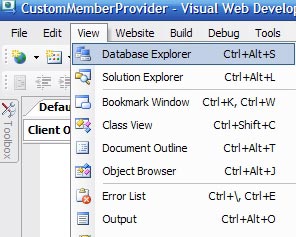
  1. Go to the View menu item and select Database Explorer.

  2. Depending on how you have your Visual Web Developer interface setup, go to the Solution Explorer, and at the bottom you will see a tab for Database Explorer. Click that. 


  3. You will see the "Data Connections" available in the Database Explorer. We currently have none displaying.

  4. Right click in the Database Explorer area and select "Add Connection..." 


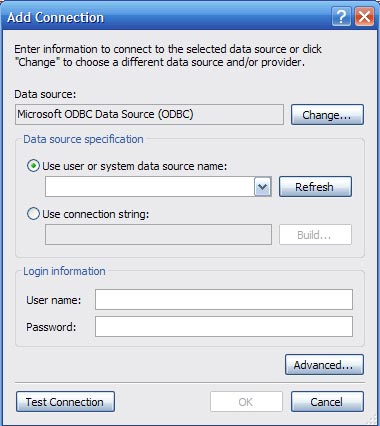
  5. This will bring up the Add Connection dialog box. Select the "Change" button. 


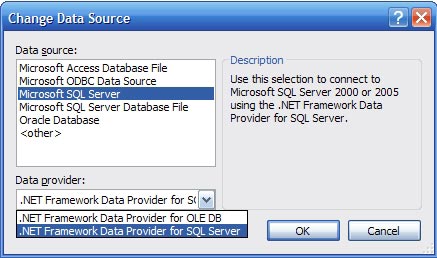
  6. In our example, we are connecting to a SQL Server database, so select the "Microsoft SQL Server" Data source option as well as the ".NET Framework Data Provider for SQL Server" Data provider. 


  7. Select "OK" to return to the "Add Connection" dialog. Put in the IP address or server name for your database. In our case, we use Windows Authentication, but you may optionally input a User Name and Password and select "Use SQL Server Authentication." Use the drop down list to "Connect to a database" and "Select or enter a database name:" Select "Test Connection" to make sure you have it setup properly. Then "OK." 


  8. Now you may use the Database Explorer tab to view your tables and data. 
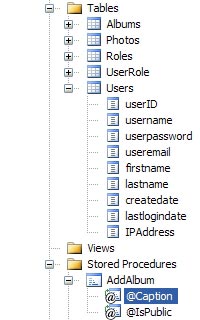


Although you may create and alter a SQL Server .mdf database within your project, Visual Web Developer doesn't support opening a table definition or adding a new table from your SQL Server 2000 database. But it does allow "Show Table Data." It allows you to see the names of your stored procedures, but not to edit or view their content, just the properties. It is very limited, but you may wish to have it just for those purposes.

If you don't yet have the new Visual Studio, but do have Visual Interdev, perhaps for use with your ASP Classic development sites, you may utilize VI to manipulate your SQL Server databases remotely.

May your dreams be in ASP.net!

Nannette Thacker
"The human body can be drained of blood in 8.6 seconds given adequate vacuuming systems." - River Tam, Firefly/Serenity
Any Firefly fans?


Comments

Anon said:

Is this a joke?

Is this what passes for content on weblogs.asp.net now?

# February 17, 2008 11:19 PM

Josh said:

Was this really worth posting?

# February 17, 2008 11:37 PM

nannette said:

Josh Anon,

It's fairly obvious that I put effort into my blog. I think some people seem to forget that the internet is full of newbies learning how to program and use the tools. I like to provide step by step instructions to aid others in learning things that you evidentally feel are uselessly beneath your level. Just congratulate yourself that you're beyond that stage and move on.

Nannette

# February 18, 2008 2:01 AM

WebReservoir said:

@ Josh + @ Anon

If you were smart and experienced enough, what made you read this blog. You should have easily neglected it.

It takes time and effort both to take the snapshots and to post it.

Pl. take the positive side that nannette is trying to help the newbies.

Carry on nannette, few odd remarks should not change your attitude.

P.S.:- it would be nice, if you can explain how to create a database on the remote server, and how to take the backups.

All this should be through Visual Web Developer.

Would it be more easy through control panels or VWD..?

Pl.guide us.

WebReservoir

# February 18, 2008 2:37 AM

nannette said:

WebReservoir,

It is my understanding that VWD doesn't support creating a database or making backups on the remote server. At least when I work with VWD on my remote database, it is very limited and doesn't allow manipulation, just viewing.

Anyone else know for certain?

I do have an upcoming article coming out on 4guysfromrolla that will demonstrate how to create an .mdf database in VWD, but that's not what you're asking.

Thanks for your kind words WebReservoir.

Nannnette

# February 18, 2008 11:10 AM

Travis said:

Nannette ignore the trolls.  Great article for the beginners out there.

# February 18, 2008 3:47 PM

VD said:

I'm a newbie and this was useful as it's what I searched for in Google.

# February 20, 2008 7:50 PM

John said:

I also appreciated the beginners step-by-step.  Not all of us have been programming .Net for years.  This post was able to get me jump started on a project I'd been putting off because I'd had problems connecting to a remote DB.  Thanks for all your work.

# February 21, 2008 5:13 PM

Mark Wisecarver said:

Nothing wrong with what you provided Nannette.

Good job mate.

# February 28, 2008 10:25 AM

G Clark said:

Nannette,thanks for the tip.  I've been doing application development for decades (I won't mention how many) and have had to learn and use dozens of languages and development tools.  In this time and place, I am a newbie, and I appreciate your efforts.

# March 31, 2008 1:36 PM

pills said:

this was very useful to me

# April 12, 2008 3:10 PM

Adam Roessler said:

Nannette,

As a newbie to asp.net, I appreciate your article.  I am new to VWD and was uncertain how to make my connection.

Now I'm working with my data and learning how to represent it in VWD.

Thanks a bunch!

# April 16, 2008 5:23 PM

Brady said:

I'm a newbies myself and this helped me out quite well

Nice one!

# May 29, 2008 4:05 AM

Eldon said:

Great post for us newbies it is very much appreciated that the more experienced will still take the time to do something like this.  

# July 28, 2008 2:28 PM
Leave a Comment

(required) 

(required) 

(optional)

(required)