Passing a parameter so that it cannot be changed – C#
I read this requirement of not allowing a user to change the value of a property passed as a parameter to a method. In C++, as far as I could recall (it’s been over 10 yrs, so I had to refresh memory), you can pass ‘const’ to a function parameter and this ensures that the parameter cannot be changed inside the scope of the function.
There’s no such direct way of doing this in C#, but that does not mean it cannot be done!!
Ok, so this ‘not-so-direct’ technique depends on the type of the parameter – a simple property or a collection.
Parameter as a simple property: This is quite easy (and you might have guessed it already). Bulent Ozkir clearly explains how this can be done here.
Parameter as a collection property: Obviously the above does not work if the parameter is a collection of some type. Let’s dig-in. Suppose I need to create a collection of type KeyTitle as defined below.
1: public class KeyTitle
2: {
3: public int Key { get; set; }
4: public string Title { get; set; }
5: }
My class is declared as below:
1: public class Class1
2: {
3: public Class1()
4: {
5: MyKeyTitleList = new List<KeyTitle>();
6: }
7:
8: public List<KeyTitle> MyKeyTitleList { get; set; }
9: public ReadOnlyCollection<KeyTitle> ReadonlyKeyTitleCollection
10: {
11: // .AsReadOnly creates a ReadOnlyCollection<> type
12: get { return MyKeyTitleList.AsReadOnly(); }
13: }
14: }
See the .AsReadOnly() method used in the second property? As MSDN says it:
“Returns a read-only IList<T> wrapper for the current collection.”
Knowing this, I can implement my code as:
1: public static void Main()
2: {
3: Class1 class1 = new Class1();
4: class1.MyKeyTitleList.Add(new KeyTitle { Key = 1, Title = "abc" });
5: class1.MyKeyTitleList.Add(new KeyTitle { Key = 2, Title = "def" });
6: class1.MyKeyTitleList.Add(new KeyTitle { Key = 3, Title = "ghi" });
7: class1.MyKeyTitleList.Add(new KeyTitle { Key = 4, Title = "jkl" });
8:
9: TryToModifyCollection(class1.MyKeyTitleList.AsReadOnly());
10:
11: Console.ReadLine();
12: }
13:
14: private static void TryToModifyCollection(ReadOnlyCollection<KeyTitle> readOnlyCollection)
15: {
16: // can only read
17: for (int i = 0; i < readOnlyCollection.Count; i++)
18: {
19: Console.WriteLine("{0} - {1}", readOnlyCollection[i].Key, readOnlyCollection[i].Title);
20: }
21: // Add() - not allowed
22: // even the indexer does not have a setter
23: }
The output is as expected:

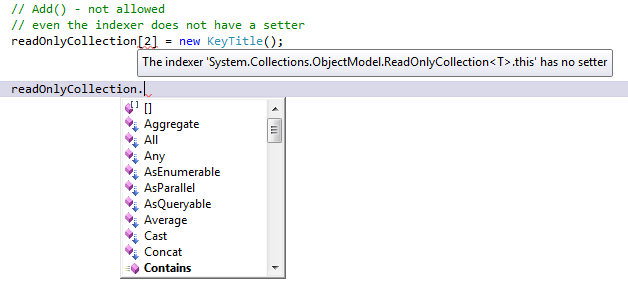
The below image shows two things. In the first line, I’ve tried to access an element in my read-only collection through an indexer. It shows that the ReadOnlyCollection<> does not have a setter on the indexer. The second line tells that there’s no ‘Add()’ method for this type of collection.
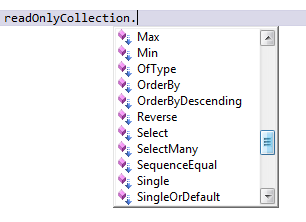
The capture below shows there’s no ‘Remove()’ method either, there-by eliminating all ways of modifying a collection.
Mission accomplished… right?
Now, even if you have a collection of different type, all you need to do is to somehow cast (used loosely) it to a List<> and then do a .AsReadOnly() to get a ReadOnlyCollection of your custom collection type. As an example, if you have an IDictionary<int, string>, you can create a List<T> of this type with a wrapper class (KeyTitle in our case).
1: public IDictionary<int, string> MyDictionary { get; set; }
2:
3: public ReadOnlyCollection<KeyTitle> ReadonlyDictionary
4: {
5: get
6: {
7: return (from item in MyDictionary
8: select new KeyTitle
9: {
10: Key = item.Key,
11: Title = item.Value,
12: }).ToList().AsReadOnly();
13: }
14: }
Cool huh?
Just one thing you need to know about the .AsReadOnly() method is that the only way to modify your ReadOnlyCollection<> is to modify the original collection. So doing:
1: public static void Main()
2: {
3: Class1 class1 = new Class1();
4: class1.MyKeyTitleList.Add(new KeyTitle { Key = 1, Title = "abc" });
5: class1.MyKeyTitleList.Add(new KeyTitle { Key = 2, Title = "def" });
6: class1.MyKeyTitleList.Add(new KeyTitle { Key = 3, Title = "ghi" });
7: class1.MyKeyTitleList.Add(new KeyTitle { Key = 4, Title = "jkl" });
8: TryToModifyCollection(class1.MyKeyTitleList.AsReadOnly());
9:
10: Console.WriteLine();
11:
12: class1.MyKeyTitleList.Add(new KeyTitle { Key = 5, Title = "mno" });
13: class1.MyKeyTitleList[2] = new KeyTitle{Key = 3, Title = "GHI"};
14: TryToModifyCollection(class1.MyKeyTitleList.AsReadOnly());
15:
16: Console.ReadLine();
17: }
Gives me the output of:

See that the second element’s Title is changed to upper-case and the fifth element also gets displayed even though we’re still looping through the same ReadOnlyCollection<KeyTitle>.
Verdict: Now you know of a way to implement ‘Method(const param1)’ in your code!